Georgia's small businesses account for 99.6% of all businesses, employ 1.7 million workers, and represent 43.4% of private-sector employment in the state, according to the SBA's Georgia Small Business Economic Profile. That scale changes how you should think about IT support in Atlanta. This isn't a niche operational issue. It's core business infrastructure for a market where companies open, close, expand, relocate, and replace technology constantly.
For Atlanta owners, the key question isn't whether technology matters. It's which IT decisions improve resilience, control costs, and reduce risk without forcing a full overhaul every time the market shifts. The strongest IT support trends for Atlanta small businesses aren't the flashiest ones. They're the ones that help a firm stay productive, secure, and disciplined about the entire lifecycle of its equipment.
Navigating the Atlanta Tech Landscape in 2026
Atlanta businesses operate in a market that's large, fast-moving, and unforgiving of avoidable downtime. In Georgia, the SBA profile shows 36,829 openings and 26,517 closings among small businesses, which points to constant churn in staffing, offices, devices, and vendor relationships, all of which create recurring technology onboarding and retirement needs in metro markets such as Atlanta. That same churn is why IT support has to be viewed as an operating system for the business, not a repair service in the background.
What Atlanta owners are really managing
A growing company in Buckhead, a healthcare office near Midtown, and a logistics firm south of downtown may use different software, but they face similar pressures:
- More connected operations. Payments, scheduling, customer records, inventory, and communication all depend on stable systems.
- Less tolerance for interruption. If email, Wi-Fi, or shared files go down, work stops quickly.
- More devices to track. Laptops, phones, printers, access points, and aging network gear all need oversight.
- A bigger disposal problem. Old devices don't just disappear when a refresh is done. They hold data, take up storage space, and create compliance and recycling questions.
That last point gets ignored too often. A business can make a smart software decision and still create risk by mishandling the laptops, drives, and peripherals it no longer needs.
The trend that matters most
The most useful way to read IT support trends for Atlanta small businesses is through an ROI lens. Not every upgrade deserves budget. Not every cloud migration should happen this year. Not every aging device needs to be replaced immediately.
Practical rule: If a technology change doesn't improve reliability, lower avoidable labor, tighten security, or simplify the next refresh cycle, it probably isn't the right priority.
That's why the conversation has to include procurement, support, security, and end-of-life planning together. Businesses tracking Atlanta's broader business transitions can see how often technology strategy follows organizational change in this look at Atlanta tech mergers and acquisitions to watch. New ownership, office moves, staffing changes, and system consolidation all create one predictable outcome: more pressure to make cleaner IT decisions.
The Move from Break-Fix to Managed IT Services
Break-fix support still exists, but it's losing ground for one simple reason. It works only after something has already gone wrong. For a small business that depends on cloud apps, email, file access, and connected phones, waiting for failure is usually the most expensive moment to start paying attention.
Atlanta SMBs have been moving toward managed service models because the business case is easier to defend. Industry reporting tied to Atlanta market expectations shows small businesses typically spend $49 to $99 per user per month on managed IT services, with some providers advertising entry pricing around $49.90 per month, as noted in the Federal Reserve small business survey framework reference for the Atlanta metro market.
What changes under a managed model
With break-fix, the provider's role is narrow. Something fails, someone calls, a technician responds, and the invoice follows. That may be acceptable for a very small office with low complexity, but it tends to fall apart once the business relies on shared systems every day.
A managed approach changes the operating rhythm:
| Support model | How it works | What the owner feels |
|---|---|---|
| Break-fix | Reactive support after failure | Unplanned disruption and uneven invoices |
| Managed IT | Ongoing monitoring and bundled support | More predictable service and fewer surprises |
Atlanta providers increasingly package 24/7 monitoring, cybersecurity, backup oversight, cloud support, and hardware maintenance because smaller firms want enterprise-style capability without building a deep internal team. That shift is also reflected in how service providers position themselves around reliability, responsiveness, and scalability for the local SMB market.
Where managed IT actually pays off
Managed IT isn't automatically the right fit for every firm. The value shows up when a company needs consistency more than occasional rescue.
It tends to work well when you have:
- A distributed team that needs remote helpdesk support and secure access.
- Multiple SaaS tools that require user management and coordination.
- Compliance pressure from handling patient, financial, or confidential client data.
- No appetite for surprise outages during payroll, invoicing, or customer-facing work.
Good managed IT should reduce the number of emergencies your team even notices.
For owners comparing providers, role clarity matters. Someone on your side still has to approve budget, replacement timing, and business priorities. That's one reason it helps to understand the internal side of the equation, especially the planning and governance work outlined in these IT manager responsibilities.
The mistake I see most often is treating managed IT as a commodity. It isn't. The cheapest monthly plan can become expensive fast if it excludes project work, weakens response quality, or leaves security and asset retirement for you to sort out later.
Meeting New Cybersecurity and Compliance Demands
Most small businesses don't need more cybersecurity products. They need fewer gaps. Security failures usually happen between systems, between people, or between phases of the device lifecycle.
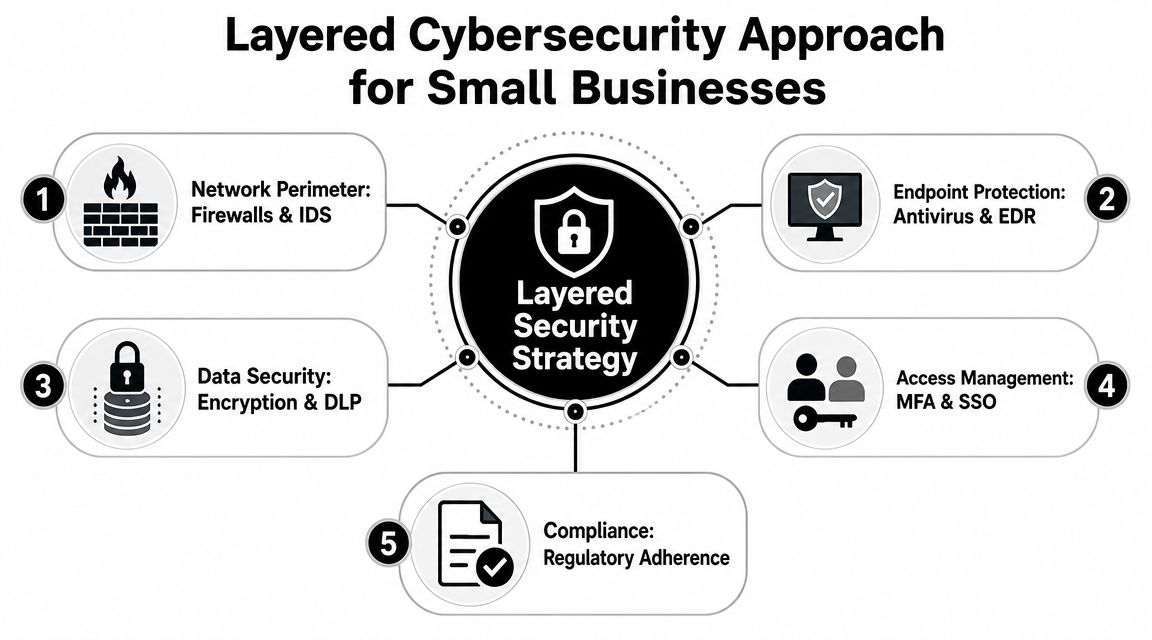
For Atlanta businesses, effective support now requires layered security controls that include firewalls, centralized backups, antivirus, and advanced spam filtering, with phishing identified as the starting point for a large share of cybercrime in Atlanta-focused IT guidance from INSI's guidance for Atlanta and Marietta businesses.
Layered security in plain business terms
Owners often ask whether antivirus is enough. It isn't. Antivirus is one control. A practical small-business security stack needs several layers working together.
Consider the basics:
- Perimeter protection. Firewalls help control what reaches your network.
- Email filtering. Spam and phishing controls reduce the chance that a bad message becomes an incident.
- Backups. Centralized backups create a recovery path when users delete data, systems fail, or malware hits.
- Endpoint protection. Laptops and desktops need monitoring because they're often the first point of compromise.
- Access control. User permissions and account discipline matter as much as software.
A healthcare practice in Atlanta may frame this around HIPAA. A law office may focus on client confidentiality. A contractor may worry about file access and project delays. Different business models, same lesson: security has to be operational, not theoretical.
What SMBs often miss
The weak point is rarely the expensive tool. It's the unpatched laptop, the shared password, the mailbox with weak filtering, or the retired device still sitting in a closet with sensitive files on it.
That's why businesses evaluating policy and oversight should also pay attention to wider governance issues like IT risk management trends for Atlanta businesses. Security starts with prevention, but it ends with discipline.
For firms that want a practical outside reference on protecting smaller organizations, Bruce and Eddy's security solutions offers a useful look at how small-business cybersecurity is being framed in service delivery today.
Security isn't complete when a device is unplugged. It's complete when the data on that device is no longer a liability.
That final step matters during laptop disposal, office cleanouts, server retirement, and facility moves. If a company upgrades hardware but leaves end-of-life handling vague, it has only solved part of the problem.
Adopting Smart Cloud Strategies for Better ROI
The cloud conversation gets distorted when vendors treat migration as a goal by itself. For most Atlanta SMBs, a blanket move isn't the smartest choice. A selective move usually is.
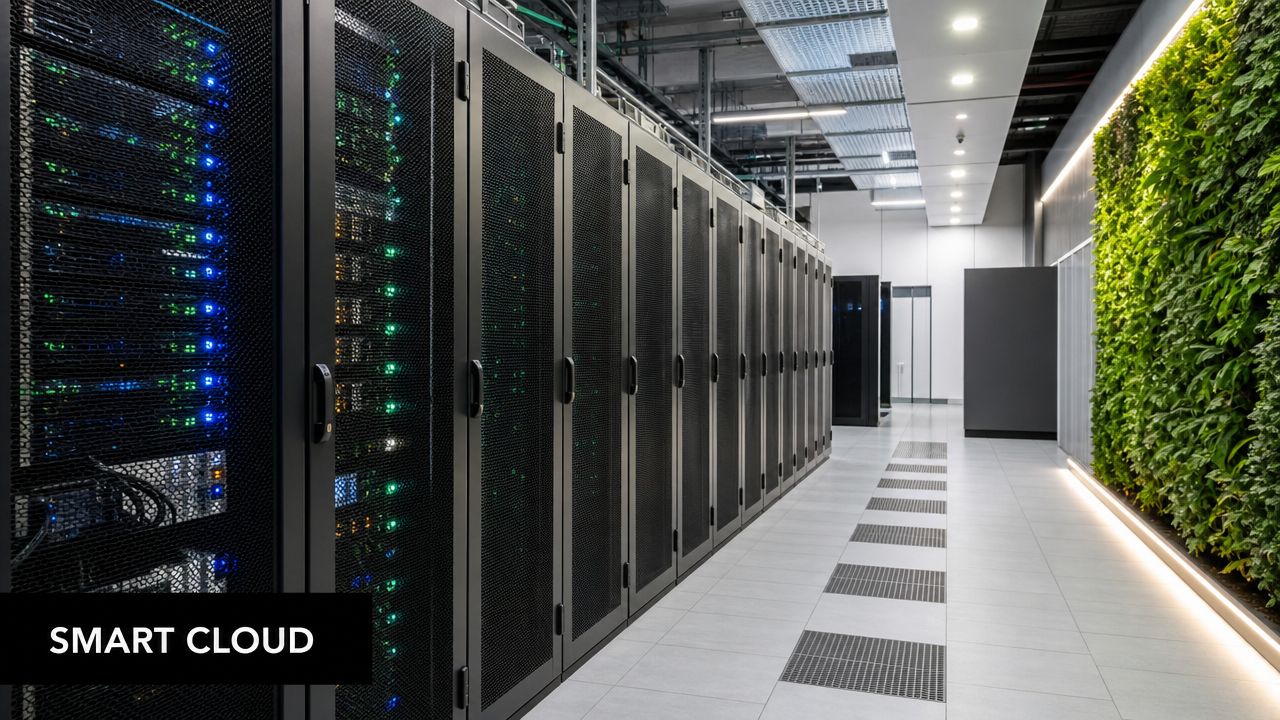
Small-business strategy content is increasingly framing IT around inflation, cost control, and ROI, and that's why the strongest trend here is selective modernization. As noted in TenHats' discussion of changing small-business IT strategy, the most valuable move for many firms isn't a full infrastructure refresh. It's targeted use of cloud or SaaS tools to reduce hardware and labor costs.
Where cloud usually makes sense
Cloud spending earns its keep when it removes friction you're currently paying for. That could mean fewer on-site servers, less manual patching, simpler remote access, or easier user provisioning.
Common high-ROI uses include:
- Email and collaboration platforms for teams that need consistent access across locations.
- Cloud file storage when version control and remote work have become messy.
- SaaS line-of-business software that eliminates local server dependence.
- Backup and recovery services that reduce reliance on one office or one piece of aging hardware.
Where cloud gets oversold
Not every workload belongs off-site immediately. Some businesses move too fast, duplicate tools, or carry both legacy systems and new subscriptions longer than planned. That creates overlap, confusion, and avoidable spend.
A better approach is to ask three questions before approving any migration:
- Does this reduce a specific maintenance burden?
- Does it simplify support for staff or locations?
- Does it let us retire hardware or software we no longer want to own?
If the answer is unclear, wait. Cloud-smart beats cloud-first.
Atlanta firms also need to think about where local processing still matters. Workloads tied to equipment, warehousing, manufacturing, or branch operations may still benefit from on-site performance and hybrid design choices, which is why topics like edge computing trends in Atlanta businesses are increasingly relevant.
Integrating Sustainable IT Asset Disposition ITAD
Every technology strategy eventually reaches the same moment. Devices age out. Offices move. Storage rooms fill up with old monitors, failed laptops, retired switches, and drives no one wants to touch. If your support plan ends there, it isn't complete.
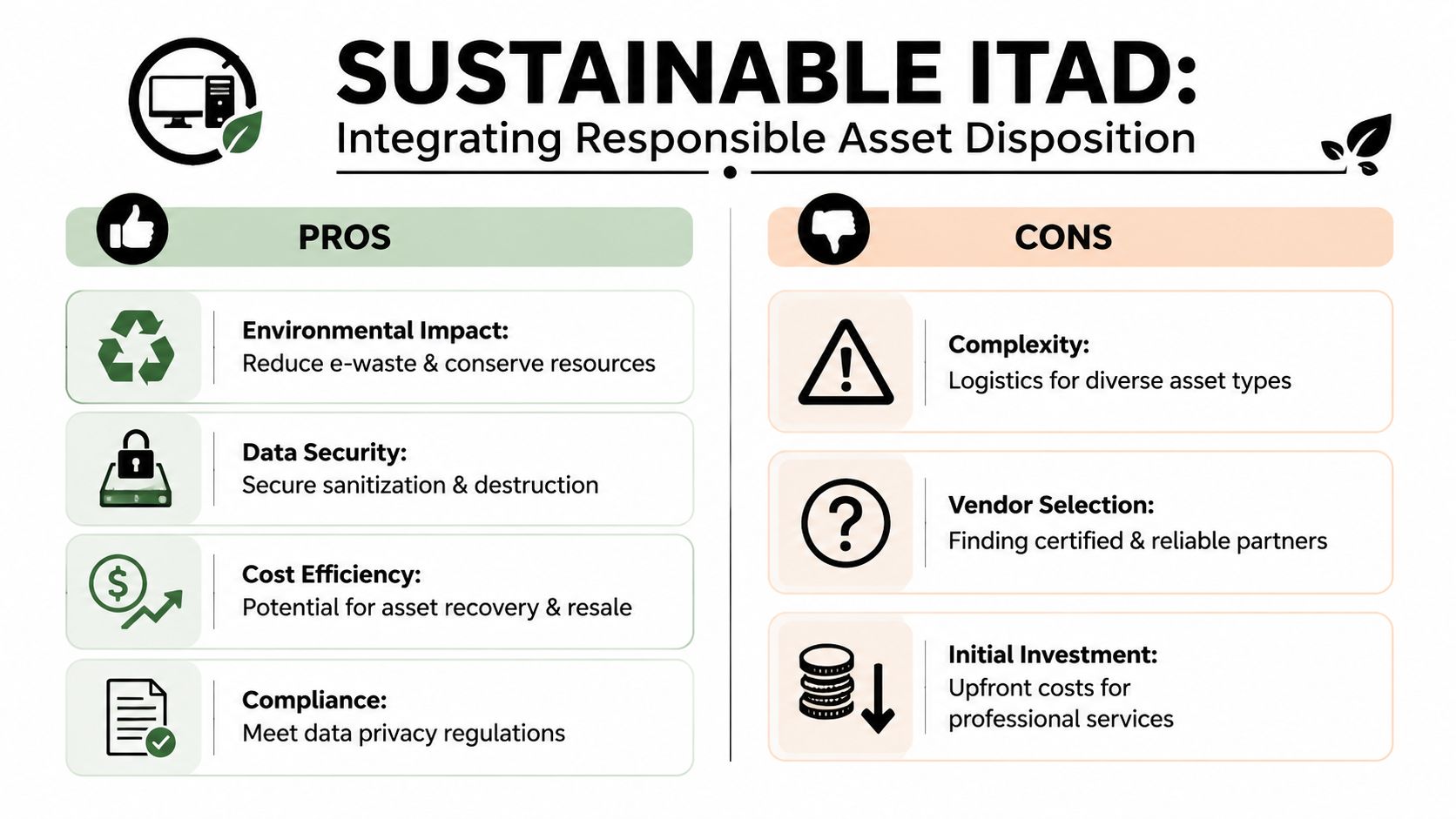
That's where IT asset disposition, or ITAD, belongs in the conversation. ITAD covers the controlled retirement of business technology, including device collection, tracking, secure data destruction, reuse decisions, recycling, and final disposition. It should sit beside procurement and support, not outside them.
Why improper disposal creates business risk
Improper electronics recycling isn't just untidy. It creates exposure in several directions at once.
- Data exposure. A stored or discarded drive may still contain customer records, payroll data, account access, or internal documents.
- Operational drag. Old equipment takes up valuable office and warehouse space during an office cleanout or facility cleanout.
- Environmental problems. Electronics don't belong in general waste streams, and sloppy handling undercuts sustainability claims.
- Chain-of-custody confusion. If no one knows what left the building, who handled it, or whether it was sanitized, the business carries uncertainty it doesn't need.
A proper process should cover computer recycling, laptop disposal, secure data destruction, product destruction when needed, and coordinated handling for more specialized categories such as medical equipment disposal or laboratory equipment disposal.
Sustainable ITAD as part of normal operations
The smarter approach is to treat retirement planning as part of every refresh cycle. When a company orders replacements, it should already know how the outgoing assets will be collected, wiped, recycled, donated, or documented.
For Atlanta organizations that want a formal service path, Reworx Recycling's sustainable IT asset disposition services cover business electronics recycling, secure hard drive handling, decommissioning support, and pickup coordination. That makes ITAD useful for more than one event. It can support routine laptop turnover, a larger office cleanout, data center decommissioning, or a corporate donation program tied to social enterprise recycling goals.
A retired laptop still carries business risk until someone documents what happened to the device and the data on it.
This is also where donation-based recycling becomes practical. Some equipment has no reuse value for your team but still has community value if handled through a structured program. That's a better outcome than indefinite storage, informal giveaways, or disposal that leaves both data and sustainability questions unresolved.
Businesses that want to align risk management with environmental responsibility should also review how a partner handles reverse logistics, chain of custody, and sustainable recycling standards. ITAD isn't glamorous, but it's one of the cleanest ways to tighten operations.
Finding the Right Partners for Your Atlanta Business
Atlanta companies rarely need one vendor to do everything. They need the right combination of partners, each responsible for a clear part of the technology lifecycle.
A firm near Technology Square may need strong cloud support and endpoint management. A business operating out of a warehouse corridor may care more about Wi-Fi coverage, cabling, rugged devices, and downtime response. A healthcare office may prioritize compliance discipline. The right fit depends on operating reality, not provider marketing.
What to look for in an IT partner
Ask practical questions that reveal how a provider works when conditions aren't ideal:
- How do they handle onboarding when new hires, new devices, and account setup all hit at once?
- What's included in support versus billed as extra project work?
- How do they approach security for email, backups, and retired equipment?
- Can they support growth if you add staff, change locations, or consolidate systems?
A strong provider should be able to explain trade-offs plainly. If every answer sounds like a sales script, keep looking.
Why your partner stack matters
Many Atlanta SMBs make a hidden mistake. They choose a managed service provider, then assume that vendor also solves recycling, secure disposition, donation logistics, and cleanout work. Often, it doesn't.
That creates a gap right when risk is highest. Devices leave service, offices get reorganized, and no one has a documented end-of-life plan. The better model is an ecosystem. Use one partner for ongoing support, another for specialized security or compliance if needed, and a dedicated ITAD and electronics recycling partner for disposition, pickup, and documentation.
The right local partner doesn't just keep systems running. They help you make cleaner decisions when equipment enters and leaves the business.
That matters whether you're refreshing laptops, vacating a suite, consolidating locations, or planning a staged facility cleanout in the metro area.
Your Next Step Towards a Future-Ready IT Strategy
The most important IT support trends for Atlanta small businesses aren't about chasing novelty. They point toward a more disciplined operating model. Proactive managed support beats waiting for outages. Layered security beats single-tool thinking. Selective cloud adoption beats expensive overhauls. Planned ITAD beats closets full of retired hardware and unanswered data questions.
That's the shape of a future-ready IT strategy. It covers the full lifecycle. You acquire technology intentionally, support it consistently, secure it properly, and retire it responsibly.
If you're evaluating your next refresh, start with a short audit:
- Which systems cause the most disruption today?
- Which subscriptions or devices no longer justify their cost?
- Which retired assets are still sitting in storage without a documented disposition path?
- Which upcoming office, staffing, or facility changes will trigger another round of equipment turnover?
Answer those questions candidly and the right priorities usually become clear. Most businesses don't need a dramatic reinvention. They need better sequencing, tighter vendor accountability, and a cleaner process for devices that no longer serve the business.
If your company is planning a refresh, clearing out retired hardware, or tightening its end-of-life process, Reworx Recycling is a practical place to start. Atlanta-area businesses can use Reworx for electronics recycling, donation-based recycling, secure data destruction, business pickups, and responsible IT equipment disposal that supports both operational risk reduction and community impact. Review their recycling resources, schedule a pickup, or explore a partnership for office cleanouts, laptop disposal, and broader corporate donation programs.