A data breach can turn an old hard drive into a board-level liability. IBM reported that the global average cost of a data breach reached $4.88 million in 2024, while the United States average reached $10.22 million, an all-time record, as summarized with reference to IBM's findings by Elake Technologies' analysis of old hard-drive risk. Secure retirement of storage media isn't an IT housekeeping task. It's a documented control that connects information security, compliance, facilities, procurement, sustainability, and executive oversight.
A practical hard drive destruction policy gives employees a decision framework for every retired drive. It defines when a device can be cleared for reuse, when it needs a stronger purge method, and when physical destruction is necessary. It also establishes custody controls, approved vendors, verification records, and accountability from decommissioning through final disposition.
Why Your Organization Needs a Formal Hard Drive Destruction Policy
A retired hard drive can remain a security problem long after its computer leaves active service. It may sit in a storage room, travel through a courier network, or enter a recycling stream while still holding customer records, employee information, financial files, credentials, or proprietary data. Deleting files or formatting a disk alone does not give an organization a defensible result. The organization must know what happened to the media, who handled it, which sanitization method was selected, and how completion was verified.
A formal policy gives IT and business leaders a consistent way to choose among Clear, Purge, and Destroy. Drives suitable for controlled reuse may need a validated clearing process. Higher-risk media may require purge, while damaged, compromised, or high-sensitivity drives may justify physical destruction. Defaulting to destruction can reduce recovery risk, but it may also eliminate reusable equipment and increase material waste.
What the policy should control
A useful document covers the media lifecycle and assigns practical controls:
- Scope: Identify hard disk drives, removable storage, retired servers, backup media, and other storage devices covered by the program.
- Risk classification: Match the sanitization outcome to information sensitivity, device condition, and the media's destination.
- Accountability: Assign duties to IT, information security, facilities, records management, procurement, and the approved IT asset disposition provider.
- Evidence: Require inventories, custody transfers, method records, verification, exception approvals, and certificates of destruction when physical destruction occurs.
- Escalation: Specify what happens when a drive is missing, unresponsive, damaged, mislabeled, or received without a reliable asset record.
The policy should also make exceptions manageable. A failed verification, uncertain data classification, or break in custody should pause disposition until an authorized person decides whether to repeat sanitization, escalate the method, or destroy the device.
Consistent rules matter across locations. A hospital, school, law firm, manufacturer, or municipal office may apply different retention and access controls, but each needs a repeatable process for preventing retired storage from becoming uncontrolled scrap. Organizations reviewing regional handling practices can consult Edmonton computer recycling options for an example of local electronics recycling and responsible disposition.
For operational guidance on placing secure disposal within the security program, review Reworx Recycling's guide to secure data destruction. The policy should answer one question plainly: Can the organization prove that the data became inaccessible through an approved, documented process?
Understanding NIST Sanitization Standards and When Destruction Is Required
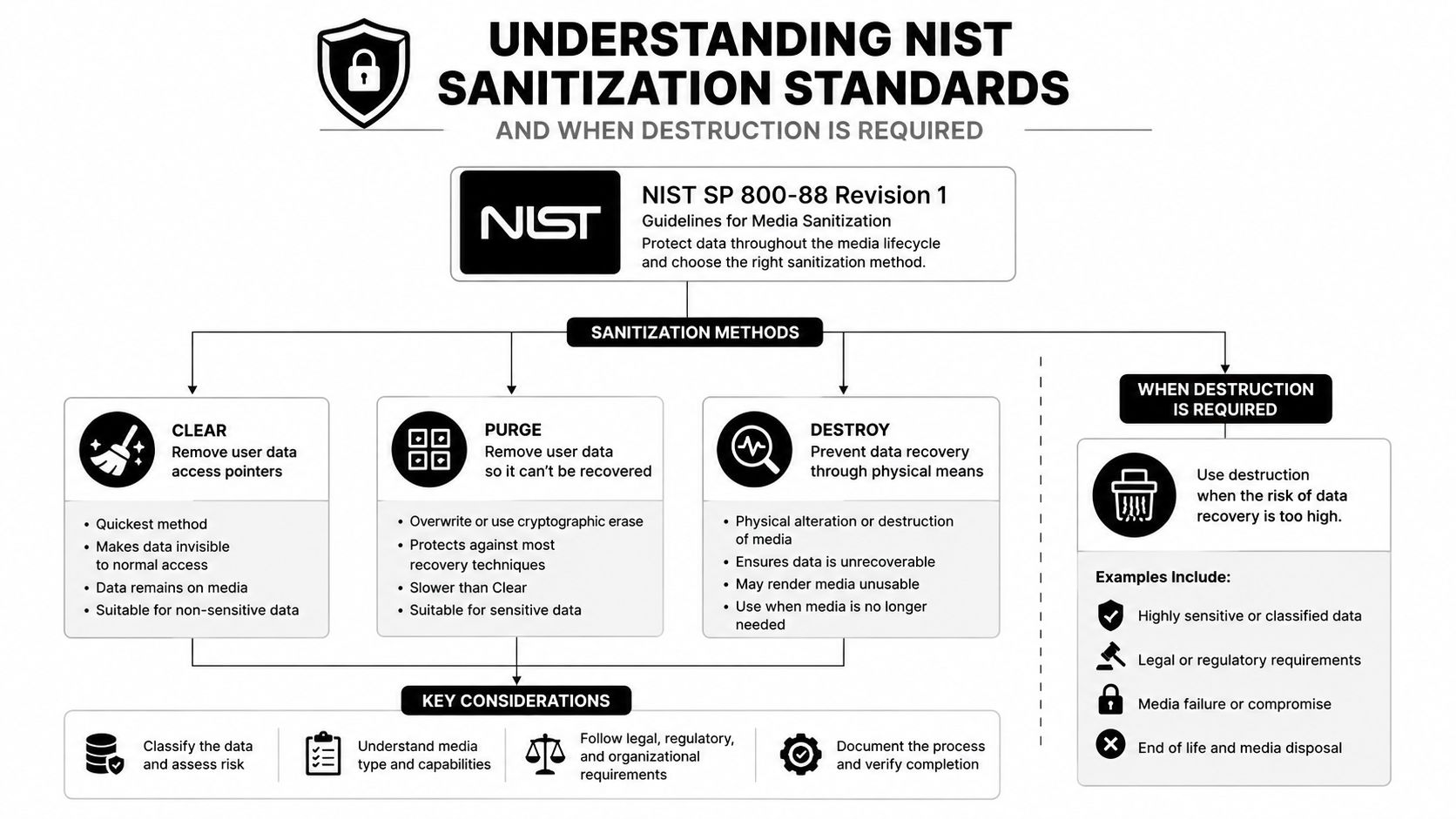
NIST's media-sanitization framework gives policy writers three outcomes: Clear, Purge, and Destroy. These terms matter because “sanitize” describes the objective, while the appropriate method depends on the media, the information, the risk, and whether the device will remain under organizational control.
Clear
Clear is generally associated with logical techniques that address user-accessible data while preserving the device for continued use. A properly selected clearing process can support internal reuse when the organization has assessed the drive, confirmed the method fits the media, and retained evidence that the process completed successfully. It shouldn't be treated as a universal answer for every drive or every threat model.
Purge
Purge uses a stronger sanitization technique intended to make recovery infeasible while potentially preserving the media for reuse. NIST identifies degaussing as an approved Purge method for hard disk drives, including an NSA/CSS-approved automatic degausser or an approved degaussing wand applied to the drive's platters, as described in the NIST media-sanitization guidance. A policy must account for whether the equipment is suitable, whether the operator can verify the process, and whether the drive's design responds reliably to the selected technique.
Destroy
Destroy is the highest-assurance outcome when media leaves secure control and must no longer function as storage. NIST's current guidance defines the result as making target-data recovery infeasible using state-of-the-art laboratory techniques and leaving the media unusable for future storage. The revision-2 draft describes five accepted destruction methods: disintegrate, incinerate, melt, pulverize, and shred.
NIST SP 800-88 Rev. 1 was published in 2014, then superseded by Rev. 2 in 2025, reflecting the evolution from a basic disposal concept into a formal lifecycle control. The policy should therefore avoid language that automatically equates every retirement with shredding. Instead, it should set decision criteria.
Practical rule: Choose the sanitization outcome first, then approve the method that can reliably produce it for that specific media and risk level.
Organizations that need a documented service pathway can review Reworx Recycling's certified hard-drive destruction service as one example of how physical destruction, verification, and disposition can be connected.
Comparing Hard Drive Destruction Methods and Their Security Levels
NIST recognizes five physical destruction methods, but they don't produce identical operational or environmental results. The right selection depends on the media, required assurance, available equipment, transportation controls, and the organization's ability to document the outcome.
| Method | Security Level | Typical Use Case | Environmental Impact |
|---|---|---|---|
| Disintegrate | High when the media is reduced beyond practical reconstruction | High-risk media requiring extensive physical breakdown | Produces mixed material that may require careful downstream separation |
| Incinerate | High when the process fully destroys the media | Specialized industrial destruction environments | Can create emissions and residue, requiring controlled environmental handling |
| Melt | High when the storage components are rendered unusable | Specialized facilities with suitable thermal equipment | Energy-intensive and may complicate material recovery |
| Pulverize | High when platters and components are reduced into small fragments | Sensitive drives requiring aggressive mechanical destruction | Supports physical destruction but can create mixed, difficult-to-sort output |
| Shred | High when the equipment and particle size match the risk requirement | Commercial hard-drive destruction and controlled ITAD workflows | Allows material recovery when outputs are segregated and managed responsibly |
Commercial hard-drive shredding commonly produces particles of 6 mm or smaller, while higher-sensitivity or classified media may require 2 mm or smaller particles to align with NSA/CSS storage-device expectations, according to industry guidance on hard-drive shredding. Particle size shouldn't be selected by habit. It should be tied to the organization's data classification, contractual obligations, and approved destruction standard.
Where degaussing fits
Degaussing is different because it's a Purge method rather than physical destruction. It may suit magnetic hard disk drives when the organization has approved the equipment, trained operators, and a verification process. It doesn't create a reusable drive, however, and it may not address every storage technology. A policy that covers mixed inventories must distinguish traditional magnetic drives from other media types instead of applying one technique to everything.
Cost and sustainability also deserve attention. Destruction can require transportation, specialized processing, and downstream material handling. Incineration and melting may achieve the intended security outcome but can offer fewer recovery opportunities than controlled shredding followed by responsible material separation. Reworx Recycling's overview of data-sanitization methods can help IT and sustainability teams compare destruction with other approved sanitization paths.
Essential Components of a Defensible Destruction Policy
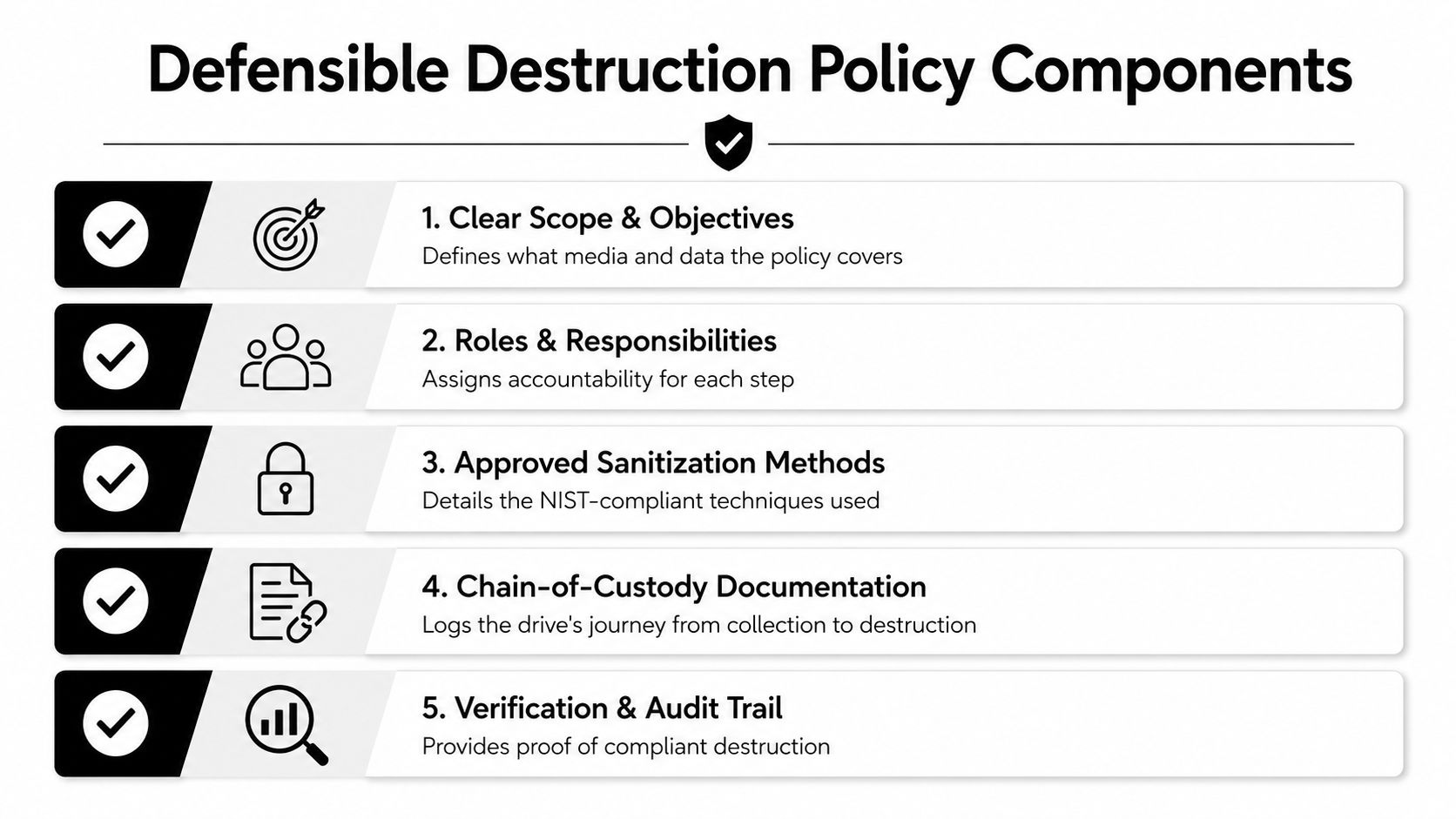
A defensible policy converts security requirements into assigned actions. It identifies what employees collect, who approves Clear, Purge, or Destroy, how media remains controlled, which records prove completion, and what happens when the standard process fails.
Define scope and ownership
Begin with an inventory linking every drive to an asset identifier, serial number where available, location, department, condition, and disposition status. Assign each control to a named role. IT can identify retiring equipment, information security can approve the sanitization result, facilities can control the staging area, procurement can manage the contract, and an authorized vendor can perform destruction.
Include exceptions in the written procedure. A failed drive, an unreadable serial number, or media found during an office cleanout must enter quarantine rather than bypassing controls. Provide a designated cage or locked cabinet, an escalation contact, and a rule for documenting the exception before disposition.
Build the custody record
Chain of custody starts at collection. Use locked containers, limited key or badge access, and tamper-evident seals with a unique seal ID. Record the seal ID, container ID, asset identifier, releasing and receiving employees, timestamp, location, and condition of the seal at every handoff. A practical log entry might read: “Container C-014, seal S-8821 intact, 12 drives received from IT staging by vendor courier, released by [employee], received by [employee], location [site], date and time recorded.” This structure lets an auditor follow the asset without relying on memory.
Use the chain-of-custody documentation resource from Reworx Recycling when designing the evidence trail. The certificate of destruction should connect completed work to the inventory and identify the relevant drives, approved method, completion date, provider, and authorized verifier or witness. Retain records according to the organization's records policy, contracts, regulatory duties, and litigation holds.
Make verification auditable
Specify how staff confirm that the recorded drive matches the physical device, and how the provider confirms the approved outcome. Require reconciliation of inventory, custody logs, seal exceptions, certificates, failed sanitization attempts, missing records, and vendor discrepancies.
Audit evidence should tell a continuous story, from asset identification to final disposition, without relying on memory or informal email.
Balancing Security Requirements with Sustainability Goals
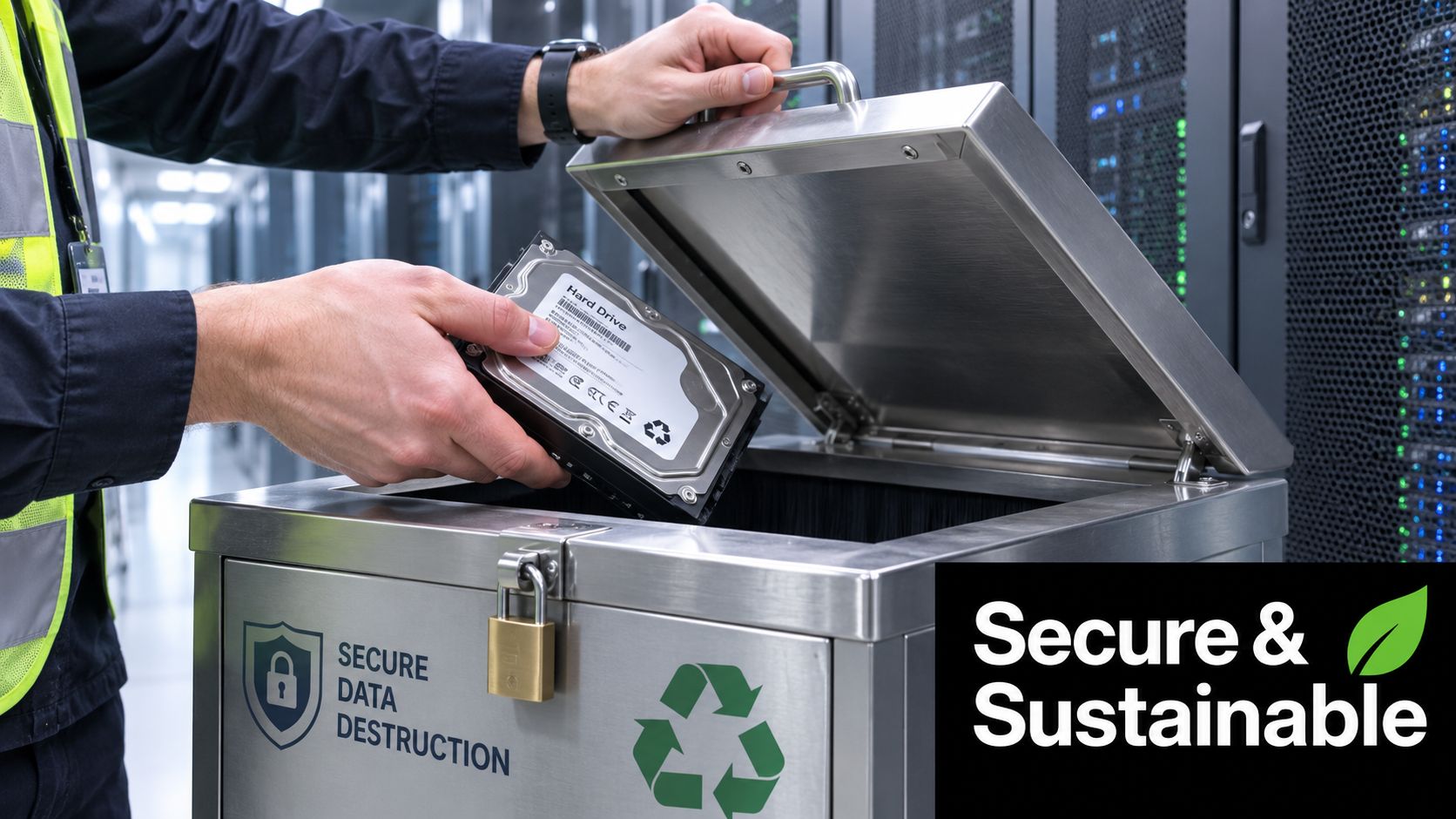
Security and sustainability aren't automatically opposing objectives. The wasteful choice is to destroy every drive without first determining whether the device can be safely reused, donated, or recovered. The reckless choice is to prioritize resale or donation without a verified sanitization decision.
Cornell's media-destruction guidance takes a conditional approach. Functional drives may be wiped for reuse, while defective or unresponsive drives should be physically destroyed. HHS likewise emphasizes that media should be cleared, purged, or destroyed so data can't be retrieved. That logic supports a tiered policy instead of a blanket shredding mandate.
Use conditional disposition
A practical decision tree can route assets into distinct channels:
- Reusable equipment: Apply an approved Clear or Purge process, verify completion, then route the device toward internal reuse, resale, or donation.
- Failed or questionable media: Use physical destruction when the drive can't be reliably sanitized or its condition prevents verification.
- High-risk assets: Require Destroy when the media is leaving secure control and the organization needs the highest assurance.
- Material recovery: Document how destroyed components move into downstream recycling and how the provider prevents data-bearing parts from re-entering circulation.
This approach supports corporate donation programs, computer recycling, laptop disposal, and broader IT asset disposition without weakening information protection. It also helps sustainability leaders measure responsible outcomes through reuse, donation, recycling, and controlled product destruction rather than treating all retired equipment as landfill-bound waste.
Preserve the records that justify the choice
Security decisions often receive scrutiny after the fact. Keep the rationale for reuse, purge, or destruction with the asset record, alongside the verification evidence. Organizations reviewing retention practices can also consult guidance on how long to keep business records and then reconcile that general framework with their own legal and contractual requirements.
Magnet recovery offers another emerging model. A 2025 industry article describes recovering rare earth elements from hard drives while destroying the data, showing how ITAD can combine secure product destruction with circular-economy objectives. The important principle is control. Resource recovery is acceptable only when the security outcome remains verifiable.
Selecting a Certified Hard Drive Destruction Vendor
A vendor becomes part of the organization's control environment the moment it accepts a retired drive. Evaluate the provider as carefully as you'd evaluate a security processor, not as a scrap hauler.
Begin with recognized credentials and scope. Ask whether the provider holds or works within programs such as NAID AAA, R2, or e-Stewards, and confirm that the certification applies to the services and locations you're buying. Certification alone doesn't replace due diligence. Request current documentation, audit information, insurance details, environmental permits, and a clear explanation of how the provider handles subcontractors.
Questions to ask before signing
- Process control: Does the provider distinguish Clear, Purge, and Destroy outcomes, and can it explain why a selected method fits each media type?
- Chain of custody: How are drives identified, sealed, transported, received, processed, and reconciled?
- Verification: Will the provider issue a certificate of destruction tied to serial numbers or equivalent asset identifiers?
- Facility security: Who can access storage and processing areas, and what controls protect media before destruction?
- Personnel: Does the company perform appropriate employee screening and training for sensitive-data handling?
- Environmental handling: How are shredded, pulverized, or otherwise destroyed components separated and sent through responsible recycling channels?
- Service resilience: What happens during a failed pickup, equipment outage, inventory discrepancy, or suspected custody incident?
The contract should define approved methods, notification duties, record delivery, subcontractor restrictions, insurance, incident reporting, and ownership of recovered materials. Avoid providers that promise destruction without explaining verification, offer vague certificates, or encourage customers to place unsorted drives into ordinary recycling bins.
For a structured review of provider capabilities, use Reworx Recycling's vendor-selection criteria. Reworx Recycling handles electronics recycling, business pickups, equipment decommissioning, ITAD, secure hard-drive shredding, donation pathways, and equipment recovery, allowing a business to evaluate security and social impact within one disposition program.
Implementing Your Policy with Training and Ongoing Compliance
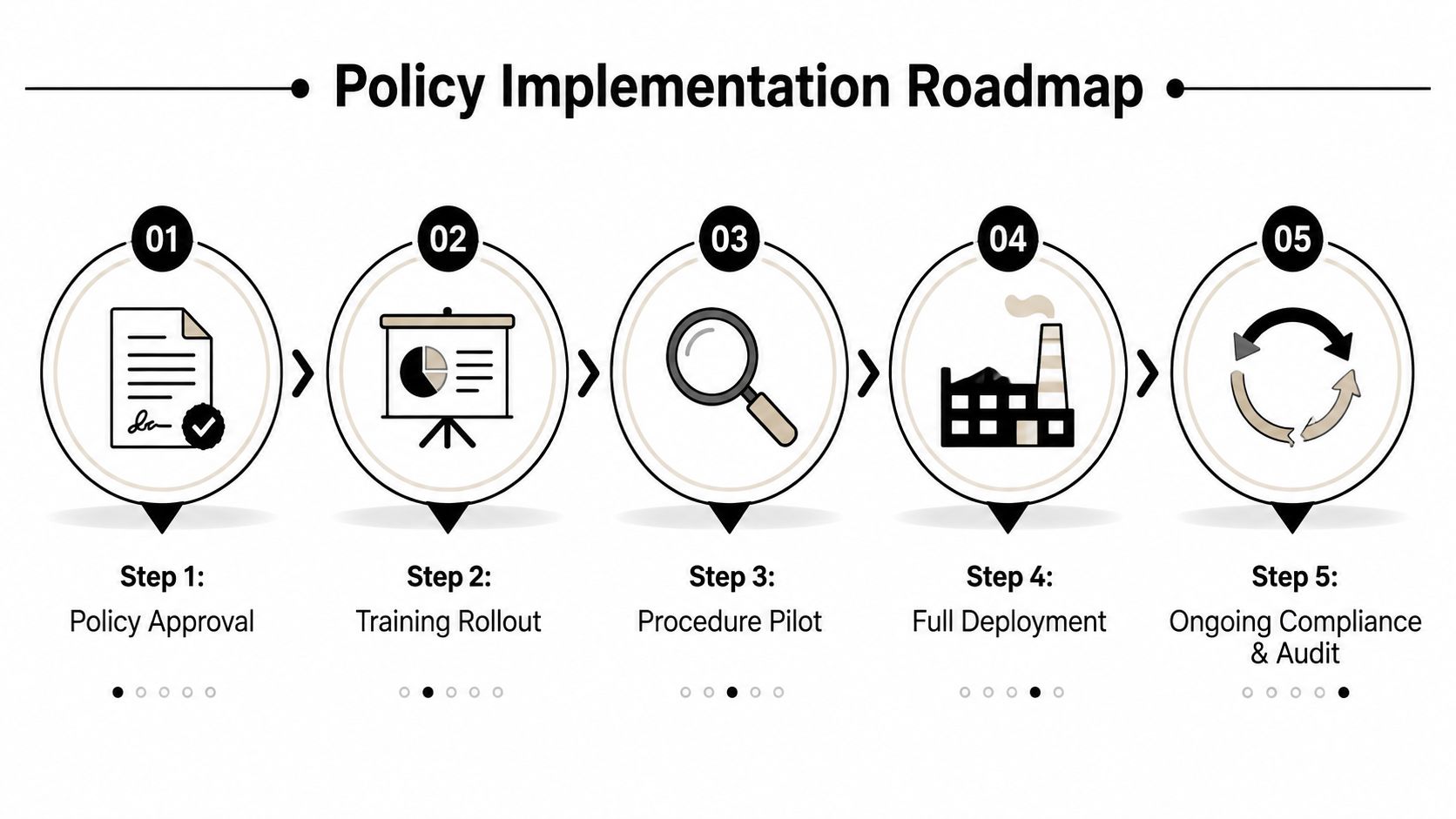
A policy only protects the organization when employees follow it under everyday pressure. Roll it out as an operating procedure, not a document that sits in a compliance folder.
Use this implementation sequence:
- Approve the policy: Obtain sign-off from IT, security, legal, facilities, procurement, and sustainability stakeholders.
- Train the teams: Show staff how to label drives, use secure collection containers, document transfers, and escalate exceptions.
- Pilot the procedure: Test the workflow with a controlled group of assets and correct gaps before wider deployment.
- Deploy consistently: Apply the same inventory, custody, sanitization, and verification rules across offices, data center decommissioning projects, laboratory equipment disposal, and medical equipment disposal.
- Audit the control: Review records, vendor certificates, exceptions, turnaround times, and unresolved discrepancies on a recurring basis.
Track practical indicators such as whether every retired drive has a disposition record, whether certificates reconcile with inventory, whether approved methods were used, and whether employees completed required training. Review the policy when technology, vendors, regulations, or organizational risk changes. A well-run program protects sensitive information while supporting sustainable recycling, donation-based recycling, digital inclusion, and workforce development through accountable community partners.
Reworx Recycling provides business pickups, secure hard-drive shredding, certificates of destruction, IT asset disposition, electronics recycling, equipment recovery, and donation pathways for organizations retiring technology. Visit Reworx Recycling to discuss a secure, documented destruction program, donate usable equipment, or schedule a pickup that aligns data protection with community and environmental goals.