The mainframe is still humming, the cloud team is still asking for answers, and someone in finance wants a retirement date that won't blow up audit, payroll, or month-end close. That's usually the moment mainframe decommissioning stops being a theory and becomes a controlled business program, with data proof, cutover discipline, and a disposal path that can survive scrutiny.
The tough part isn't deciding whether legacy systems are old. It's deciding whether the workloads are ready to leave. In practice, the strongest programs don't start with hardware removal, they start with dependency mapping, data completeness checks, and a disposal partner that can document every handoff. For teams that are still sorting out whether to modernize in place or retire specific applications, modernization strategies that drive growth is a useful way to frame the broader decision before anything gets powered down. If surplus gear is part of the transition, Reworx Recycling's IT asset recovery workflow gives a practical model for the disposition side of the project.
When Mainframe Decommissioning Makes Business Sense
A finance team can keep a 1990s mainframe running beside a modern cloud stack for years, and that mixed environment often hides the underlying issue. The question isn't whether the mainframe still works. It's whether the organization still wants to carry the cost, risk, and process friction of a platform that's becoming harder to justify for a shrinking slice of work.
The market data says this is still a selective move, not a default one. In the 2026 Arcati Mainframe User Survey, only 3.2% of organizations said they plan decommissioning over the next three years, while 34% were already on the current z/OS release and 40% were on the previous release, which shows most enterprises are still operating current or near-current environments rather than exiting outright. That's why mainframe decommissioning usually makes sense only for specific workloads, consolidation efforts, or cost-optimization programs, not as a blanket replacement strategy. The data also helps separate genuine retirement candidates from teams that really need modernization in place, selective decomposition, or a longer transition window. 2026 Arcati Mainframe User Survey
Read the workload mix, not the nostalgia
A decommissioning candidate is usually a workload with limited change velocity, clear downstream replacements, and a manageable retention profile. If the application is mostly a historical system of record, if users only touch it for retrieval, and if the business can already prove alternate access to the data, the retirement case gets stronger. If the platform still supports live processing, batch dependencies, or regulatory workflows, the discussion shifts toward modernization rather than shutdown.
Practical rule: retire the platform only when the business has already retired the need for the platform, not when the hardware looks old.
Kyndryl's 2025 State of Mainframe Modernization survey gives a useful financial anchor for that decision. Organizations pursuing moving off the mainframe reported 362% ROI, up from 225% the year before, and average project costs held at $7.2 million after dropping by more than $2 million from $9.1 million in the prior year. The report also showed expected annualized savings of at least $23.3 million from modernization, which is a strong reminder that retirement programs are typically justified as portfolio moves, not just equipment swaps. Kyndryl 2025 State of Mainframe Modernization report
What usually fails is the “we'll just rip it out” mindset. Mainframe decommissioning is a controlled retirement program, and the business case has to survive compliance review, operational overlap, and the cost of preserving access to historical records. Teams that recognize that early tend to choose the right path faster, whether that's full retirement, selective workload exit, or a phased modernization that leaves only the hardest applications behind.
Assessment, Inventory, and Dependency Mapping
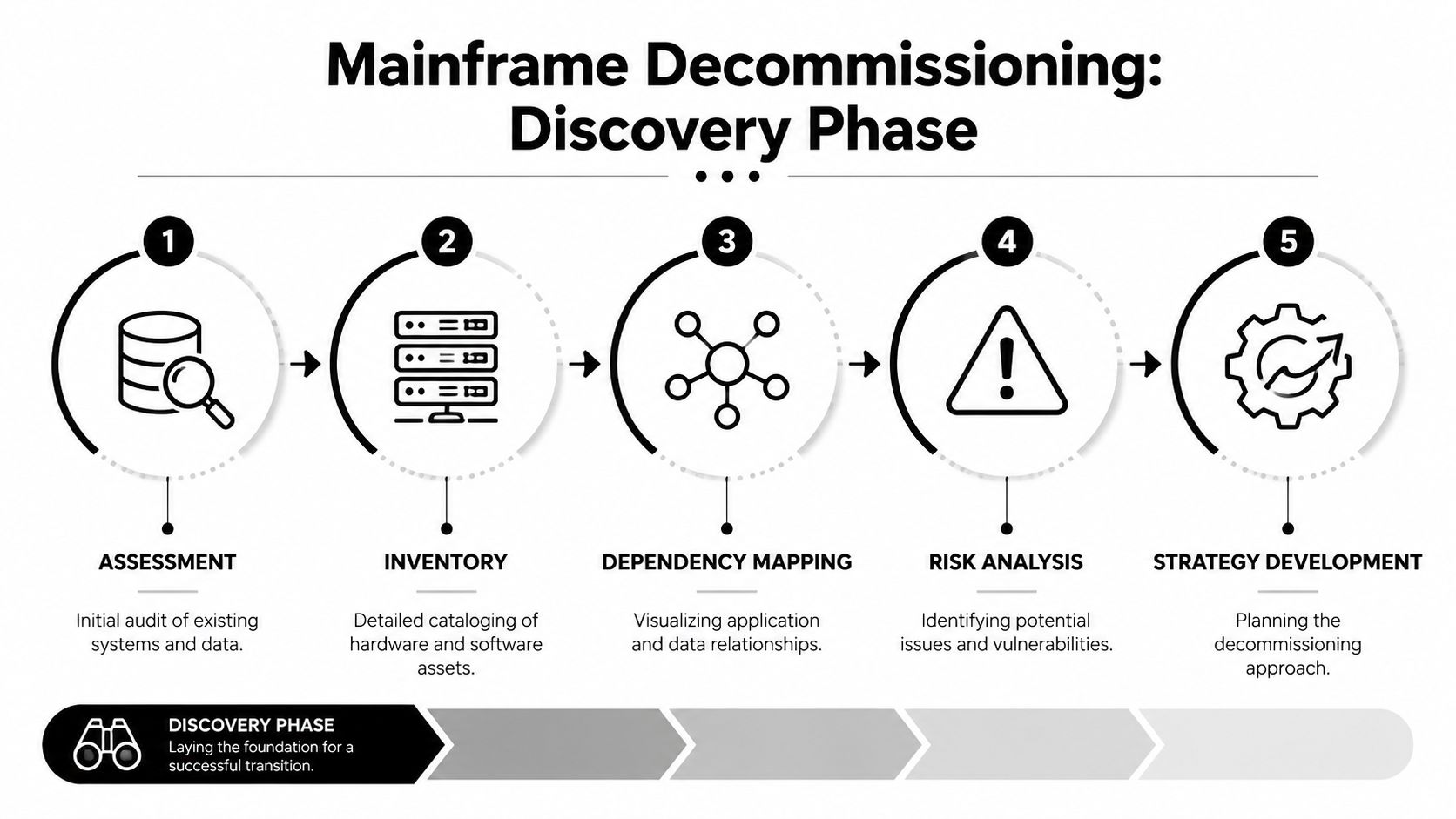
A defensible decommissioning plan starts with one uncomfortable truth. Most organizations don't fully know what depends on the mainframe until they start looking across systems, logs, users, and batch schedules at the same time. A single inventory source is never enough, because each source misses something the others catch.
The best discovery work combines automated scans, database and batch-job inspection, access-log review, and stakeholder workshops. Automated discovery finds installed components, interfaces, and system relationships quickly. Database inspection, especially around DB2 and batch processing, exposes stored dependencies and scheduled processes that don't show up in application catalogs. Access logs reveal which programs and data sets are still used, while workshops surface the institutional knowledge that never made it into documentation.
Build the inventory like an audit file
The goal isn't a pretty spreadsheet. It's a package that an auditor, an architect, and a downstream service provider can all trust. That means every application gets tied to its data stores, every data store gets tied to its batch and interface dependencies, and every interface gets tied to an owner who can confirm whether it still matters.
A practical inventory package usually separates workloads into three buckets:
- Migrate: active functions that still have a business owner and a target platform.
- Archive: historical data that must remain queryable for compliance or reference.
- Remove: dormant components, obsolete jobs, and abandoned interfaces that no longer serve a business purpose.
The payoff is bigger than anticipated. One modernization playbook says a thorough discovery pass can identify dormant programs and remove roughly 20 to 40% of the perimeter before cutover, which materially reduces migration scope and decommission risk. That isn't a promise of savings, it's a reason to treat discovery as a cost-control step, not an administrative chore. Mainframe-to-AWS decommissioning playbook
Use four views of the same environment
Automated scans show what exists. Database inspection shows what's wired into the data layer. Access logs show what people and jobs still touch. Workshops show what the documentation forgot. When those four views disagree, the disagreement usually points to the hidden dependency that would otherwise cause a failed cutover.
If the inventory can't explain why a batch job exists, assume it still matters until someone proves otherwise.
That's also the stage where dormant programs get exposed. Teams often find old reports, test feeds, and downstream utilities that no one owns anymore. Retiring those before cutover is one of the cleanest ways to shrink risk without touching critical business logic.
For teams formalizing this work, Reworx Recycling's IT equipment audit is a useful model for disciplined asset and dependency review on the disposition side, especially when the retirement program spans more than one class of hardware.
Migration, Application Retirement, and Data Sanitization
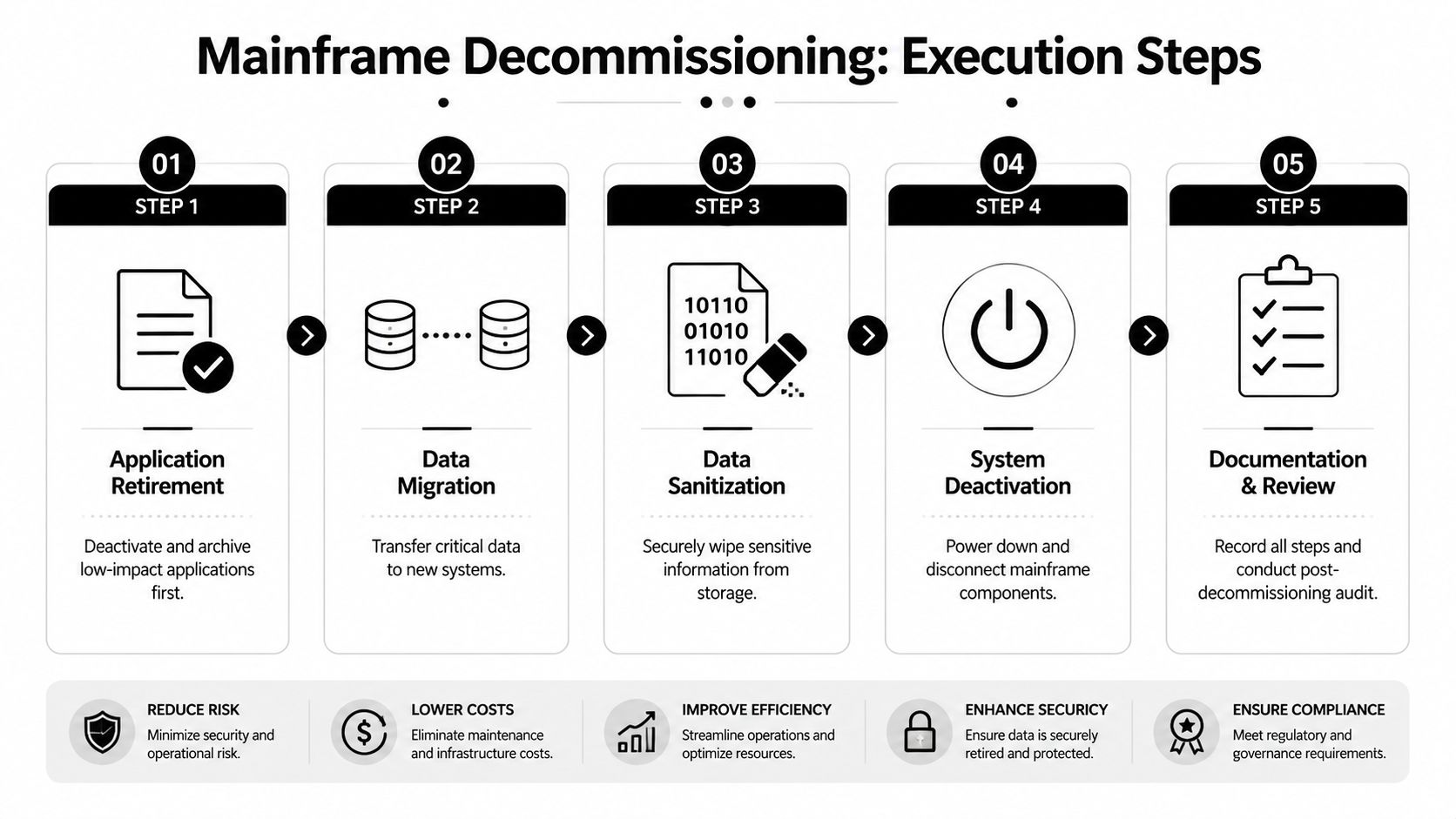
The safest cutover sequence is boring on purpose. Retire low-impact applications first, move the workloads that still have a live target, and leave the core system for last, after the archive and routing paths have already proven they can carry the load. Data sanitization belongs after validation, not before it, because once you wipe the source too early, you've destroyed your fallback.
The technical mistake teams make most often is treating migration and destruction like one action. They're not. Migration moves the workload or the records. Retirement disables what no longer needs to run. Sanitization removes residual data from storage media only after the business has confirmed that the archive, retrieval, and control processes all work the way they should.
Sequence the work by business impact
Low-impact applications are the right first targets because they give the team a clean way to test the process without risking the core of the operation. Dependent services come next, because they often reveal gaps in routing, naming, or access control. The core system only comes down when the evidence shows that historical access, audit trails, and business continuity are intact.
That sequence is more than a technical preference. Government decommissioning guidance treats retirement as a controlled chain of migration planning, decommission planning, execution, and post-decommission review, with data sanitization and final validation as distinct steps. The practical benchmark is simple, don't power down the mainframe until the archival system can demonstrably serve authorized queries and preserve the records that counsel, audit, and regulators may need later. Legacy system decommissioning plan guidance
Chain of custody has to cover every media type in the room, including tape, DASD, exported databases, and any removable storage tied to the application estate. Teams should decide early whether they need logical wiping, physical destruction, or cryptographic erasure at the asset level, because the wrong choice can leave security gaps or create needless destruction of usable media.
Make sanitization a documented event
Secure data destruction becomes part of the retirement runbook, not a separate cleanup task. If hard drives or backup media leave the site, they should already be under a controlled manifest, with serials tied to the asset list and a destruction path that matches the risk profile of the data. For teams standardizing that process, Reworx Recycling's data sanitization methods fit naturally into the handoff between validated migration and final disposal.
The archive is only useful if the business can trust it before the old system disappears.
A clean cutover checklist should answer three questions before the source is retired. Is the target system complete? Can authorized users retrieve what they need? Has every storage device been accounted for, sanitized, or destroyed under documented control? If any answer is no, the shutdown is premature.
Cost, Timeline, and ROI Benchmarks You Can Defend
A steering committee does not want a hand-wavy estimate. It wants a range it can challenge, a timeline it can hold people to, and a clear explanation of what drives the number up or down. As noted in the Kyndryl 2025 State of Mainframe Modernization report, real-world anchors include 362% ROI for organizations moving off the mainframe, average project costs of $7.2 million, and expected annualized savings of at least $23.3 million from modernization.
Those figures do not describe every retirement program. They do show how the business case should be built, around workload count, archive retention requirements, and logistics complexity, not around the idea that hardware removal is the costly part. In practice, the biggest cost drivers are parallel run time, knowledge transfer, validation effort, and the labor required to prove that historical access still works after cutover.
What makes the budget move
A smaller application footprint is easier to retire, but archive retention rules can keep a “small” project open longer than expected. Complex batch ecosystems create the same problem, because every downstream job, report, and reference table extends the validation window. Hardware logistics matter too, especially when the decommissioning plan calls for staged removals, secure handling, or coordinated access windows with facilities and security.
The cleanest way to size the work is to separate direct costs from soft costs. Direct costs cover migration tooling, archival storage, destruction services, and transport. Soft costs cover internal staff time, business owner review cycles, testing, and the hidden cost of keeping legacy support alive while the new archive proves itself.
Budget for proof, not just movement. If the archive cannot be validated, the retirement is not done.
For finance review, frame the business case in three layers. First, what it costs to execute. Second, what it costs to keep the mainframe alive for another year. Third, what the organization avoids by retiring the workload, including recurring support burden and the risk of stranded historical data. That structure is easier to defend than a flat savings estimate, because it shows why the retirement is operationally credible.
Teams that do this well present the project as a controlled transition with measurable checkpoints, not a one-time cleanup. That is the kind of case procurement, compliance, and finance can sign off on.
ITAD Vendor Selection and Chain-of-Custody Standards
Picking an ITAD partner for mainframe decommissioning isn't a price-per-pound exercise. It's a procurement decision about who can prove control from the moment hardware leaves the data center to the moment the last certificate is filed. The right vendor model depends on what you need more, certified handling, downstream accountability, or donation-based reuse with documented disposition.
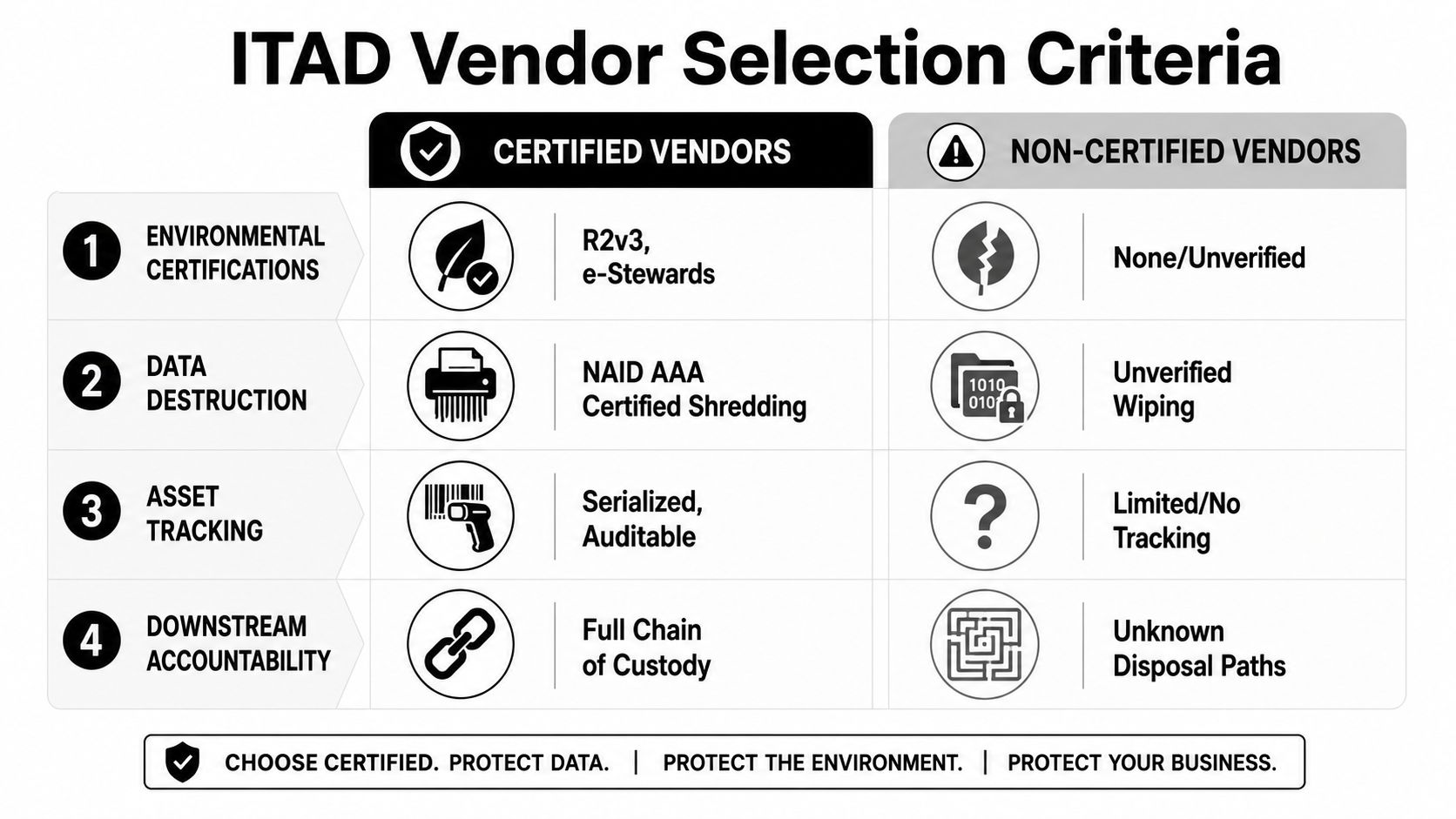
Certified vendors usually win on controls. Look for R2v3, e-Stewards, and NAID AAA where data destruction is involved. Also ask for serialized asset tracking, downstream chain-of-custody records, insurance or bonding, and written proof of how each asset class is handled after pickup. Broker-only models can be cheaper on paper, but they often create gaps in accountability because the end destination isn't transparent enough for audit comfort.
Compare the models against the handoff you actually need
A broker model can work when the organization only cares about convenience and resale routing. OEM take-back can be suitable when the hardware is still within a manufacturer's ecosystem, but it may not fit a decommissioning program that needs detailed serial reconciliation or flexible reuse pathways. A certified social-enterprise recycler adds a different value proposition, because it combines documentation with donation pathways and community reuse, which can matter for organizations with corporate social responsibility goals.
For a social-enterprise option, Reworx Recycling is one example of a vendor that combines donation-based recycling with IT asset disposition services, secure transport, and data destruction. It's not a substitute for due diligence, but it does fit the model of an accountable end-of-life destination when the business wants both traceability and a reuse path for qualifying equipment. Reworx vendor selection criteria
The chain-of-custody package should be locked down before anything leaves the room. That means tamper-evident seals, weight and serial reconciliation, signed manifests, and a destruction or sanitization certificate for each asset class. If a vendor can't produce those documents without chasing, the control environment is weaker than it looks.
Hardware Removal, Logistics, and Secure Hard-Drive Shredding
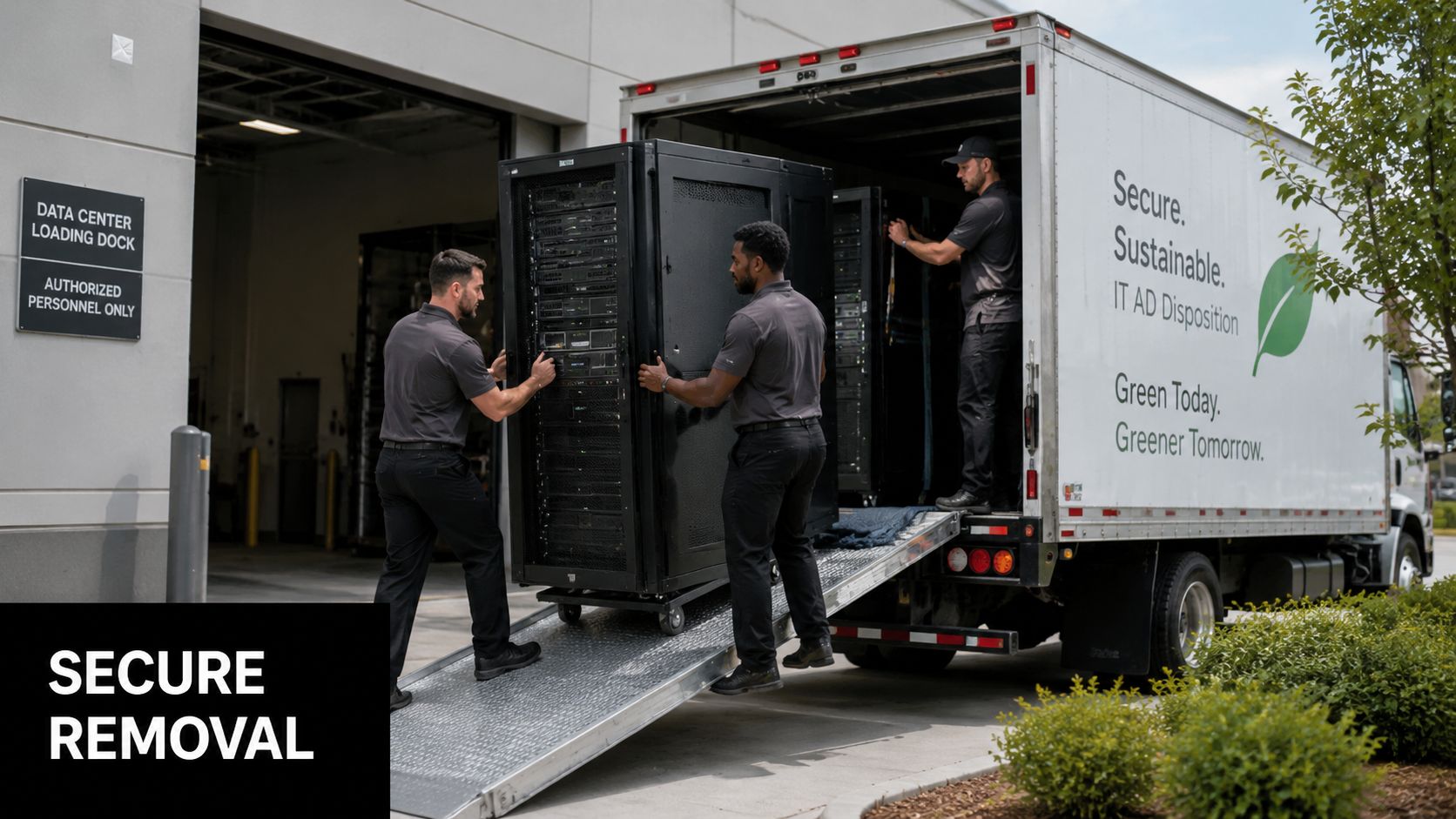
The physical removal day looks simple from the outside and complicated from the dock. Facilities wants floor protection and load coordination. Security wants escort control and a clean muster plan. IT wants the gear gone without creating a chain-of-custody problem. None of that happens well if the logistics are improvised.
The first check is environmental and structural. Power, cooling, rack access, and floor loading all need to be coordinated before removal starts. The second check is procedural. The site should know who can enter, who can escort, where the secure cage sits, and how photos, serials, and handoffs are recorded.
Treat the move like a controlled transfer
A decommission day should read like a checklist, not a hallway conversation. Hardware is staged, access is restricted, seals are applied, and the escort path is documented. If drives or backup media are still present, they stay under control until they're shredded or otherwise destroyed under the agreed method.
For higher-security environments, on-site hard-drive shredding avoids unnecessary transport risk. Off-site destruction can still work, but only when the device-level chain of custody is already tight and the vendor can show exactly how the media was handled in transit. Reworx Recycling's hard drive shredding service belongs in that conversation when the disposal path needs to be paired with documented destruction.
Overton Security's data center access control best practices are a helpful reference if your facilities team needs a reminder that physical controls are part of the decommissioning program, not a separate issue. The best runs I've seen always involve facilities, security, IT, and the ITAD partner in the same room before the truck shows up.
The audit trail starts before the first rack moves.
The auditor will want more than a pickup receipt. They'll want the serial log, the manifest, and the destruction certificate, all aligned to the equipment that left site. If those documents don't match, the cleanup isn't finished, even if the room is empty.
Post-Decommission Validation, Compliance, and Long-Term Obligations
The hardest part of mainframe decommissioning often starts after the old system is off. Teams still have to prove data completeness, reconcile hidden batch dependencies, and show that the archive can answer the questions the business will ask later. That's where a lot of programs get thin, because the archive exists, but no one has validated the edge cases embedded in data structures or institutional knowledge.
That gap matters because retention is not optional. The IAEA guidance says records should be retained for no less than their authorized retention period under a retention and disposition schedule, and that decommissioning-related records may need to stay in a records management system for the full decommissioning period, which may be 100 years. IAEA records retention guidance
What done actually looks like
A clean closure file should show that authorized users can retrieve archived records, that business owners have signed off on completeness, and that the final data sanitization or destruction evidence is preserved with the asset trail. It should also capture the exceptions list, because unresolved oddities are exactly what auditors ask about later.
The practical test is simple. If a downstream team can't tell whether a record came from an old batch process, a hidden interface, or a human workaround, the decommissioning team hasn't fully reconciled the environment. That's why post-decommission review has to include not just technical validation, but also business signoff and record retention controls.
For organizations that want the end-of-life process to support community impact as well as compliance, donation-based recycling is a sensible path for qualifying equipment. Reworx Recycling fits that model by combining IT asset disposition, secure data destruction, and equipment diversion from disposal routes that don't add social value.
If you're planning a mainframe retirement, Reworx Recycling can help with equipment decommissioning, secure data destruction, and donation-based electronics recycling that keeps the chain of custody clear. Visit Reworx Recycling to schedule a pickup or start a decommissioning conversation for your next ITAD project.