It's 2 a.m. in Tampa. A storm track has shifted, the office is nearly empty, and the IT lead is checking whether critical systems can stay online. Three workstations still contain client information, the generator fuel gauge doesn't match the maintenance log, and nobody can say with confidence which equipment should be evacuated first.
That situation is avoidable. Florida hurricane preparation has to cover people, buildings, power, communications, data, and electronics disposition. This Florida hurricane season guide gives business owners, IT managers, facilities teams, schools, and public agencies a practical playbook for preparing before landfall, managing the final response window, and handling damaged equipment afterward.
Why Florida Hurricane Season Demands a Year-Round Playbook
Florida's hurricane exposure makes readiness a standing operating requirement. The official Atlantic hurricane season runs from June 1 through November 30, with peak activity typically centered from mid-August through late September, according to NOAA's historical hurricane records. Do not treat preparation as an annual reminder email.
For an organization, wind is only one failure point. Evacuations reduce staffing, blocked roads delay technicians and vendors, and utility outages can disrupt servers, access control, payment systems, telephones, and building systems. Florida's disaster history reinforces that risk. NOAA's Florida disaster summary records recurring billion-dollar weather and climate disasters, with activity increasing in recent years.
Operational rule: Use the quiet months to prepare. Once a storm threatens your market, procurement, transportation, contractors, and staff availability are already less reliable.
A year-round playbook should set deadlines for vendor contracts, backup verification, asset inventories, insurance reviews, and equipment decisions. Include hard drives and other data-bearing devices in that planning. Decide in advance which hardware leaves the building, which stays protected, and which requires secure handling if it is damaged. Keep at least seven days of supplies available for the organization's continuity needs, rather than waiting for stores, fuel suppliers, or delivery routes to recover.
Reactive planning forces staff to make irreversible choices under pressure. It also creates weak records, leaving the organization unsure which assets were moved, exposed, lost, or ready for reuse.
For IT and operations leads, the standard is direct: every critical system has an owner, every data-bearing device has a handling rule, and every facility dependency has a tested fallback. Align asset and continuity procedures with Florida electronics recycling and IT equipment services so retired, damaged, or surplus equipment does not become an unmanaged security or disposal problem after the storm.
Pre-Season Planning Timeline for Florida Organizations
Start planning in March, not when a named storm appears on the forecast. Florida's season window is predictable, and the strongest preparation cadence gives IT, facilities, procurement, legal, and communications teams time to resolve conflicts before they become emergencies.
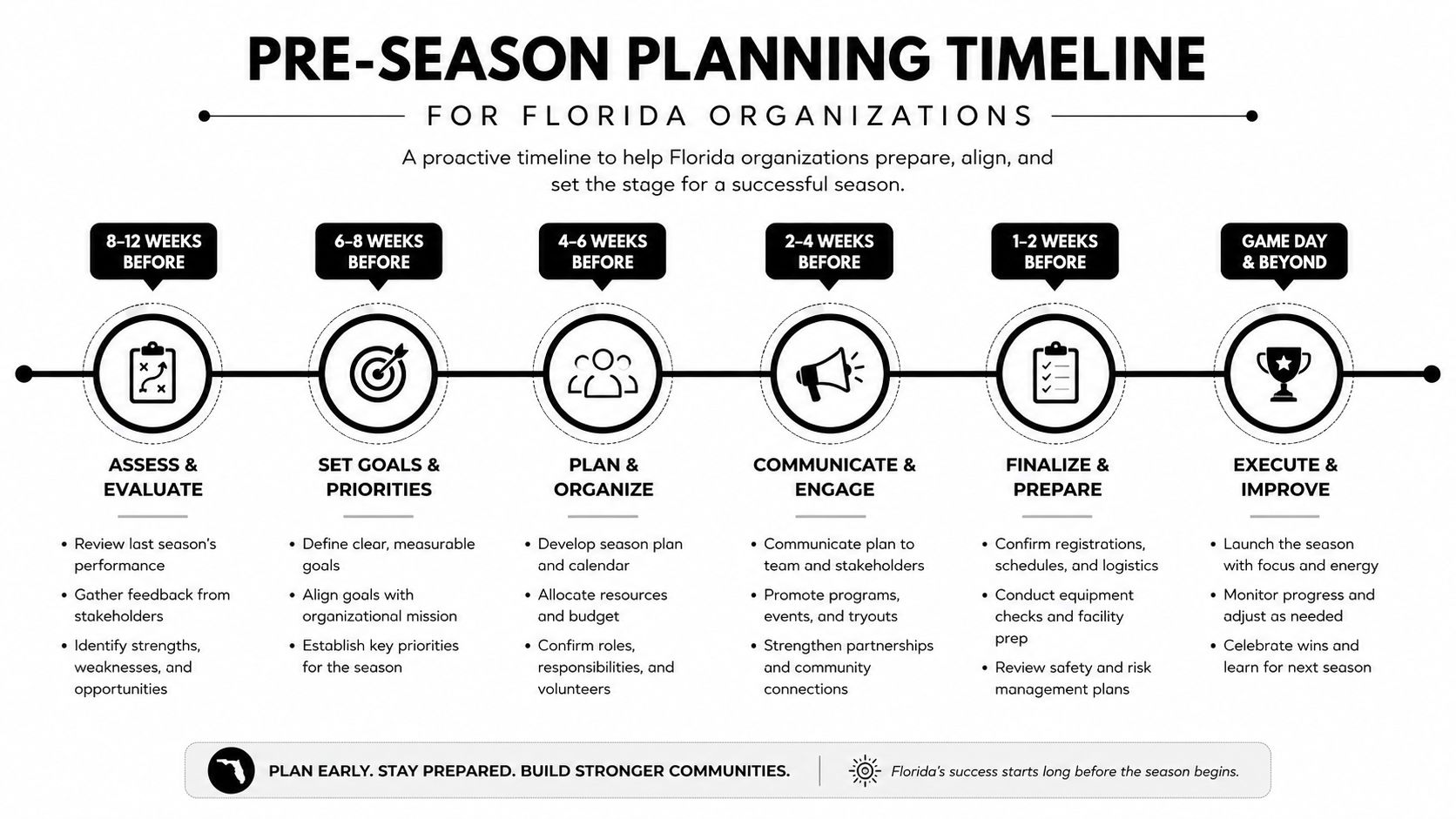
March establishes ownership
Run a vendor review covering generators, fuel, telecommunications, cloud platforms, security monitoring, restoration contractors, and electronics pickup providers. Audit the insurance binder and confirm that facilities and IT leaders know where policies, contact details, deductibles, and business interruption records are stored.
Then complete a hardware and data-bearing device inventory. Include desktops, laptops, servers, switches, storage arrays, backup media, printers, medical equipment, laboratory equipment, and removable drives. Record serial numbers, locations, assigned users, encryption status, operational importance, and planned disposition.
April tests recovery, not just backups
Verify that backups are completing, replicating off-site, and retaining usable restore points. Perform an actual restoration test for the systems the business needs first, such as identity services, financial applications, customer records, communications, and operational databases.
Facilities should test generator connections, UPS performance, fuel arrangements, cooling dependencies, sump pumps, and water intrusion controls. Review IT asset management best practices alongside the continuity plan so the asset register reflects what the recovery team will find.
May turns the plan into a decision
Run a tabletop exercise with named owners. Test the communication tree, remote-work assumptions, evacuation triggers, server shutdown authority, vendor escalation, and relocation options for critical infrastructure. Decide which systems must remain online, which can be shut down, and which equipment should be moved before access becomes unsafe.
Residential and office preparation overlap at the building level. Teams can use this practical resource on how to secure your home before hurricane season for useful hardening and readiness ideas that also apply to smaller offices and facilities.
By June 1, freeze nonessential changes to core systems, confirm contracts, publish the asset protection plan, and stage supplies. Florida Disaster recommends maintaining at least seven days of supplies, while NOAA and FEMA minimum guidance commonly begins at three days, as summarized in Florida's hurricane preparation guidance. The longer target is the better operating assumption for Florida organizations.
Protecting IT Assets, Hardware, and Sensitive Data
Protect systems in priority order. The first priority is an off-site, encrypted, and preferably immutable backup that has been restored successfully. A backup that has never been tested is an assumption, not a recovery capability.
Next, stabilize the physical environment. Use appropriate surge protection and power conditioning, confirm UPS batteries are serviceable, and place servers, switches, backup devices, and storage media above projected water exposure. Don't put critical equipment directly on a floor because the room has never flooded. Surge can enter through more than one path, and a dry server room still needs electrical protection.
Decide what moves and what stays
Evacuate laptops and portable drives when staff can move them safely and the devices are encrypted, inventoried, and assigned to accountable personnel. Leave sealed racks in place when moving equipment creates greater risk, but document the decision, isolate power when appropriate, and protect the rack from water and debris.
Hard drives removed for evacuation need a chain-of-custody record. Log the asset identifier, drive serial number, person removing it, destination, container, transfer time, and receiving person. Use tamper-evident packaging and keep the register with the incident lead, not only on a device inside the threatened facility.
For sanitization decisions, use the NIST Special Publication 800-88 framework for media sanitization. Purge is appropriate when the device can be reliably sanitized and reused. Destroy is the correct route when media is damaged, cannot be verified, cannot be sanitized reliably, or must not return to service. A damaged laptop that won't boot may still contain recoverable information.
| Device Condition | Action | Compliance Reference | Documentation Required |
|---|---|---|---|
| Encrypted, working laptop | Evacuate or assign to remote staff | Internal access and encryption policy | Asset ID, user, destination, transfer record |
| Working server or storage device | Back up, isolate, and move only under approved procedure | NIST SP 800-88 for later media handling | Serial number, system owner, backup confirmation |
| Drive that can be verified and reused | Apply an approved purge method | NIST SP 800-88 | Method, tool or process, verifier, completion record |
| Damaged or unverifiable drive | Hold for physical destruction | NIST SP 800-88 destroy guidance | Chain of custody, destruction certificate |
| Storm-damaged device | Do not power on until evaluated | Security incident and asset policy | Photos, condition, location, custodian |
Keep the disposition workflow separate from ordinary trash removal. Follow data sanitization methods for retired electronics and require evidence before equipment is donated, recycled, resold, or sent for product destruction.
The 72-Hour Pre-Storm Response Playbook
Assign one accountable owner to every task. A checklist without ownership turns into a collection of good intentions.
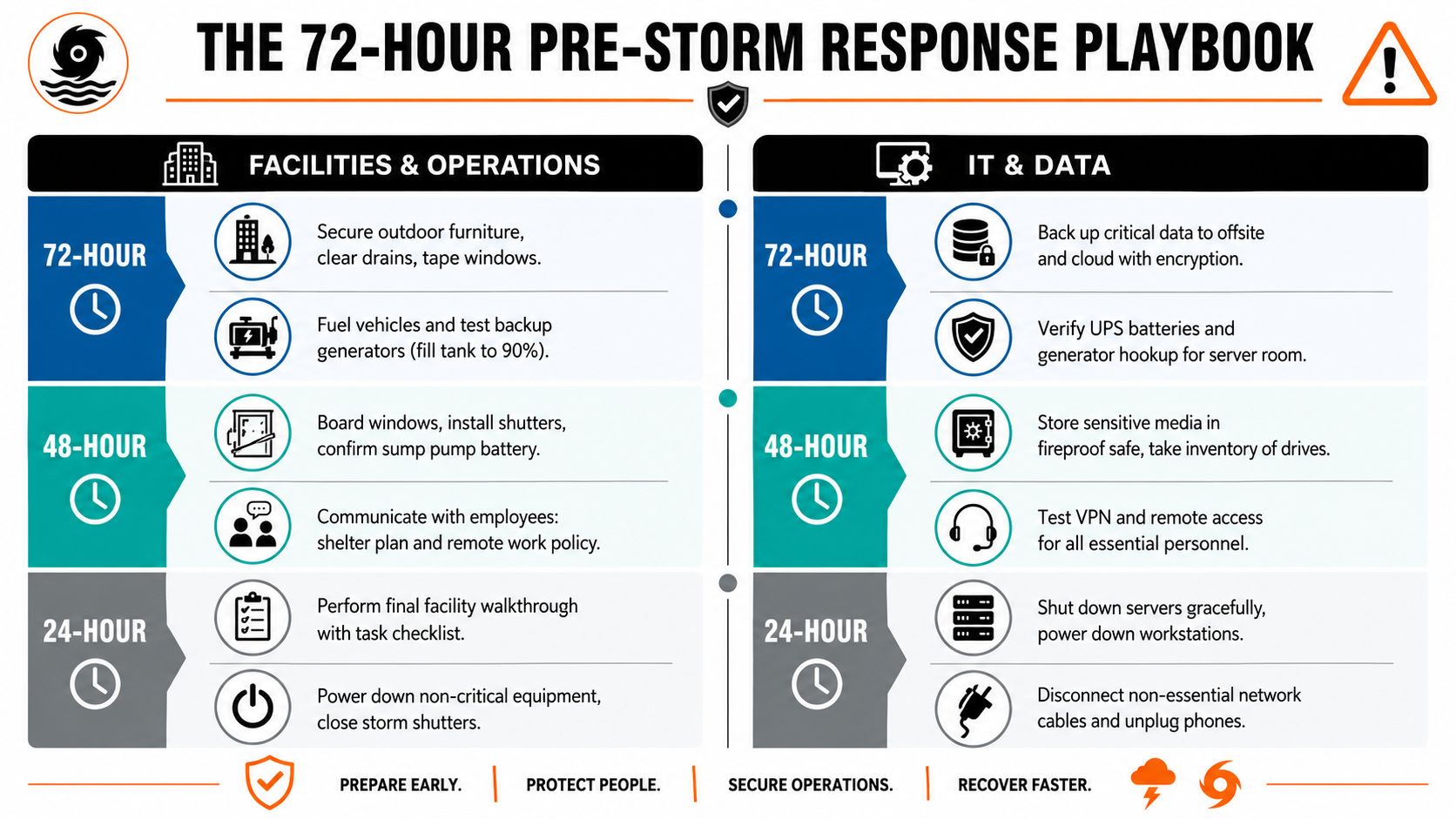
At 72 hours
Facilities and operations should secure loose outdoor items, clear drains, inspect windows and doors, confirm generator and vehicle fuel, protect paper records, and validate building access controls. The operations lead should issue the first internal alert, state the expected work posture, and identify employees who need evacuation or accessibility support.
IT and data should complete the last planned cloud and off-site backups, verify encryption, test remote access, check UPS status, and confirm generator connections for server rooms. The IT lead should distribute approved laptops and chargers to essential staff, record custody, and stop nonessential infrastructure changes.
At 48 hours
Facilities should install shutters or board-up systems, confirm pumps and emergency lighting, secure critical documents, and notify vendors whose access may be restricted. Send vendor notifications at this checkpoint, including site closure instructions, emergency contacts, and authorization limits for work performed during recovery.
IT should inventory removable media, place sensitive devices in approved protected storage, test VPN access with essential personnel, and confirm the server shutdown sequence. Use safe electronics packing guidance if equipment must be transported to another site.
At 24 hours
The facilities owner performs the final walkthrough against a signed task list. Close shutters, power down noncritical equipment, confirm evacuation decisions, and stop sending staff into unsafe conditions.
The IT owner shuts down systems gracefully according to the approved sequence, disconnects nonessential devices, and leaves only explicitly approved services online. Pulling drives is usually not reversible in the short term, so don't do it casually. Leaving drives in sealed racks is also a decision that requires documented risk acceptance.
Send customer advisories at 24 hours if service, response times, office access, or support channels may change. During the storm, nobody should improvise a shutdown, evacuation, or data transfer without the designated owner's approval unless immediate safety requires it.
Post-Storm Recovery and Damaged Electronics Triage
Recovery starts with safety, not equipment testing. Confirm that the building is structurally safe, electricity is controlled, standing water is absent from work areas, and local officials have cleared access. Do not energize a wet server, desktop, power strip, laptop, or network appliance to see whether it works.
The first recovery window should produce an evidence record. Photograph rooms and equipment before cleanup, capture serial numbers, note water lines and visible contamination, and record the time and location of each observation. Timestamped photos, serial logs, and clear damage descriptions support insurance claims and later audit questions.
Use a staged triage process
Working equipment should be isolated, inspected, and imaged before normal deployment. Re-image systems when integrity is uncertain, rotate credentials if devices or accounts may have been exposed, and restore services in business priority order rather than based on convenience.
Water-damaged devices should remain powered off. Tag them, place them in a controlled holding area, and maintain chain-of-custody documentation until an insurer, qualified technician, or security lead approves the next step. For consumer devices, a specialist resource such as CTF Mobile Phones water damage repair can help explain why powering on wet electronics can worsen damage, but enterprise data-bearing equipment still needs your organization's security and insurance process.
| Device Condition | Immediate Action | Data Security Step | Final Disposition |
|---|---|---|---|
| Working and clean | Isolate and inspect | Image or verify integrity before reuse | Re-deploy or retain |
| Working but exposed to contamination | Quarantine | Treat as potentially compromised | Approved repair, destruction, or recycling |
| Water-damaged and powered off | Tag and preserve | Maintain chain of custody | Specialist evaluation or certified destruction |
| Lost or missing device | Open an incident record | Assess data exposure and rotate credentials | Insurance, breach review, and documented closure |
| Destroyed storage media | Do not place in general waste | Physical destruction with evidence | Certified destruction and compliant recycling |
Coordinate restoration vendors through one incident lead. Don't let a cleanup contractor remove electronics before the asset register, insurance documentation, and data-security decision are complete.
Turning E-Waste Into Community Impact Through Donation-Based Recycling
Post-storm electronics create two risks at once. Damaged equipment can contain sensitive information, while rushed disposal can send reusable assets, recoverable materials, and hazardous components into the wrong stream.
The better approach separates function from condition. Working but surplus laptops, monitors, networking equipment, and peripherals can move through a documented refurbishment and donation pathway after data sanitization. Nonfunctional equipment should be dismantled through responsible electronics recycling, with recoverable materials directed into appropriate processing channels.
That distinction matters for business continuity because replacement projects often produce usable equipment before the organization has decided what to do with it. A controlled donation-based recycling program gives operations teams a place to route surplus assets during upgrades, office cleanouts, facility cleanouts, and storm recovery without mixing them with ordinary waste.
Build the disposition record before the pickup
A useful record identifies the equipment category, quantity, condition, serial number where available, data-bearing status, sanitization method, final route, and supporting documentation. The same record can support internal controls, sustainability reporting, procurement reviews, and insurance conversations.
Donation is not a substitute for data destruction. The device should be sanitized or physically destroyed according to its condition and risk before it enters a reuse pathway. Businesses should also confirm that their chosen processor can distinguish donation, refurbishment, material recovery, and product destruction rather than treating every item as an undifferentiated load.
Reworx Recycling's mission is relevant to this model because social enterprise recycling connects responsible disposition with community support, digital inclusion, and workforce development. A business can retire laptops safely, document secure data destruction, and support technology access through a donation route instead of treating every replacement as a landfill-bound expense.
For organizations building corporate donation programs, the practical standard is traceability. Keep evidence of what left the site, how data was handled, where usable equipment went, and how non-reusable electronics were processed. That turns cleanup into a defensible sustainability activity rather than an informal handoff. A dedicated laptop donation pathway can help teams separate reusable devices from material recovery candidates.
Final Checklist, Insurance Reminders, and Partnering With Reworx
Print this punch-list and assign a name beside every item:
- Verify the property's evacuation status using Florida's Know Your Zone maps.
- Confirm emergency contacts and alternates.
- Review vendor contracts and emergency service terms.
- Audit wind, flood, equipment, and business interruption coverage.
- Photograph facilities and critical equipment before the season.
- Reconcile the hardware and data-bearing device inventory.
- Confirm encryption and access controls on portable equipment.
- Test off-site backup restoration.
- Verify UPS, generator, fuel, cooling, and pump dependencies.
- Decide what equipment moves and what stays.
- Stage protected containers for drives and sensitive media.
- Prepare at least seven days of supplies, following Florida Disaster's preparation guidance.
- Run a tabletop exercise.
- Refresh the communication tree.
- Issue the 72-hour internal alert when conditions warrant.
- Notify vendors at the 48-hour checkpoint.
- Send customer advisories at 24 hours when service may change.
- Photograph and log damage before cleanup.
- Quarantine wet or unknown-condition electronics.
- Complete sanitization, destruction, donation, recycling, and insurance records.
Insurance reviews deserve special attention. Standard homeowners coverage typically doesn't cover flood damage, and a 2026 AAA survey found that 23% of Floridians didn't know this, while 41% suspected coverage gaps or were unsure what their policies covered, and only 26% had reviewed their coverage, according to reporting on the AAA survey. Businesses should confirm wind versus flood treatment, deductibles, equipment coverage, business interruption requirements, and the records needed to substantiate a claim.
Schools and government offices should also review FEMA public assistance requirements with their emergency management and finance teams. If hardware is lost and personal information may be exposed, involve counsel and privacy officers immediately so the organization can evaluate Florida data-breach notification obligations rather than waiting for a recovery vendor to raise the issue.
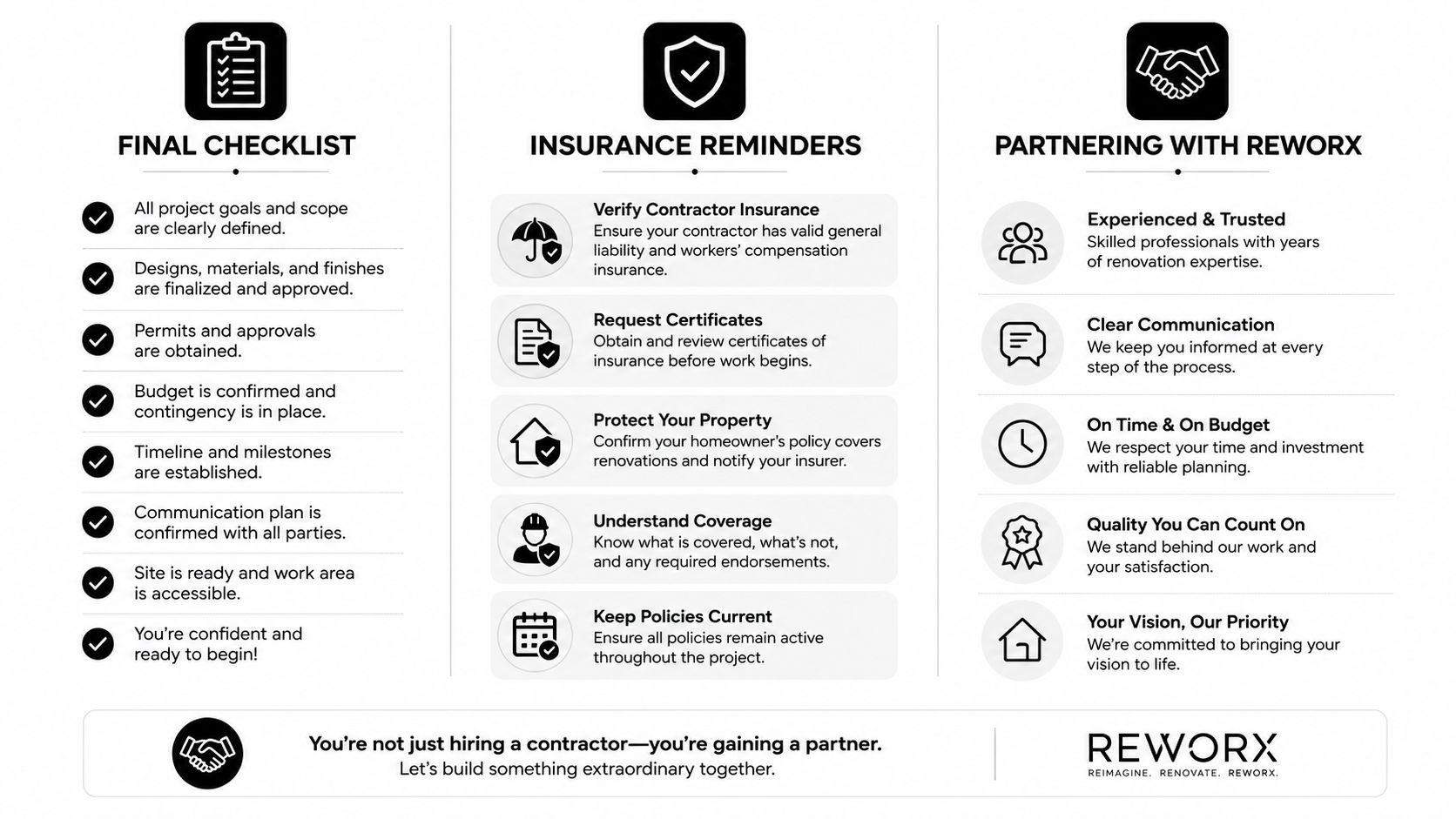
Schedule a pre-season site walkthrough and request a quote before the forecast gets busy. Reworx Recycling can help plan pre-storm hard drive destruction, damaged electronics pickup, secure data destruction, IT asset disposition, and donation-based recycling that supports nonprofits while giving your organization a measurable continuity and ESG record.
Reworx Recycling helps Florida organizations handle old laptops, hard drives, servers, and storm-damaged electronics through secure data destruction, responsible recycling, pickups, and donation pathways. Visit Reworx Recycling to plan a pre-season site walkthrough, schedule equipment pickup, or request a quote before the next storm threatens your operations.