On Sunday, a lot of Atlanta business leaders do the same thing. They watch the atlanta falcons, think about roster moves, argue about pass protection, and wonder whether the next adjustment will finally create a more stable season.
Monday morning brings a different version of the same problem.
Instead of cornerbacks and pass rushers, you’re looking at aging laptops, retired servers, storage arrays, access control devices, phones, and monitors that no longer fit the business. Some still hold sensitive data. Some still have residual value. Some can be donated. Some need certified destruction. All of them need a plan.
That’s why the Falcons are a useful local analogy for IT asset disposition (ITAD). Football teams don’t keep every player forever. Businesses shouldn’t keep every device forever either. Performance changes. Needs shift. Systems get replaced. Risk builds when old equipment piles up in closets, server rooms, and storage cages.
For Atlanta companies, the lesson is simple. The best technology programs aren’t just about procurement and deployment. They also include electronics recycling, secure data destruction, computer recycling, office cleanout planning, and sustainable recycling at the end of the lifecycle.
From the Gridiron to the Office A Shared Cycle of Strategy
An operations leader in Atlanta might spend the weekend listening to Falcons talk radio and hearing the same themes repeated. Build depth. Protect the middle. Fix weak spots before they become game-breaking. Don’t wait until a crisis exposes a roster flaw.
That logic carries over to the office.
A business runs on its own roster. Employee laptops. Desktop fleets. Conference room systems. Security hardware. Networking gear. Data center equipment. Specialty devices used in healthcare, labs, logistics, and field service. Every one of those assets moves through a cycle of purchase, use, refresh, retirement, and replacement.
Technology has an off-season too
Most companies are disciplined at the front end. They budget for new hardware. They coordinate installs. They assign devices. They track warranties.
The breakdown usually happens at the back end.
Old devices sit longer than they should because no one wants to make the disposal call. An office cleanout gets delayed. A facility cleanout uncovers years of forgotten equipment. A server refresh happens, but the retired drives remain on-site in a locked room with no clear chain of custody.
That’s where strategy matters. A good IT lifecycle includes retirement planning from the beginning. If you want a practical framework, this guide to IT asset management best practices is a useful starting point for aligning operations, security, and sustainability.
Businesses get in trouble when they treat end-of-life equipment like leftover clutter instead of managed risk.
The Atlanta lens makes this easier to understand
The atlanta falcons are familiar territory for local readers. You already know that performance depends on timing, replacement decisions, coaching discipline, and clear roles.
IT works the same way:
- Useful assets stay in rotation when they still support the mission.
- Outdated equipment gets retired before it becomes a drag on productivity.
- Sensitive devices get special handling because the risk isn’t equal across all assets.
- Surplus equipment can still create value through donation-based recycling or responsible remarketing.
When companies ignore that cycle, they don’t just create mess. They create legal, operational, and environmental exposure. That’s why the end of the asset lifecycle deserves the same planning attention as deployment.
Lessons from Falcons History The Inevitable Rebuilding Season
The Falcons offer a long view of what rebuilding looks like. Across 60 seasons, the franchise has posted a 406-521-6 all-time regular season record, with 14 playoff appearances and two NFC Championships, and it didn’t produce consecutive winning seasons until 2008 and 2009 according to the Atlanta Falcons season history.

That record isn’t just a football trivia point. It’s a reminder that no organization stays at one performance level forever. Teams cycle through contention, transition, reset, and rebuild. Businesses do too.
Aging assets always change the equation
Technology leaders sometimes assume a device remains harmless if it still powers on. That’s not the right test.
An older laptop may still boot, but that doesn’t mean it meets current security standards. A storage appliance may still function, but that doesn’t mean it belongs in production. Legacy equipment can slow support, increase downtime, complicate compliance, and consume valuable space.
In practice, an unmanaged device fleet often creates four familiar problems:
| Risk area | What it looks like in a business |
|---|---|
| Security drift | Retired devices still contain data or credentials |
| Space waste | Closets, racks, and storage rooms fill with obsolete hardware |
| Process confusion | Nobody knows what can be donated, wiped, recycled, or destroyed |
| Missed community value | Reusable equipment never reaches schools or nonprofits |
A rebuilding season in football forces hard choices. Which pieces still fit the plan? Which veterans no longer match the timeline? Which positions need a clean reset?
ITAD asks the same questions.
Rebuilding is not failure
Some readers get stuck here. They hear “retire assets” and think “loss.” But retirement is often the healthiest move. Equipment reaches the point where keeping it costs more than replacing it. Sometimes the cost is money. Sometimes it’s security exposure. Sometimes it’s the burden placed on the IT team.
Operational lesson: Don’t measure asset value only by remaining function. Measure it by fit, risk, and next-best use.
That’s why smart companies plan laptop disposal, product destruction, data center decommissioning, and medical equipment disposal before the hardware becomes a problem. A mature organization expects turnover. It doesn’t pretend permanence is possible.
The Falcons’ history shows that cycles are normal. The better business lesson is what you do with that reality. You can delay decisions and let old assets accumulate, or you can make retirement part of a disciplined operating model.
A Championship Defense for Your Company Data
Defense wins field position. In ITAD, defense protects your company after a device leaves active use.
The Falcons’ 2025 defense set a franchise record with 57 sacks and ranked #4 in the NFL with a 9.73% sack rate, a level of disruption noted in the team’s official statistical profile. That idea of disruption efficiency maps neatly to secure asset retirement. The highest-risk items should get the fastest, most controlled response.
Start with the assets that can hurt you most
Not every retired device carries the same risk. A keyboard isn’t a hard drive. A display isn’t a backup appliance. A phone used by a senior executive doesn’t deserve the same assumptions as a spare monitor in a training room.
Prioritization matters. Many breaches and exposure events become possible because organizations focus on convenience instead of risk.
A practical order looks like this:
Storage media first
Hard drives, SSDs, backup units, and removable media should move to secure data destruction early in the process.Devices with user histories next
Laptops, desktops, and mobile devices often hold cached files, saved sessions, and account traces.Infrastructure with embedded data
Servers, network appliances, and multifunction office systems can retain more than teams expect.
That’s why secure retirement should sit beside other core resilience tools. If your organization also reviews cyber recovery planning, resources on immutable backup solutions can help frame how disposal, retention, and recovery fit into one broader protection strategy.
Deleting files isn’t enough
A common misunderstanding persists in offices of every size. Someone assumes that dragging files to the trash, reimaging a device, or performing a quick reset solves the problem.
It may not.
Secure data destruction exists because devices can outlive the visible data a user sees on the screen. End-of-life handling needs documented procedures, chain of custody, and a clear decision about whether the media will be wiped, shredded, or otherwise processed according to policy.
For a deeper operational view, this resource on the growing importance of data security in IT asset disposition best practices for businesses gives decision-makers a stronger baseline.
The most expensive disposal mistake usually isn’t recycling the wrong cable. It’s releasing a storage device without proper control.
Good defense is proactive
The Falcons’ defensive model in that season wasn’t passive. It attacked problems before plays developed. Businesses should treat retired hardware the same way.
That means:
- Flagging high-risk assets early
- Separating reusable equipment from destruction streams
- Documenting handling procedures
- Building secure data destruction into every refresh project
If your company waits until the office move, merger, or cleanup deadline, the process gets rushed. Rushed disposal is where mistakes happen.
Beyond the Game The Falcons Community and Your CSR Goals
The Falcons matter in Atlanta because they’re more than a schedule. They’re part of local identity, local conversation, and local community work. That wider role offers a helpful model for corporate social responsibility.
A business can retire equipment in a purely transactional way. Or it can treat end-of-life technology as a chance to support people, not just clear space.

Donation changes the meaning of disposal
Many organizations have reusable devices they no longer need. Maybe the systems don’t meet internal standards after a refresh. Maybe a department closed. Maybe a branch relocated and left behind workable hardware.
In those moments, donation-based recycling can support a larger mission.
Instead of asking only, “How do we remove this equipment?” a better question is, “What can still serve a school, nonprofit, training program, or community initiative?”
That shift matters for several reasons:
Community benefit
Usable devices can support digital access and workforce development.Stronger ESG and CSR narratives
Stakeholders want to see practical action, not broad statements.Employee engagement
Staff often respond well when a technology refresh also produces social value.
Social enterprise recycling fits local expectations
Atlanta companies increasingly want partners that align environmental outcomes with community impact. That’s where social enterprise recycling stands out from a simple haul-away model.
A social enterprise approach asks whether retired assets can do more than leave the building. It combines electronics recycling, corporate donation programs, secure handling, and local benefit into one framework.
Businesses exploring that approach can review this perspective on corporate social responsibility and donating datacenter equipment for businesses in Atlanta Georgia.
A retired laptop can be waste, or it can become a tool for learning. The process around it decides which outcome you get.
The atlanta falcons give local companies a familiar example of what public goodwill looks like. For business leaders, the takeaway is direct. Your recycling program can protect data, reduce landfill pressure, and support the community at the same time.
Sustainable Operations A Lesson from Mercedes-Benz Stadium
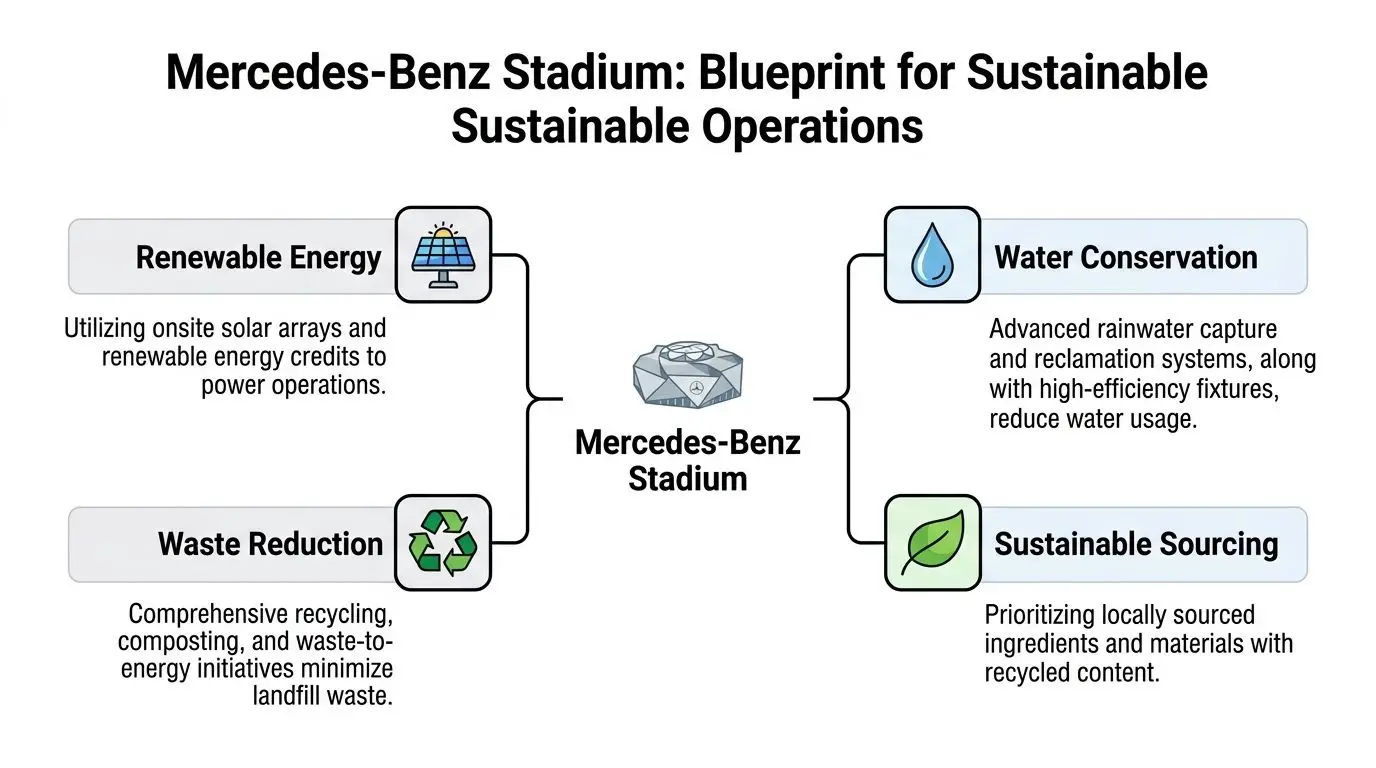
Atlanta businesses don’t need a stadium footprint to think like a large-scale operator. They do need the same discipline. Sustainable operations work best when they’re built into everyday decisions, not added at the end.
That’s why the Falcons’ home environment offers a useful mental model. High-visibility facilities are expected to think about energy, water, sourcing, and waste together. Companies should treat technology waste with that same seriousness.
E-waste is the hidden operations issue
Office sustainability conversations often focus on paper, lighting, or HVAC upgrades. Those matter. But retired electronics deserve a seat at the same table.
According to the verified Georgia figure, the state generated over 100,000 tons of e-waste in 2025, while reporting on e-waste practices at high-tech NFL facilities remains limited, as discussed in this Georgia e-waste and Falcons sustainability discussion. That gap creates an opening for private organizations to lead.
For a business, leadership looks like creating a repeatable process for:
- Computer recycling
- Laboratory equipment disposal
- Medical equipment disposal
- Office cleanout and facility cleanout events
- Data center decommissioning
- Secure downstream handling
Sustainability works best when systems connect
One reason some programs stall is that departments operate separately. Facilities handles moves. IT handles deployment. Compliance handles policy. Sustainability handles reporting. Procurement handles buying. No one owns the full retirement pathway.
A stronger model links those teams.
For organizations also evaluating broader environmental infrastructure, articles on empowering businesses with solar energy can be useful because they show the same operational principle. Environmental performance improves when leaders connect daily systems to long-term goals.
A similar mindset applies to technology retirement. This guide on minimizing carbon footprint of IT departments can help sustainability and IT leaders talk in the same language.
A simple operating checklist
If your company wants a more mature e-waste program, start here:
Map asset flows
Identify where devices enter service, where they’re stored, and where they go when retired.Separate reuse from destruction
Don’t mix viable donation candidates with media that needs hard destruction.Train local teams
Site managers, office admins, and facilities staff should know the difference between recycling, donation, and secure disposal.Document approved channels
Informal disposal creates environmental and security blind spots.
The lesson isn’t that your office should function like a stadium. It’s that visible institutions remind us what disciplined sustainability looks like. Businesses can apply the same thinking at their own scale.
Your Game Plan for Secure and Sustainable IT Asset Disposition
A good game plan removes guesswork. That matters because instability in a key position creates vulnerability. The same principle appears in football and business. In the Falcons conversation, the revolving CB2 spot has been framed as a weak point that can expose the whole defense, and that same idea was extended to ITAD risk in this discussion of secondary instability and disposal security gaps.
For a business, the weak point is often process inconsistency.
Maybe one office stores retired laptops in a locked room. Another lets them pile up in cubicles. One department requests secure data destruction. Another sends mixed equipment out with no clear documentation. Over time, those variations create avoidable risk.

The practical playbook
If you’re building or tightening your program, use a sequence your teams can repeat.
Identify what you have
Start with visibility. You can’t retire assets well if you don’t know what’s in inventory.
Look for:
- employee devices
- server and storage hardware
- networking gear
- phones and tablets
- AV systems
- specialty equipment in labs, clinics, or production spaces
This is also the moment to tag high-risk items such as hard drives and backup media.
Sort by outcome, not by department
Once identified, sort assets into paths:
| Asset condition | Best next step |
|---|---|
| Still usable | Evaluate for donation or redeployment |
| Contains sensitive data | Route to secure data destruction |
| No longer functional | Send to responsible electronics recycling |
| Branded or restricted items | Consider product destruction |
This prevents a common failure. Teams often group hardware by who used it instead of what handling it requires.
Build chain of custody into the process
Someone should be able to answer basic questions at any point. What was collected? Where was it stored? Who moved it? Which assets were destroyed? Which were recycled? Which were donated?
That level of discipline matters for audits and internal accountability. It also makes office moves, mergers, and refresh projects much less chaotic.
Field rule: If your team can’t describe the path a retired device follows, the process isn’t mature enough yet.
Match service to real business scenarios
Different projects need different responses. That sounds obvious, but many organizations still use one disposal method for everything.
A better approach:
- Office cleanout for relocations, consolidations, and floor-by-floor refreshes
- Facility cleanout for warehouses, clinics, campuses, and large administrative sites
- Laptop disposal for employee refresh programs
- Data center decommissioning for infrastructure transitions
- Secure data destruction for anything holding confidential information
- Corporate donation programs for reusable systems that can still create social value
Businesses formalizing those decisions can use this planning guide on how to implement an IT asset disposition strategy.
Stability is the real advantage
The biggest gain from a strong ITAD program isn’t only cleaner storage rooms. It’s organizational confidence.
Your IT staff knows what happens after retirement. Facilities isn’t improvising. Sustainability leaders can speak clearly about outcomes. Compliance teams have a process they can inspect. Executives don’t have to wonder whether old devices are still sitting in a branch office with customer data intact.
That’s what a stable program delivers. Not flash. Control.
Make Your Next Move with Reworx Recycling
The atlanta falcons remain a strong local reference point because people understand what they represent. Preparation. Reset. Defense. Community identity. Those same themes apply to technology management more than many companies realize.
A business that plans for equipment retirement early will usually handle upgrades better. A business that treats data destruction like defense will usually reduce avoidable exposure. A business that sees retired devices as part of CSR and sustainability, not just disposal, will usually create more long-term value from the same hardware lifecycle.
That’s the standard worth aiming for in Atlanta. Not a last-minute cleanup. A repeatable, secure, and sustainable operating model that supports IT, facilities, compliance, and community goals at once.
If your organization is reviewing electronics recycling, computer recycling, secure data destruction, medical equipment disposal, product destruction, or a broader IT equipment disposal program, this is the right time to turn the concept into policy and action.
If your Atlanta-area business needs a practical partner for responsible IT asset disposition, Reworx Recycling can help you move from scattered equipment piles to a clear, documented plan. Whether you’re preparing for an office cleanout, scheduling pickup for surplus devices, setting up a corporate donation program, or handling secure data destruction, Reworx Recycling supports organizations that want environmental responsibility, local community impact, and disciplined end-of-life technology management in one place.