The move date is set. The lease clock is running. Facilities is thinking about furniture, HR is fielding employee questions, and IT is staring at closets full of aging laptops, retired monitors, spare docks, firewalls, printers, and a few servers nobody wants to touch until the last possible week.
That’s where office moves usually get expensive.
Most businesses still treat the relocation itself as the project and the old technology as cleanup. In practice, it’s the opposite. The physical move is visible. The primary risk sits in the equipment room, under desks, in storage cabinets, and inside devices that still hold company data.
The Modern Office Move Is a Technology Move
A clean office move rarely feels clean in the middle of it. There are labels on boxes that no longer match departments, conference room screens that were “working last week,” and a growing pile of electronics nobody has formally assigned to keep, retire, or recycle.
That pile matters more than many teams expect.
The broader market tells the same story. The office relocation market was valued at $14.8 billion in 2024 and is projected to reach $27.3 billion by 2033. Those moves often line up with technology refreshes, footprint changes, and equipment turnover. In other words, modern office relocation services aren't just about trucks and floor plans. They're about controlling IT change while the business keeps operating.

A practical move plan starts by recognizing that every device has a destination. Some assets go to the new office. Some should be redeployed to another team. Some belong in resale, donation-based recycling, or formal IT asset disposition. Some need secure data destruction before anyone loads a truck. If you wait until move week to sort that out, the relocation team ends up making disposal decisions under deadline pressure, and that's when chain-of-custody breaks down.
What gets overlooked first
The most overlooked items are rarely the obvious ones.
Teams remember the server rack. They forget the loaner laptop cart, the access control panel, the test tablets in a department drawer, the copier hard drive, the old switches in storage, or the stack of drives removed during a prior upgrade. Those are the assets that create surprise pickups, missed records, and security headaches after the move is “done.”
What works better
The firms that handle relocations well do one thing early. They treat retired technology as a tracked project stream, not miscellaneous junk.
That means assigning ownership, auditing hardware before packing starts, and deciding what stays active versus what exits the business. If your team needs a grounding point on process, this overview of what is IT asset disposition is worth reviewing before relocation planning gets too far along.
Practical rule: If an electronic device won’t be plugged in at the new site, decide its final disposition before move week.
That single discipline prevents a lot of bad habits. It cuts duplicate handling, reduces storage clutter at the new office, and closes the gap between relocation logistics and compliance.
Building Your Relocation Playbook Timeline
Good office relocation services are won long before the first crate shows up. The timetable has to match company size, technical complexity, and how much equipment you're carrying forward.
The planning windows are wider than many teams expect. Recommended lead times are 3 to 4 months for offices under 25 employees, 6 to 9 months for 25 to 100 employees, and 9 to 18 months for firms with 100 to 500 employees. IT often represents 20 to 25% of the total relocation budget. That’s why late IT planning usually turns into a budget problem.
Start with roles, not tasks
Before building a checklist, assign who owns each lane.
A workable relocation committee usually includes:
- Facilities leadership for site readiness, access, vendors, and building coordination
- IT leadership for cutovers, network readiness, device tracking, and decommissioning
- Finance or procurement for approvals, contracts, and asset disposition decisions
- HR or internal communications for employee notices and move-day guidance
- Department representatives for local asset validation and special equipment needs
Without clear ownership, everything defaults to the mover. That’s a mistake. Movers transport. They shouldn't decide whether a device gets redeployed, wiped, shredded, donated, or recycled.
Build milestones around decision points
A strong timeline doesn’t just list logistics. It places the critical decisions early enough to act on them.
Here’s a practical framework.
| Phase (Time Before Move) | Key Relocation Tasks | Integrated ITAD & E-Waste Actions |
|---|---|---|
| 9 to 18 months | Lease planning, move budget, project leadership, early vendor research | Identify legacy IT, data center decommissioning needs, and surplus equipment categories |
| 6 to 9 months | Floor plans, cabling scope, furniture planning, mover RFPs | Launch IT asset audit, flag items for reuse, donation, resale, or recycling |
| 3 to 6 months | Finalize vendors, employee communications, schedule phased move plan | Confirm secure data destruction workflow, pickup sequencing, and chain-of-custody requirements |
| 1 to 2 months | Labeling, packing prep, access scheduling, cutover rehearsals | Segregate end-of-life devices, document serials, prepare devices for disposition |
| Move week | Department moves, network cutover, issue response | Remove approved retired assets from active areas and maintain disposal records |
| 2 to 4 weeks after | Punch list, missing asset review, employee setup support | Reconcile final disposition records and archive certificates and recycling documentation |
Why the ITAD schedule belongs in the core plan
If IT disposition sits on a separate spreadsheet, it gets bumped every time a move task escalates. That’s how retired equipment follows you into the new office and turns into a second project.
A better approach is to include ITAD milestones directly in the relocation calendar. For example:
- Initial audit window when you verify every laptop, monitor, docking station, server, and specialty device.
- Disposition decision deadline when leadership signs off on keep, redeploy, donate, sell, or recycle.
- Data destruction window before movers handle retired assets.
- Pickup and documentation date tied to the broader move sequence.
If you want a practical service-oriented view of that workflow, this guide to office relocation support maps well to the way operations teams usually run these projects.
A move calendar that only tracks furniture and employee seating is incomplete. The real schedule has to track systems, devices, and retired assets too.
Plan for the day after occupancy
One common error is treating opening day as the finish line.
It isn’t. The first week after occupancy is where hidden issues surface. Devices are missing power adapters. AV gear lands in the wrong rooms. Old printers that should've been retired get plugged back in because someone needed to print. Storage closets fill with untagged electronics because nobody wanted to delay go-live.
That’s why I prefer building a short post-move stabilization window into the plan. Keep the relocation team active long enough to close inventory gaps and finalize equipment exits.
There’s also value in reviewing adjacent setup details while planning layouts and employee work zones. If your team is rethinking workstation standards or hybrid configurations, this piece on how to set up your new office is a useful reference for practical setup decisions that tend to get pushed to the end.
The timeline discipline that saves headaches
The teams that stay calm do three things consistently:
- Freeze disposition decisions early
- Separate active IT from retired IT physically
- Tie every electronics pickup to a documented date and owner
That’s not glamorous work. It’s what keeps a relocation from becoming a scavenger hunt.
Conducting Your Pre-Move IT Asset Inventory
Before packing starts, you need one thing more than boxes or labels. You need a trustworthy asset picture.
That means more than an old spreadsheet exported from procurement. A relocation inventory has to reflect what’s in service, what’s in storage, what’s broken, and what still contains data.
Surplus electronics are common during moves. A 2025 Gartner report indicates that 68% of office relocations generate surplus electronics, yet only 22% of companies have integrated ITAD protocols. The inventory process is where that gap gets fixed.
Audit by location, not by department list
Department-level inventories are often incomplete. Offices accumulate equipment in shared spaces, closets, training rooms, and underutilized cabinets. Start with a physical sweep.
Use a room-by-room approach:
- Workstation areas for laptops, desktops, monitors, docks, desk phones, and accessories
- Conference rooms for displays, cameras, speaker bars, tablets, control panels, and mini PCs
- IT rooms for switches, firewalls, patch panels, servers, UPS units, and spare drives
- Storage areas for old endpoints, toner devices, cables, keyboards, and retired peripherals
- Specialty spaces for medical equipment disposal, laboratory equipment disposal, or product destruction needs if your operation includes technical or regulated devices
A lot of waste comes from “temporary storage” that evolved into permanent.
Use a four-way decision model
Once equipment is identified, force a disposition decision. Don’t let assets sit in a maybe category for weeks.
I recommend four buckets:
Keep
Equipment that will be installed and used in the new office.
These assets should receive destination labels tied to the new floor plan or room assignment. Keep equipment should also be checked for power compatibility, cable needs, and user assignment before move day.
Sell or recover value
Hardware with remaining market value but no place in the new environment.
This usually includes recently retired laptops, monitors, some network gear, and selected mobile devices. If you wait until after the move, resale value often drops because the devices get mixed into general surplus.
Donate
Equipment that still works and can support corporate donation programs or social enterprise recycling channels.
For many organizations, donation-based recycling aligns better with ESG goals than storing usable hardware indefinitely. It also helps teams clear space while documenting responsible disposition.
Recycle
End-of-life devices, damaged electronics, obsolete accessories, and anything that no longer makes financial or operational sense to retain.
Electronics recycling, computer recycling, laptop disposal, and broader IT equipment disposal need to be planned deliberately, especially when devices may contain sensitive information.
Tag like a mover, think like an auditor
A good label does two jobs. It tells the mover where the item goes. It tells the business what the item is.
At minimum, each asset record should include:
- Asset type
- Make or model
- Serial number if available
- Current location
- Assigned disposition
- New destination or exit path
- Data-bearing status
Color coding helps on move day, but digital logs matter more after the move. When disputes happen, the digital record is what lets you prove whether a device was meant to travel, be picked up for recycling, or be destroyed.
If your team can't answer “where did this device end up?” for every retired asset, the inventory wasn't finished.
For teams refining the audit process itself, this article on why IT inventory audits matter before recycling is a solid companion to pre-move planning.
Don’t ignore low-value, high-risk devices
The expensive hardware gets attention. The risk often sits in lower-value equipment.
That includes:
- Old external drives
- Multifunction copiers
- Test laptops
- Reception tablets
- Legacy phones
- Wireless access points
- Equipment used in break rooms or temporary offices
These devices may not carry resale value, but they still create disposal, security, and tracking obligations.
A disciplined pre-move inventory turns office cleanout and facility cleanout work into structured asset control. That’s the difference between moving efficiently and discovering three weeks later that the old office still contains a cabinet full of data-bearing hardware.
Executing Secure Data Destruction and E-Waste Recycling
Once inventory decisions are locked, the next priority is control. Retired devices need to leave the environment through a documented, secure workflow.
Many office relocation services still leave a blind spot. They can disconnect and transport equipment, but that doesn’t automatically mean the data is destroyed correctly or the material is recycled responsibly.
Match the destruction method to the risk
Not every device needs the same treatment.
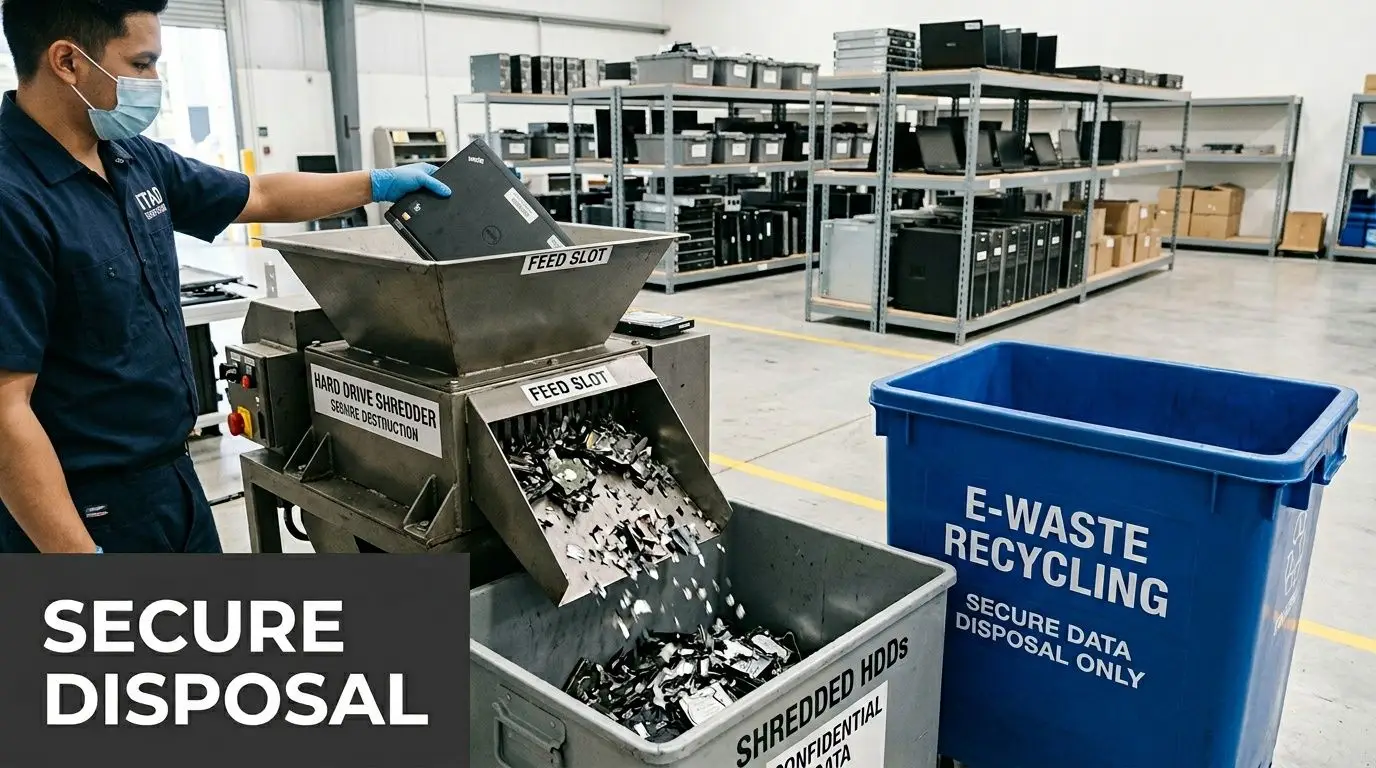
For some organizations, software wiping is acceptable for selected assets that are being refurbished or remarketed. For others, especially where devices handled sensitive records, legal material, health information, or regulated research data, physical destruction of storage media is the safer route.
A practical decision standard looks like this:
- Reuse or resale path often calls for validated wiping and documented processing
- High-sensitivity assets often justify physical hard drive shredding
- Unknown device history should never be treated casually
- Mixed storage media require identification before pickup, not after
If your environment includes healthcare workflows, legal files, public sector records, or finance systems, don’t make the disposition vendor guess. Specify your destruction method in writing.
Separate decommissioning from removal
One of the biggest operational mistakes is combining “disconnect,” “move,” and “dispose” into one vague instruction.
Those are separate actions.
Decommissioning
This means taking systems out of service cleanly. Servers are shut down properly. Network dependencies are checked. User access is redirected. Backups are verified. Asset records are updated.
Data destruction
This is the controlled handling of the storage media itself. Drives are wiped, removed, or shredded according to policy. Devices that contain embedded storage, such as copiers or appliances with smart control systems, should be reviewed too.
Material recycling or downstream processing
This covers what happens after data security is resolved. Devices may be refurbished, harvested for parts, donated, or sent into formal recycling channels.
Keeping these steps distinct avoids the common assumption that “it left the building, so the risk is gone.” It isn't.
Documentation isn't optional
When teams rush, they focus on truck schedules and forget the paperwork. That’s backwards.
You need records that show:
- What assets were collected
- When they were collected
- Who released them
- Which items received destruction treatment
- What happened to the material downstream
Certificates of data destruction and recycling reports aren't administrative extras. They’re the proof that your company handled retired electronics properly.
For organizations tightening disposal controls, this overview of secure data destruction services outlines the documentation and handling standards worth expecting from a qualified provider.
Field note: The most expensive disposal mistake isn't overpaying for recycling. It's failing to document what happened to a data-bearing asset.
Handle specialized equipment deliberately
General office hardware is only part of the picture.
Relocations often include:
- Data center decommissioning
- Medical equipment disposal
- Laboratory equipment disposal
- AV systems with embedded storage
- Security systems and badge infrastructure
- Product destruction for branded or obsolete hardware
These categories need planning because they often involve more stakeholders. Facilities may own the room. IT may own the network dependency. Compliance may own the retention rule. Procurement may own the service contract. No single team sees the full chain unless someone drives the workflow.
What responsible recycling actually looks like
Responsible recycling doesn't mean tossing electronics into a generic bulk stream and hoping for the best.
It means the provider can explain:
- How data-bearing devices are segregated
- How chain-of-custody is maintained
- How reuse is evaluated
- How non-reusable material is processed
- How reporting is delivered back to the client
For sustainability teams, this also connects to broader goals around sustainable recycling, electronics recycling, and avoiding unnecessary landfill disposal. For operations teams, the practical win is simpler. You close the move with fewer loose ends.
Sequence matters on move week
Don’t let retired assets sit beside live assets in the final week.
I prefer this order:
- Finish active system cutover planning
- Physically separate retired equipment
- Execute approved data destruction workflow
- Schedule pickup with clear chain-of-custody
- Reconcile records before the old site is surrendered
That sequence reduces accidental reinstallation, mixed pallets, and last-minute confusion between “still needed” and “ready to dispose.”
Choosing the Right Relocation and ITAD Partners
Vendor selection shapes the move more than is often realized. A polished proposal doesn't mean a provider can handle live network gear, data-bearing devices, or a sustainability-driven office cleanout.
That gap matters because many companies want more than speed. A 2025 Deloitte survey found that 75% of SMB sustainability managers want to integrate zero-waste goals into operations, yet standard relocation services rarely address that need. If your relocation vendors don't ask about retired electronics, secure disposal, or documentation, they’re not solving the full problem.
What to ask the mover
A commercial mover should be able to explain how they handle technology, not just cubicles.
Ask questions like:
- How do you separate active IT assets from retired electronics during the move?
- Have you moved server racks, conference room systems, and serialized IT assets before?
- What labeling method do you expect for electronics and peripherals?
- How do you handle access windows for phased cutovers or after-hours work?
- What happens when a device arrives without a destination label?
The point isn't to get perfect answers. It's to see whether the mover has a process or is improvising.
What to ask the ITAD provider
The ITAD side needs a stricter screen.
Look for a provider that can answer:
- What certifications or secure disposal credentials do you hold?
- How do you document chain-of-custody?
- Do you provide certificates for data destruction and recycling?
- Can you support equipment buyback, donation, and end-of-life recycling in one program?
- How do you handle laptop disposal, server disposal, and mixed electronic loads from a relocation?
- Can you coordinate pickups around mover schedules and building restrictions?
Where applicable, teams often ask about standards such as NAID AAA certification because secure destruction credentials help close a common trust gap.
Don’t hire two vendors who won’t coordinate
This is one of the quiet failure points in office relocation services.
A mover may be competent. An ITAD firm may be competent. If they don’t coordinate timing, access, labeling, and responsibilities, your internal team ends up doing the integration work under pressure.
Strong vendors reduce decision load. Weak vendors create “just tell us what to do” emails all week before the move.
Look beyond disposal
A mature ITAD partner should support more than recycling.
That can include:
- IT asset disposition planning
- Secure data destruction
- Computer recycling and electronics recycling
- Donation-based recycling
- Corporate donation programs
- Value recovery through resale or buyback
- Support for schools, agencies, and nonprofit recipients where appropriate
If those options aren't on the table, the provider may be treating everything as scrap. That usually means lost value and weaker sustainability outcomes.
For a clearer benchmark on provider capabilities, this roundup of IT asset disposition companies is useful when comparing service models and qualification criteria.
The partner test that matters most
Ask each vendor to walk through your move using your actual asset mix.
If they can only speak in generalities, keep looking. Good partners can discuss conference room technology, old laptops, hard drives, patch panels, surplus monitors, copier storage, and specialty equipment without collapsing all of it into “electronics.”
That level of specificity is what keeps vendor management from becoming a second full-time job.
Unlock Savings and Strengthen Compliance During Your Move
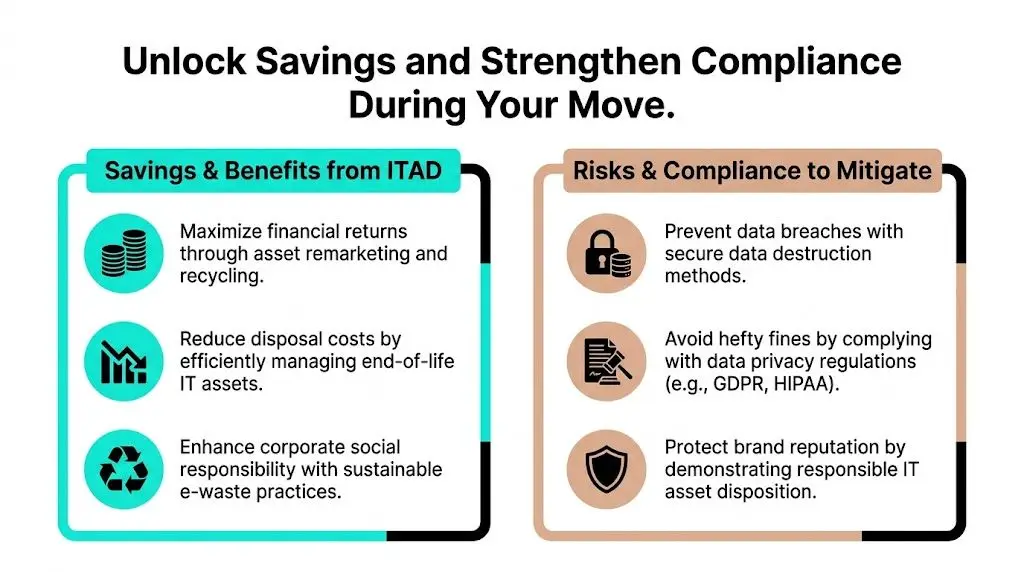
Most businesses budget for the obvious move costs. They budget trucks, labor, setup, and furniture. They don’t always budget for the cost of dragging obsolete technology into the new office, handling it twice, storing it again, and then disposing of it under less control.
That’s why integrated ITAD creates value even when the relocation budget already feels tight.
Savings usually come from fewer touches
Every unnecessary touch adds cost.
If an outdated monitor is packed, moved, unloaded, stored, reviewed, and then recycled later, you paid to handle dead inventory multiple times. The same is true for surplus laptops, damaged docks, obsolete phones, and legacy networking gear.
Integrated ITAD reduces that friction by moving assets directly into the right stream:
- Redeploy what still serves the business
- Remarket what still has value
- Donate what can support community use
- Recycle what has reached end of life
- Destroy data securely before devices leave controlled custody
That approach also supports social enterprise recycling and corporate donation programs when your organization wants the move to align with broader community impact.
Compliance gets harder when your move crosses regions
Relocations become more complex when assets move across jurisdictions. In 2021, 52.8% of U.S. businesses relocated inter-regionally, compared with 47.2% moving within the same region. When a move spans states or regions, disposal rules, handling expectations, and internal approval requirements can get more complicated.
That’s one reason a knowledgeable ITAD partner matters. Different offices may be used to different disposal habits. During a regional move, those habits collide quickly.
Risk reduction is a financial outcome
People talk about compliance as if it lives in policy documents. In reality, it shows up in labor, legal review, escalations, and brand protection.
A secure disposition program helps prevent:
- Data-bearing devices leaving without documented destruction
- Retired electronics getting mixed with active production equipment
- Improper disposal practices that create avoidable exposure
- Weak records that make audits and internal reviews harder
- Storage room creep at the new office
Those aren't abstract concerns. They create rework, delays, and leadership attention at the worst possible time.
The cheapest device to move is the one you already decided not to move.
A move can support sustainability and operations at the same time
There’s a false choice that shows up in relocation planning. One camp pushes speed. The other pushes sustainability. The best teams combine both.
Practical examples include:
- Routing reusable equipment into donation-based recycling instead of storing it
- Pairing office cleanout work with secure collection of retired endpoints
- Including facility cleanout planning so electronics don’t get stranded at surrender
- Folding computer recycling and IT equipment disposal into move-week logistics instead of creating a second event later
The move becomes more than a relocation. It becomes a reset of your asset standards.
What “good” looks like after the move
You know the process worked when:
- The new office contains equipment people need
- Retired devices aren’t sitting in random rooms waiting for a future decision
- Data destruction records are filed and easy to retrieve
- Sustainability and procurement teams can see what was reused, donated, or recycled
- Facilities doesn't inherit a hidden pile of electronics on day one
That outcome is why integrated ITAD belongs in serious office relocation services. It cuts waste, tightens control, and removes a category of avoidable chaos from an already busy project.
Make Your Next Move Your Best Move
A relocation gives you one of the few clean opportunities to reset how your business handles technology.
You can carry old habits into a new address. Or you can use the move to tighten inventory control, retire obsolete devices properly, improve secure data destruction, and make electronics recycling part of normal operations instead of a delayed side project.
The pattern is consistent. Start early. Audit thoroughly. Separate active equipment from retired equipment. Assign a final disposition before move week. Choose partners who can document what they do, not just promise that they’ll handle it.
The physical workplace matters too. If your team is redesigning the new space as part of the move, these modern office furniture ideas can help align layout decisions with a cleaner, more intentional setup.
The best office relocation services don't just move your business. They remove clutter from the environment, close security gaps, and make the next phase of operations easier to manage.
If your business is planning an office move, retiring outdated devices, or needs help with secure IT equipment disposal, Reworx Recycling can help you handle the transition responsibly. Reach out to schedule a pickup, donate old equipment, or build a compliant plan for electronics recycling, secure data destruction, and IT asset disposition that supports both your operations and your community impact.