You clear out a storage room before an office move and find three separate piles. Old laptops and monitors. A box of fluorescent tubes from a lighting retrofit. A growing stack of spent batteries from keyboards, tools, and backup power units.
Many organizations understand that computers should go to an electronics recycler. The bulbs and batteries are where uncertainty starts. They are easy to overlook, easy to stash in a corner, and easy to mishandle.
That is the gap universal waste systems are meant to close. They give organizations a practical framework for dealing with common items that may contain hazardous materials, without forcing every office, school, or local agency into the most burdensome hazardous waste process. For small and mid-sized businesses, public entities, and facilities teams without dedicated compliance staff, that difference matters.
The Hidden Waste Stream in Your Office
A lot of organizations discover universal waste by accident.
It happens during an office cleanout, a facility cleanout, a lighting upgrade, or a data center decommissioning project. Someone opens a cabinet and finds old UPS batteries. Another team empties a maintenance closet and uncovers mercury thermostats or aerosol cans. The IT group retires aging displays and realizes some older units include components that need more care than regular trash can provide.

The first instinct is usually operational, not regulatory. “Can this go in the dumpster?” “Can the janitorial team take it?” “Should IT handle it?” Those questions are reasonable. They also show why universal waste often gets missed. It sits between normal trash, electronics recycling, and full hazardous waste management.
Why this matters sooner than many organizations expect
The waste stream behind everyday operations is larger than it looks. The world generated 2.56 billion tonnes of solid waste in 2022, and annual management costs exceeded $250 billion, according to this overview of universal waste systems. The EPA’s universal waste rules under 40 CFR Part 273 were created to divert common hazardous items from that stream by reducing regulatory burdens and encouraging recovery over disposal.
That framework is especially useful when you are already managing electronics recycling, computer recycling, secure data destruction, or an office move. The hidden waste stream is rarely a separate event. It usually rides alongside broader IT equipment disposal and facility work.
What confusion looks like in practice
A smart facilities manager may know old servers require an ITAD process. A smart IT manager may know laptops need secure handling. But neither person may be sure what to do with:
- Spent batteries from laptops, tools, and UPS units
- Fluorescent lamps removed during a lighting upgrade
- Mercury thermostats left behind in older spaces
- Aerosol cans from maintenance supplies
These materials do not fit neatly into “regular trash” or “general e-waste.”
A practical rule: if the item seems routine but contains chemicals, mercury, or battery chemistry, stop and classify it before disposal.
Many organizations only fix this after they have accumulated a mixed pile of materials in a back room. If that sounds familiar, a better first step is to treat the cleanout as a sorting exercise. Separate electronics from universal waste, then route each stream correctly. That approach also makes office recycling programs easier to maintain long term, especially if your team already struggles with too much e-waste during office turnover.
Decoding Universal Waste What It Is and What It Is Not
A school office packs up old laptops after a refresh. Maintenance replaces fluorescent tubes in the hallway. During the same cleanout, someone finds a bucket of loose batteries, an old mercury thermostat, and a few half-used aerosol cans in a custodial closet. To a small team without an environmental manager, that can look like one disposal project.
It consists of several different waste streams that happen to show up at the same time.
Universal waste is the regulatory track for a narrow group of hazardous items that appear often in day-to-day operations. EPA created that track to make collection and recycling easier than full hazardous waste management, while still keeping materials controlled.

The five federal categories
Under 40 CFR Part 273, the federal system recognizes five common universal waste categories:
- Batteries. This often includes sealed lead-acid batteries, rechargeable packs, and certain batteries removed from devices or backup power equipment.
- Pesticides. Usually recalled, unused, or collected agricultural or facility-use products that meet the universal waste criteria.
- Mercury-containing equipment. Thermostats, switches, and similar devices are common examples.
- Lamps. Fluorescent, HID, and similar lamps often fall into this group.
- Aerosol cans. Non-empty cans containing hazardous materials may qualify.
For SMBs, schools, and local governments, the practical takeaway is clear. Universal waste usually comes from routine upkeep, not from a dramatic spill or industrial process. It shows up during lighting retrofits, classroom cleanouts, IT refreshes, fleet maintenance, and office moves.
What belongs outside this category
Universal waste has a tight definition. That matters because many teams over-apply the term and end up mixing unlike materials.
A desktop computer is usually not universal waste. A retired server is usually not universal waste. A printer, monitor, or network switch does not become universal waste just because it came from the same room as lamps or batteries.
A better way to classify items is to ask, “Am I looking at the whole device, or at a regulated component removed from it?”
| Waste type | Typical examples | Usual handling path |
|---|---|---|
| General waste | Office trash, packaging, non-hazardous disposables | Regular waste stream |
| Universal waste | Batteries, lamps, mercury thermostats, aerosol cans, some pesticides | Management under Part 273 |
| Other e-waste | Laptops, servers, monitors, printers, networking gear | Electronics recycling or ITAD |
| Fully regulated hazardous waste | Hazardous materials outside the universal waste categories | Full hazardous waste procedures |
That distinction saves money and confusion. If you send everything through one vendor without sorting first, you can pay more than necessary, lose recyclable value, or create avoidable compliance problems.
The device-versus-component rule
The easiest mental model is this: the device and the part inside it may follow different paths.
A laptop usually belongs in an electronics recycling or IT asset disposition workflow. Its removed battery may belong in the universal waste stream. A building control panel may be standard equipment, while the mercury thermostat pulled from the wall needs separate handling. During a facility cleanout, those decisions often happen at the same loading dock, but they should not be managed in the same container.
If your team needs a plain-English overview of the larger electronics category, this guide to what electronic waste recycling means helps clarify where e-waste ends and universal waste begins.
A practical example from an office or campus cleanout
Consider a routine renovation in a small public building.
IT has stacked retired docking stations and laptops for pickup. Facilities has boxed spent lamps. Maintenance has set aside an old thermostat and several aerosol cans from repair supplies. If all of it gets labeled “e-waste,” the organization now has a sorting problem at the end of the process, where mistakes are harder and more expensive to fix.
Sort it at the start instead. Electronics go to the ITAD or electronics recycler. Lamps, batteries, mercury devices, and qualifying aerosol cans go into the universal waste workflow. That one habit is often the difference between an orderly cleanout and a back-room accumulation area nobody wants to claim.
One battery issue that catches small teams off guard
Battery waste looks harmless because it is familiar and easy to stash in a drawer.
That is exactly why it gets missed. Old packs from laptops, cordless tools, scanners, and UPS units can sit for months with no owner, no date, and no container. Some also degrade in storage. This short reference on rechargeable batteries is useful for understanding why aging battery stock deserves prompt, separate handling.
If you are unsure whether an item qualifies as universal waste, pause the cleanout, isolate the item, label the container, and confirm the classification before it leaves your site.
Federal and State Compliance Simplified
A school maintenance closet, an IT storage room, and a public works garage can each look manageable on their own. Put them together, and the organization may be holding far more universal waste than anyone realizes.
That is the compliance question that matters first. How much universal waste is on site at one time?
Under EPA rules, that total determines whether your organization is a Small Quantity Handler of Universal Waste (SQHUW) or a Large Quantity Handler of Universal Waste (LQHUW). As noted earlier, the dividing line is based on the total quantity of universal waste accumulated at one time. Below that level, you are generally an SQHUW. Above it, you are an LQHUW, and the paperwork, training expectations, and shipment recordkeeping become more formal.
For a small business, school district, or local government office without a dedicated compliance team, this threshold helps turn a legal definition into an operating rule. If universal waste is piling up in several rooms and no one can estimate the total, the process is already too loose.
What the SQHUW and LQHUW distinction means in practice
The easiest way to understand the two categories is to compare them to traffic volume. A small, steady flow is easier to direct with simple controls. Heavy volume needs clearer lanes, more signs, and tighter oversight.
| Handler status | Core condition | What it usually means operationally |
|---|---|---|
| SQHUW | Less than the designated threshold on site at one time | Fewer formal obligations, but you still need proper accumulation, labeling, and prevention of releases |
| LQHUW | More than the designated threshold on site at one time | More formal employee training, stronger documentation practices, and shipment records retained for three years |
That difference matters during facility cleanouts and IT refreshes. A campus clearing old batteries from multiple labs, or a municipality combining lamp replacements with a desktop replacement project, can cross the threshold faster than expected. The issue is not only the size of one container. It is the total amount spread across the site.
Why smaller organizations benefit from a simple counting method
You do not need a full environmental department to stay organized. You need one method that people can follow.
A practical approach is to assign one coordinator, identify every place universal waste may collect, and keep a running estimate of what is stored in each area. The estimate does not need to be perfect on day one. It needs to be consistent enough to show whether accumulation is staying controlled or drifting upward.
For example, a small manufacturer may have batteries in maintenance, lamps in facilities, and aerosol cans in custodial storage. A school may have batteries in IT, lamps in custodial rooms, and mercury devices left over from older equipment. If each department manages its own leftovers without a shared log, the organization can miss both the total volume and the pickup timing.
One person does not have to do all the handling. One person does need visibility.
Federal rules set the baseline. States may add more.
Federal universal waste rules are the starting point, not the full answer. States can adopt different categories, add requirements, or apply stricter handling standards. That matters for any organization with more than one building, more than one campus, or more than one state.
A good internal standard for lean teams is straightforward:
- Identify which waste streams at your site qualify as universal waste.
- Count and consolidate them often enough to spot growth before it becomes a threshold problem.
- Check state-specific rules before shipping or combining materials from different locations.
- Schedule pickups deliberately so storage time and volume stay under control.
This is also where universal waste and IT asset disposition start to overlap. During office closures, device refreshes, and storeroom cleanouts, electronics may move through one vendor while batteries and lamps move through another. If you use outside partners for equipment retirement, review electronics recycling certifications so your downstream handling standards match the care you put into classification on site.
The business case is clear. A basic tracking system costs less than a rushed cleanout, a misclassified shipment, or staff time spent sorting mixed material after the fact.
Best Practices for Storage Labeling and Training
Universal waste compliance lives or dies in daily habits.
Not in policy binders. Not in annual sustainability reports. In the ordinary choices people make when they change a bulb, remove a battery, or clear a maintenance shelf.
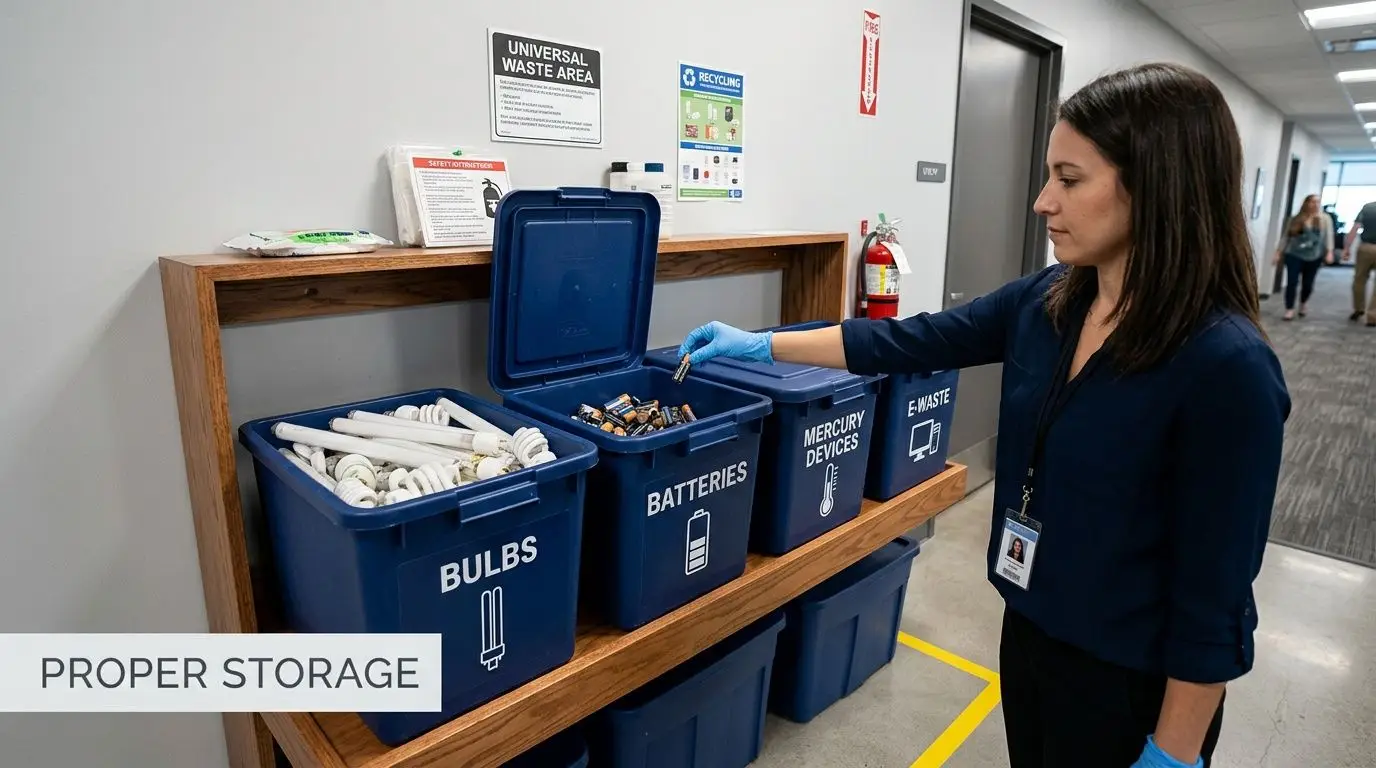
Storage that prevents releases
Storage is not just about tidiness. It is about preventing breakage, leaks, and accidental mixing.
A strong example is lamp handling. A single 4-foot fluorescent lamp contains 10-20 mg of mercury, which can vaporize if the lamp breaks. Federal rules require lamps to be stored in intact, crush-resistant containers, and proper handling can reduce spill risk by over 90%, according to this technical disposal specification.
For day-to-day operations, that means:
- Use closed containers that match the waste type
- Keep batteries protected from damage and shorting
- Store lamps in boxes or containers built to resist breakage
- Avoid mixed containers with batteries, bulbs, and general scrap together
A “temporary” pile on the floor becomes a permanent bad habit quickly.
Labeling that removes doubt
Good labels reduce mistakes by everyone who touches the material, including custodial staff, maintenance crews, temporary workers, and shipping personnel.
For universal waste, simple and direct is best.
Universal Waste, Battery(ies)
Universal Waste, Lamp(s)
Waste Mercury Thermostat(s)
Those labels should be visible, readable, and attached to the actual container. Many organizations also mark the accumulation start date on the container or a log tied to the container. That gives the coordinator a workable way to manage timing and pickup scheduling.
Training that fits real organizations
You do not need an elaborate compliance academy to train staff.
You do need people to know four things:
- What items belong in the universal waste stream
- Where those items go
- What not to do, such as tossing lamps into open trash or mixing loose batteries with metal scrap
- Who to notify if a container breaks, leaks, or gets full
A short toolbox talk for maintenance staff often works better than a long slide deck. A one-page visual guide posted near the accumulation area often works better than a policy no one reads.
Recordkeeping that stays lightweight
If your organization crosses into LQHUW status, recordkeeping becomes more formal. Even smaller handlers benefit from basic documentation because it creates continuity when staff changes.
Keep a practical file with:
- Container logs for start dates
- Pickup records from your recycler or transporter
- Photos or notes showing labeled storage areas
- Staff training notes for maintenance, facilities, and IT teams
If you are setting up a broader end-of-life process that includes equipment handling and staging, these recycling equipment best practices can help you standardize the physical side of the program.
If staff cannot answer “where does this go?” in under ten seconds, your process is still too complicated.
Integrating Universal Waste with Your ITAD Program
Universal waste and IT asset disposition usually sit in different departments. That separation causes delays, duplicate vendors, and missed items.
Facilities may manage lamps, thermostats, and maintenance batteries. IT may manage laptop disposal, computer recycling, secure data destruction, and product destruction. During a real cleanout, those streams show up together.
Why these streams should meet in one workflow
A technology refresh rarely produces just computers.
It also creates backup battery waste, damaged peripherals, old power equipment, and sometimes older display or lighting components from the same project. If the facilities team and IT team run separate disposal calendars, materials get stranded. One group schedules pickup while the other waits. The result is more handling, more internal confusion, and more risk that something gets tossed into the wrong stream.
The better model is one retirement workflow with separate material categories inside it.
What an integrated process looks like
A practical integrated program often follows this pattern:
| Project type | IT-related stream | Universal waste stream |
|---|---|---|
| Office cleanout | Laptops, monitors, docks, phones | Batteries, lamps, aerosol cans from maintenance areas |
| Data center decommissioning | Servers, drives, networking gear, secure data destruction | UPS batteries and related battery components |
| Facility renovation | Retired AV equipment, control hardware | Fluorescent lamps, mercury thermostats |
This structure helps teams ask a better question. Not “Who owns this item?” but “What handling path does this item need?”
The business case for one capable partner
The recycling industry operates at serious scale. California’s Universal Waste Systems is cited with $42.1 million in revenue and 45,000 tons of annual processing volume in this company profile. For organizations trying to manage IT equipment disposal alongside regulated side streams, that scale is a reminder that disposal is not an informal back-office task. It is a logistics and compliance function.
That is why a unified vendor approach often makes sense. If one qualified partner can handle electronics recycling, secure data destruction, office cleanout material flow, and the universal waste components that come with retired technology, your internal process gets simpler.
You avoid the usual friction points:
- Separate pickup schedules
- Conflicting container rules
- Gaps between IT and facilities ownership
- Incomplete documentation
If your team is still defining the broader process, this explainer on IT asset disposition is a useful foundation for aligning ITAD with environmental handling.
Implementation Checklist for Your Organization
Organizations do not need a large compliance program. They need a repeatable one.
The checklist below is designed for SMBs, schools, universities, and local agencies that want a low-friction way to start managing universal waste systems correctly.
A simple launch plan
Walk the site and identify likely waste streams
Check IT closets, maintenance shops, janitorial rooms, storage areas, and loading docks. Look for batteries, lamps, aerosol cans, and old mercury-containing devices.Assign one coordinator
This can be a facilities lead, office manager, operations manager, or environmental health contact. The key is clear ownership.Choose one or two accumulation areas
Keep them controlled and easy to access for the people who generate the waste. Avoid scattered collection points unless you can monitor them.Buy the right containers first
Closed bins for batteries, protective lamp boxes, and clearly marked containers solve many compliance problems before they start.Create plain-language labels
Do not rely on memory. Put labels directly on containers and keep extras nearby.Train the staff who handle the material
Focus on maintenance, IT, custodial teams, lab staff, and office managers. They do not need legal theory. They need sorting rules.Set a review schedule
Check containers regularly for fullness, damage, and dates. A small monthly review is often enough for smaller organizations.Pair the program with larger cleanouts
If you already schedule laptop disposal, office cleanout support, or facility cleanout work, tie universal waste collection to the same planning cycle.
Low-cost ways to keep it running
Organizations without dedicated environmental staff often assume this has to be expensive. It does not.
Start with visible controls:
- A single binder or digital folder: for labels, pickup receipts, and training notes
- A posted sign: showing what belongs in each bin
- One email contact for questions and incident reporting
- A basic internal map of storage locations
Those steps are not glamorous. They are effective.
A quick readiness check
Ask these five questions:
- Do we know which items on site count as universal waste?
- Are they stored in the right containers?
- Are the containers labeled?
- Does one person track accumulation and pickups?
- Do IT and facilities use the same offboarding plan during cleanouts?
If the answer to two or more is no, the program is not ready yet.
Start small, but standardize immediately. A modest system used consistently beats a detailed system no one follows.
Frequently Asked Questions for Public and Private Sectors
A facilities manager finds a box of spent batteries in a supply closet. IT has a stack of old laptops waiting for pickup. Someone in maintenance asks whether the fluorescent lamps in the basement count too. For organizations without a dedicated compliance team, this is how universal waste questions usually start. The good news is that the rules were designed to make common hazardous items easier to collect and send to the right destination.
That matters for small businesses, school districts, and local governments. These organizations often deal with recurring cleanouts, device refreshes, and scattered storage areas, but they do not always have one person focused only on environmental compliance.
We are a school or local government. Is this harder for us
It is often harder to coordinate, not harder to understand.
A public entity may have several buildings, older storage areas, and shared responsibility across maintenance, IT, administration, and custodial teams. One site may collect batteries, another may replace lamps, and a third may be retiring desktop computers. The challenge is less about legal complexity and more about keeping everyone on the same process.
That is why the universal waste framework helps. As the EPA notes in its introduction to universal waste, the program was created to simplify collection and management for widely generated hazardous wastes, including those commonly found in schools and government settings.
Central coordination usually fixes the problem. One point of contact, one set of labels, and one pickup plan can bring order to a scattered operation.
What is the biggest mistake organizations make
They treat universal waste like general clutter during a cleanout.
That shows up in familiar ways. Batteries get tossed into a box with cables and power strips. Lamps are left loose in a hallway. A copier room becomes temporary storage for anything no one wants to claim. During ITAD projects, old devices are boxed correctly, but the battery packs, backup units, and lamps tied to the same refresh are left behind.
Universal waste systems work like a sorting station at a shipping dock. If the materials are separated early and assigned to the right container, the rest of the process stays manageable. If everything gets mixed together, every later step takes longer and carries more risk.
Can we recover value from any of this
Sometimes, mostly from the electronics side.
Universal waste is usually about compliant handling, not resale value. Retired laptops, networking gear, and some reusable hardware may still have remarketing or donation potential through an ITAD program. The practical move for a lean team is to plan both streams at the same time. Send reusable electronics through data destruction and asset disposition. Route batteries, lamps, and similar items through the universal waste process tied to the same pickup or facility cleanout.
That approach saves time because staff are not solving the same disposal problem twice.
We are on a tight budget. What should we do first
Start with a small system people will use.
Pick the waste stream you see most often, usually batteries or lamps. Set up one clearly marked collection point. Assign one person to arrange pickups and keep the basic records. Then choose a recycling partner that can handle electronics and related waste streams together, especially if your organization already runs office cleanouts, laptop replacements, or end of year surplus removal.
For schools, nonprofits, municipal offices, and small businesses, that is often the most cost-effective path. A modest process with clear ownership beats an ambitious program that depends on time no one has.
Does this help with sustainability goals or just compliance
Both, and the connection is practical.
Compliance reduces the chance of improper disposal and the cleanup costs that follow. Better sorting also improves recycling outcomes, supports reuse where appropriate, and makes larger cleanout projects run with less confusion. A team that knows how to separate lamps and batteries correctly is usually better prepared to separate laptops, monitors, and accessories during an ITAD event.
In other words, good universal waste habits strengthen the rest of your material handling program.
If your organization needs help connecting universal waste handling with electronics recycling, secure data destruction, office cleanouts, or IT asset disposition, Reworx Recycling offers practical guidance, pickup support, and donation-based recycling services that help businesses, schools, and public agencies retire equipment responsibly while supporting community impact.