
Your Dallas team adds headcount, signs bigger customers, and moves more systems into cloud and SaaS tools. Then the cracks show. Voice quality gets inconsistent, conference rooms lose connectivity, wireless coverage turns patchy at the edges, and the telecom closet turns into a pile of unlabeled patch cords, aging switches, and mystery uplinks nobody wants to touch.
That's usually the moment a network overhaul stops being an IT wish list and becomes an operating constraint.
Hiring a telecom installation company in Dallas isn't just about pulling new cable. It's about deciding how your business will handle growth, downtime risk, construction logistics, documentation, and the retirement of old infrastructure that still may contain sensitive data. If you treat it as a labor-only purchase, you'll likely get a labor-only outcome. If you treat it as part of a full technology lifecycle, you'll make better decisions from day one.
Growing Your Dallas Business Beyond Connectivity Limits

Dallas is a strong market for serious network infrastructure work, not just basic office wiring. The Bureau of Labor Statistics telecom industry profile reports 91,770 telecommunications equipment installers and repairers and 60,030 telecommunications line installers and repairers nationally, and the same industry profile also notes 35,244 private-industry establishments. In that broader market context, Dallas stands out because Equinix identifies it as home to the “largest IX in South Central US,” reinforcing the city's role in enterprise connectivity, carrier access, and data-center interconnection.
For a Dallas business, that matters for one reason. You're not buying into a fringe specialty. You're operating in a market where telecom work supports carriers, enterprise IT environments, and dense commercial facilities that depend on stable connectivity.
What growth pressure looks like in practice
The first major overhaul usually starts with symptoms that look small on their own:
- Voice issues: VoIP calls drop or jitter during peak usage.
- Wireless complaints: Users crowd onto a few access points while dead zones spread across conference rooms and warehouse corners.
- Patchwork upgrades: New hires get added with ad hoc cabling instead of a planned layout.
- Closet sprawl: Racks fill up with abandoned hardware, old punchdowns, and unlabeled cross-connects.
- No clean baseline: IT can't tell which circuits are active, which patch panels are live, or what can be retired safely.
A business can live with that for a while. Then a relocation, expansion, lease renewal, or compliance review forces a decision.
Practical rule: If your team hesitates to touch the telecom room because nobody trusts the documentation, you already have an infrastructure problem, not just a housekeeping problem.
Why installer selection changes the outcome
A capable Dallas telecom partner should help you do three things at once. Build what you need now, leave room for what comes next, and reduce the amount of hidden technical debt that gets carried into the new environment.
That means asking better questions than “What do you charge per drop?” It means asking whether the company can support structured cabling, fiber paths, equipment mounting, power routing, labeling standards, validation, and turnover documentation. It also means recognizing that your “installation project” may be part expansion, part modernization, and part cleanup of years of accumulated infrastructure drift.
The companies that get the best outcomes usually start with a business problem, then map that problem to physical network design. That's the right order.
Defining Your Telecom Project Scope Before You Call
The fastest way to get bad bids is to ask for pricing before you know what you're buying. Most Dallas companies don't need a quote first. They need a project brief first.
A usable brief doesn't have to be long. It has to be specific enough that two installers would be pricing the same job.
Start with business outcomes, then translate them
“Improve network reliability” is too vague to estimate. “Support a new office floor with wired workstations, stronger conference room Wi-Fi, cleaner rack layout, and redundant fiber uplinks” is something an installer can evaluate.
Write down what changed in the business that triggered the project. Typical examples include a larger headcount, a move into a new suite, a leasehold improvement, a warehouse expansion, a VoIP rollout, or a cleanup after years of piecemeal adds and changes. That business context tells the installer whether the work is mostly structured cabling, transport, wireless support, equipment migration, or a mixed modernization effort.
Separate the project into physical layers
Most first-time buyers combine everything into one bucket called “network install.” That makes comparison hard. Break it into parts instead.
| Project area | What to define before bidding |
|---|---|
| Structured cabling | Copper category, number of drops, locations, labeling expectations, patch panel needs |
| Fiber | Backbone or horizontal use, pathway constraints, termination points, testing expectations |
| Equipment spaces | Rack count, cabinet reuse or replacement, cable management, power cleanup |
| Wireless support | Access point locations, mounting constraints, backhaul cabling |
| Voice and devices | VoIP phones, printers, cameras, badge systems, specialty endpoints |
| Legacy removal | What stays, what gets disconnected, what must be documented before removal |
If you skip this breakdown, one bidder may price only new cable while another includes rack remediation, labeling, testing, and removals. The cheaper quote often just covers less scope.
Decide what “done” actually means
Installers can finish the same project in very different ways. One team may leave organized patching, labeled racks, and validation records. Another may leave a functioning network that only makes sense to the crew that built it.
Use a short acceptance checklist:
- Cable and pathway standards: What cable type are you standardizing on, and where?
- Testing and validation: What proof do you need before turnover?
- Documentation: Do you expect marked-up floor plans, rack elevations, and final labels?
- Cutover planning: Will work happen after hours, by floor, or all at once?
- Retirement scope: Which old switches, phones, patch panels, UPS units, or servers are leaving the site?
The cleanest projects are usually the ones where the client decides early what needs to be preserved, what needs to be migrated, and what needs to disappear.
Think one cycle ahead
A first major upgrade shouldn't be planned only for current occupancy. It should account for near-term change. That doesn't mean overbuilding blindly. It means being realistic about office growth, densification, conference room use, security devices, and whether your next step is more on-prem hardware, more cloud access, or a hybrid model that still depends on strong local infrastructure.
If you prepare that scope before making calls, conversations with a telecom installation company in Dallas get sharper fast. You'll spend less time sorting through generic sales language and more time testing whether a provider understands your environment.
Essential Credentials for a Dallas Telecom Installation Partner

A polished proposal doesn't prove technical competence. In telecom work, credentials matter because the physical installation affects signal performance, future maintenance, safety, and how much rework you'll pay for later.
The core test is simple. Can the team execute in a real commercial environment where plans, pathways, power, and existing infrastructure rarely line up as neatly as the drawings suggest?
What capable technicians must be able to do
The telecommunications equipment installer role description from KGP Co Services spells out what qualified field work involves. Technicians must be able to read detailed specifications, blueprints, and schematics, install fiber and transport equipment, route power and data cabling, mount racks and cable trays, and perform quality validation. That matters because poor installation directly affects signal integrity and reliability.
That requirement sounds basic until you see projects where it's missing. The failure usually isn't dramatic. It shows up as bad labeling, strained bend radius, poor rack layout, unplanned power routing, incomplete testing, and turnover documentation that leaves your internal team guessing.
Credentials that actually change project quality
Some qualifications are table stakes. Others tell you whether the company can work in your environment without creating long-term mess.
Look for these categories:
- Technical training: Structured cabling standards knowledge, fiber handling discipline, and the ability to work from real design documents instead of improvising in the field.
- Safety alignment: Crews should be prepared for occupied commercial spaces, construction coordination, ladder work, and restricted equipment rooms.
- Commercial experience: Office, warehouse, medical, industrial, or data-center work each creates different constraints.
- Documentation discipline: A company that treats labels, test results, and as-built records as optional will cost you later.
- Insurance and licensing: You want proof, not assumptions, especially when crews are working around active business operations.
What to ask for before contract signature
Don't ask whether a vendor is “experienced.” Ask for evidence tied to the kind of work you're buying.
A strong review process includes:
- Sample deliverables: Ask to see anonymized examples of rack diagrams, labeling schemes, and closeout documentation.
- Field escalation process: Find out who makes decisions when the crew encounters blocked pathways or missing conduit.
- Supervision model: Clarify whether the senior engineer who scoped the job will stay involved after the sale.
- Insurance confirmation: Request current certificates and verify that coverage matches the site risk.
- Testing standards: Ask how they validate copper, fiber, and power-related work before turnover.
What works: installers who can explain their standards in plain language and show how they document the finished environment.
What doesn't: companies that answer every technical question with “we'll figure it out onsite.”
The credential trap to avoid
Buyers often overvalue sales responsiveness and undervalue execution evidence. A fast proposal is useful. It isn't the same as a competent crew.
A Dallas telecom project touches active employees, leased space, building rules, and equipment your business depends on every day. The partner you want is the one whose qualifications reduce ambiguity. If their process depends on field improvisation, your timeline and your future maintenance burden will absorb the cost.
Budgeting Your Telecom Installation Project in Dallas
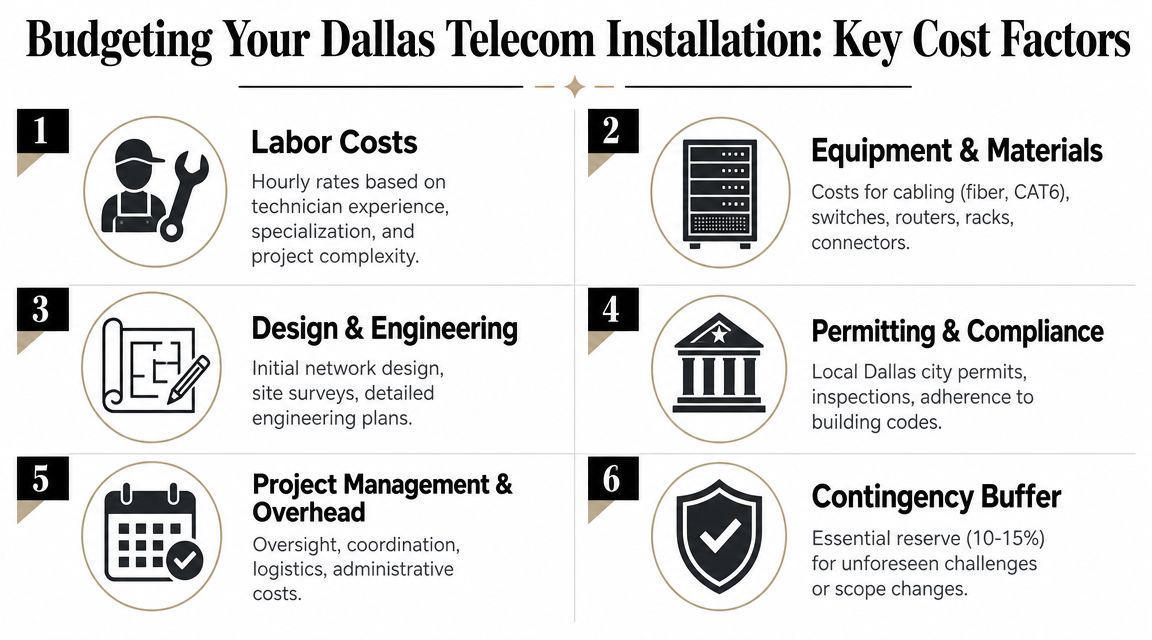
Dallas telecom pricing becomes much easier to manage once you stop thinking in terms of a single job total and start thinking in cost drivers. Labor, cable type, route difficulty, equipment-space condition, and documentation requirements all move the number.
The Dallas network cabling pricing guide from Just Cabling gives a practical benchmark. It lists Cat6A commercial installations at $125–$250 per drop, installer labor at $90–$150 per hour, typical project ranges at $2,500–$4,500, individual runs at $75–$120, cable pricing across CAT-5, CAT-6, and CAT-7 at $0.10–$1.13 per foot, CAT-6 installation at $0.90–$1.55 per foot, and fiber optic cable at $1–$6 per foot.
Why one quote can be much higher than another
Those numbers don't mean every bidder should land in the same place. A straightforward office add-on is different from a cleanup-heavy modernization where crews have to trace legacy runs, reorganize racks, and work around active operations.
The biggest budget variables usually include:
- Cable choice: Copper for desk drops is a different cost profile than fiber backbone work.
- Pathway conditions: Open, accessible routes are cheaper than congested ceilings and packed risers.
- Active environment constraints: Work in occupied offices often takes more coordination and off-hours sequencing.
- Closet condition: A neat rack supports faster work. A cluttered room with abandoned gear doesn't.
- Closeout expectations: Testing, labeling, and as-built deliverables add value, but they also add labor.
A better way to evaluate bids
Don't compare totals first. Compare assumptions first.
| Bid review item | What to check |
|---|---|
| Scope coverage | Does the quote include removals, labeling, testing, and documentation? |
| Labor model | Is pricing tied to clear tasks, hours, or unit counts? |
| Material assumptions | Are cable types and termination hardware specified clearly? |
| Site conditions | Did the bidder account for your actual building constraints? |
| Exclusions | What is not included that may become a change order later? |
A low bid can still be the most expensive option if it leaves out pathway remediation, patch-panel cleanup, post-install testing, or cutover coordination. Those gaps usually resurface when the project is already underway and your bargaining position is weaker.
Where to spend and where to control
Spend on the parts that are expensive to fix later. That usually means backbone decisions, rack layout, labeling discipline, and testing. Control cost by tightening scope, clarifying endpoint counts, and deciding early what legacy gear will stay versus what will be retired.
Budget discussions go better when you frame them as risk allocation. Are you paying now for a cleaner install, or paying later in troubleshooting, downtime, and change orders?
For a first major overhaul, the smartest budget isn't the smallest one. It's the one that matches the existing environment, includes closeout requirements, and leaves you with infrastructure your internal team can manage after the installers leave.
The Vetting Process An RFP and Interview Question Checklist
Most vendors sound capable in a discovery call. True separation happens when you ask questions that force them to describe how they work under imperfect conditions.
A useful RFP should expose whether the bidder has a repeatable delivery model or just a strong sales script. If a telecom installation company in Dallas can't answer detailed operational questions before award, that uncertainty won't improve once the work starts.
Questions that reveal real capability
Use questions that require explanation, not yes-or-no responses:
- Walk us through your site survey process. Ask what the team verifies physically before finalizing scope.
- Show us an example of your closeout package. You want to know how they document the finished environment.
- How do you handle blocked pathways or undocumented legacy cabling? This tells you whether they escalate, improvise, or stop work.
- Who owns project management and who owns field supervision? Sales handoff failures are common.
- What testing is included before turnover? If the answer is fuzzy, expect disputes later.
- How do you manage phased cutovers in an occupied office? This matters when your business can't shut down.
- What does change-order control look like? Ask when a change becomes chargeable and how it gets approved.
What strong answers sound like
Good providers usually answer in sequence. They describe the survey, assumptions, field verification, escalation path, acceptance criteria, and documentation package. They talk about who signs off at each stage.
Weak providers stay abstract. They say they're flexible, experienced, and customer-focused, but they don't show how that translates into actual field control.
A few interview prompts are especially effective:
- Give us a recent example of a project where drawings didn't match site conditions.
- Describe how you label racks, patch panels, and cable runs.
- Tell us what you expect from building management before work begins.
- Explain how you coordinate decommissioning when old circuits must remain live during transition.
Ask questions that make the vendor describe a problem they had to solve. Anyone can describe a smooth install.
Red flags you shouldn't rationalize away
Some warning signs are easy to dismiss because the price looks attractive or the sales team is responsive. Don't ignore them.
- No sample documentation
- No clear field lead
- Assumptions hidden in fine print
- Heavy reliance on verbal promises
- Unclear warranty boundaries
- No process for legacy cleanup or retirement planning
The right partner should make your internal review easier, not harder. If your team still can't tell what's included, who is accountable, or how turnover will work after multiple conversations, keep looking.
From Dallas Permitting to Project Completion
A telecom project can fail even when the installer is technically competent. In Dallas, the breakdown often happens in logistics. Access, route approval, construction sequencing, and the mismatch between drawings and field conditions can stall a project long before final turn-up.
The Dallas directional boring telecom overview highlights a point many buyers miss. The bottleneck may instead be permitting, pole access, or right-of-way logistics, not installer skill. The same source notes that many projects struggle on site access, route planning, and construction sequencing before turn-up, and it also distinguishes trenchless directional boring for underground fiber from aerial deployments that depend on existing utility pathways and coordination.
The project plan has to match the deployment method
If your work stays fully inside a suite, logistics are simpler. If it extends to building entrances, campus links, parking-lot crossings, or external pathways, the project becomes part telecom and part construction coordination.
That changes how you should manage the job:
- Building coordination: Confirm access windows, riser rules, after-hours policies, and escort requirements.
- Route validation: Verify that proposed pathways are physically available before the schedule locks.
- Method alignment: Underground and aerial paths create different dependencies, approvals, and sequencing.
- Operational protection: Plan around live services that can't be interrupted during migration.
Why field verification matters more than the drawings
Installers often receive plans that look complete but don't reflect what's above the ceiling, inside risers, or in telecom rooms that have changed repeatedly over time. The companies that avoid expensive surprises are the ones that verify first and build second.
A practical completion model usually includes three layers:
| Phase | What should happen |
|---|---|
| Preconstruction | Site walk, pathway check, access review, building coordination |
| Execution | Controlled installation, issue escalation, live-environment protection |
| Closeout | Final labeling, as-built updates, turnover review, retirement handoff |
If the team discovers major site constraints after material is ordered and schedules are fixed, you're no longer managing a clean install. You're managing recovery.
Hold the partner accountable for the boring parts
Buyers naturally focus on hardware and cabling. The schedule usually depends on less glamorous work. Permits, pathway approvals, utility coordination, loading access, and closeout paperwork don't get much attention until they cause delay.
That's why the strongest installers are also disciplined coordinators. They don't treat documentation and site readiness as administrative extras. They treat them as prerequisites for finishing on time.
Closing the Loop Secure IT Asset Disposition and Recycling
The new network is up by Monday morning. By Friday, the telecom room looks better, tickets have dropped, and leadership assumes the project is done. Then the retired gear starts to stack up. Old switches, handsets, UPS units, patch panels, servers, drives, copper cabling, and accessories end up in a storage room because no one assigned ownership for removal, data handling, and final disposition.
That gap creates avoidable risk.
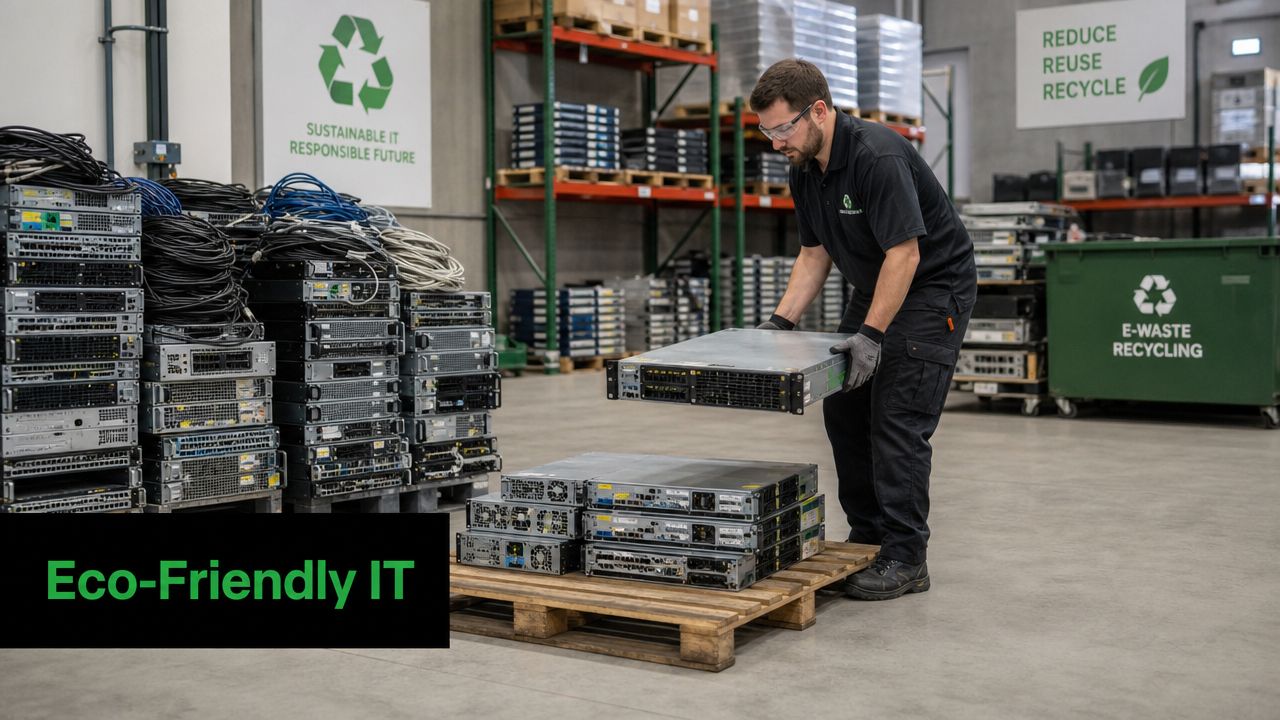
Unplugged equipment can still hold credentials, call records, configuration files, user data, and storage media tied to other systems. It also consumes space your team will need for the next upgrade, audit, or move. A Dallas telecom project is not fully closed until retired assets are identified, removed, documented, and sent through a controlled disposition process.
Decommissioning belongs in the project plan, not the cleanup phase
The telecom infrastructure modernization analysis from vHive points to a familiar problem in field work. Planned conditions and actual site conditions often do not match. That same disconnect shows up at the end of the job when teams remove more equipment than expected, discover undocumented connections, or find data-bearing devices mixed in with scrap.
A better approach is to decide the retirement path before cutover starts. That includes:
- What leaves service immediately
- What stays in place for a phased migration
- What contains data and requires controlled handling
- What can be reused, remarketed, recycled, or donated
- Who signs off on custody and final disposition records
I advise Dallas clients to treat this as part of project scope, not post-project housekeeping. It protects schedule, avoids finger-pointing, and keeps the closet from turning into a graveyard of "temporary" old equipment.
Security should drive the disposal process
Retired telecom hardware is easy to underestimate because much of it looks passive. Some of it is not. Firewalls, call systems, appliances, servers, wireless controllers, and storage-equipped devices often retain information long after they leave production.
The process should separate passive scrap from anything that stores or processes data. That means asset tagging, removal logs, controlled staging, documented transport, and verified sanitization or destruction through an approved chain of custody. For a midsize office, that may sound formal. It is still cheaper than explaining why a decommissioned device sat untracked in a back room for six months.
Recycling should be planned with the same discipline as installation
A network overhaul usually retires more than network gear. Companies often uncover old laptops, phones, peripherals, rack components, and general office electronics that no longer belong in service. If no one plans for that volume, the disposal decision gets pushed to facilities or office management after the technical team has already moved on.
An IT asset disposition and recycling plan fixes that. Depending on the equipment mix, the job may involve electronics recycling, computer recycling, laptop disposal, office cleanout, facility cleanout, product destruction, or broader IT equipment disposal tied to a relocation or refresh.
Reworx Recycling is one example of the type of downstream partner companies use for donation-based recycling, secure data destruction support, pickup coordination, and business technology disposition. In practice, that kind of partner should work alongside the installer's closeout process so retired assets leave the site under documented control instead of becoming long-term storage.
Old hardware is not gone when it is unplugged. It is gone when custody, data handling, and final disposition are documented.
What a clean retirement process looks like
The closeouts that hold up best in audits and future expansions usually follow a simple operating discipline:
- Tag retired equipment early: Decide what is leaving before the cutover weekend.
- Separate data-bearing devices from scrap: Do not mix drives, appliances, or storage-equipped devices with passive material.
- Keep a removal log: Match every removed asset to project records and disposition paperwork.
- Schedule pickups promptly: Avoid leaving obsolete equipment in hallways, closets, or loading areas.
- Store final records with project closeout documents: Make sure the installation file shows what was removed, how it was handled, and where it went.
That is how a Dallas business closes the telecom lifecycle. The install solves the connectivity problem. The retirement plan removes the security, storage, and compliance problems that old hardware leaves behind.
Your Partner for a Complete Technology Lifecycle
A Dallas company usually feels the difference between a basic install and a well-run lifecycle project about six months after cutover. The network is live, but the key test is whether your team can support it, expand it, and prove what happened to the equipment it replaced.
A strong telecom installation company in Dallas should deliver more than cable pulls and rack work. It should leave you with labeled pathways, readable documentation, an equipment room your staff can manage, and a closeout process that accounts for both new infrastructure and retired assets. That is the standard I advise clients to set before contracts are signed, because labor savings disappear fast when your team has to trace ports by hand or store old gear with no disposition record.
The last part of the lifecycle gets missed too often. Switches, firewalls, servers, UPS units, and endpoint equipment that come out during a refresh still carry cost and risk until custody, data handling, and final disposition are documented. If that hardware ends up in a back room, the project remains only partially finished.
The better approach is to treat installation and retirement as one operating plan. Build the removal schedule into the cutover plan. Decide who tags equipment, who signs the chain of custody, where data-bearing devices are staged, and how pickup will be coordinated once the site is stable. That keeps the new environment clean and prevents old technology debt from following your business into the next phase.
If your Dallas business is planning a network overhaul, include retirement planning at the start of the project and work with Reworx Recycling for responsible electronics recycling, secure IT equipment disposal, and pickup coordination for retired technology.