You've probably got a pile of laptops in circulation, a few phones still tied to old users, and at least one “temporary” tablet that's been in service long enough to become permanent. Somewhere in that mix is a refresh plan, a warranty clock, a compliance question, and a disposal task that nobody wants to own. Device lifecycle management is the discipline that turns that mess into a repeatable process, from the day hardware arrives to the day it leaves inventory.
For first-time owners, the easiest way to think about it is simple. A device is like a company vehicle. Someone buys it, hands it out, maintains it, reassigns it when needed, and eventually retires it safely. The difference is that the “keys” are often passwords, certificates, and access tokens, which makes the retirement step as much about identity and security as it is about recycling.
That's why lifecycle work now sits at the intersection of IT operations, finance, security, and sustainability. Gartner's projection that adoption of Managed Device Lifecycle Services would rise from fewer than 35% in 2025 to more than 70% by 2028 shows how fast organizations are moving away from ad hoc support toward managed, outcome-based operations, with a stronger focus on circularity and redeployment as a way to extend asset value and reduce waste. The same shift explains why lifecycle platforms are treated as strategic, not administrative, in major fleets.
If you're trying to map your own program, a helpful starting point is this internal guide on IT asset management best practices, because good lifecycle work starts with good inventory discipline. For a broader operations comparison, what is fleet management is also a useful reference, since the same idea of controlling a distributed asset base applies here.
What Device Lifecycle Management Really Means
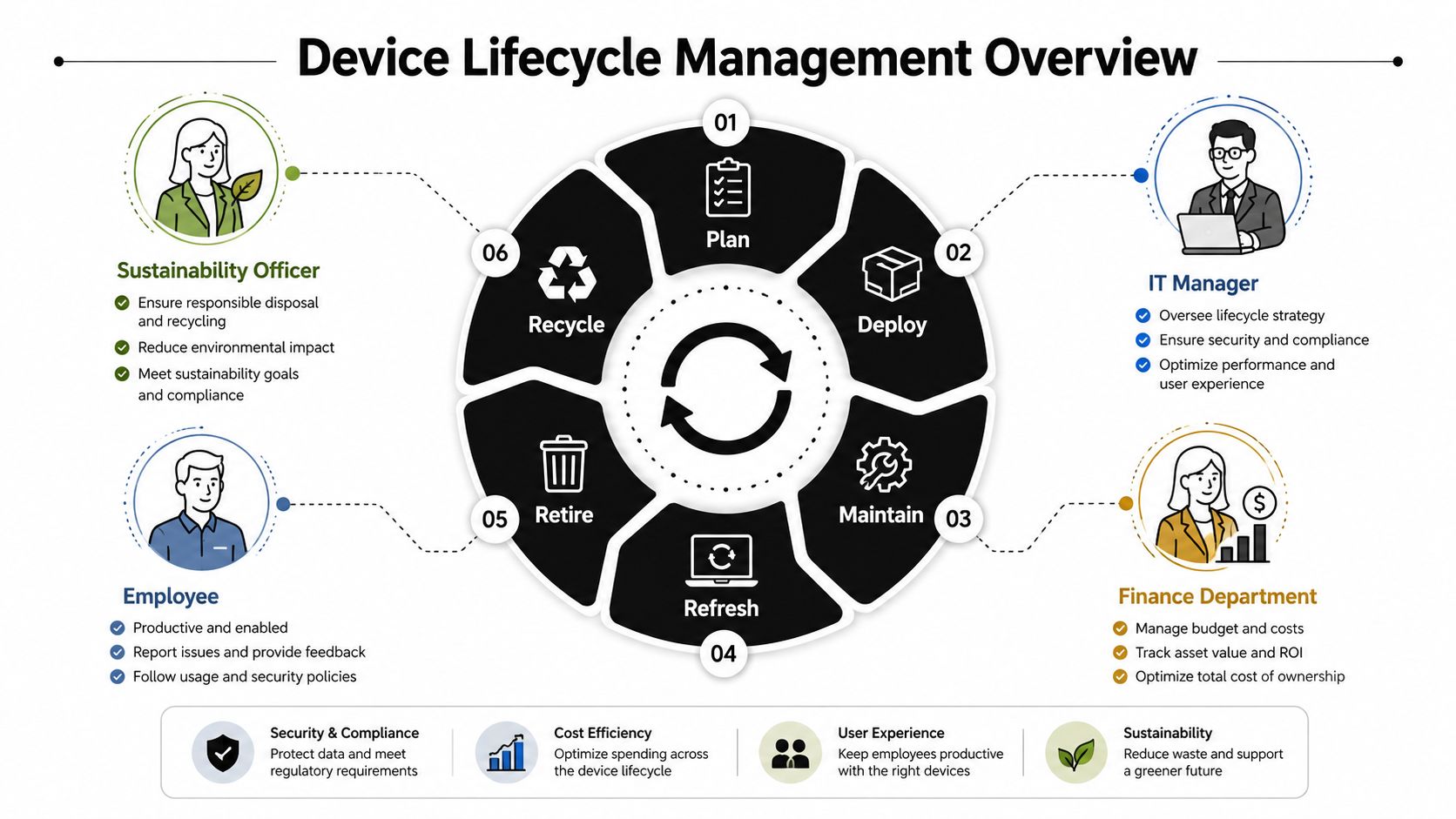
A mid-sized IT manager rarely gets a clean slate. One week it's new-hire laptops, the next it's a pile of returned phones, and after that it's a lab cart full of aging endpoints that no one wants to own. Device lifecycle management is the structure that keeps all of that from turning into a spreadsheet graveyard, because it defines how the organization plans, supports, redeploys, and retires hardware as one continuous business process.
From reactive support to controlled flow
The practical difference between lifecycle management and ordinary IT support is control. Reactive support answers tickets one device at a time, while lifecycle management asks who owns the asset, what state it's in, what business value it still has, and what happens next. That includes procurement choices, standard build images, maintenance windows, refresh timing, and end-of-life evidence.
Many teams get stuck here. They treat the laptop as “done” once it stops being useful to the current user, but the organization still has work to do, including access removal, inventory reconciliation, and secure disposition. The better model treats every device as a tracked asset with a beginning, a middle, and a documented exit.
Practical rule: if you can't tell who last used the device, what it still can access, and where it's going next, the lifecycle is already broken.
Why the concept matters now
The business case isn't just about tidiness. IDC-linked analysis of Dell Lifecycle Hub reported 37% lower total costs over the average PC lifespan, 37% less staff time spent on lifecycle activities, and 42% faster PC deployment reference. Those outcomes explain why lifecycle programs moved from back-office repairs to executive-facing operations. Fewer manual steps mean less labor, fewer delays, and less room for inconsistent handling.
A useful way to frame the discipline is this: acquisition decisions affect support costs, support discipline affects refresh timing, and retirement discipline affects both security and sustainability. Once you see those links, the process starts to look less like hardware management and more like a governed supply chain for endpoints.
The Six Phases Every Device Passes Through
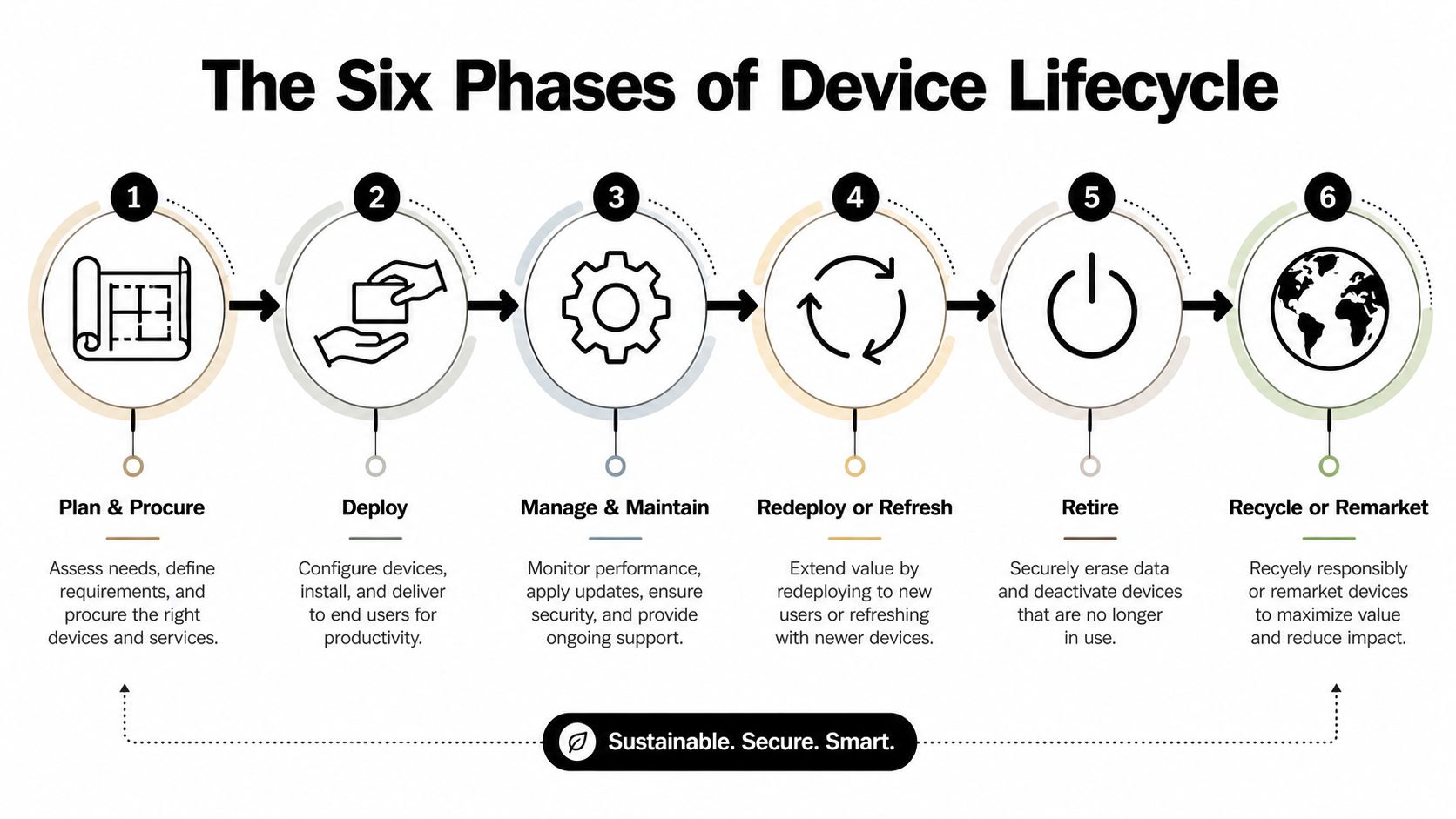
A device lifecycle works like a relay race. One team hands off cleanly to the next, and the baton only stays safe if every runner knows their role. A clean lifecycle model gives finance, IT, security, and sustainability teams the same map, so spend can be planned, support work can be tracked, and retirement evidence does not get lost at the end. If you can place a device in one of these stages, the process is under control.
1. Plan and procure
The organization decides what it needs before anyone places an order. That means choosing device types, standard configurations, support terms, replacement cycles, and the records that will follow the asset through its life. A new hire's laptop order is a simple example, but the value is consistency, because standard builds are easier to support, audit, and retire later. Proper asset tagging from the start, through asset tagging systems, makes every later handoff easier to trace.
2. Deploy
Deployment is more than handing over a box. It includes imaging, enrollment, account setup, and the security controls that must be in place before the user starts work. A field technician receiving a tablet with the right apps, Wi-Fi settings, and management profile already applied is a clear deployment win. At this stage, the device should already carry the identity markers that let operations tie it back to the right person and the right inventory record.
3. Manage and maintain
This phase covers the long middle of the device's life. Patching, troubleshooting, battery replacement, warranty repairs, and policy enforcement all live here. A notebook that gets a battery swap and a configuration refresh instead of being replaced outright is still in active lifecycle management, not limbo. The point is to keep the device useful without losing sight of who controls it, what state it is in, and whether it still matches policy.
4. Redeploy or refresh
Devices do not always end their useful life with the first user. A returned sales laptop can be wiped, reimaged, and reassigned to a new employee if it still meets standards. That is redeployment. If it is too far gone for another assignment, it moves toward refresh, meaning the organization plans a replacement based on condition and business need. In a well-run program, this decision is based on the device record, not on guesswork from whoever last held it.
5. Retire
Retirement starts when the device can no longer justify staying in service. A lease ends, a repair becomes uneconomical, or the hardware cannot support the software and security posture the business requires. This is the most sensitive phase, because the asset is still full of business data and identity links even if nobody is using it day to day. Access removal, inventory reconciliation, and proof of handoff have to happen together, or the retirement story is incomplete. If you need a practical relocation reference for the operational handoff side of this work, Home Removals Sydney IT moves is a useful reminder that device movement and office movement often happen in the same project window.
6. Recycle or remarket
Some devices can be resold, donated, or reused internally. Others need parts recovery or responsible recycling. The key decision is whether the hardware still has usable value after retirement. A surplus desktop with working components may be suitable for remarketing, while an older unit with no resale value should move through secure recycling. What matters here is not just the metal and plastic, but the evidence that the organization closed the loop on custody, access, and disposition.
Where ITAD and Recycling Fit Into End of Life
By the time a device reaches retirement, the question isn't just “where should the hardware go?” It's “what proof do we have that the device is no longer a business risk?” That's where IT asset disposition (ITAD), donation-based recycling, and secure data destruction fit together. Each serves a different purpose, and a clean workflow keeps them in the right order.
Different jobs, different handlers
An ITAD provider typically manages the whole end-of-life path, including logistics, inventory tracking, data handling, remarketing, and recycling. A recycler focuses on material recovery and responsible downstream processing. A refurbisher looks for devices that can be repaired and reused. When those roles are blurred, organizations lose sight of custody and proof.
A compliant workflow usually starts with serialized inventory, then follows with chain of custody, device triage, and data sanitization. After that, equipment can be routed for reuse, donation, resale, or recycling depending on condition and policy. That order matters because you can't safely decide the next use of a device until the data and management layer have been handled.
What matters most: if the device leaves inventory before the audit trail is complete, the organization has already lost control of the retirement process.
What a clean end-of-life process looks like
A solid retirement process includes documented sanitization, removal of management agents, and evidence that disposition was approved and completed. The goal is not only to protect information, but also to create a record that can stand up to internal review or a regulatory audit. That's why certificates of destruction and inventory reconciliation matter as much as the physical handoff.
For organizations looking for a practical partner model, Reworx Recycling is one option to consider because it combines scheduled business pickups, secure hard drive shredding, donation-based recycling, and reverse logistics in one service flow. If you need a deeper breakdown of the disposition side, their IT asset disposition overview is a useful reference point for how the retirement stage can be handled as a formal process rather than a one-off cleanup.
Benefits and Risks of a Structured Program
The easiest way to judge your lifecycle maturity is to compare two environments. In one, devices are tracked, standardized, and retired on purpose. In the other, devices drift through users, spreadsheets, drawers, and finally a rushed disposal event. The difference shows up in cost, security, and how much work lands on your team at the worst possible time.
| Dimension | Managed Program | Unmanaged Program |
|---|---|---|
| Visibility | Assets are tracked through the full lifecycle | Devices go missing, sit unassigned, or get duplicated in records |
| Security | Retirement includes patch awareness, sanitization, and handoff evidence | Old endpoints can keep credentials, agents, or data traces |
| Cost control | Refreshes are planned and budgets are easier to forecast | Spend leaks through duplicate, unused, or delayed replacement decisions |
| Deployment | Standard builds and repeatable setup reduce friction | Each rollout becomes a one-off task |
| Sustainability | Redeployment and responsible disposal are part of the process | Hardware is more likely to be stored, scrapped, or discarded late |
What the organized version buys you
Structured programs usually produce smoother provisioning because IT isn't rebuilding the process every time. They also reduce risk because obsolete devices are identified earlier, before they become a patching problem or a compliance exception. On the operational side, finance gets a clearer picture of replacement timing, which helps avoid surprise spend.
The environmental upside is real too, although it's often the last thing leaders measure. When devices are redeployed, remarketed, or responsibly recycled instead of sitting unused, the organization is making a better use of already-paid-for hardware. That's a quiet but important sustainability gain.
What the informal version costs you
Unmanaged fleets create hidden liabilities. Devices miss updates, are reassigned without full records, or leave the building without a verified data-handling step. The result is a weaker security posture and a disposal process that's hard to prove after the fact.
If you're deciding where your organization sits today, ask one blunt question. Can you trace a device from purchase to retirement without hunting through email threads and spreadsheets? If not, the program is already costing more than it should.
The Identity Governance Gap at Retirement
The common mistake is thinking retirement ends when the hardware is wiped. It doesn't. A device can be physically clean and still carry identity residue through management agents, certificates, application tokens, or old access records. That's why retirement has to be treated as an identity-governance event, not just an asset handoff.
Why wiping isn't enough
A real retirement should prove that the device no longer holds active trust. That means the MDM record is unenrolled, the device is removed from device trust lists, credentials are revoked where needed, and any linked access paths are closed. If those steps don't happen together, the organization can't show that the endpoint is dead from an access standpoint.
A public-sector-style failure is easy to picture. An old laptop gets wiped and reassigned, but the user profile still appears in identity records, the VPN client still recognizes the old certificate, and SaaS access stays open longer than anyone expected. The hardware looks retired, but the trust chain isn't gone.
What proof should follow every retirement event
A strong retirement file should include:
- MDM unenrollment evidence so the device no longer appears managed
- Identity record updates so user-device links are closed
- Access revocation confirmation for VPN, SaaS, or privileged apps where relevant
- Sanitization documentation showing the data state was handled
- Disposal or redeployment record showing the final destination
For teams that want to tighten this part of the process, the guidance in secure data destruction services is a helpful benchmark because it connects wiping, custody, and retirement proof in one workflow. That connection is what most generic disposal checklists miss.
Implementation Roadmap and Readiness Checklist
A good rollout doesn't start with a vendor demo. It starts with inventory truth, policy clarity, and a small pilot that proves the process works before anyone scales it. The goal is to make device lifecycle management repeatable enough that the team can run it without heroics.
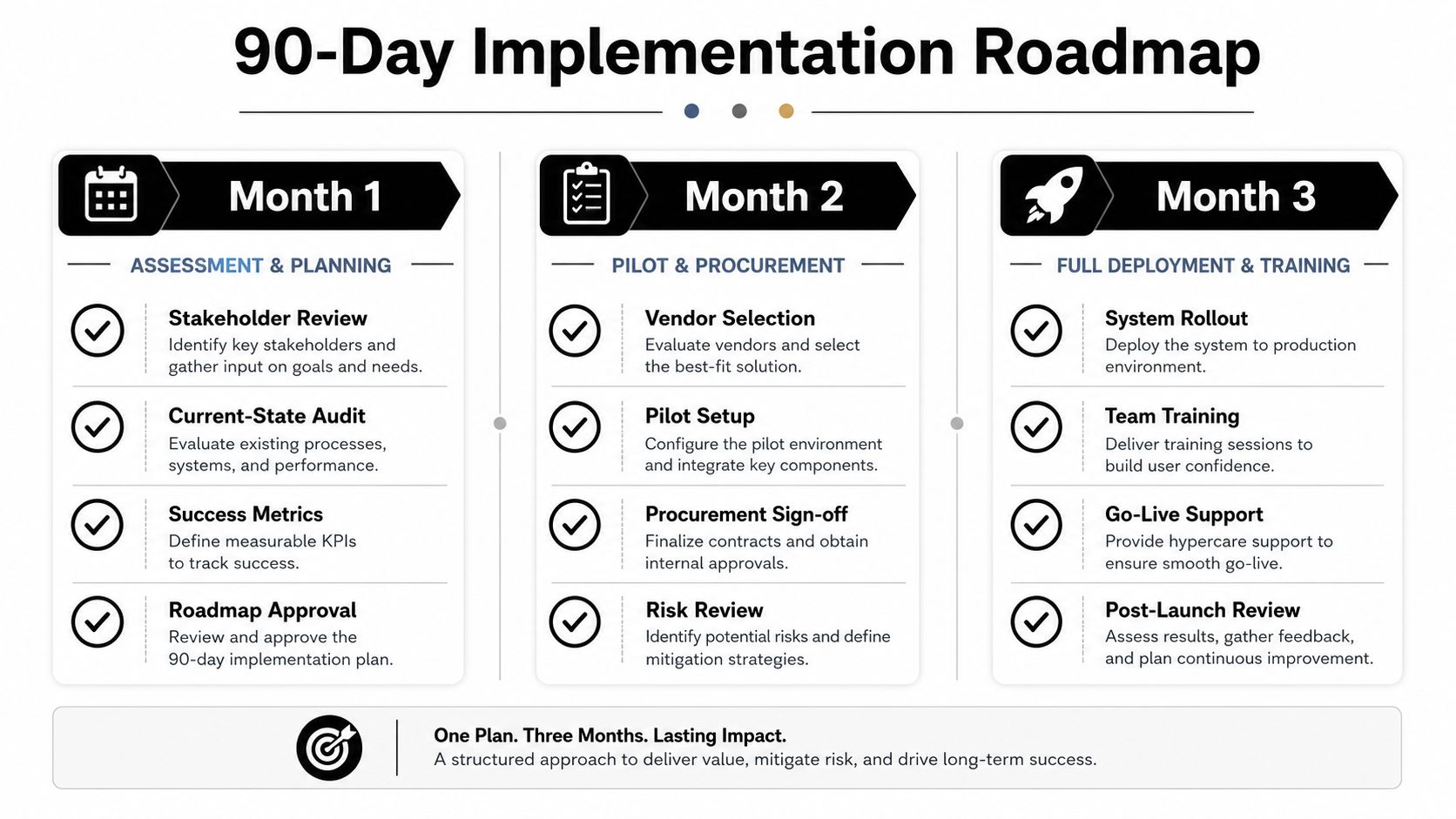
A practical 90-day path
Month 1, assessment and planning. Start with discovery. Build a clean inventory of active devices, define ownership rules, and document the retirement triggers your team will use, such as patch failure, compliance exceptions, or repair-cost thresholds. Then write the policy that tells people what happens at each handoff.
Month 2, pilot and procurement. Choose one team, one site, or one device class and run the process end to end. That gives you a chance to test procurement standards, onboarding steps, retirement documentation, and partner handoffs without disrupting the whole company. Use the pilot to confirm that the data and asset records line up.
Month 3, rollout and training. Expand only after the pilot is stable. Train IT, finance, and facilities on the handoffs they own, then make the lifecycle steps part of normal operations instead of a special project. This is the point where you remove workarounds and make the process visible.
Good KPIs are boring on purpose. If the numbers are easy to explain, the process is easier to manage.
What to measure
Use a small set of metrics that tell the truth without creating extra reporting work:
- Average device cost over lifecycle to understand total spend
- Retirement cycle time to see how long end-of-life handling takes
- Percent of devices with verified data destruction to check control quality
- Percent of retired devices diverted from landfill to track responsible disposition
For a closer look at the documentation side, the compliance checklist template can help a team standardize evidence collection and approval steps. That matters because a lifecycle program only stays credible if the paperwork is as disciplined as the hardware handling.
Readiness checklist
Before you scale, make sure you can answer yes to these points:
- Governance: Do you know who owns each phase?
- Tooling: Can you track devices from intake to final disposition?
- Partnering: Have you chosen external support for pickups, destruction, or recycling where needed?
- Evidence: Can you produce records for sanitization and final handoff?
- Metrics: Are the lifecycle KPIs reviewed on a schedule?
Reworx Use Cases and How to Get Started
A quarterly office cleanout is usually where the hidden backlog shows up. Old monitors, surplus laptops, and a stack of hard drives suddenly need a destination, and that's when a planned lifecycle program saves time. In that scenario, Reworx Recycling can handle scheduled business pickups, secure hard drive shredding, and donation-based recycling so the retired equipment moves out of the office with a clear record.
A different trigger might be a data center decommissioning or a school laptop refresh. In both cases, the issue is not just removal, but custody, data handling, and where usable equipment goes next. Reworx also offers equipment buyback for surplus hardware, which helps organizations recover value when devices are still worth remarketing instead of scrapping.
The practical pattern is simple. Use internal lifecycle controls to decide when hardware is ready to leave active service, then use an external partner when logistics, destruction, or downstream reuse need extra discipline. That keeps IT focused on control, while the retirement event still supports community impact through responsible donation workflows.
If you're ready to turn device lifecycle management into a repeatable program, start by reviewing your asset list, your retirement evidence, and your disposal workflow. Then visit Reworx Recycling to explore pickup scheduling, secure data destruction, and donation-based electronics recycling options for your next refresh or cleanout.