Many Chicago companies begin the same way. The internet works well enough until the office fills up, the scanners come online, the conference rooms get booked, and the guest network collides with the devices that run the business.
Then the complaints get specific. Video calls freeze in a Loop high-rise. Handhelds lose signal in a warehouse near Fulton Market. Staff in a clinic move ten feet and drop off the wireless network. At that point, wireless network installation Chicago stops being an IT wishlist item and becomes an operations project.
The smart move is to treat it as a full lifecycle upgrade. That means planning the new network, validating it after installation, and handling the retired access points, switches, controllers, and cabling with the same discipline you apply to the rollout.
Your Chicago Business Deserves Better Wi-Fi
A weak wireless network rarely fails all at once. It fails at the edges.
One floor has strong coverage, but the conference rooms don't. The office side works, but the production area doesn't. Your ERP or inventory app is fine at 7 a.m., then slows down when more devices join. Chicago buildings make those problems worse because layouts change over time and wireless design often doesn't.

A proper upgrade fixes more than dropped connections. It supports how your team works now. That might mean stable roaming for warehouse handhelds, stronger meeting room performance, cleaner segmentation for guests and internal devices, or better coverage through brick, concrete, glass, and metal that older Chicago properties often have in abundance.
A wireless project succeeds when users stop noticing the network.
The phase that is often overlooked occurs after cutover. The old hardware pile in the IT room still matters. Legacy access points can hold configuration data. Old switches and controllers still need decommissioning, inventory tracking, and secure retirement. If you skip that step, the project isn't finished. You've just moved the risk from performance to disposal.
Strategic Planning and Needs Assessment
Buying newer access points first is a common mistake. Planning starts with business requirements, not hardware.
Chicago organizations often operate in buildings with mixed construction, irregular floor plates, and changing tenant layouts. That makes it even more important to define what the network has to support before anyone opens a product catalog.
Start with what the network must do
Ask direct questions and force specific answers:
- User density: How many employees, guests, scanners, tablets, cameras, and IoT devices connect during peak hours?
- Critical applications: Which tools can't tolerate delay or interruption, such as VoIP, video meetings, cloud ERP, EMR access, or inventory systems?
- Mobility requirements: Do users stay seated, or do they roam continuously across offices, corridors, warehouse aisles, classrooms, or treatment areas?
- Security posture: Do you need separate SSIDs, VLAN segmentation, stronger authentication, or tighter device controls for regulated workflows?
- Growth path: Will the footprint, headcount, or device count expand over the next few years?
These answers shape everything else. Access point density, switch capacity, uplink design, controller strategy, mounting choices, and testing criteria all come from this early work.
Don't assume outside connectivity solves inside performance
Chicago's broadband environment is uneven. Broadband adoption rates in Chicago vary from 58% to 93% across community areas, with the lowest rates in majority-Black neighborhoods on the South and West Sides, according to research on the Chicago digital divide. For a business, that means external connectivity conditions and service options aren't a substitute for a strong internal network.
If your organization spans multiple sites, serves customers across neighborhoods, or supports field teams, internal reliability becomes part of continuity planning. Your in-building wireless design is one of the few variables you fully control.
A practical planning conversation should also include backup connectivity. For teams comparing access options, this overview of Hosted Telecommunications fixed wireless is useful because it explains where fixed wireless fits and where it doesn't.
Planning rule: Write acceptance criteria before procurement. If you can't define what "good" looks like, vendors will define it for you.
Build the scope before you buy
A solid scope document usually includes the physical footprint, coverage priorities, user density by area, application needs, cabling assumptions, switch room constraints, and cutover expectations. It should also name the spaces that matter most, like executive boardrooms, loading docks, receiving areas, classrooms, or patient intake zones.
If you're coordinating a broader telecom refresh, it's worth reviewing Chicago-focused enterprise telecom solutions so wireless, cabling, and retirement planning stay aligned instead of becoming separate projects.
A rushed plan usually produces the same symptoms later. Too few APs. Bad mounting. Weak roaming. Guest traffic competing with operations. Then the business pays twice. Once for the install, and again for remediation.
Mastering Site Surveys and RF Planning in Chicago
The site survey is where good wireless projects separate from expensive guesses.
In Chicago, RF planning isn't theoretical. The city has dense neighboring networks, older masonry buildings, modern steel-and-glass towers, and industrial spaces filled with shelving, ductwork, conveyors, and reflective surfaces. Those conditions change how signals behave. A floor plan alone won't tell you enough.
Chicago's median mobile download speed reaches 226.11 Mbps, which is one reason the surrounding RF environment is so busy, as noted by Broadband Breakfast's coverage of connected complexity in Chicago. If your installer skips proper spectrum analysis, your internal Wi-Fi has to fight that crowded environment blind.
What a real survey includes
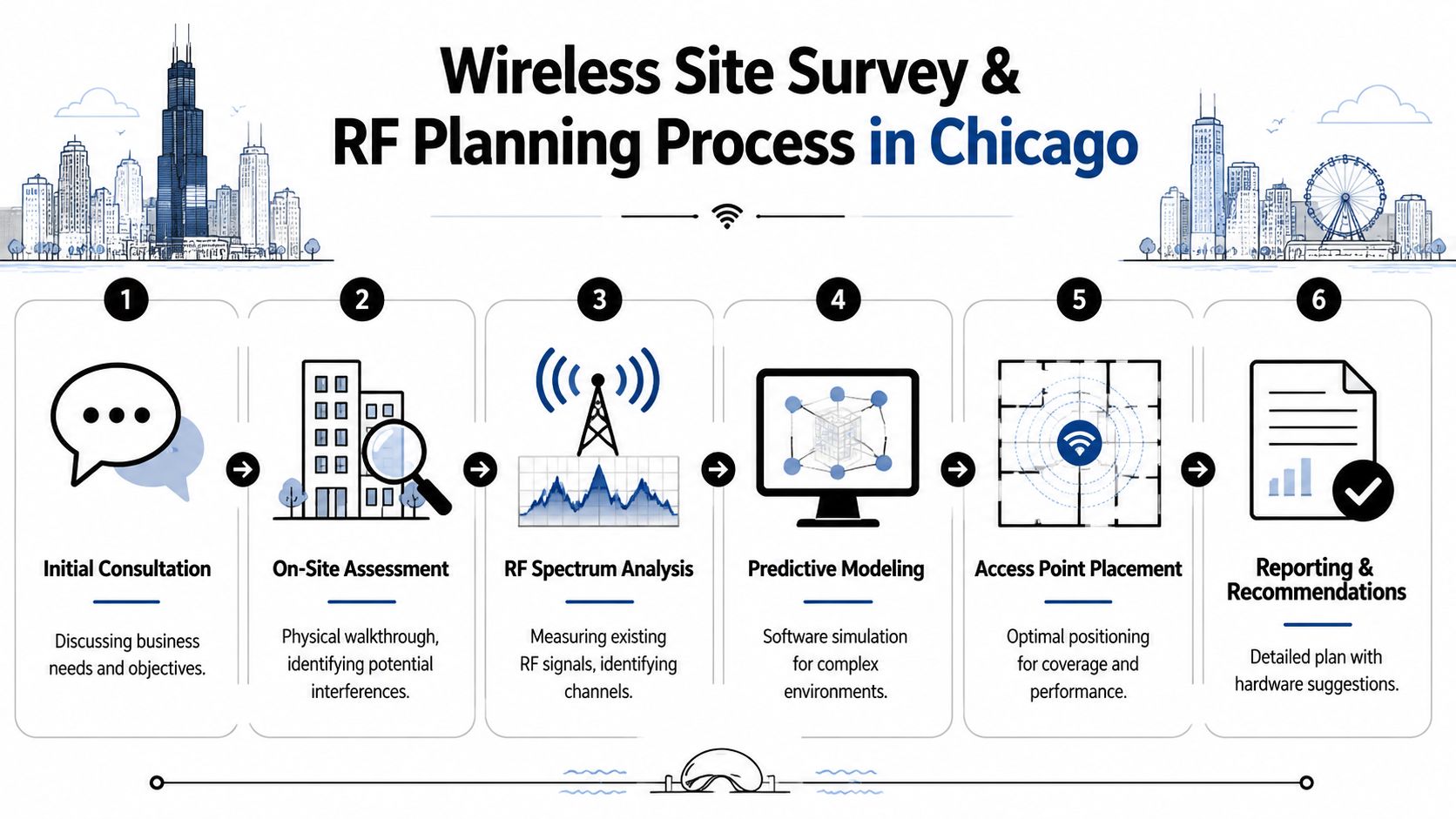
A professional survey isn't just a walkthrough with a tablet. It should combine physical inspection, RF measurement, predictive modeling, and post-install validation.
Look for a process that includes:
- Physical assessment: The team identifies wall materials, ceiling types, riser access, rack locations, elevator cores, stairwells, and mechanical obstacles.
- Spectrum analysis: They measure existing RF activity and locate interference from neighboring Wi-Fi, non-Wi-Fi devices, or problematic channel use.
- Predictive modeling: They use software to simulate propagation before installation, especially in multi-floor or high-density spaces.
- Placement testing: They determine where APs should go for coverage, capacity, and roaming, not just convenience for cabling.
- Validation survey: After installation, they test whether the live environment matches the design.
What works and what usually doesn't
Some shortcuts are tempting and usually backfire.
| Approach | What happens in practice |
|---|---|
| Reusing old AP locations | Coverage holes stay where the building changed and user density increased |
| Adding range extenders everywhere | Problems move around instead of getting solved |
| Designing only for signal strength | Users still complain because capacity and interference were ignored |
| Surveying during off-hours only | The network behaves differently when neighboring tenants and devices are active |
| Modeling plus live testing | Best path for dense offices, schools, medical sites, and warehouses |
If you're trying to troubleshoot a small space, consumer advice on stronger WiFi from Nerds 2 You can help explain why extenders feel like an easy fix. In commercial environments, though, extenders usually create design debt. Businesses need coordinated AP placement, channel planning, and proper backhaul.
Chicago buildings change the RF map
A timber loft in the West Loop behaves differently from a glass office tower on Wacker. A recycling floor, clinic, or light manufacturing site behaves differently again because metal racks, equipment, and partitioning can reshape coverage after a design is approved.
That is why survey documentation matters. The installer should mark AP locations against usable work areas, not just architectural symmetry. Signal maps need to reflect where people work, where devices roam, and where interference originates.
Don't approve an AP count based on aesthetics. Approve it based on measured coverage, capacity, and roaming behavior.
For organizations comparing vendors or coordinating broader carrier and cabling work, these Chicago telecommunications services are relevant because site surveys and wireless rollout rarely stand alone. They intersect with uplinks, switching, structured cabling, and decommissioning.
A good survey prevents dead zones. A great survey also prevents expensive change orders.
Selecting Hardware and Adhering to Cabling Standards
A Chicago office can approve a solid RF design and still end up with poor Wi Fi if the hardware stack underneath it is mismatched. I see this when a business buys premium access points but leaves old switching in place, or upgrades the closet and then treats AP placement like a cabling convenience. Both choices show up later as unstable roaming, power problems, and expensive change orders.
Match the hardware to the building, not the brochure
A loft office in Fulton Market, a medical suite in River North, and a warehouse near O'Hare need different hardware decisions even if the floor plans look similar on paper. Ceiling height, surface materials, client density, shift patterns, and how often people move through the space all affect AP model selection, antenna type, mounting height, switch capacity, and PoE budget.
Chicago's older buildings add another layer. Thick masonry, retrofitted telecom rooms, and limited pathway space can rule out the cleanest design option and force a better one. In those cases, the right answer is not always the newest AP. Sometimes it is a slightly different model with better antenna options, a lower-profile mount, or power draw that fits the switching you can support without rebuilding the closet.
A good bill of materials should answer four questions clearly. What devices are being installed. Why those models fit the environment. How they will be powered and uplinked. What capacity headroom remains after cutover.
Cabling standards protect the wireless investment
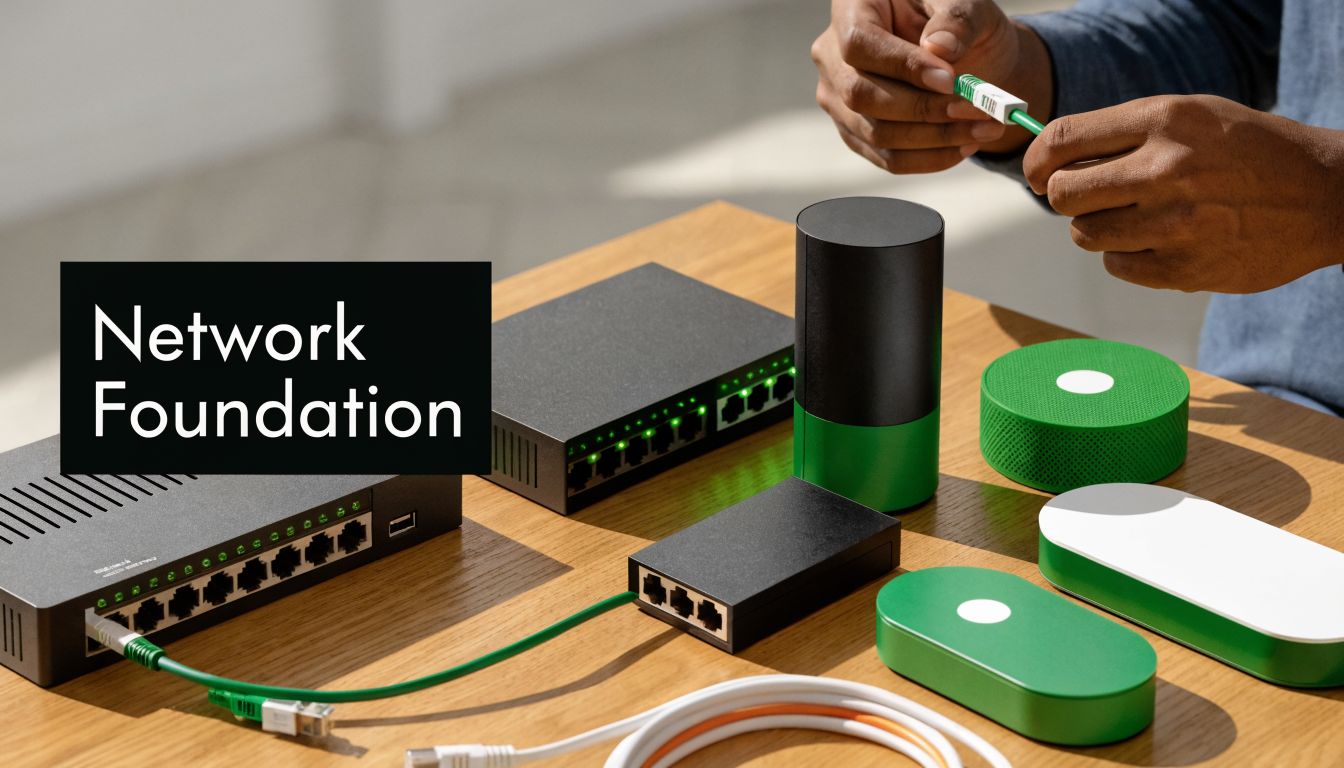
Wireless performance depends on copper and fiber discipline. If cabling is inconsistent, poorly labeled, loosely terminated, or squeezed through bad pathways, the APs inherit those problems.
City Colleges of Chicago standards call for dual Category 6 runs to indoor access point locations in many deployments, according to the City Colleges cabling standards document. For many Chicago businesses, that is a practical benchmark. Dual runs can support redundancy, staged upgrades, secondary services, or future hardware that needs more flexibility than a single drop allows.
Use this checklist during scope review:
- Indoor AP drops: Specify the cable category, run count, and termination standard before installation starts.
- Outdoor APs: Use exterior-rated materials, grounding, surge protection, and weather protection matched to the mounting location.
- Switching and PoE: Confirm power class, available budget, uplink speed, and patch panel capacity for every IDF involved.
- Pathways: Verify conduit, sleeves, risers, and firestopping requirements against the actual building conditions.
- Labeling: Make every cable, patch panel port, faceplate, and enclosure traceable in the closeout package.
- Documentation: Require as-builts that show final AP locations, cable IDs, test results, and closet assignments.
Mounting details decide whether the design holds up
Mounting is where good plans get preserved or compromised. Antenna orientation, bracket selection, ceiling type, clearance above the device, and proximity to lighting, ductwork, cameras, or structural steel all affect coverage and roaming.
That is especially true in Chicago retrofits. I have seen exposed-deck ceilings force APs lower than planned, decorative plaster limit attachment points, and shared tenant buildouts leave only a few acceptable pathways back to the closet. If the installer treats mounting as an afterthought, the network inherits avoidable RF problems on day one.
If the wireless project also includes backbone upgrades, review fiber optic installation options for uplinks and backhaul while the design is still open. Wireless, switching, and uplink capacity should be specified together.
One more point gets missed during procurement. Hardware selection should account for what is being removed, not just what is being installed. Old switches, legacy APs, failed UPS units, and abandoned cabling need a documented decommissioning plan so the project closes cleanly, data-bearing equipment is handled properly, and the business is ready for responsible IT asset disposition with Reworx Recycling instead of leaving retired gear stacked in a closet.
Navigating Chicago Permits Timelines and Costs
Chicago installation projects don't usually get derailed by access points. They get derailed by coordination.
Permits, landlord approvals, historic building constraints, firestopping requirements, after-hours work windows, elevator reservations, union building rules, and riser access can all affect schedule. If your wireless network installation Chicago plan doesn't account for those realities at the start, the timeline will slip even if the design is sound.
Why projects stall
In many buildings, low-voltage work intersects with life safety rules, shared risers, and property management procedures. Penetrating a rated wall, adding conduit, accessing roof or exterior mounting locations, or opening a ceiling in a controlled area often triggers extra review.
Historic and older commercial buildings are especially sensitive. You may find undocumented pathways, inaccessible chases, or legacy telecom rooms that were never designed for current device density.
A realistic schedule usually includes:
- Survey and design review
- Landlord or facilities approvals
- Permit and compliance steps where required
- Material staging
- Installation windows
- Testing and punch list closeout
Budget for friction, not just hardware
The biggest budgeting mistake is treating labor as a flat number. In Chicago, labor often shifts based on working hours, occupancy restrictions, patching requirements, and how difficult it is to access the structure.
Ask vendors for itemized pricing that separates hardware, software licensing, labor, project management, and validation. That gives you a cleaner way to compare proposals and spot where someone lowballed the administrative work.
A practical budget also leaves room for unknowns such as hidden obstructions, old cable removal, or extra pathway work. Not because the installer is careless, but because many Chicago buildings reveal their problems only after ceilings open and closets get audited.
Timelines improve when ownership is clear
One of the fastest ways to lose weeks is fuzzy responsibility. Decide early who owns each dependency.
| Project item | Best owner |
|---|---|
| Building access and work windows | Facilities or property management |
| Network requirements and sign-off | IT leadership |
| Permit coordination | Installer with clear client support |
| Change approvals | Named project sponsor |
| Final acceptance | IT plus operations stakeholders |
When no one owns the non-technical steps, the installation crew ends up waiting on paperwork, badges, or room access. That isn't a technical failure. It's a project management failure.
Chicago projects reward realism. The teams that finish cleanly are usually the ones that respected administrative work from day one.
Choosing Your Chicago Installation Partner and Executing the Project
A Chicago office can spend months planning a wireless upgrade and still end up with dropped calls in conference rooms, dead zones behind old masonry walls, and a punch list that drags on for weeks. The difference usually shows up before the first cable is pulled. It starts with who owns the work, how clearly success is defined, and whether the installer can handle the building conditions you have.

Price still matters. Scope control matters more.
In Chicago, a qualified installer needs more than low-voltage labor. They need experience working around tenant access rules, elevator reservations, union conditions in some buildings, after-hours cutovers, and the surprises that show up above old ceilings. Ask direct questions about similar projects in downtown high-rises, healthcare suites, schools, warehouses, or mixed-use buildings that match your environment.
What a strong RFP looks like
A useful RFP gives the installer enough detail to price the actual job and gives your team a way to hold them to it later. Include square footage, user counts by area, device mix, voice or handheld requirements, mounting restrictions, cable pathways, IDF and MDF locations, cutover windows, and security expectations. Require clear deliverables too. Heatmaps, bill of materials, labeling standards, closeout documents, cable test results, and post-install validation should all be listed in writing.
The best proposals also state what happens when field conditions change. If a pathway is blocked, a closet lacks power, or a lift is required, the process for approvals and pricing should already be defined.
Use these criteria when screening installers:
- Relevant project history: Ask for recent Chicago-area installations in buildings like yours, with references who can speak to scheduling, punch-list cleanup, and post-cutover support.
- Design accountability: Require predictive design files and a written coverage target tied to your applications, not a generic promise that signal will be "good."
- Validation discipline: The installer should commit to post-install testing and provide readable results your IT team can review.
- Project management: Name the project manager and site lead before kickoff. You need to know who handles access issues, change requests, and daily coordination.
- Documentation quality: Final as-builts, labels, port mappings, and cable certification records should be part of closeout, not an extra you discover later.
Compare vendors by execution, not presentation
A polished sales deck does not tell you how a crew performs during a 6 a.m. cutover on the 23rd floor.
| Vendor trait | Strong partner | Risky partner |
|---|---|---|
| Discovery process | Reviews operations, occupancy, and building constraints | Pushes preferred hardware before understanding the site |
| Field coordination | Confirms access, staging, patching, and cleanup responsibilities | Assumes facilities will sort it out |
| Proposal clarity | Lists scope, assumptions, exclusions, and validation steps | Uses broad language that shifts risk back to you |
| Cutover method | Provides rollback planning and support coverage | Treats cutover as a basic install task |
| Closeout | Delivers complete records and retires punch-list items quickly | Leaves missing labels, open questions, and undocumented changes |
For companies evaluating broader communications support, these telecom solutions for businesses are useful context because wireless performance depends on switching, cabling, power, and carrier handoffs as much as access point placement.
It also helps to borrow screening habits from adjacent trades. These tips for hiring an electrician translate well to network work because both depend on licensing, site discipline, change control, and clear closeout documentation.
Execution should feel controlled from day one. Daily logs, issue tracking, material substitutions, blocked areas, and test status all need an owner. At acceptance, do not rely on a hallway comment that the Wi-Fi feels fine. Sign off after the installer submits validation results, resolves punch-list items, and documents what was removed as well as what was installed. That last point matters because the old access points, switches, and related hardware should already be tagged for secure retirement instead of being left in a closet for someone else to deal with later.
The Final Step Decommissioning and Sustainable IT Disposal with Reworx Recycling
A network upgrade isn't done when the new SSIDs go live.
What's left behind matters just as much. Old access points, switches, firewalls, controllers, routers, patch panels, cellular gear, and boxed spare hardware often get stacked in a closet and forgotten. That's a security problem, a compliance problem, and an environmental problem.
One verified data point should get every Chicago IT manager's attention. An estimated 68% of enterprises upgrading their networks fail to properly sanitize or recycle old hardware. In Chicago's market of over 150,000 SMBs, that contributes to nearly 20,000 tons of unmanaged e-waste annually, according to the source material provided for local wireless installation content analysis.
What needs to happen after cutover
Retired network gear should move through a controlled process:
- Inventory the equipment: Record what came out, from where, and in what condition.
- Separate reuse from retirement: Some gear may have residual value or internal lab use. Other equipment is clearly end-of-life.
- Sanitize stored data: Configurations, credentials, logs, and management data can't be treated casually.
- Document chain of custody: Especially important for regulated industries and multi-site organizations.
- Route equipment to certified disposition: Landfill disposal should not be part of the plan.
Many installers stop at this point and the client is left holding the risk.
Why disposal should be planned before installation starts
A disciplined decommissioning plan prevents two common failures. First, old gear doesn't sit unsecured in a closet for months. Second, facilities teams don't have to guess whether networking hardware belongs in standard waste streams.
Even general contractor guidance can be useful here. These tips for hiring an electrician are relevant because they reinforce a broader lesson that applies to low-voltage and decommissioning partners too. Vet credentials, define scope clearly, and make responsibility explicit before work begins.
Where Reworx Recycling fits
This is the part of the project where a specialized partner matters. Reworx Recycling handles electronics recycling, IT equipment disposal, computer recycling, secure data destruction, and broader IT asset disposition (ITAD) workflows that many installers don't cover after a wireless refresh.
For Chicago organizations, that means the retired hardware from a wireless upgrade can be processed through a documented end-of-life path instead of becoming unmanaged stock. That may include network hardware from office refreshes, office cleanout projects, facility cleanout work, laptop disposal, or larger infrastructure transitions such as data center decommissioning and product destruction where appropriate.
Reworx Recycling also brings a different operating model to the table. Its donation-based recycling and social enterprise recycling approach supports sustainable recycling while helping organizations align disposal with community benefit. For businesses with ESG, procurement, or community impact goals, that matters. It turns IT retirement into something more useful than a line item.
Retiring hardware without secure disposition is the last unforced error in an otherwise successful network project.
If your upgrade includes servers, controllers, storage, or a larger telecom room cleanup, this server decommissioning checklist is a practical starting point for building a controlled retirement process.
The right sequence is straightforward. Install the new network. Validate performance. Remove the old gear. Document disposition. Close the project cleanly.
If your business is upgrading wireless infrastructure, don't leave the last step unresolved. Reworx Recycling can help you handle retired networking gear through secure data destruction, responsible electronics recycling, IT equipment disposal, and donation-based recycling that supports community impact. Schedule a pickup, plan a compliant office cleanout, or partner with Reworx Recycling to complete your Chicago network upgrade the right way.