Your laptop refresh is done. The new devices are deployed, users are settled in, and now the old equipment is piled in a storage room, under desks, or sitting in a corner of the server room waiting for someone to deal with it.
That last step is where a lot of Fairfax County businesses lose control of the process.
For a company, electronics recycling in Fairfax County isn't just about getting rid of old laptops, monitors, printers, and networking gear. It touches data security, internal policy, environmental handling, chain of custody, and whether your team is using a disposal channel that accepts commercial material. Fairfax County does offer public electronics recycling infrastructure, but that doesn't mean it's the right option for a business.
A residential drop-off program solves one problem. Business IT asset disposition solves a different one.
The End of the Upgrade Cycle in Fairfax County
The typical cleanup starts the same way. An IT manager signs off on a refresh. Facilities wants the storage area back. Finance wants retired assets removed from the books. Security wants confirmation that nothing with company data leaves the building unmanaged.
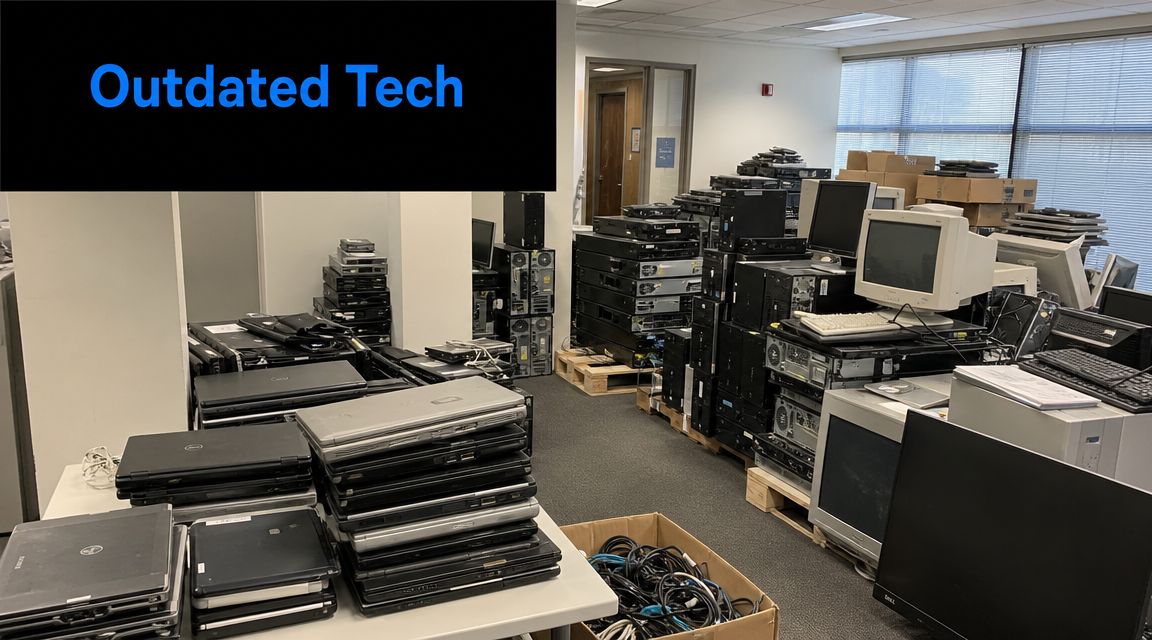
Then reality sets in. The load usually isn't uniform. You may have working laptops that could be redeployed, dead monitors, old docks, keyboards, printers, loose drives, and a few mystery boxes of cables no one wants to claim. If your business has gone through an office cleanout, relocation, merger, or partial return-to-office reset, the pile gets messy fast.
What businesses actually need
Most organizations aren't looking for a generic recycling answer. They need a disposal path that handles four things at once:
- Data-bearing devices need secure handling before they leave the building.
- Mixed equipment loads need sorting, not guesswork.
- Staff time can't disappear into loading cars and making repeated drop-offs.
- Documentation has to support internal controls, audits, and vendor management.
A resident drop-off site may be useful for a household TV or printer. It usually doesn't fit a company retiring endpoint devices or clearing out an office suite.
Practical rule: If the devices came from business operations, treat disposal as a controlled business process, not a convenience errand.
Why the disposal method matters
The wrong disposal path creates avoidable risk. A laptop isn't just scrap metal. It may contain stored credentials, local files, browser history, cached email, or software tied to your environment. Even non-data equipment can create problems if your team mixes batteries, displays, and general electronics without a clear handling plan.
There's also the reputational side. Employees, clients, and procurement teams increasingly expect companies to retire equipment responsibly. Throwing old electronics into general waste, or sending staff to improvise a workaround with a public program that excludes commercial users, doesn't hold up well under scrutiny.
For Fairfax County businesses, the first question isn't where you can drop off electronics. It's whether the channel is built for commercial loads, secure data handling, and operational accountability.
Understanding Fairfax County's Public Recycling Program
A Fairfax County office manager can load a car with old monitors and laptops, drive to a county site, and still have the wrong disposal channel for business equipment. That is the key distinction. Fairfax County's electronics program serves residents, and businesses need to treat it as a public convenience program, not a commercial disposition option.
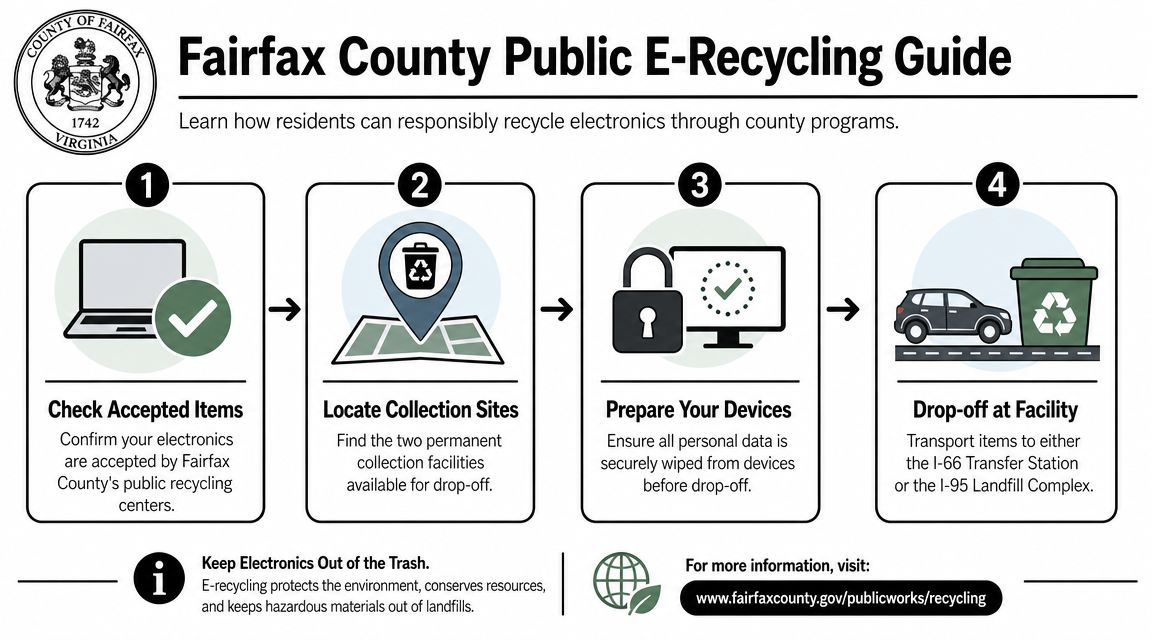
The county offers residential electronics drop-off at two locations, the I-66 Transfer Station and the I-95 Landfill Complex in Lorton. The program is set up for household recycling and regular public access. It accepts many of the items people commonly want to clear out, including TVs, monitors, printers, laptops, towers, keyboards, mice, and similar consumer electronics, as noted earlier.
That makes sense for a resident cleaning out a basement. It does not solve the chain-of-custody, pickup, scheduling, and documentation issues that come with retired business IT assets.
A quick comparison shows the boundary clearly:
| Public program detail | Fairfax County rule |
|---|---|
| Who can use it | Residents only |
| Collection sites | I-66 Transfer Station and I-95 Landfill Complex |
| Cost | No cost for residents |
| Large item limit | 10 large items per residential drop-off |
| Commercial loads | Not allowed |
The commercial restriction matters more than the accepted-items list. County guidance excludes business material, including loads from companies and other organizations. For a Fairfax business, that means the public program may look convenient on the surface while still being the wrong fit operationally and from a compliance standpoint.
I see this mistake often during office cleanouts. A team focuses on whether the county accepts the device type and skips the harder question, which is whether the county accepts the source of the equipment. For business assets, that answer changes the disposal plan.
Companies that need a proper business process should start with a provider built for Virginia electronics recycling for commercial equipment. That gives you a disposal path designed for business inventory, secure handling, and documented transfer instead of a resident drop-off workflow.
Why County Programs Create Business Compliance Gaps
A Fairfax County business can follow the public program rules and still end up with a weak disposal record.
The problem is not whether electronics get recycled. The problem is whether your company can show proper control of business assets from the office floor to final processing. Public collection is built to receive material. Business disposal has to answer harder questions about custody, data, transport, and documentation.
Public recycling doesn't replace controlled IT disposal
For commercial equipment, disposal is part compliance task and part logistics task. If your team is retiring laptops, desktops, drives, phones, and accessories, someone should be able to confirm who packed them, who picked them up, where they went, and what happened to any data-bearing device.
County programs are not structured around that business recordkeeping. They are structured around resident drop-off.
That leaves common gaps such as:
- Channel mismatch if a company tries to use a resident-focused program for business assets
- No scheduled pickup so employees end up handling staging, loading, and transport themselves
- Limited documentation for IT, legal, procurement, or facilities teams that may need proof later
- No defined data disposition record tied to each batch of retired equipment
Those gaps show up during audits, lease exits, office moves, and internal security reviews. They also show up after a loss. If a laptop or drive cannot be accounted for after it leaves service, the disposal process becomes an incident-response problem.
Logistics problems quickly become security problems
I see this most often during office cleanouts. Equipment gets stacked in a conference room, packed into mixed boxes, and moved in personal vehicles because the team assumes recycling is the easy part. That shortcut usually creates the exact exposure they were trying to avoid.
A loose process increases the chance of missing devices, broken chain of custody, damaged batteries, and incomplete asset records. For a business, those are not small operational mistakes. They affect legal defensibility and data security.
The environmental and legal risks of improper commercial e-waste disposal are not theoretical for companies handling retired IT in volume. The practical takeaway is simple. A public drop-off model leaves too much of the risk on your staff.
If you cannot produce a clear handoff record for retired business electronics, the disposal job is incomplete.
That is why Fairfax businesses usually need a commercial process, not a public convenience program. Reworx handles the part county programs do not cover: pickup, chain of custody, data-bearing asset control, and documentation your team can keep on file.
The Professional ITAD Solution for Fairfax Businesses
A Fairfax business retiring office equipment usually needs more than a legal place to drop off old electronics. The job often includes serialized laptops, loose drives, damaged devices, monitors, printers, and a deadline tied to an office move or refresh cycle. At that point, the actual requirement is controlled IT asset disposition, not basic recycling.
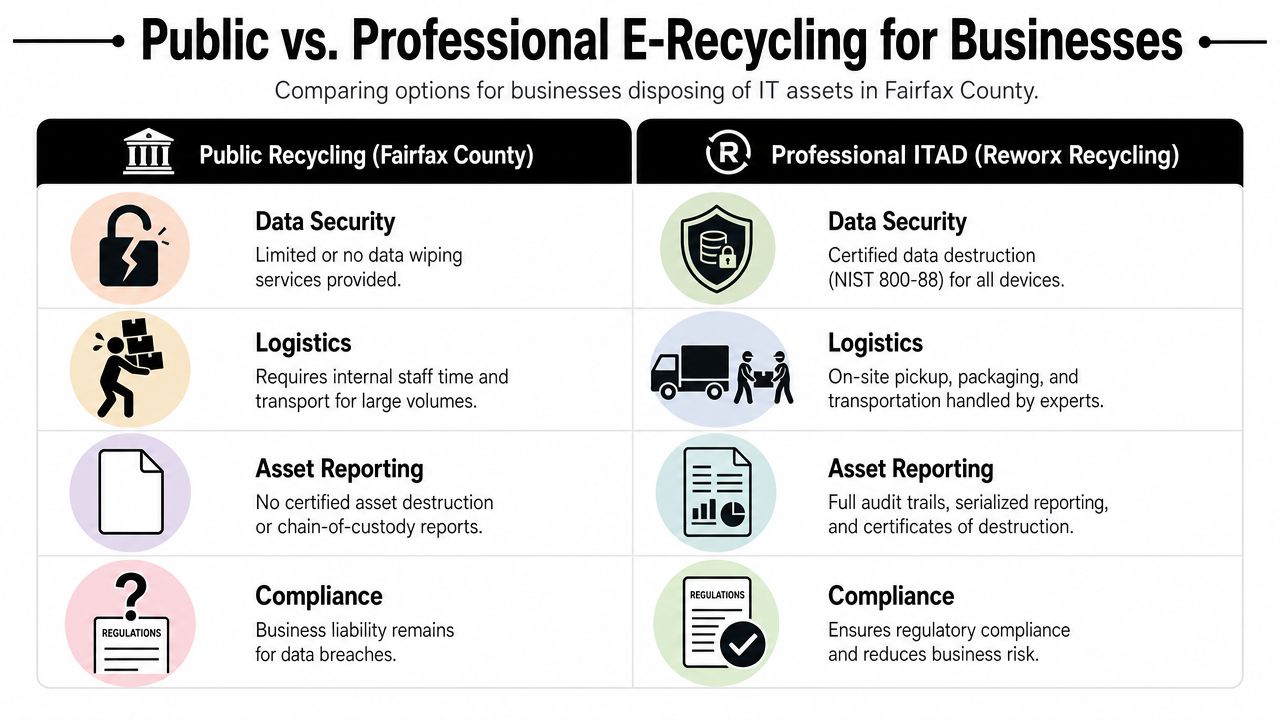
A professional ITAD process treats retired equipment as three things at once. It is a data security issue, a logistics project, and an environmental disposition task. Public recycling programs are built for convenience. Business ITAD is built for custody, documentation, and repeatable handling.
What a business-grade process should include
Fairfax County promotes electronics recycling to keep hazardous materials out of the waste stream. That environmental goal still matters for businesses. It just does not answer the harder operational questions, such as who packed the devices, who transported them, whether storage media was destroyed, and what records your team kept after pickup.
For commercial cleanouts, a workable ITAD process usually includes:
- Scheduled pickup and packaging so employees are not loading business equipment into personal vehicles
- Asset identification and tracking for devices that require serialized reporting or internal signoff
- Secure data destruction for hard drives, SSDs, backup media, and other storage devices
- Triage for reuse, resale, recycling, or destruction based on condition and policy
- Certificates and final reporting your IT, compliance, and facilities teams can retain
The difference is practical, not theoretical.
| Requirement | Residential program | Professional ITAD |
|---|---|---|
| Commercial eligibility | No | Yes |
| Pickup from office | No | Typically yes |
| Data destruction | Limited by design | Core service |
| Audit documentation | Minimal | Expected |
| Mixed business loads | Awkward | Normal |
Where Reworx fits
If your team is comparing options, start with a clear definition of what IT asset disposition involves for business electronics. That gives you the right standard for evaluating a provider.
Reworx Recycling handles the parts county programs do not cover well for businesses. That includes computer recycling, secure data destruction, laptop disposal, office cleanout support, and managed handling for larger volumes of retired IT equipment. For Fairfax County companies, that usually matters most in a few predictable situations.
A tenant is leaving a suite and needs pickup on a fixed schedule. An IT department is rotating out endpoints and cannot afford gaps in device tracking. A server room refresh creates decommissioning work that includes both infrastructure gear and storage media. A healthcare, legal, or lab-adjacent operation needs tighter internal documentation before assets leave the building.
The value is not limited to recycling. The value is a process your business can defend later if someone asks what left the office, how data was handled, and where the equipment went.
Preparing for a Secure and Efficient Office Cleanout
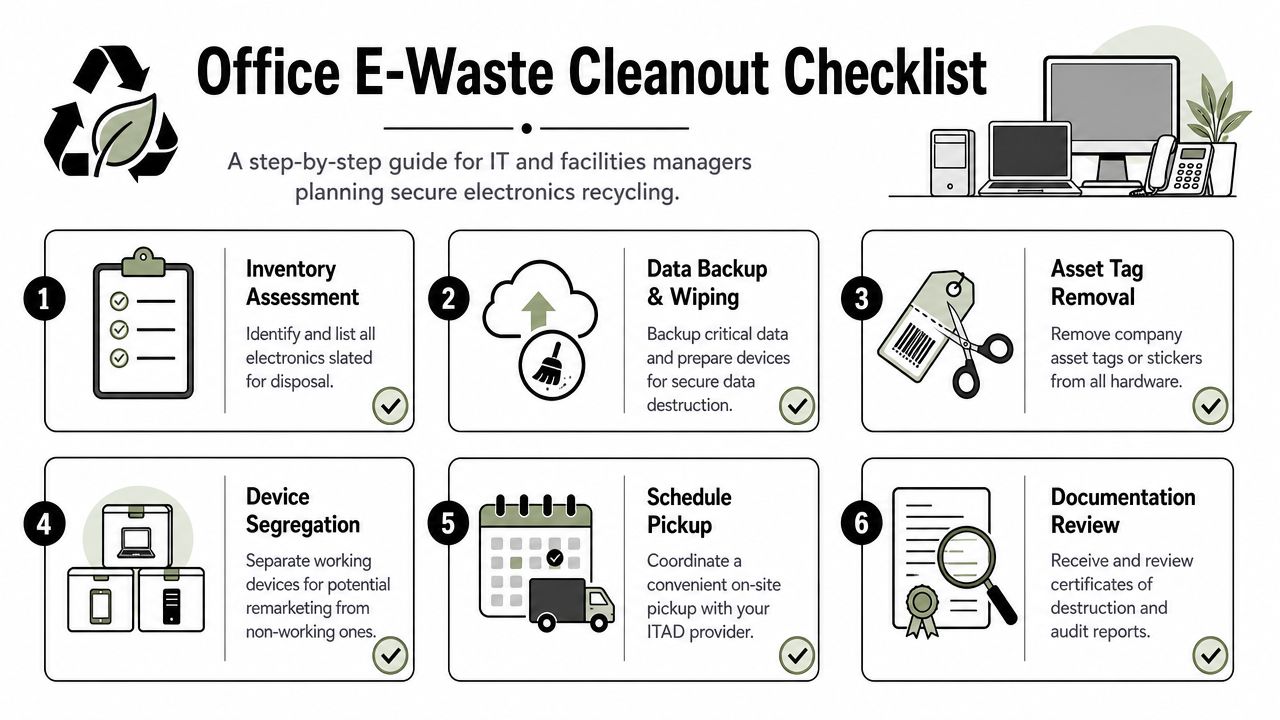
A clean disposal project starts before pickup day. The companies that handle electronics recycling smoothly usually do a few simple things in advance. They inventory first, separate device categories early, and decide what needs destruction versus potential reuse before anything leaves the building.
That prep work keeps your office cleanout from turning into a last-minute scramble between IT, facilities, and department admins.
Start with an internal inventory
Don't begin by counting pallets. Begin by identifying asset types and risk.
A useful internal list often includes:
- Data-bearing devices such as laptops, desktops, servers, external drives, and loose media.
- Display equipment including monitors and TVs.
- Peripherals and accessories like docks, keyboards, mice, and cables.
- Problem items such as damaged equipment, battery-containing devices, and unknown boxed surplus.
If you have asset tags, note them. If you don't, at least separate departments or rooms. That gives you a cleaner handoff and fewer questions later.
Sort by disposition, not by convenience
One of the most common mistakes is boxing everything together by location. That saves time for ten minutes and creates extra work for everyone afterward.
Use a more practical split:
- Redeploy or donate candidates if equipment is still functional and appropriate for further use.
- Recycling-only material for nonworking or obsolete devices.
- Destruction-required assets for anything that holds sensitive data or branded material that shouldn't re-enter use.
- Special-handling items such as batteries, swollen units, or broken displays.
A planning guide on how to prepare your company's electronics for recycling is useful because it mirrors how clean projects are executed. Teams that pre-sort assets usually reduce confusion at pickup and make reporting easier afterward.
Keep the handoff disciplined
A few operating habits make a big difference:
- Assign one owner: One person from IT or facilities should approve what goes out.
- Stage equipment in one secure area: Avoid scattered piles across departments.
- Back up needed data first: Retirement should follow retention policy, not replace it.
- Flag damaged devices early: Those items often need extra handling.
- Review final paperwork promptly: Close the loop while the event is still fresh.
Good cleanouts don't depend on memory. They depend on staging, labeling, and a controlled handoff.
Partner with Reworx for Sustainable Community Impact
A Fairfax County office cleanout usually leaves a business with two goals at once. Retire equipment safely, and show that the company handled the material in a way employees, customers, and leadership can stand behind.
Public recycling programs rarely cover that full business need. They help residents clear out devices. They do not usually give a company the chain of custody, data controls, pickup coordination, or disposition reporting needed for an organized IT asset retirement project. That gap matters if your load includes reusable laptops, storage media, damaged devices, batteries, or equipment that could still support a community reuse program after proper review.
Reworx is useful here because the job is not only hauling material away. The job is deciding what can be remarketed, what should be donated, what must be destroyed, and what belongs in downstream recycling. That is the practical difference between a basic recycling outlet and a business-grade ITAD partner.
A strong outcome usually includes:
- Secure retirement decisions for devices that hold company or client data
- Documented reuse and recycling paths so sustainability reporting is easier to support
- Managed donation opportunities for equipment that is still functional and appropriate for redeployment
- Specialized handling for mixed loads that include batteries, damaged units, or niche equipment
- Clear records that satisfy IT, facilities, compliance, and ESG stakeholders
That last point gets overlooked. Internal teams do not all judge success the same way. Facilities may want the space cleared quickly. IT may care about serialized tracking and data destruction. Compliance may need documentation. Sustainability leaders may want reuse outcomes they can report without overstating the result.
A professional partner helps align those priorities in one process.
If your organization wants disposal to support a broader mission, review how partnering for impact with Reworx supports responsible electronics disposition. For Fairfax County businesses, that can mean combining secure asset handling with reuse and recycling programs that produce a visible community benefit where appropriate.
If your Fairfax County business needs a practical path for electronics recycling, IT equipment disposal, secure data destruction, or a donation-based office cleanout, Reworx Recycling is a straightforward place to start. You can use that conversation to map pickup logistics, review mixed-equipment handling, and build a process that protects data while supporting responsible community impact.