Your Austin office upgrade is finished. The new laptops are deployed, the conference rooms have newer displays, and the servers you retired are sitting in a back room next to tangled power cords, old phones, and a few mystery boxes nobody wants to claim.
That pile looks like an operations problem. It is a security, compliance, and asset-control problem.
For facilities teams, electronics disposal in Austin often starts as a cleanup request. For IT managers, it usually starts with a refresh cycle, a relocation, a merger, or a data center change. In both cases, the mistake is treating end-of-life equipment like ordinary junk removal. Old devices carry data, batteries, regulated components, and often some remaining reuse value. Once they leave your building without a documented process, your control over all of that leaves with them.
A workable plan has to do four things at once. It has to protect data, support environmental compliance, keep the internal workload manageable, and align with your company's sustainability goals. That's why the best electronics recycling programs aren't just hauling arrangements. They're IT asset disposition workflows with clear chain-of-custody, documented destruction, and a realistic policy for reuse, donation-based recycling, and downstream processing.
The Hidden Risks of Outdated Office Technology
A common Austin scenario looks like this. A company upgrades staff laptops over two quarters, replaces a rack of aging network gear, and stacks the retired equipment in an IT closet “until there's time to deal with it.” Then finance wants the space back, facilities wants the room cleared, and leadership wants assurance that customer data, employee records, and internal files won't leak.
That's the point where electronics disposal stops being housekeeping.

Clutter becomes liability fast
Old desktops and servers don't just occupy square footage. They often hold hard drives, SSDs, backup media, or embedded storage that still contains recoverable information. A device can be powered off for months and still create risk if nobody has logged it, wiped it, or documented its disposition.
There's also the operational side. When companies delay office cleanouts, they usually lose track of what they have. Asset tags go missing. Serial numbers aren't reconciled. A few laptops get set aside for “possible reuse,” but no one decides their final status. That gray area is where control breaks down.
Practical rule: If you can't match a retired device to an asset record, a disposition method, and a transfer log, you don't have a disposal program. You have stored risk.
What usually doesn't work
Three approaches repeatedly create problems:
- Ad hoc internal cleanups that focus on removing equipment quickly, but skip inventory and chain-of-custody.
- General junk hauling that treats IT hardware like furniture or scrap.
- File deletion as a data plan even though deleting files isn't the same as verified data destruction.
For a business, the issue isn't just whether the equipment leaves the building. It's whether the process stands up to internal audit, customer scrutiny, and practical security review.
That's why IT and facilities teams increasingly treat electronics disposal as part of a larger disposition program. A provider handling data-bearing devices should support secure retirement steps, not just pickup. Guidance on data security in the recycling industry is useful here because it frames disposal as an information-governance issue, not merely a recycling task.
Why this matters in Austin
Austin businesses often move fast. Tech refreshes, office reconfigurations, lab changes, and facility consolidations create steady streams of retired hardware. In that environment, the costliest mistake is assuming someone can “just take it away.”
What works is a disciplined process with ownership. IT identifies data-bearing assets. Facilities coordinates access and staging. Procurement or sustainability defines acceptable downstream handling. Then the equipment moves through a controlled path for secure data destruction, computer recycling, product destruction where needed, and responsible material recovery.
Understanding Austin's Electronics Disposal Laws
A common Austin mistake starts in the loading area. A team finishes a refresh, stacks old laptops, monitors, phones, and a few printers on pallets, then assumes the city recycling stream or a quick haul-off will handle the rest. For a business, that assumption creates compliance gaps, weak documentation, and unnecessary data-security exposure.
Austin's local rule is straightforward. Electronics do not belong in the blue recycling cart, and the city directs residents to dedicated electronics recycling options through Austin Resource Recovery's electronics guidance. That point matters for companies because it sets the baseline. Electronics disposal is treated as a separate waste and recovery category, not ordinary office recycling.
The local rule is simple. Business execution is not.
A household drop-off model answers a resident's question about where to bring a device. A company has a different job. It has to retire assets in a way that supports internal controls, protects data, documents transfers, and fits sustainability goals. That is why electronics disposal in Austin works better as a business process than a cleanup task.
Public discussion around device life cycle policy helps make that distinction clear. Fixo on Australian repair laws highlights the broader point that repair, reuse, redeployment, donation, and recycling are connected decisions. For Austin companies, disposal should sit inside that larger framework so value recovery and responsible reuse are considered before equipment is treated as scrap.
Texas adds another layer that facilities and IT managers should understand. State programs address electronics recycling and manufacturer take-back for certain consumer equipment categories. For a business, the practical lesson is not that every retired device can go into a public-facing program. The lesson is that electronics already sit inside a structured recovery system, and your internal process needs to match that reality.
Three operating rules usually keep companies out of trouble:
- Separate municipal or household options from commercial IT disposition. They solve different problems.
- Classify equipment by business risk, not by convenience. A monitor and a laptop may leave on the same truck, but they do not carry the same security and recordkeeping burden.
- Keep documentation aligned with the end path. Recycling, resale, donation, and destruction each require different internal approvals and downstream records.
The strategic dimension comes into play. The cheapest pickup option is often the most expensive choice once you factor in audit exposure, lost residual value, and inconsistent downstream handling. A documented commercial process gives Austin businesses a better way to balance compliance, security, CSR commitments, and asset recovery.
Before anything leaves the site, confirm who signs off on the disposition, which items contain storage, which records your team must retain, and whether the vendor is built for commercial electronics workflows. For recurring pickups or larger refresh projects, corporate computer recycling services in Austin are generally a closer fit than a public drop-off model.
Preparing Devices for Secure IT Equipment Disposal
The most important step in IT equipment disposal happens before pickup day. It happens when your team decides that every device will move through a documented decommissioning process instead of an informal cleanout.
Start with inventory, not boxes
Don't begin by piling equipment near a loading dock. Begin with an asset list. At minimum, log device type, serial number, asset tag, assigned user or department, physical location, and whether the device contains storage.
This matters because your disposal record should answer basic audit questions without guesswork. Which laptops were retired? Which hard drives were physically destroyed? Which devices were cleared for donation-based recycling or resale? If your records can't answer that, the process is weak.
A practical prep checklist is available in this guide on preparing your company's electronics for recycling, and it aligns well with what internal IT teams already do during hardware refreshes.
Deleting files isn't disposal
Teams still confuse user-level cleanup with secure data destruction. Removing files, reformatting a drive, or resetting a device may support redeployment workflows, but those actions don't automatically give you the level of assurance a regulated or risk-sensitive environment needs.
For devices leaving company control, the U.S. EPA recommends using certified electronics recyclers and notes the two accredited U.S. certification standards are R2 and e-Stewards through the EPA's electronics management guidance. In practice, that means your disposal partner should support documented downstream chain-of-custody and secure handling for data-bearing assets.
When your company retires equipment, the standard isn't “we probably cleared it.” The standard is whether you can prove what happened to each data-bearing asset.
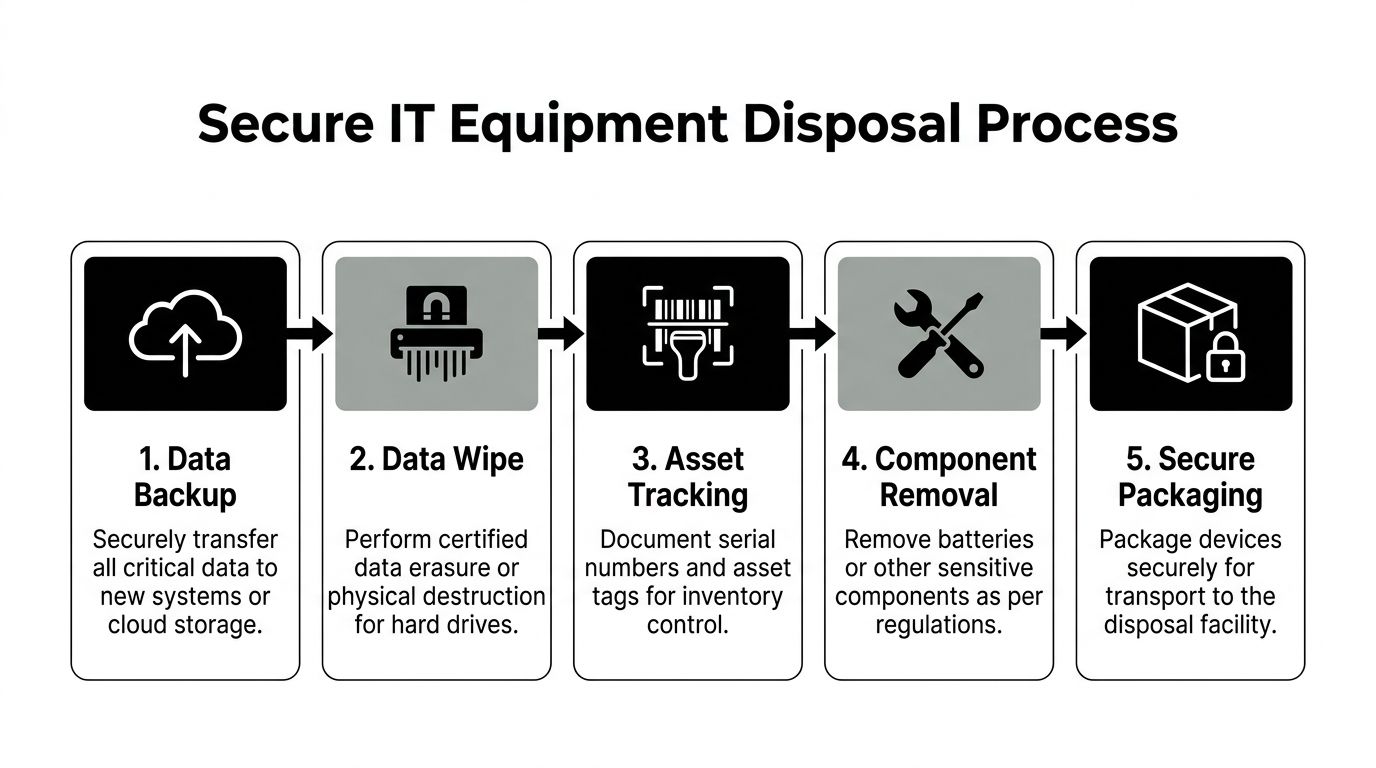
A field-ready preparation sequence
Use a sequence your team can repeat:
- Back up what still matters. Confirm any needed files, user data, logs, or configuration data have been transferred.
- Classify the media. Separate standard office devices from servers, removable drives, backup appliances, copiers, and any equipment with embedded storage.
- Choose the destruction method. Some organizations require data wiping for reuse paths. Others require shredding for higher-risk assets.
- Pull sensitive accessories. Smart cards, SIMs, removable media, and labeled storage often need separate handling.
- Package by category. Keep laptops, monitors, servers, and loose drives organized so the receiving process doesn't become a sorting exercise.
If your security team is mapping broader exposure points, resources on how to manage data leak risks can help frame disposal as one part of a larger data-loss prevention posture.
Choosing Your Disposal Path DIY vs Professional ITAD
Some Austin companies can handle a small amount of retired equipment internally. Others shouldn't try. The decision usually comes down to volume, sensitivity, staff time, and how much documentation your organization needs after the equipment is gone.
The real trade-off
DIY disposal looks inexpensive because the visible cash outlay can seem low. But internal labor, staging time, transport coordination, incomplete records, and inconsistent data handling often make it more expensive operationally than it appears.
That's not unique to electronics. The same pattern shows up in other cleanout decisions. A practical comparison like this estate sale agents vs DIY guide is useful because it shows how “doing it yourself” often shifts cost from invoice line items into staff time, missed detail, and execution risk.
DIY disposal vs professional ITAD services
| Factor | DIY Disposal (Public Drop-off/Internal) | Professional ITAD (e.g., Reworx Recycling) |
|---|---|---|
| Data security | Often depends on internal staff remembering to wipe, remove, and document every asset | Built around controlled intake, defined destruction methods, and formal handling of data-bearing devices |
| Chain-of-custody | Usually limited, especially if multiple departments move equipment before final drop-off | Typically structured from pickup through processing and final documentation |
| Compliance support | Harder to standardize across locations or departments | Better suited for repeatable policy enforcement and audit-ready records |
| Convenience | Staff must sort, stage, load, transport, and often troubleshoot mixed loads | Pickup, logistics coordination, and decommissioning support reduce internal burden |
| Value recovery | Reuse opportunities are often missed because no one has time to test and triage equipment | More likely to separate reusable assets from material recycling streams |
| Environmental handling | Can be inconsistent if staff treat all items the same | More likely to align device type, reuse potential, and downstream processing correctly |
| Best fit | Small, low-risk volumes with simple device types | Office cleanouts, recurring refreshes, secure data destruction, and mixed enterprise assets |
How to decide quickly
A DIY path may be workable if all of the following are true:
- Low volume: You're handling a small batch, not a floor-wide cleanout or data center decommissioning.
- Low sensitivity: No regulated data, no uncertain drives, no embedded storage concerns.
- Internal control: Your team can maintain inventory and custody without shortcuts.
If those conditions aren't true, use an ITAD model. For teams comparing options, this overview of what IT asset disposition involves is a practical baseline for deciding whether your process is mature enough to run in-house.
Solutions for Specialized Commercial Equipment
Standard office laptops are the easy part. The harder jobs in Austin usually involve equipment that was never managed as “just electronics” in the first place.
Data center and server room projects
A data center decommissioning project has moving parts that a routine office pickup doesn't. Racks may contain servers, switches, storage arrays, rails, PDUs, and loose drives stored in separate bins. Some assets have resale or redeployment potential. Others go straight to product destruction or commodity recovery.
A disciplined project starts with room-level planning. Teams map what's staying, what's migrating, and what's leaving service permanently. Then they stage by rack or system group so custody doesn't break during teardown.
In server environments, the biggest errors happen during transition windows. Equipment gets unlabeled, drives get separated from host systems, and nobody can reconstruct the final chain later.
Medical and laboratory equipment
Healthcare and research environments add another layer. Medical equipment disposal and laboratory equipment disposal often involve embedded storage, calibration histories, attached peripherals, and non-IT staff who may not realize a device stores data at all.
Examples include imaging workstations, analyzer control PCs, smart infusion support hardware, diagnostic carts, and instrument controllers. Even when the core device isn't a standard computer, the retirement process should still ask familiar questions:
- Does it store patient, research, or operational data
- Does it include removable media or integrated drives
- Can it be refurbished, or does it require dismantling and product destruction
- Who signs off on decommissioning before it leaves the department
Mixed commercial cleanouts
Austin's commercial footprint includes offices, clinics, engineering teams, and hybrid facilities with all of the above under one roof. That's why facility cleanouts work best when the recycler or ITAD provider can handle varied categories in a single project scope. One pickup might include monitors, phones, laptops, point-of-sale terminals, lab controllers, and surplus network gear.
In those situations, the winning process is rarely the fastest-looking one. It's the one that keeps assets categorized, data-bearing devices separated, and final reporting clean enough that no department has to reverse-engineer what happened later.
The Reworx Advantage Donation-Based Social Enterprise
A facilities or IT team usually reaches the same decision point after a cleanout is scoped. Some assets need destruction, some belong in downstream recycling, and some still have enough remaining life to justify controlled reuse. Treating all three the same is simple, but it leaves money, documentation quality, and community value on the table.
A donation-based social enterprise model turns disposition into a business process instead of a bulk haul-away event. The goal is not to push every device toward donation. The goal is to sort each asset into the right outcome based on condition, data risk, age, and resale or reuse potential.

Why that model fits business goals
For Austin companies, that matters because electronics disposal is rarely just a sustainability task. It sits at the intersection of security, compliance, ESG reporting, and asset recovery. A shred-everything approach can reduce decision friction, but it can also destroy reuse value and weaken the story behind your end-of-life program. A donate-everything approach creates different problems if screening is loose or data controls are weak.
The better model uses a documented triage process. Devices that fail reuse standards go to recycling. Devices with data risk go through verified sanitization or destruction first. Devices that meet technical and policy requirements can be refurbished and reassigned through a community-benefit channel.
That last part is where social enterprise adds something standard recycling does not.
Where Reworx fits
Reworx Recycling combines electronics recycling, secure data handling, and donation-based processing under one operating model. For companies retiring usable laptops, Reworx Recycling's laptop donation program shows how equipment can move into a structured reuse path instead of going straight to commodity recovery.
That distinction matters to managers who have to answer practical questions later. Which devices were destroyed. Which were recycled. Which were refurbished. Which chain-of-custody records support each decision.
A strong disposition program sorts assets by risk and remaining value, then documents that path clearly enough for IT, facilities, compliance, and leadership to rely on the same record. In Austin, that makes electronics disposal a stronger business decision, not just a cleaner storage room.
Your Next Steps for Responsible Disposal in Austin
A lot of Austin companies wait until a lease exit, audit request, or storage-room overflow forces action. By then, the job is harder. Assets are harder to identify, internal ownership is blurry, and devices with resale or donation value have often sat too long to be useful.
Treat electronics disposal as an operating process, not a cleanup event.
A simple three-step path
Inventory what you have
Start with a site walk. Identify asset types, note approximate volumes, and separate data-bearing equipment from monitors, docks, printers, cables, and other peripherals. Check the places equipment tends to disappear into over time, including storage rooms, IDF closets, training spaces, conference rooms, and back-office cabinets.Define handling rules before anything leaves the building
Set clear criteria for reuse, recycling, and destruction. Some assets belong in a secure sanitization or destruction stream first. Some may still have internal reuse, donation, or resale potential. Specialized equipment, including lab systems, medical devices, and server infrastructure, should be managed as separate categories with their own documentation requirements.Assign ownership and schedule processing
One team should own the inventory. Another should approve data handling standards if needed. Then schedule pickup and processing with a provider that can match your security, chain-of-custody, and reporting requirements. Reworx Recycling is one option for organizations that want a documented pickup and disposition process.
The goal is not only to clear space. The goal is to close data risk, meet policy requirements, support sustainability commitments, and recover remaining value where it makes business sense.
For Austin organizations, the strongest disposal programs give IT, facilities, compliance, and sustainability one shared record of what left, how it was processed, and why each disposition decision was made. That is what turns electronics disposal into a sound business decision instead of a reactive cleanout.