A Montgomery company can retire a roomful of laptops in a single afternoon and still lose control of the data inside them. The same risk appears when a school clears an aging computer lab, a clinic replaces workstations before an EHR upgrade, or a public agency decommissions servers that have been collecting records for years. A factory reset may make a device look clean, but appearance isn't proof.
The right approach to data destruction services in Montgomery starts with an inventory, a documented decision, controlled handling, verified sanitization, and records that connect every storage device to its final disposition. Physical destruction matters, but shredding is only one tool within a broader IT asset disposition (ITAD) program. The organization still needs to decide which equipment can be reused, which media requires logical sanitization, and which devices should never leave the destruction stream.
Why Data Destruction Is a Program, Not a One-Off Task
A Montgomery school replaces its computer-lab PCs, a clinic retires workstations before an upgrade, or a county office decommissions a server. Devices leave the room, but records may remain on SSDs, backup media, removable drives, or linked cloud accounts. A reset confirms only that a command ran. It does not prove that every asset was identified, retained when needed, sanitized correctly, or documented.
Secure data destruction therefore needs a controlled lifecycle, not a single shredding appointment. The program starts when equipment is marked for retirement and continues through inventory intake, retention review, method approval, custody, verification, disposition, and record retention. A local nonprofit ITAD partner can support this workflow alongside for-profit vendors, especially when reuse, donation, recycling, and destruction must be coordinated.
The operational sequence
Montgomery organizations should require these controls in their ITAD procedure:
- Inventory intake: Record the asset tag, serial number, device type, department, and condition before equipment moves.
- Retention review: Confirm whether authorized staff still need information from laptops, servers, backups, or removable media.
- Method approval: Choose NIST's clear, purge, or destroy path based on media type, data sensitivity, and the reuse plan.
- Controlled custody: Use locked containers, named personnel, signed handoffs, and a defined transport route.
- Verification: Record how sanitization was checked and what happened if a device failed verification.
- Disposition evidence: Keep a certificate or destruction report that reconciles every processed asset.
Montgomery County, Maryland, offers a useful out-of-state public-sector benchmark that Alabama organizations can adapt. Its process retains laptops for two weeks after replacement or excessing decisions and servers for two months, allowing authorized staff time to recover needed information. The county then sanitizes storage devices under the Department of Defense 5220.22-M standard, removes county identifiers, and requires third-party records listing the destruction date, item, order number, and serial number. Montgomery County's IT asset management document demonstrates why retention windows and asset-level records belong in one procedure. A Montgomery, Alabama agency should set comparable windows through its records and legal review, then document who approved them and when they expire.
Practical rule: Do not release a device for resale, donation, electronics recycling, or computer recycling until its identity, retention status, sanitization method, and verification result are recorded.
One-off deletion leaves predictable gaps. Teams lose serial numbers, overlook loose SSDs, miss storage in decommissioned servers, or assume that disappearing local files mean a cloud-linked laptop is clean. A documented program connects procurement, replacement planning, office and facility cleanouts, vendor handoffs, and compliance reporting. Decide the method before disposal, record the decision, and audit the result.
Methods That Protect Montgomery Organizations
A Montgomery office can erase a laptop, send it to a recycler, and still leave data exposed on an SSD, phone, backup tape, or cloud-linked account. A school may have reusable Chromebooks mixed with damaged devices. A government department may need every serial number tied to a recorded sanitization result. NIST SP 800-88 gives buyers a clear hierarchy for these decisions: clear, purge, and destroy.
Clear uses logical methods intended to protect against ordinary, non-invasive recovery. Purge uses physical or logical methods intended to make recovery infeasible, including against advanced laboratory techniques. Destroy makes recovery infeasible and leaves the media unusable for storage. The NIST media sanitization guidance should guide the method recorded for every asset.
Match the method to the media
A traditional magnetic hard drive may support validated overwriting, ATA Secure Erase, or degaussing when technically appropriate. Degaussing applies to magnetic media, not every modern storage device, so it is not a universal answer for SSDs, phones, or embedded flash storage. Trained personnel can shred, pulverize, or otherwise physically destroy a hard drive marked for destruction.
SSDs and NVMe drives need closer review. Their controllers distribute data across flash cells, so file deletion or a basic format does not establish that every underlying location is inaccessible. For drives approved for reuse, use a media-appropriate purge or validated secure erase process, then verify the result. Failed, damaged, inaccessible, or high-risk drives should generally go to physical destruction.
Mobile-device processing must cover both the device and its accounts. A factory reset may be one step, but the operator should also confirm remote-wipe status, remove account associations, and record the device identifier. Montgomery County's electronics guidance separates reusable equipment from devices that cannot be reused. It requires partners to erase data from equipment intended for reuse and destroy remaining memory devices in equipment that is not reused. The county's electronics recycling guidance shows why recycling and data protection belong in the same workflow.
| Media Type | Primary Method | Secondary Method | When to Destroy | Verification |
|---|---|---|---|---|
| Magnetic HDD | Validated overwrite, ATA Secure Erase, or appropriate degaussing | Physical destruction | Failed, damaged, highly sensitive, or non-reuse media | Tool result, operator record, serial reconciliation |
| SSD or NVMe | Media-appropriate purge or secure erase | Physical destruction | Failed verification, inaccessible, or high-risk media | Sanitization result and asset-level review |
| Mobile device | Factory reset with account and remote-wipe checks | Physical destruction | Locked, damaged, or unverifiable device | Device identifier and reset or destruction record |
| Backup tape | Media-appropriate purge | Physical destruction | Expired, damaged, or non-reusable tape | Tape identifier, method, and disposition |
| Optical media or microfilm | Physical destruction where reuse is not required | Appropriate logical or physical treatment | Sensitive or unusable media | Batch record with item range and witness |
Use this decision rule: reuse internally, purge; donate or resell, purge and verify; failed or sensitive, destroy; unknown, quarantine and investigate. Hybrid drives need treatment for both magnetic and flash components. Encrypted drives still require a documented decision about key destruction and media disposition.
Put the rule in the procurement SOP, then apply it during office refreshes, school device collections, and government cleanouts. A local nonprofit ITAD partner can support reuse and community disposition, while a for-profit vendor may handle secure processing or destruction. Require either partner to identify the method for each media type and provide asset-level verification. Organizations comparing secure data destruction services should ask whether the vendor owns the equipment, or can prove who performed the work, when it occurred, and which assets were processed.
Onsite vs Offsite Destruction for Montgomery Buyers
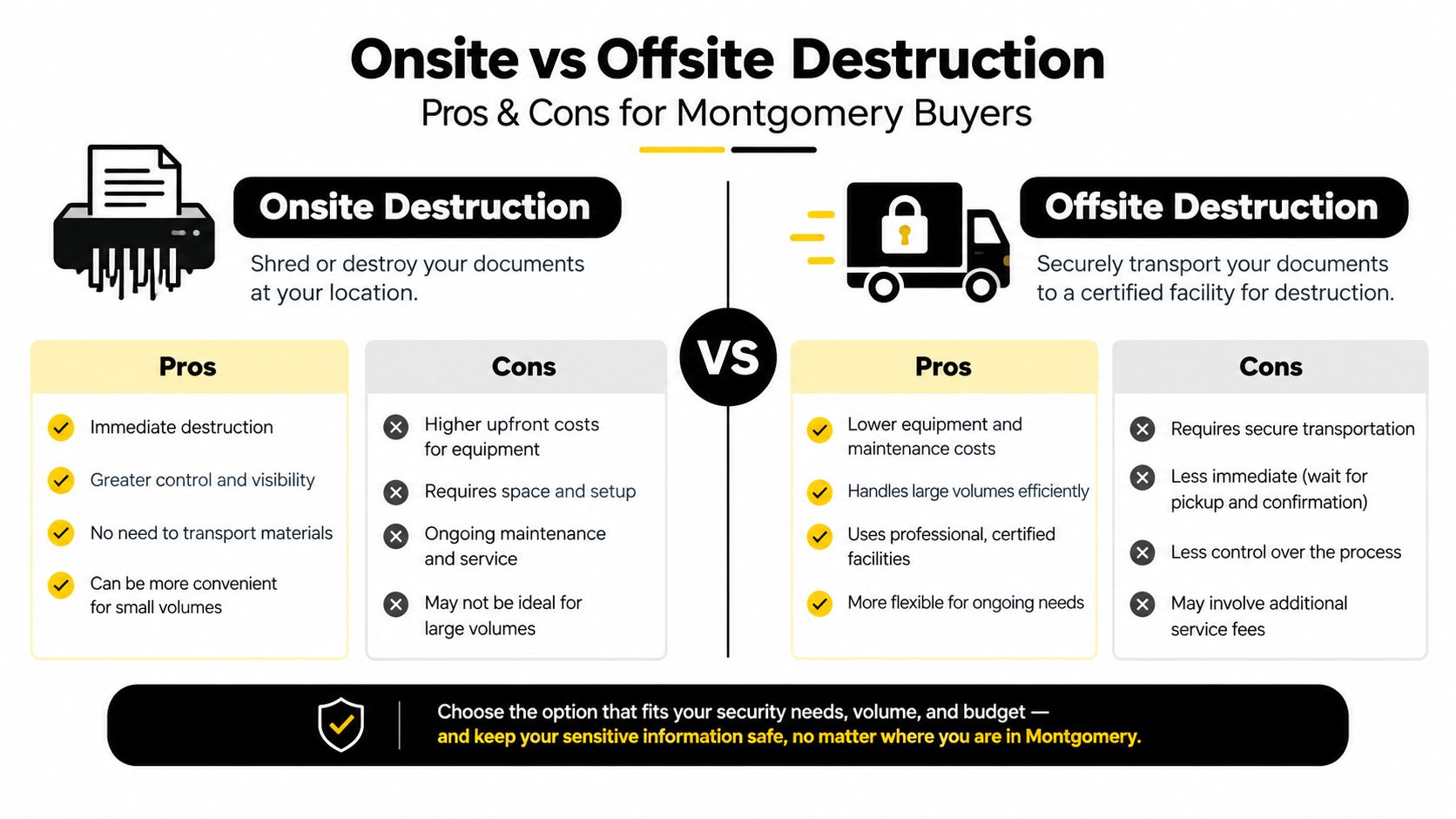
Onsite and offsite destruction solve different procurement problems. Onsite service brings processing to the loading dock, office, school, clinic, or data center. The buyer can observe handling, verify the asset count during processing, and reduce the number of uncontrolled handoffs. The tradeoff is a higher event minimum and a narrower scheduling window.
Offsite service moves equipment to the vendor's secure facility. Batch processing can provide lower per-drive pricing and more flexible pickup routes, but serialized assets travel through the local transport chain before destruction. That matters for a regulated clinic, a government department, or a school holding student information. A vendor should explain who accepts the equipment, how it is locked, and when custody changes.
Where each model fits
Onsite destruction usually wins when:
- The organization has hard drives or servers with sensitive records.
- An auditor expects direct witness verification.
- The buyer can't tolerate an untracked transport interval.
- A data center decommissioning project involves a concentrated asset population.
- The team needs immediate documentation tied to the witnessed batch.
Offsite destruction can work well when:
- Equipment is already cleared for donation or resale.
- SSDs have completed an approved cryptographic or logical sanitization process.
- The organization has reliable inventory controls and locked transport.
- The project involves bulk electronics recycling with separate destruction-only media.
- The vendor can return serialized certificate data rather than a generic receipt.
A hybrid model often makes sense. The vendor picks up locked bins, reconciles the serialized inventory, sanitizes or destroys media at its facility, and provides certificate data for the processed population. This arrangement can support laptop disposal, corporate donation programs, and office cleanout projects without forcing every reusable device into a destruction stream.
For buyers considering onsite hard-drive destruction, use a practical rule: choose onsite when custody and witness control outweigh convenience, and choose offsite when documented transport and batch processing provide adequate assurance. Put that decision in the procurement SOP before requesting proposals.
Compliance Standards That Shape Local Disposal Decisions
Compliance doesn't begin with a certificate. It begins with the organization's retention policy, the type of information stored on the device, and the method selected for the media. NIST's clear, purge, and destroy framework gives the technical structure. Federal and state obligations may influence how a clinic, financial institution, school, insurer, or public agency handles records, but the buyer still needs an asset-level process that shows what happened.
For Montgomery organizations operating under Alabama requirements, the state's data breach law expects reasonable measures for disposing of records containing sensitive personally identifying information once retention is no longer required by law, regulation, or business need. The statute recognizes shredding, erasing, or another modification that makes information unreadable or undecipherable through reasonable means consistent with industry standards. The Alabama Data Breach Notification Act connects retention governance directly to disposal operations.
A HIPAA-covered clinic should ask whether the vendor can document the handling of devices containing protected health information. A school should define how student records are handled. A financial organization should identify the controls that apply to consumer information. A signed vendor agreement can allocate responsibilities, but it doesn't replace evidence that a specific drive was sanitized or destroyed.
What the file should contain
Keep records that allow an auditor or internal reviewer to reconstruct the decision:
- The retention trigger or business reason for disposal.
- The asset inventory and serial-number list.
- The selected NIST method and media classification.
- The chain-of-custody handoffs and transport record.
- The verification result, operator identity, and equipment or tool identity.
- The Certificate of Destruction or certificate of sanitization.
- The final reuse, donation, recycling, or destruction disposition.
| Framework | Who It Covers in Montgomery | Required Disposal Action | Records to Retain |
|---|---|---|---|
| Alabama disposal expectations | Organizations handling sensitive personal information | Make information unreadable or undecipherable through reasonable means | Retention decision, method, asset list, verification, disposition |
| HIPAA-related policy controls | Clinics and other organizations managing health information | Apply the organization's approved media-sanitization and vendor controls | Asset record, authorization, custody, method, certificate |
| FACTA-related disposal policy | Organizations holding consumer information | Follow the organization's approved secure disposal procedure | Policy reference, vendor record, destruction evidence |
| GLBA-related disposal policy | Financial organizations managing customer information | Match disposal controls to information risk and retention rules | Inventory, method decision, custody, certificate |
| FERPA-related school controls | Schools managing student records | Control devices and records through approved retirement procedures | Device list, authorization, verification, final disposition |
A buyer can also review whether a provider maintains a recognized security and environmental certification. For example, Reworx Recycling's certification information can be part of a broader vendor review, but no certification should replace the buyer's own reconciliation and retention controls.
Chain of Custody and Certificates of Destruction
Chain of custody is the audit backbone. It starts when an employee or technician places an inventory tag on a device and ends only when the organization files a certificate that identifies what happened to that specific asset.
For a clinic retiring laptops, the process might run from department pickup to a locked staging area, then to a named carrier or vendor employee, then to onsite destruction or a controlled processing facility. A school clearing a lab needs the same discipline for desktops, Chromebooks, removable media, and loose drives. A small business performing an annual purge should be able to match the certificate back to its asset register without relying on a vendor's memory.
The handoff sequence
Each transfer should identify:
- The releasing employee or department.
- The receiving person or vendor.
- The date and time of transfer.
- The container, vehicle, or order reference.
- The count and serialized assets included.
- The next destination and expected disposition.
A defensible Certificate of Destruction should identify the media description, asset serial numbers, sanitization method, destruction date, operator or witness, and final result. It should also include a reconciliation line that lets a reviewer match the document to an order, purchase record, inventory export, or specific drive.
NIST states that verification should occur every time sanitization is applied, or through representative-sample verification when an approved sampling approach exists. NIST's sanitization verification material makes verification a distinct control, not an assumption that a completed software command succeeded.
Common certificate problems include a batch count without serial numbers, a destruction date without a method, a vendor name without the actual processing location, or a certificate covering “all equipment” when the intake list includes exceptions. Those gaps become serious during an audit, a breach investigation, or a dispute over whether an asset was donated, resold, recycled, or destroyed. Use chain-of-custody documentation as a model for the evidence your internal file should contain.
How to Choose a Data Destruction Vendor in Montgomery
Compare two or three proposals on operational detail, not brochure language. “Secure wiping” and “certified destruction” are incomplete answers until the vendor explains the method, the media types covered, the custody path, and the evidence delivered afterward.
Start with direct questions:
- Where does shredding or sanitization occur?
- Who performs degaussing, secure erase, or physical destruction?
- Which NIST method is assigned to HDDs, SSDs, mobile devices, tapes, and failed media?
- Are subcontractors involved in pickup, transport, processing, or recycling?
- Can the vendor show a sample certificate with serial numbers?
- How are exceptions handled when a drive can't be accessed or verified?
- Does the proposal separate labor, transport, destruction, certificates, and recycling?
- What insurance covers cyber, general liability, environmental handling, and professional services?
- Can the vendor provide evidence of a recent third-party audit or relevant certification?
A local buyer should also ask whether the vendor can support more than destruction. A good ITAD partner may need to handle computer recycling, laptop disposal, data center decommissioning, product destruction, medical equipment disposal, laboratory equipment disposal, and donation-bound equipment under one controlled inventory. Reworx Recycling is one option that combines electronics recycling, equipment pickups, secure hard-drive shredding, data sanitization, equipment disposition, and donation-based downstream reuse.
A practical scoring view
| Criterion | What to Verify | Weight | Notes |
|---|---|---|---|
| Security | Media-specific methods, trained operators, controlled access | High | Reject vague “military-grade” language without a defined method |
| Compliance | Certificates, verification records, insurance, relevant certification | High | Ask for documents before signing |
| Transparency | Subcontractor disclosure, pricing detail, exception process | High | Require written answers |
| Local accountability | Pickup procedures, contact person, escalation path | Medium | Confirm who owns the relationship |
| Sustainability | Reuse, donation, material recovery, downstream controls | Medium | Separate reusable assets from destruction-only media |
Red flags are easy to identify. Avoid providers that can't explain where processing occurs, offer only generic batch receipts, refuse to disclose subcontractors, provide no onsite option for high-risk projects, or treat every device as if it were the same. The cheapest proposal often becomes expensive when the buyer has to rebuild the inventory or prove what happened to missing assets.
A Step-by-Step Procurement Checklist for Secure Disposal
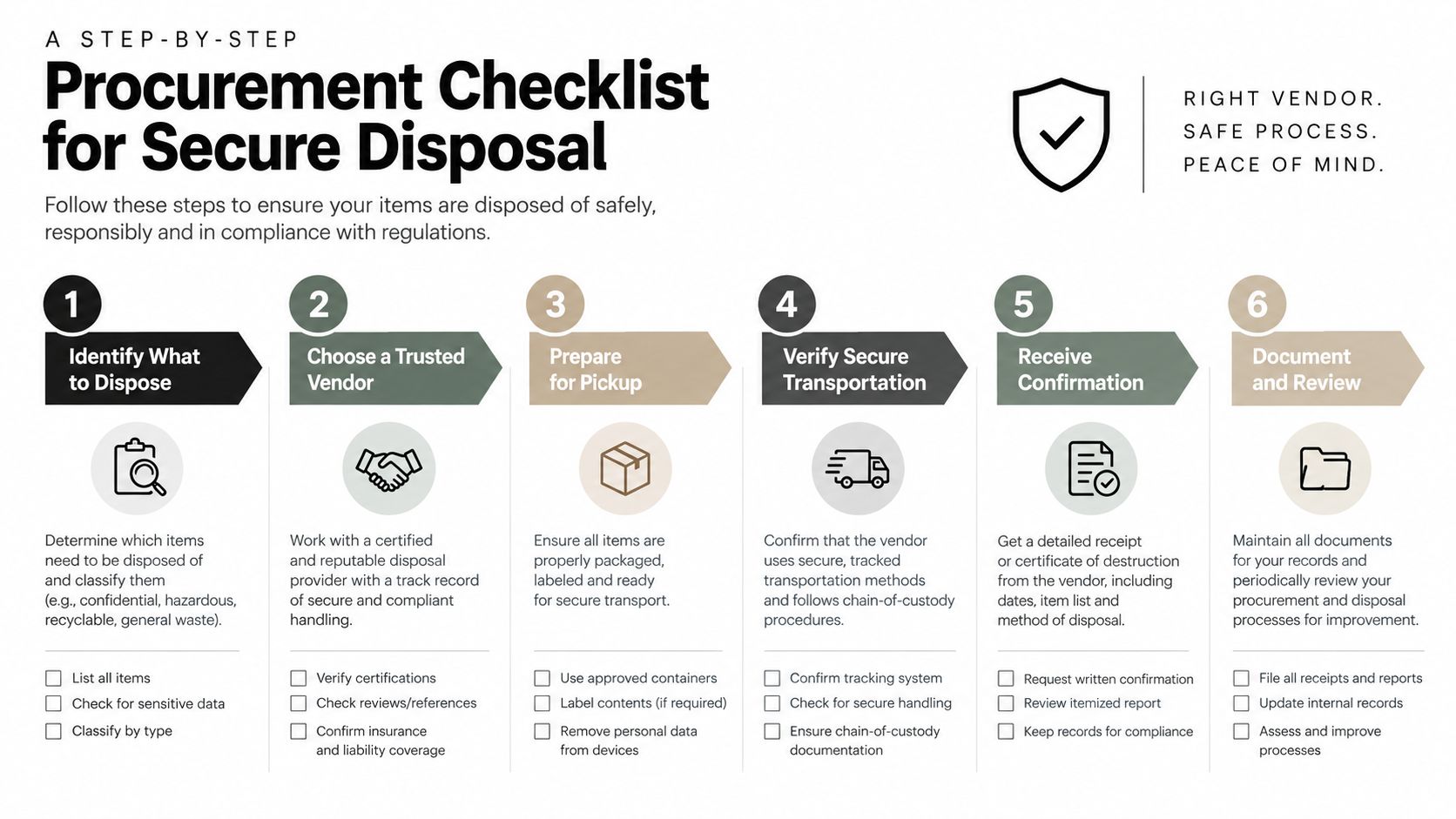
Use this sequence as the core of an internal SOP. It fits a laptop refresh, school lab replacement, office cleanout, facility cleanout, or larger IT asset disposition project.
Build the inventory. Export the asset register, then physically confirm tags, serial numbers, device types, departments, and condition. Add loose drives, backup media, mobile devices, and server components missing from the main register.
Apply the retention decision. Hold equipment until authorized staff confirm that required information has been recovered or retained. Record the decision date and approver's name on each asset line, so the hold can be audited before release.
Classify the media. Separate HDDs, SSDs, NVMe devices, phones, tapes, optical media, and damaged equipment. Do not apply degaussing to flash storage or treat a factory reset as equivalent to a documented purge or destroy method.
Select and approve the method. Record whether each asset will be cleared, purged, or destroyed, and explain the choice. Use clear for basic removal when appropriate, purge when reuse requires stronger protection, and destroy when the media is failed, inaccessible, or too risky to reuse. Verify reuse-bound equipment before donation or resale, and place uncertain devices in a destruction quarantine.
Schedule controlled custody. Confirm the pickup date, locked containers, responsible personnel, transport route, onsite witness plan, and vendor contact. Record the count before transport and again when the vendor accepts the load. Ask who handles exceptions if the count or condition changes.
Verify and reconcile. Compare the vendor intake report with the original inventory. File tool results, witness records, exception logs, and certificates by department or project. Route verified reusable equipment to donation, resale, or sustainable recycling, while keeping destruction-only media segregated.
Quarantine rule: If a device fails wipe verification, cannot be accessed, or has an uncertain history, stop the disposition. Tag it, isolate it, and route it for an approved destruction decision.
The certificate is the final control, not an administrative afterthought. Use a compliance checklist template to confirm that every action, from tagging through donation handoff, leaves evidence an auditor can follow.
Local Resources, FAQs, and Next Steps
A retired laptop may still support donation or resale, while a failed drive belongs in a controlled destruction stream. Montgomery buyers should separate reuse decisions from destruction decisions, document the sanitization method, and direct recovered metals and plastics to responsible recycling. Alabama guidance follows this same two-track approach: erase data from equipment intended for reuse, and destroy remaining memory devices in equipment that will not be reused.
Montgomery buyer questions
What should a HIPAA-covered clinic request?
Request an asset-level inventory, the media-specific sanitization method, verification evidence, custody records, and a Certificate of Destruction or sanitization certificate. A generic invoice cannot show how retired workstations were handled.
What works for an SSD-heavy laptop fleet?
Classify the drives before selecting a method. Use documented purge or secure erase when reuse is appropriate, verify the result, and destroy devices that fail verification or cannot be accessed reliably. HDD procedures do not automatically transfer to SSDs.
What will destruction cost per drive?
There is no defensible universal price. Require proposals to separate labor, transport, onsite minimums, processing, certificates, recycling, and exception handling. Compare vendors only after they price the same scope.
Is onsite shredding worth the premium?
It can be the right choice when staff need direct witness control, the load includes sensitive servers, or audit expectations are strict. Offsite processing fits cleared equipment and bulk recycling when serialized custody remains documented.
How often should certificates be audited?
Review them whenever a disposal project closes, then sample records through the organization's normal internal review cycle. Confirm that each certificate reconciles to the source inventory and records the verification outcome.
What should happen to devices with resale value?
Remove account associations, apply an approved sanitization method, verify completion, and route the equipment through controlled donation, resale, or corporate donation. Devices that cannot be verified belong in the destruction stream.
Montgomery schools, offices, and government departments should assign one owner for the disposition program, keep reuse and destruction workflows separate, and require the same evidence from nonprofit and for-profit providers. A local nonprofit ITAD partner can support donation and community reuse, while a commercial vendor may handle larger destruction volumes. The buyer should judge both by custody controls, verification, reporting, and downstream handling.
Buyers can consult Alabama Department of Environmental Management disposal resources, review NIST SP 800-88 Rev. 1, and check recognized R2v3 or e-Stewards directories. NIST's newer program-based direction emphasizes governance, validation, documented decisions, and logical storage environments, including cloud data. The NIST SP 800-88 Revision 2 publication page helps organizations update their policy.
Reworx Recycling provides recycling, secure data destruction, IT equipment disposal, and donation routing for Montgomery organizations.
Before signing, ask for a facility walkthrough and a sample certificate. Confirm office recycling programs, secure data destruction, IT equipment disposal, donation-based recycling, and the handling of reusable equipment.
Reworx Recycling helps Montgomery organizations plan secure data destruction, IT equipment disposal, electronics recycling, and donation routing with documented handling for data-bearing devices. Visit Reworx Recycling to request a walkthrough, schedule a pickup, or start a responsible equipment donation partnership.