
Atlanta's tech growth is easy to spot in construction headlines and data center announcements. The harder part to see is what that growth means inside your business. More applications, more customer records, more security logs, more backups, and more AI experimentation all push one practical question to the front of the room. Where will all this data live, and what will you do with the hardware you replace along the way?
That's the complete picture for Atlanta's growing demand for data storage solutions. It isn't only about adding capacity. It's also about managing the full lifecycle of the equipment that stores, processes, and protects your information. For business leaders in Atlanta, that means storage planning and end-of-life planning now belong in the same conversation.
Atlanta's Data Boom Is Your Next Big Challenge
Atlanta has entered a different category of digital infrastructure. According to CBRE's report on Atlanta's rise as a major data center hub, the metro ended 2025 with 1,459.2 MW of total inventory, up 458.8 MW year over year, making it the second-largest U.S. market behind Northern Virginia. The same report says Atlanta recorded 456 MW of net absorption in 2025 and still finished the year with just 2% vacancy.
For a non-technical business leader, those numbers point to a simple conclusion. Atlanta organizations want more compute and storage than the market can comfortably absorb. Capacity is expanding fast, but demand is still pressing harder.
That affects more than hyperscale operators. It affects banks keeping more records online, healthcare providers retaining imaging and patient data, logistics firms processing constant location updates, manufacturers collecting equipment telemetry, and schools shifting administrative systems into digital platforms.
The challenge most companies underestimate
Most discussions stop at procurement. Leaders ask whether to move workloads to the cloud, lease colocation space, or refresh on-premise systems. Those are important questions, but they leave out the second-order effect. Every storage expansion creates a retirement problem for older servers, drives, laptops, network appliances, and backup hardware.
Growth in data volume usually creates growth in retired equipment volume a little later.
That's why Atlanta's infrastructure boom should change your operating model. Hardware retirement can't sit with whoever has space in a storage closet. It needs policy, chain of custody, secure data destruction, and a clear path for reuse, recycling, or decommissioning. Businesses following Atlanta tech mergers and acquisitions to watch already understand that fast-moving markets create integration work on the back end, not just opportunity on the front end.
Why Atlanta's Data Demand Is Soaring
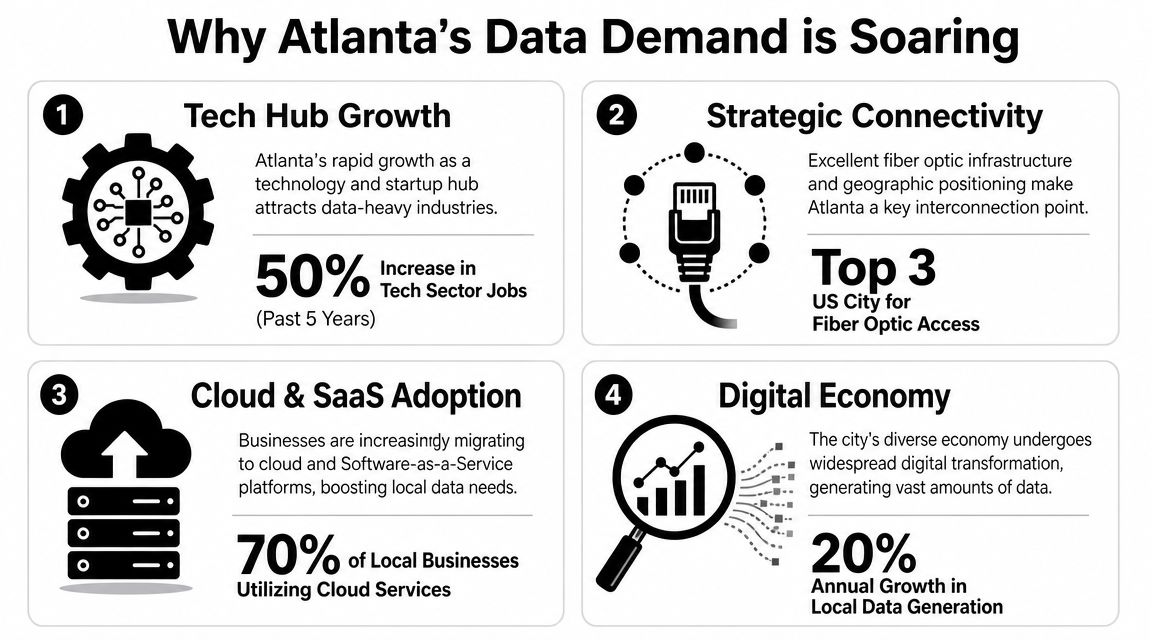
As noted earlier, market findings place Atlanta among the country's largest and fastest-growing data center hubs. That headline matters, but the bigger business story is what sits underneath it: more digital activity, more stored information, and, a little later, more retired hardware that has to be handled safely.
Enterprise activity is feeding the need for capacity
Atlanta's storage demand starts with the kind of economy the city has built. Large employers, regional headquarters, hospitals, universities, logistics networks, and public agencies all produce information every hour. They may work in different sectors, but they create the same infrastructure problem: data accumulates faster than many organizations expect.
A finance department keeps records for audit and retention purposes. A healthcare system stores imaging, patient data, and operating records. A logistics company captures route updates, scan events, warehouse activity, and delivery confirmations. A school district manages devices, student systems, files, and archives.
That mix matters because storage growth rarely comes from one dramatic system. It usually comes from hundreds of ordinary business processes that keep generating new files, backups, logs, and copies.
Market pressure is showing up in real infrastructure decisions
The local data center market confirms that this demand is not theoretical. As mentioned earlier, the CBRE market findings show that Atlanta finished 2025 with:
- 1,459.2 MW of total inventory
- 458.8 MW added year over year
- Second-largest U.S. data center market
- 456 MW of net absorption
- 2% vacancy at year-end
For a non-technical leader, those numbers are similar to watching warehouse space fill up during a shipping surge. Builders are adding capacity, customers are taking it quickly, and open space remains tight. In practical terms, that affects pricing, location options, deployment speed, and contingency planning.
It also changes the retirement cycle for equipment. When companies expand storage, add backup systems, or refresh infrastructure to keep up, older servers, drives, network gear, and employee devices do not disappear. They move into the end-of-life queue.
AI, analytics, and digital services are increasing the load
AI gets attention, but the broader shift is larger than AI alone. Analytics tools, automation platforms, video-heavy applications, connected devices, and customer-facing digital services all increase storage needs. Some workloads need more speed. Others need longer retention. Many need both.
Cloud adoption often confuses this discussion. Cloud does not remove the storage problem. It changes where the hardware sits and who operates part of it. Your company still has to decide what data to keep, how to protect it, when to archive it, and how to retire the devices that supported users, local systems, edge locations, and backups.
A useful way to frame it is this: data growth works like inventory growth in a physical business. More product moving through the system means more shelving, more tracking, and more outdated stock to clear out. In IT, that outdated stock is retired hardware, and it can carry both data security risk and disposal liability.
Atlanta's connectivity advantage keeps data close to business activity
Atlanta's role as a major connection point across the Southeast adds another layer. Businesses that depend on low latency, regional reach, and reliable network access often want infrastructure close to their operations, customers, or branch locations. That is one reason storage planning now overlaps with network planning.
Companies reviewing internet service providers in Atlanta often find that bandwidth decisions and storage decisions are tied together. More connectivity supports more digital services. More digital services create more stored data. More stored data leads, over time, to more hardware coming out of service.
That second-order effect is easy to miss. It should not be. In a fast-growing market like Atlanta, the rise in data volume is also the early signal of an e-waste surge, and smart businesses plan for both at the same time.
Mapping Local Data Storage and Infrastructure
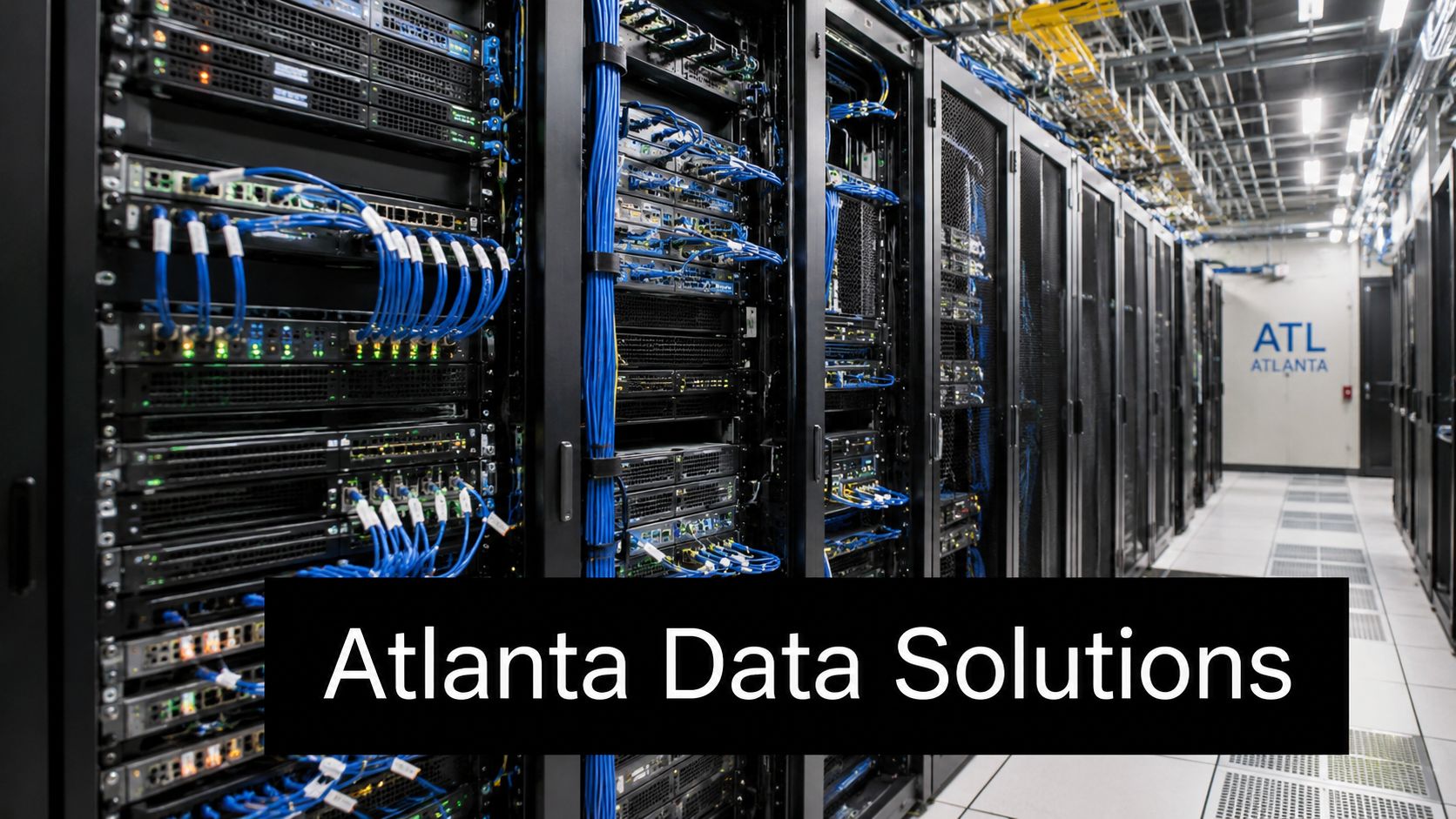
The phrase “data storage solution” can sound abstract. In practice, Atlanta businesses usually choose among three models. They keep data on-site, move it to cloud platforms, or split it across both in a hybrid design. The right answer depends on workload sensitivity, budget, uptime requirements, and how much control the organization wants.
On-premise, cloud, and hybrid mean different things
A lot of confusion starts here, so it helps to define them plainly.
| Storage approach | What it usually means | Where it fits |
|---|---|---|
| On-premise storage | Your company owns or directly manages the hardware in its own facility | Useful when control, local access, or specialized environments matter |
| Cloud storage | Data lives in infrastructure operated by a third-party provider | Useful for flexibility, remote access, and reducing in-house hardware burden |
| Hybrid storage | Some data stays local while other workloads move to cloud platforms | Useful when businesses need both control and scalability |
Many Atlanta organizations land in the hybrid middle. They may keep core systems, archived records, or sensitive workloads under tighter internal control while using cloud platforms for collaboration, backup, analytics, or overflow capacity.
What business leaders should evaluate first
A better storage decision starts with business questions, not hardware questions.
- Risk tolerance: If a system goes down, how disruptive is it?
- Data sensitivity: Are you storing regulated records, customer data, or internal IP?
- Growth pattern: Is your data footprint steady, seasonal, or hard to predict?
- Operational capacity: Does your internal team have the time to manage infrastructure well?
- Exit planning: When equipment ages out, who handles removal and secure retirement?
That last point gets missed often. A company may spend months selecting new storage architecture and almost no time planning for the decommissioning of the environment it replaces.
The physical buildout matters even if you never own a data center
Atlanta's wider infrastructure expansion affects local businesses whether they host their own racks or not. More facilities across the metro can improve access to colocation, cloud adjacency, disaster recovery options, and vendor diversity. It can also increase the pace of technology refresh cycles because service expectations rise alongside market capability.
Here's the practical takeaway. As local infrastructure improves, businesses often modernize in waves. They migrate old applications, consolidate storage, replace backup appliances, and retire equipment that no longer fits the newer environment.
Better storage infrastructure often creates more retired hardware, not less.
That's why facilities teams, IT leaders, compliance staff, and procurement managers need to coordinate. A storage project can trigger an office cleanout, network refresh, rack removal, media destruction process, and recycling event at the same time. Organizations facing that kind of transition often benefit from planning data center decommissioning in Atlanta, Georgia before the migration date is locked in.
The Hidden Consequence E-Waste and Security Risks
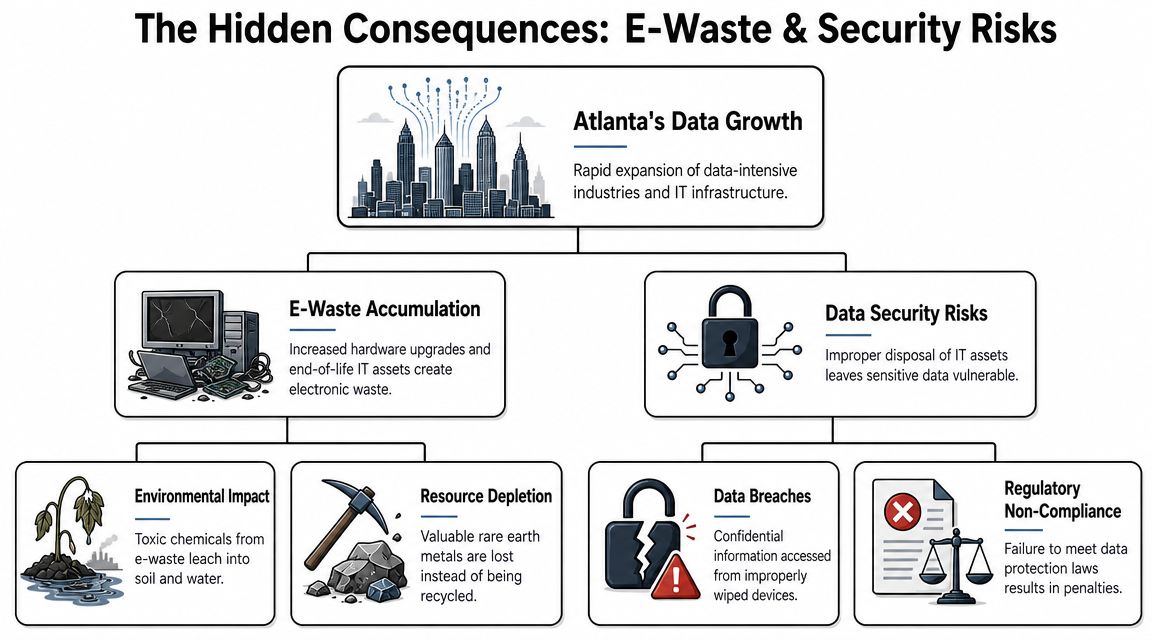
Most articles about Atlanta's digital growth focus on power, land, and construction. Those are real issues. But they're only half the picture. The less visible consequence is the expanding stream of retired hardware that follows every upgrade, migration, consolidation, and closure.
Growth in infrastructure also means growth in asset retirement
According to Government Technology's reporting on the Atlanta area data center market, metro Atlanta has been called the nation's hottest data-center market since 2023, with construction space roughly doubling every six months since mid-2023. The same reporting notes that this growth implies a large, recurring wave of server refreshes and end-of-life devices, yet most coverage stays focused on new builds rather than asset retirement, secure decommissioning, and e-waste.
That observation should matter to any organization with a server room, branch office, school lab, medical clinic, or warehouse network closet. Old equipment doesn't disappear when new capacity arrives. It piles up in back rooms, loading areas, storage cages, and surplus lists.
The risk isn't only environmental
Business leaders sometimes hear “electronics recycling” and think primarily about sustainability reporting. That's too narrow. Retired hardware creates at least three kinds of exposure.
- Data exposure: Hard drives, SSDs, backup media, laptops, and mobile devices may still contain sensitive information.
- Operational exposure: Untracked assets create confusion during audits, renewals, and incident response.
- Environmental exposure: Improper disposal can send recoverable materials into the waste stream and push hazardous components into the wrong channels.
A server that looks dead to an operations team can still be alive from a data-risk perspective. The same is true for employee laptops, external drives, copiers with storage components, firewall appliances, and network gear.
Old hardware is rarely empty hardware.
Why secure decommissioning gets delayed
Most organizations don't ignore this on purpose. They delay it because responsibility is fragmented. IT thinks facilities will remove the equipment. Facilities assumes IT has already wiped it. Finance cares about asset records. Compliance wants documentation. Nobody owns the whole chain.
That's where small mistakes become expensive mistakes. Devices may leave a site without documentation. Drives may be stored for months without a defined custody process. An office move may turn into a last-minute disposal scramble.
Common categories of overlooked devices
- Primary storage equipment: servers, storage arrays, rack units, and backup appliances
- End-user devices: laptops, desktops, tablets, and phones
- Peripheral systems: printers, copiers, scanners, and conference room gear
- Network hardware: switches, routers, firewalls, wireless controllers, and related gear
- Specialized equipment: lab systems, medical technology, and industrial devices with embedded storage
Why this matters in Atlanta now
Atlanta's growth increases the pace of replacement. More digital activity means more refresh cycles. More refresh cycles mean more hardware moving out of service. If your organization is expanding, consolidating, or migrating applications, the disposal question isn't a side issue. It's part of the project.
Companies that want to reduce risk should formalize chain of custody, data sanitization standards, approved downstream recycling practices, and reporting requirements before assets leave the building. Businesses reviewing why data security matters in safe IT equipment disposal in Atlanta usually discover the same lesson. Disposal is not the final housekeeping step. It is a security control.
Strategic ITAD for Atlanta Businesses
A stronger response to Atlanta's storage expansion starts with IT asset disposition, often shortened to ITAD. ITAD is the managed process for retiring technology in a way that protects data, captures reusable value where appropriate, and sends non-usable material into responsible recycling channels.
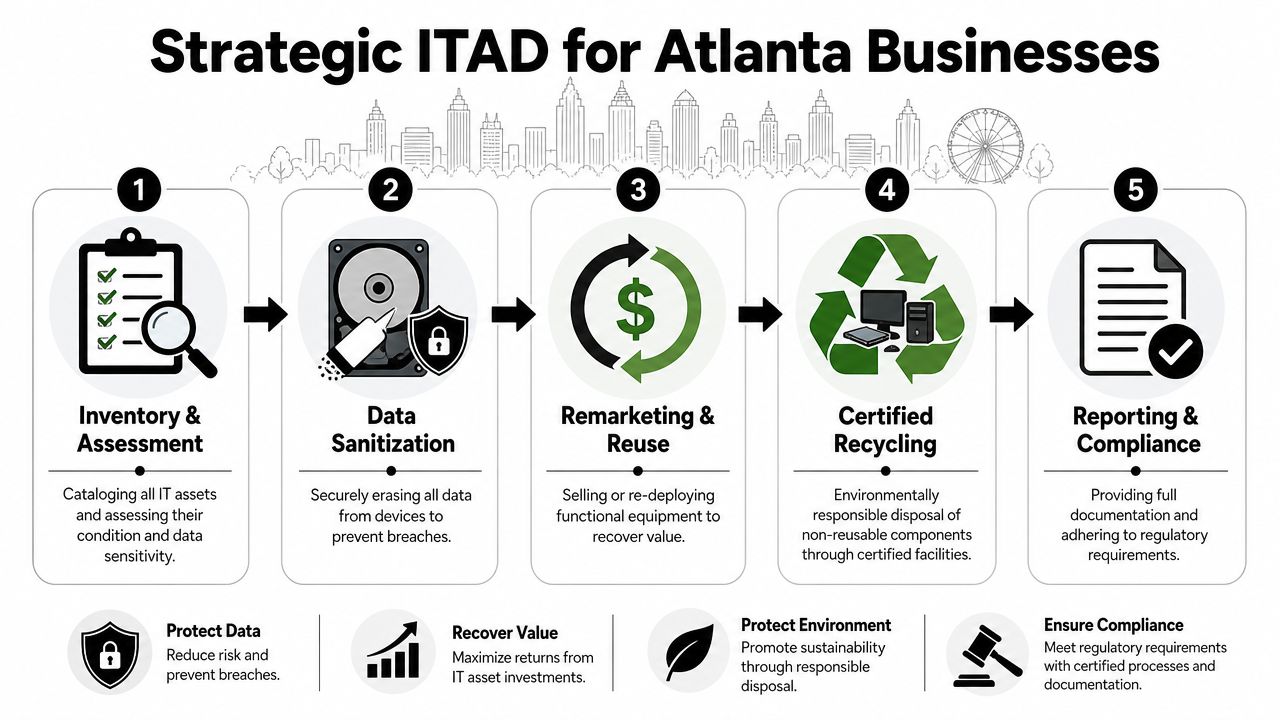
What a strategic process looks like
Good ITAD is not a truck arriving after a cleanout. It begins earlier, while equipment is still in service.
Inventory and classify assets
Teams should identify what's being retired, where it sits, what data it may contain, and whether it has resale, redeployment, donation, or recycling potential.Choose a data destruction method
Some assets are better suited to logical erasure. Others require physical destruction, such as hard drive shredding. The method should match the media type and the organization's risk profile.Separate reuse from scrap
Not every retired device is waste. Some equipment can be refurbished, remarketed, donated, or redeployed internally if policy allows.Document the chain of custody
This step matters during audits, internal reviews, and vendor management. If a device leaves your facility, you should know when, how, and under whose control.Get final reporting
Disposition records help prove that devices were processed according to policy and that data-bearing assets were handled correctly.
Decision guide: The earlier you build ITAD into your refresh plan, the less likely you are to end up with unsecured equipment sitting in storage.
Different organizations need different approaches
An Atlanta manufacturer with warehouse scanners and shop-floor systems won't retire assets the same way a medical office, law firm, school district, or regional enterprise does. The process should match the environment.
For small and mid-sized businesses
SMBs often need simplicity more than scale. They benefit from a scheduled pickup, a clear inventory process, secure data destruction for laptops and drives, and help handling an office cleanout without disrupting daily operations.
For enterprise IT teams
Larger organizations usually need more coordination. They may be retiring racks, network gear, storage appliances, backup units, and devices across several sites at once. In those cases, decommissioning planning, serial tracking, chain of custody, and standardized reporting become much more important.
For schools, agencies, and mission-driven organizations
Donation pathways can be part of the plan when devices are suitable for reuse and policy permits it. That shifts the conversation from disposal only to community benefit as well, especially when a social enterprise model supports digital inclusion.
Repair, reuse, and disposal should work together
A mature IT lifecycle strategy doesn't jump straight to recycling every time. It asks whether a device can be maintained longer, redeployed internally, repaired for secondary use, or donated after secure sanitization. For teams trying to reduce unnecessary waste before assets reach end-of-life, these practical device repair tips offer a useful companion perspective.
That said, many assets do reach a point where retention no longer makes sense. They may be incompatible with current security needs, too costly to support, or no longer fit for business use. That's when a formal ITAD partner becomes useful.
One local option is IT asset disposition services in Atlanta for corporate IT teams. Reworx Recycling handles electronics recycling, secure data destruction, equipment decommissioning, and donation-based recycling programs that can support both compliance and community reuse goals.
What business leaders should ask before choosing a partner
Use these questions to separate a basic hauling vendor from a true ITAD process:
- How is data-bearing media handled? Ask whether the vendor offers data erasure, shredding, or other documented destruction methods.
- What reporting will you receive? You need records that support internal controls and compliance reviews.
- Can they manage pickups and decommissioning logistics? This matters for office moves, server room refreshes, and facility cleanouts.
- Is there a reuse or donation pathway? That can support sustainability and corporate donation programs when equipment qualifies.
- How do they manage non-reusable materials? Responsible downstream recycling practices matter.
A strategic ITAD plan protects more than old equipment. It protects your brand, your customer information, your internal controls, and your sustainability commitments.
Partnering for Responsible Growth
Atlanta's digital expansion creates opportunity, but it also creates responsibility. The businesses that handle this well won't treat storage as a single purchasing decision. They'll manage the whole technology lifecycle, from deployment to retirement.
That approach reduces risk in practical ways. It lowers the chance that sensitive data stays on forgotten devices. It keeps retired equipment out of hallways, closets, and dumpsters. It gives sustainability leaders a clearer path for electronics recycling and reuse. It also helps finance, facilities, and IT work from the same playbook instead of reacting at the last minute.
For many organizations, the most useful shift is conceptual. Old technology isn't just clutter. It's an asset stream that needs governance. Some devices can support donation-based recycling or reuse. Others need certified recycling and secure data destruction. All of them need a plan.
When companies align growth with responsible IT asset disposition, Atlanta's technology boom becomes easier to manage and easier to trust.
If your business is upgrading systems, clearing out surplus devices, or planning a larger decommissioning project, Reworx Recycling offers a practical next step. You can explore donation-based recycling options, schedule a pickup, or start a conversation about secure data destruction, electronics recycling, computer recycling, office cleanout support, and broader IT equipment disposal needs across the Atlanta area.


















