Your company phones are due for refresh, the security team wants clean decommissions, finance wants to recover value, and sustainability wants fewer devices heading to the wrong place. At the same time, those same phones have spent months or years feeding taps, sessions, identifiers, and background signals into app analytics systems. That's why mobile app tracking belongs in the same conversation as MDM, asset retirement, and secure disposal.
For IT managers and asset owners, the issue isn't just what an app can see. It's also what a fleet of devices, SDKs, identifiers, and analytics platforms can still reveal after a phone leaves active service. Once you see tracking as part of the device lifecycle, the compliance questions get clearer, and so do the end-of-life decisions.
When Tracking Quietly Shapes an IT Refresh Cycle
A refresh cycle usually looks orderly on paper. A fleet of iPhones or Android tablets gets inventoried, the MDM console flags which ones are due, and the business lines start asking which devices can be reassigned, wiped, or retired. Then the questions get harder, because each device has spent its working life generating app telemetry for marketing, support, and product teams, often without the IT team seeing the whole picture.
That's the tension most managers live with now. The device itself is an asset, but it's also a conduit for identifiers, location signals, and behavioral data that may still sit in vendor systems long after the hardware leaves the office. Apple's App Tracking Transparency framework, introduced in 2021, changed that balance on iPhone by requiring permission before tracking across apps and websites, and by Q1 2025 the global ATT opt-in rate had risen to 35%, up from 32% on average in 2024, according to the Adjust and AppLovin report in the verified data. The point for IT is simple, because a substantial share of users still allow tracking, but nearly two-thirds remain unavailable for traditional cross-app tracking on iOS, which makes device retirement and data governance part of the same operational picture (Adjust x AppLovin mobile app trends 2025).
Why asset managers should care
When a phone is reassigned, it's not only the local device state that matters. You also need to know which apps collected what, which accounts remain linked, and which vendor systems have copies of the event stream. That's the same logic behind Reworx Recycling's IT asset disposition services, because disposition is as much about information control as it is about moving hardware out the door.
Practical rule: if a device touched customer data, employee data, or location-aware apps, treat it like a data object first and a piece of hardware second.
That mindset helps when security, procurement, and sustainability all want something different from the same refresh list. One team wants risk reduction, one wants reuse, and one wants a better environmental outcome. Mobile app tracking sits in the middle of those demands because it influences what was collected, how long it may remain useful, and how much confidence you can have in a wipe, a reassignment, or a recycling handoff.
How Mobile App Tracking Actually Works on a Device
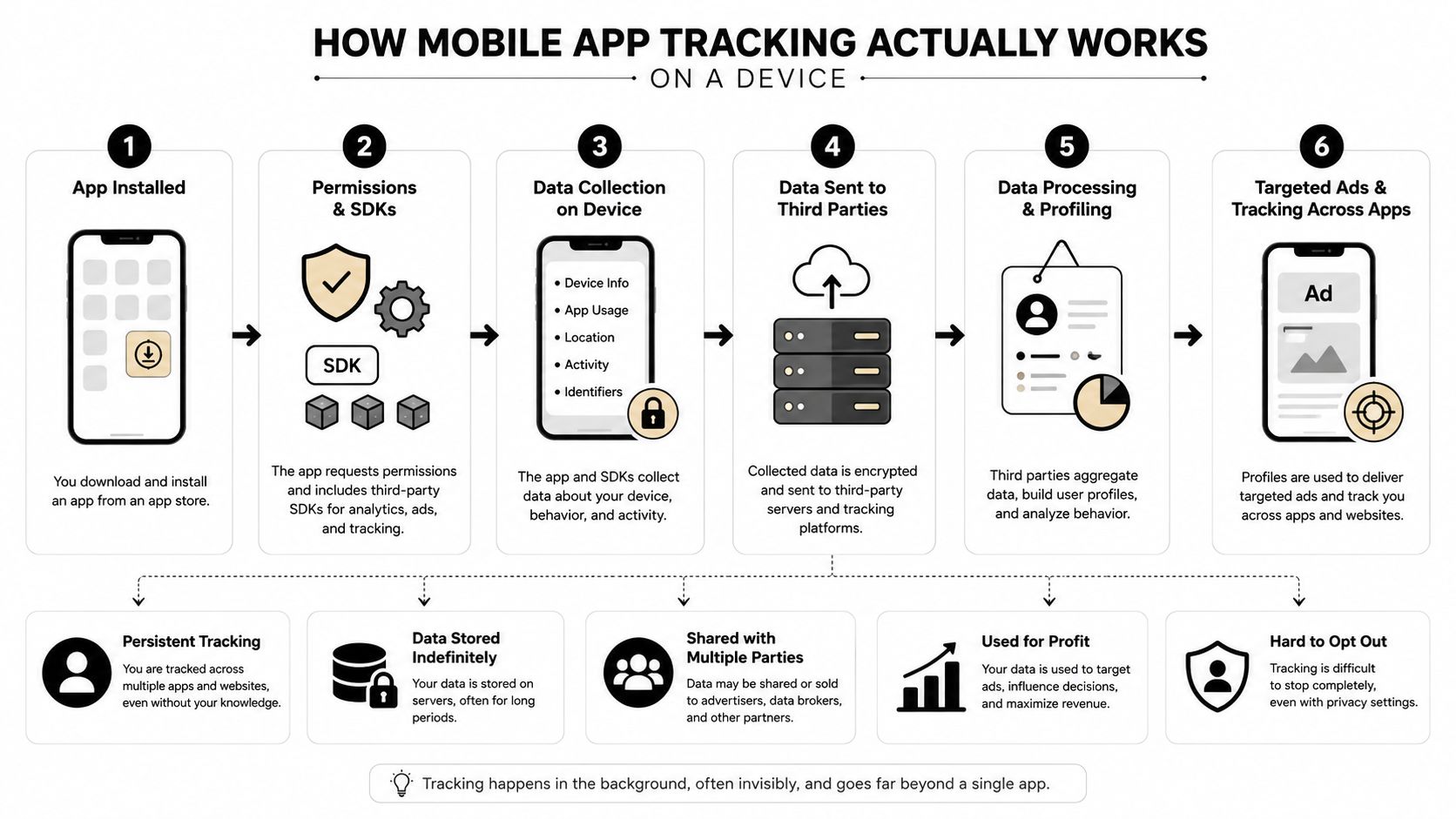
Mobile app tracking is easiest to understand if you think of the app as a building full of small sensors. The SDK is the wiring behind the walls, the event stream is the logbook at the front desk, and the analytics platform is the room where the logs get sorted into dashboards. On iOS, Android, React Native, and Flutter, the SDK embedded in the app captures lifecycle and interaction events, batches them, retries offline sessions over HTTPS, and then enriches and deduplicates the data before dashboards, funnels, session replays, and heatmaps ever appear (UXCam on mobile app tracking tools).
The basic pipeline
The first step is collection. The SDK listens for taps, screen views, purchases, crashes, and other defined events, then packages them into batches so the app doesn't have to send every interaction one by one. The second step is transport. Those batches travel over HTTPS to a backend, where they can be enriched with metadata and matched against existing user or device records.
The third step is cleanup. Deduplication matters because mobile networks aren't always stable, and retries can produce duplicate events if the system isn't designed carefully. Weak batching or sloppy retry logic can undercount conversions, overcount sessions, or make drop-off look worse than it really is. That's why data quality on mobile is an engineering problem before it becomes an analytics problem.
What goes wrong when the plumbing is weak
A dashboard can look polished and still be misleading. If the SDK misses offline sessions, the app may appear healthier than it is in the field. If it duplicates events after reconnecting, your funnel may show artificial friction that sends product teams in the wrong direction.
A good mobile tracking stack doesn't just collect more data, it preserves the meaning of the data while it moves from the device to the server.
For non-developers, that's the key idea. The SDK is the collector on the device, the analytics server is the processing layer, and the dashboard is only as trustworthy as the event design and transport rules underneath it. That's why any conversation about mobile app tracking should start with mechanics, not with ad reports.
Identifiers, MDM, Location, and Analytics Platforms
A device can be watched by several systems at once, and each one sees a different layer of the same story. Apple's ATT controls whether an app can track users across other companies' apps and websites on iOS, while Apple defines tracking as linking app data with data from other companies' apps, websites, or offline properties for advertising or measurement, including sharing with data brokers. On Android, the advertising ID serves a similar role as a device-level advertising signal. The California privacy agency notes that mobile apps typically use a mobile advertising ID, or MAID, instead of website cookies, and may pair it with precise location and other personal information before selling or sharing it (Apple user privacy and data use, California privacy agency guidance).
Four collection channels, four different controls
An MDM agent is not the same thing as an analytics SDK. One reports whether the device meets policy, which apps are installed, and whether the phone is healthy enough for work use. The other records behavior inside the app, such as screens, taps, and conversions. Location services form a third channel, because they can support app behavior, incident response, or workforce coordination depending on the app and policy. Analytics platforms sit above those layers and turn raw events into attribution, retention, and usage views.
| Channel | Owner | Example Identifier or Signal | Typical Policy Lever |
|---|---|---|---|
| App tracking framework | Operating system | IDFA on iOS, advertising ID on Android | User consent, OS privacy settings |
| MDM agent | Employer or managed service | Device compliance, app inventory, posture data | Enrollment policy, profile restrictions |
| Location services | Device and app | Precise location, geofenced events | App permission, location policy |
| Analytics SDK | App vendor or business | Screens, taps, sessions, conversions | SDK configuration, event schema |
| Corporate identity layer | Enterprise IT | User account, asset tag, device ownership | Joiner-mover-leaver controls |
That table matters because each channel answers a different question. MDM tells you whether the device is under control. The SDK tells you what happened inside the app. The OS identifier links advertising behavior to a device or user, if permission exists. Turning off one channel does not shut down the others.
Why the policy boundaries matter
Teams often treat “tracking” as one bucket, then get surprised when the controls do not line up. A privacy setting can stop one path and leave another open. An MDM restriction can limit app behavior without touching the analytics layer. A location permission can be denied while the app still reports screen activity and device posture.
Reworx Recycling's device lifecycle management resource fits here because device management, app management, and end-of-life handling all depend on the same inventory discipline. If IT does not know which device carries which identifier, it is harder to decide what to retain, what to revoke, and what must be destroyed before a device leaves service.
The practical takeaway is simple. Some streams can be disabled with consent settings. Others can only be observed, restricted, or replaced through vendor contracts and MDM policy. Once you separate those channels, vendor discussions get clearer and compliance reviews become much easier to explain.
Designing Event Schemas and Device Context That Hold Up
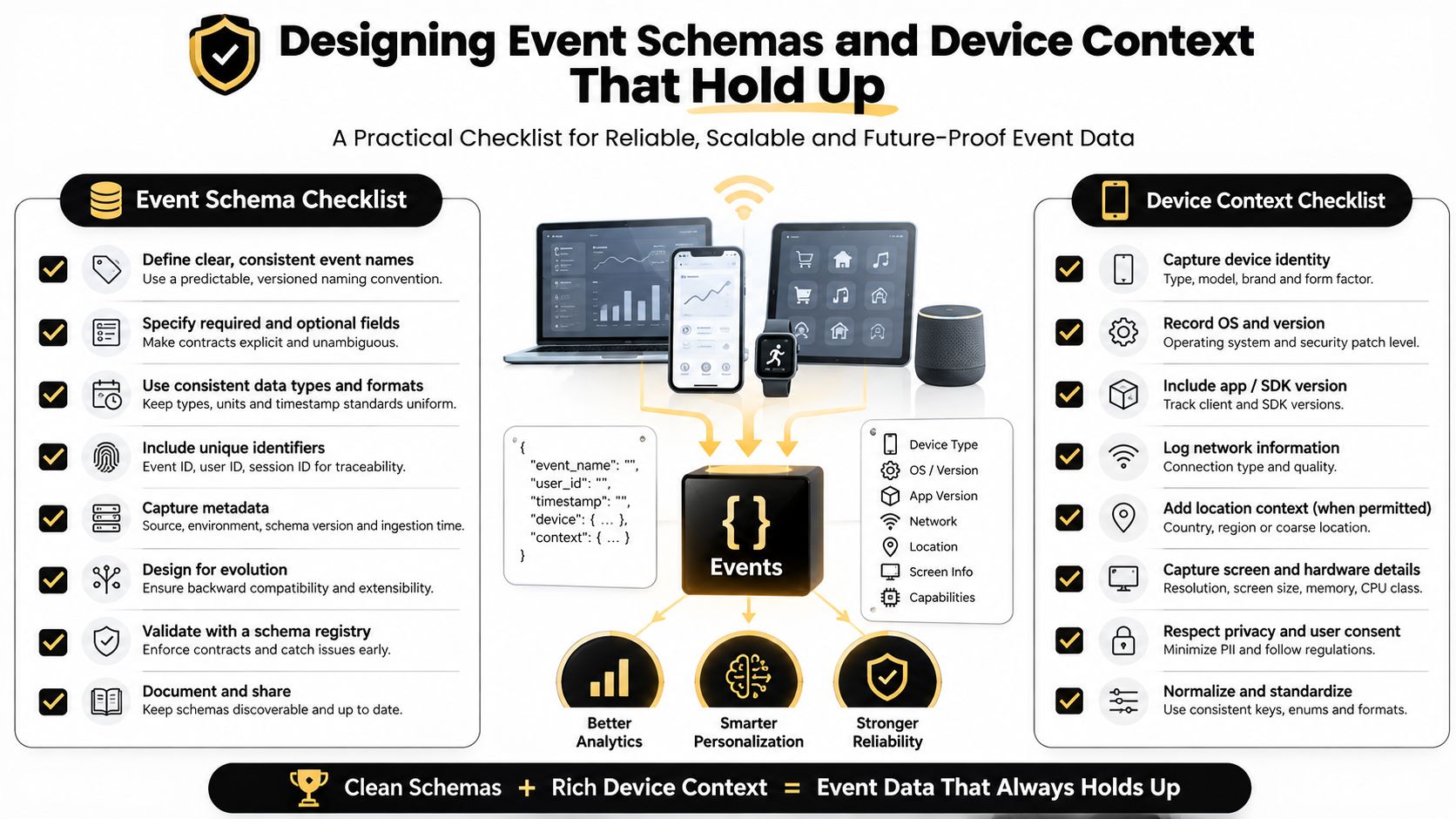
Most tracking failures start with bad event design, not bad dashboards. If one team calls a purchase order_complete, another calls it checkout_success, and a third records it only when the backend finishes processing, the analytics layer can't clean up the confusion for you. Consistent naming, versioning, and clear definitions are what make mobile app tracking usable across product, support, and IT.
What device context should travel with the event
Snowplow's mobile tracker context shows why context matters, because it can record OS type and version, radio technology, memory, battery level or state, low-power mode, storage, and orientation, with some fields available only on one platform, such as IDFA on iOS and Android advertising ID on Android (Snowplow mobile tracker context). That matters because a crash on a low-memory device is a different problem from a crash caused by a broken screen flow.
A strong schema usually includes:
- Event name and version, so teams know whether they're looking at the current definition or an older one.
- Screen or feature context, so a tap has meaning instead of being a floating number.
- Device state fields, such as memory, battery, and connectivity, so performance issues can be tied to conditions.
- Ownership context, such as managed device or BYOD, so IT knows which policy bucket applies.
- Identifier context, so privacy and consent rules can be mapped before the data is exported.
Why context beats raw counts
If the help desk sees repeated abandonment on a screen, the first question shouldn't be “how many?” It should be “under what conditions?” A slow screen on a weak radio connection points to a network or app optimization issue. The same screen failing only when battery is low may point to power-management behavior or a background process conflict.
Useful habit: log the device state you'd want to know if you had to explain the failure to an executive or a regulator.
The asset tagging system guidance is relevant here because event schema discipline and physical asset discipline solve the same problem, which is knowing exactly what object you're dealing with. If the event model is messy, your conclusions will be messy too. If the event model includes context, the team can separate user friction from device-environment issues much faster.
Where Tracking Data Touches Real Business Decisions
Once the event stream is reliable, the data stops being a marketing artifact and becomes a cross-functional input. Marketing looks at attribution and campaign quality. Product looks at funnel friction and feature adoption. Support looks at repeated error paths or crash clusters. IT looks at device compatibility, refresh timing, and how much risk is attached to a given population of hardware.
A single SDK can feed all of those decisions, but each team asks something different. Marketing wants to know whether a campaign brought in qualified users. Product wants to know which screens keep people moving. Support wants to know what happened before a ticket was filed. IT wants to know whether the issue is tied to an OS version, a managed profile, or a device class that should be retired sooner.
The same data, different consequences
That's why poor tracking has a ripple effect. If event names are inconsistent, marketing can misread attribution. If crash events aren't paired with context, product can prioritize the wrong fix. If device ownership isn't tied back to the asset register, IT may miss a pattern that should inform the next refresh cycle.
The verified data shows why this matters at scale. In 2025, Adjust reported that global app installs increased 10% year over year and sessions rose 7%, while e-commerce apps specifically saw installs grow 17% and sessions increase 13% in 2024 (Adjust mobile app use grew globally in 2025). Sensor Tower reporting cited in the same industry coverage estimated 5.3 trillion hours spent in mobile apps in 2025, or about 3.6 hours per day per user, and $167 billion in global app monetization in 2025. Those figures show why app telemetry has become a core operating input, not a niche analytics feed.
Planning by lifecycle, not by silo
The business mistake is to treat these outputs as belonging to one department. In reality, the app tells a story about customer behavior, device health, and field conditions at the same time. That's especially useful when a managed fleet is nearing replacement, because the same telemetry that flags a poor user experience can also reveal whether the hardware itself is aging out.
The result is a better refresh plan. IT can prioritize devices that consistently underperform, operations can schedule decommissioning with fewer surprises, and leadership can see app telemetry as part of lifecycle planning instead of an isolated digital metric.
Hidden Risks Beyond the Permissions Screen
Most privacy guidance stops at the app permission dialog, but that's only the front door. Research and security guidance show that Android sensors can infer routes and whereabouts without GPS, and enterprise-focused advice warns that location-tracking SDKs and advertising components can create real surveillance and compliance risk. The exposure isn't just whether a user granted location permission, it's whether motion sensors, background activity, or embedded third-party code can still reconstruct behavior anyway (Computer research on sensor inference and mobile privacy).
What can still leak from a managed fleet
A company-issued tablet with GPS turned off can still carry motion sensors, radios, and vendor SDKs that continue to emit useful signals. A vendor-supplied app may also inherit permissions you never meant to grant broadly, which is why “location disabled” doesn't always mean “behavior fully hidden.” In a fleet environment, those edge cases matter because one misconfigured app can affect many users at once.
Permissions reduce exposure, but they don't erase the data trails already created by background telemetry.
That's why the app list on a managed device deserves the same attention as the permission screen. If the code is talking to ad networks, analytics vendors, or embedded service providers, the privacy question shifts from a single setting to the whole vendor chain. The data breach prevention resource fits here because telemetry risks and breach risks often travel through the same weak points.
Regulations IT Teams Cannot Ignore
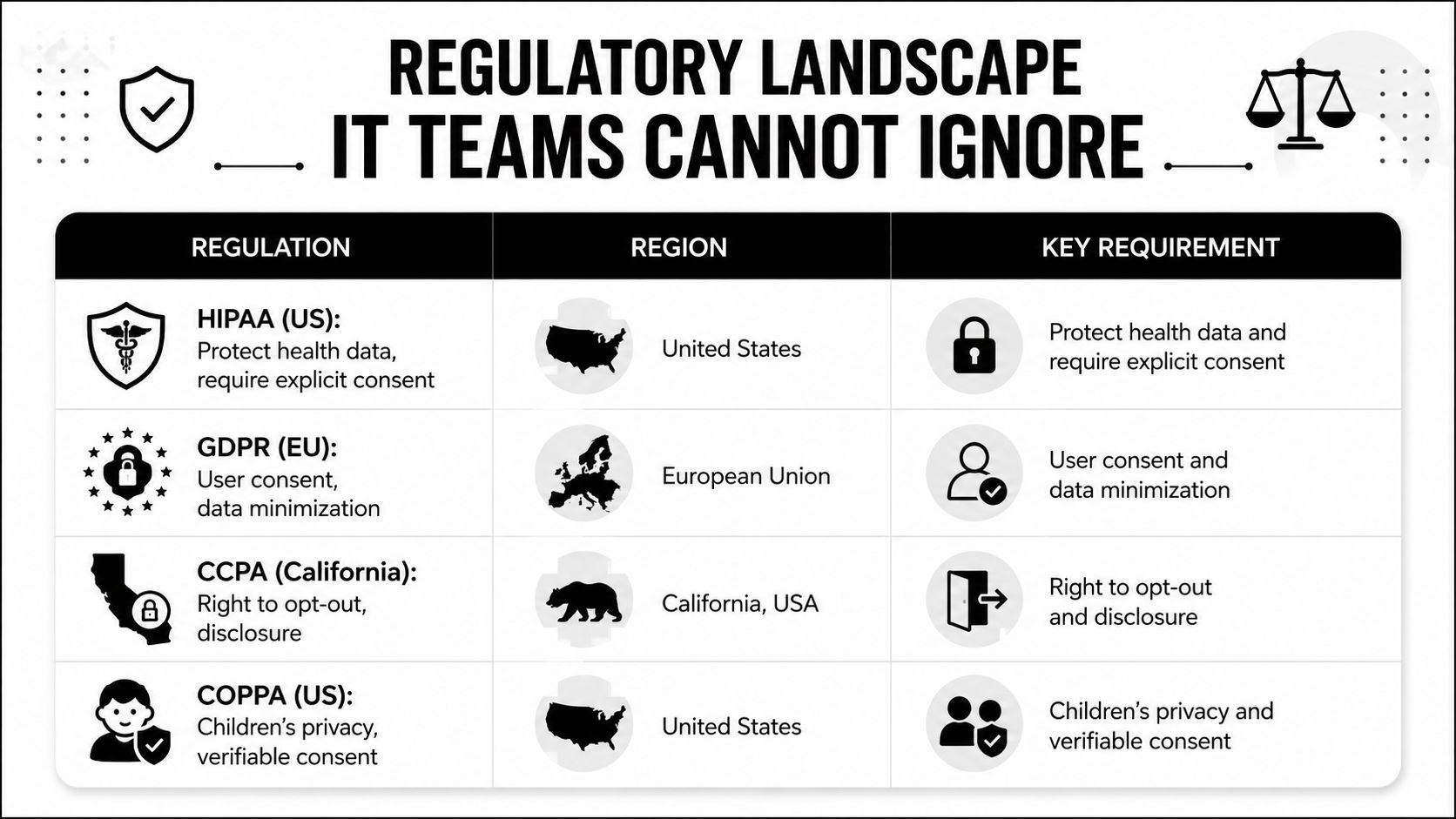
Mobile app tracking sits inside several legal regimes at once, and the overlap is usually where IT teams feel the most pressure. The U.S. HHS says tracking technologies on unauthenticated webpages are not regulated by HIPAA when they do not access PHI, but once they do access PHI, the HIPAA Rules apply to the regulated entity's use and any disclosures to tracking vendors. HHS also says mobile apps offered by regulated entities often collect device identifiers, geolocation, advertising IDs, and other user-entered data that generally count as PHI (HHS HIPAA online tracking guidance).
The practical legal map
The EU ePrivacy Directive Article 5(3) generally requires consent for third-party tracking because it involves accessing or storing data that is not strictly necessary for the app or service to function on the device. A related analysis also notes that starting with iOS 14.5 in April 2021, Apple made explicit permission mandatory for app tracking, and declining permission blocks access to IDFA (EU and mobile tracking analysis).
California adds another layer. As noted earlier in the article, the state privacy agency says mobile apps typically use MAIDs, and app developers may pair MAID-linked data with precise location and other personal information before selling or sharing it with third parties. That turns mobile tracking into a compliance issue for consumer apps and for any business that handles personal data through a mobile interface.
For teams that need a shared vocabulary before they turn legal language into operating policy, the GDPR compliance glossary can help legal and technical reviewers use the same terms. The main lesson is straightforward. One SDK can trigger several obligations, like a single sensor feed lighting up different dashboards at once, so policy review needs to happen before deployment, not after a complaint.
Closing the Loop on Lifecycle and End-of-Life Devices
A phone that's leaving service should go through a controlled sequence. The asset tag gets matched to the inventory record, the user account is detached, the device is wiped, and the team verifies what was backed up, what was destroyed, and what remains for audit. That process matters because a managed mobile device can hold identifiers, cached session data, local tokens, and app traces even after the screen is dark.
The end-of-life IT equipment guidance is the right lens for this final step because disposition is where privacy and sustainability meet. If a device is going to be reused, the wipe standard has to be stronger than a casual factory reset. If it's going to be recycled, the chain of custody has to preserve both data security and environmental responsibility.
For organizations that want a practical, responsible handoff, Reworx Recycling provides donation-based electronics recycling, IT equipment disposal, and secure hard drive shredding with data destruction so retired hardware can leave the building without leaving risk behind. That combination fits the reality of mobile app tracking, because the same devices that collected sensitive telemetry during their working life shouldn't become a loose end at retirement.
If your team is planning a device refresh, office cleanout, or secure data destruction project, Reworx Recycling can help you retire equipment responsibly and keep sensitive data out of the wrong hands. Visit Reworx Recycling to explore pickup options, disposal guidance, and donation-based recycling support for your next IT lifecycle project.