The refurbished laptop market is already too large to dismiss as a side channel. One market report estimates the global refurbished laptop market reached $8.16 billion in 2025 and is projected to reach $10.78 billion by 2030, with North America as the largest region in 2025, driven in part by efforts to mitigate e-waste and expand access to affordable technology, according to The Business Research Company's refurbished laptop market report.
That matters because refurbished corporate laptops aren't just a finance play anymore. They sit at the intersection of procurement discipline, lifecycle planning, endpoint standardization, and end-of-life recovery. If you treat them like random bargain buys, you'll create support noise. If you treat them like a managed asset class, they can give your organization more flexibility across refresh cycles, temporary staffing, branch rollouts, training labs, and donation programs.
Why Refurbished Laptops Are a Strategic Priority Now
The old view of refurbished laptops was simple. Buy older hardware cheap, accept some compromises, and use it where budgets are tight. That view is outdated.
Procurement teams now have to balance at least three pressures at once. They need to control spend, reduce avoidable waste, and keep enough device inventory moving to support real operations. Refurbished corporate laptops fit that mix when they're selected intentionally and folded into a broader green IT strategy.
Why the category has moved into the mainstream
Refurbished is no longer a fringe resale market. It's become a scaled channel with enough volume to support repeatable purchasing, especially for standard business lines such as Dell Latitude, HP EliteBook, and Lenovo ThinkPad.
That shift changes how IT leaders should think about supply planning. A refurbished program can fill specific gaps that new-device procurement doesn't always solve cleanly:
- Bridge refresh timing: Useful when budget timing and deployment timing don't line up.
- Support role-based fleets: Good for call centers, task workers, field teams, interns, and loaner pools.
- Reduce disposal waste: Extends useful life before final recycling or remarketing.
- Build contingency stock: Helps when an organization needs ready-to-deploy backup devices.
Practical rule: Don't buy refurbished to save money alone. Buy refurbished when the device role, support model, and remaining lifecycle all make sense together.
Where teams get real value
The strategic value comes from control, not novelty. Mature teams use refurbished corporate laptops where standardization is possible and hardware variability won't disrupt support.
Good candidates usually include:
| Use case | Why refurbished works |
|---|---|
| Loaner fleets | Fast replacement matters more than pristine cosmetics |
| Hybrid work spares | Keeps extra stock available without tying up as much capital |
| Training rooms | Performance needs are predictable |
| Non-executive office roles | Enterprise hardware often remains more than capable |
| Donation or redeployment pipelines | Supports social impact and asset recovery goals |
The strongest programs start with policy. Decide which user groups can receive refurbished hardware, what technical floor is acceptable, and when a device should be redeployed versus retired. Without those rules, organizations drift into one-off purchases that are harder to image, support, and track.
Decoding the Language of Refurbished Laptops
One reason buyers get burned is simple. Sellers use overlapping terms, and those terms don't always mean the same thing from one listing to the next.
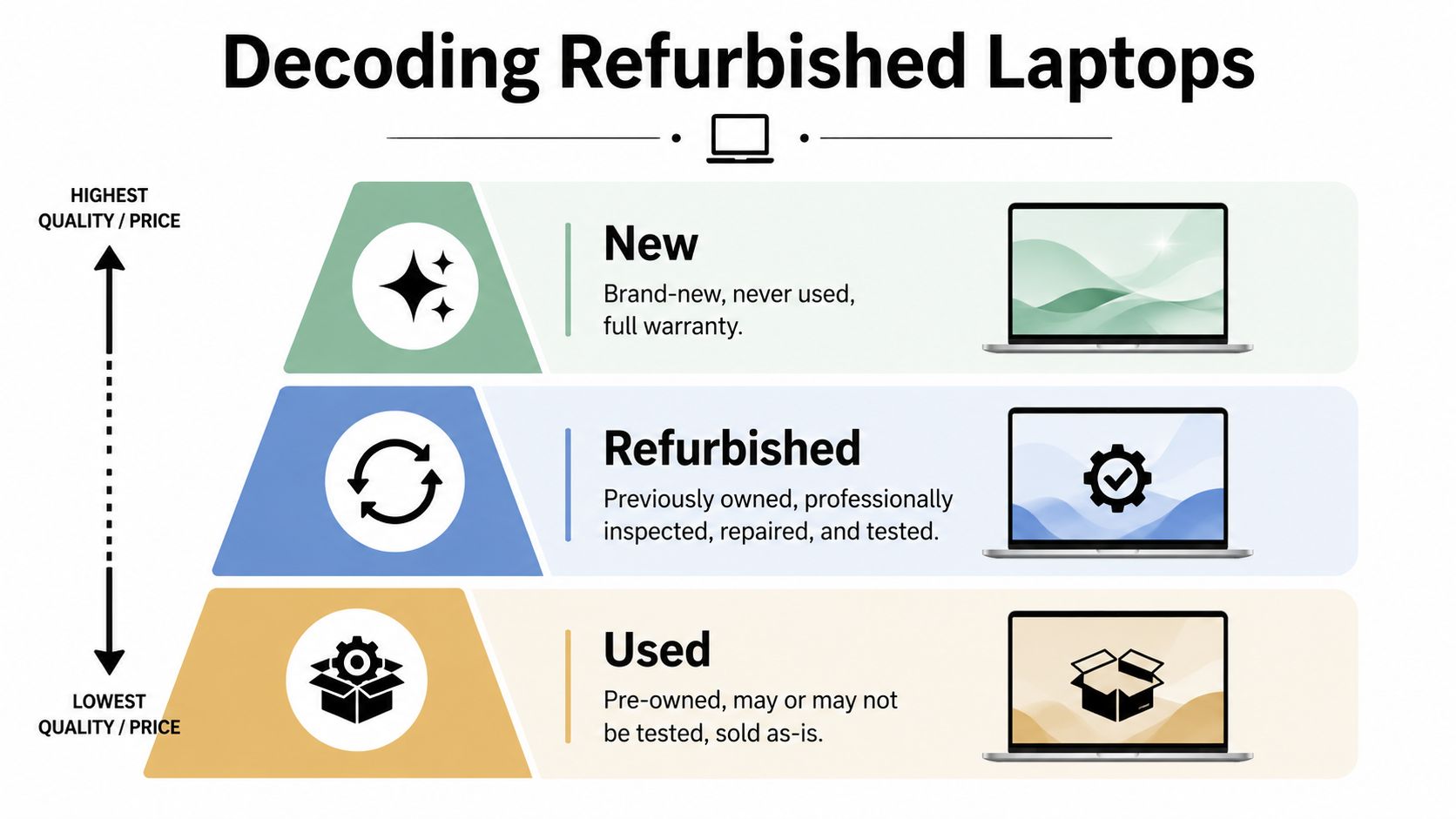
In practical terms, think of the market as three lanes: new, refurbished, and used. That distinction matters because support expectations, cosmetic condition, and failure risk all change depending on which lane you're in.
Used versus refurbished versus recertified
A used laptop is just that. It has had a prior owner and may or may not have gone through any meaningful testing. Some sellers wipe it, power it on, and ship it. For corporate buying, that's usually too loose unless the units are headed for parts recovery or low-stakes internal use.
A refurbished laptop should mean the device has been inspected, tested, cleaned, repaired as needed, and restored to a defined sale condition. In the business market, that often includes battery checks, keyboard and port inspection, drive replacement, memory upgrades, and OS installation.
A manufacturer-recertified or similarly described unit usually implies the OEM or an authorized channel has applied a more standardized process. That doesn't automatically make every offering better, but it often means tighter documentation and more consistent grading.
The reason this matters is scale. The broader refurbished computers and laptops market is established enough that HP, Dell Technologies, Apple, Lenovo, and Microsoft collectively held 16% market share in 2025, according to GM Insights' refurbished computers and laptop market analysis. That's one reason procurement teams should evaluate the category through formal IT asset disposition guidance rather than through the lens of consumer resale sites.
What grading usually means in practice
Grading is where buyers need to slow down. Cosmetic grades are often clear enough on paper but can hide support implications.
- Grade A: Best fit for office deployment. Expect minimal cosmetic wear and no functional issues.
- Grade B: Usually acceptable for back-office users, loaners, and shared devices. Expect visible wear, but not broken function.
- Grade C: Better suited to low-priority use, parts, or niche internal deployments where appearance matters less and support tolerance is higher.
A good vendor tells you two things separately: cosmetic grade and functional status. If those are blended into one vague description, ask more questions.
Terms that should trigger a follow-up
Some listing language sounds reassuring but doesn't tell you enough. Watch for broad phrases such as:
- “Tested working” without any mention of which components were tested
- “May show signs of wear” with no grade definition
- “Battery holds charge” without any stated minimum standard
- “Refreshed” when there's no explanation of the refurbishment process
A procurement manager doesn't need perfect cosmetics. They do need clarity. Clear grading, documented testing, and consistent configurations are what separate an operationally useful refurbished fleet from a pile of one-off laptops.
The Business Case Benefits Risks and Mitigation
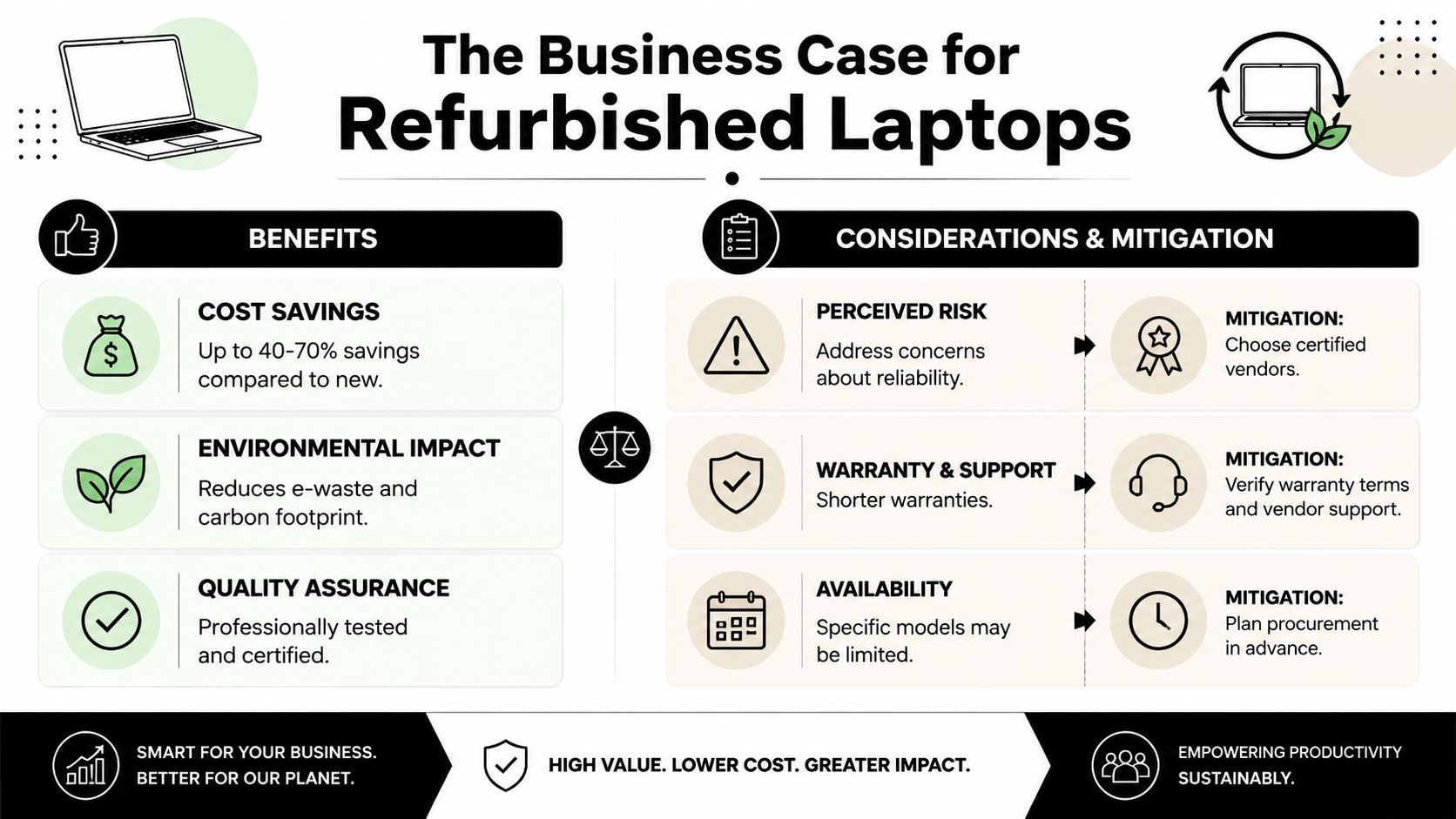
The financial case is straightforward on the surface. Refurbished corporate laptops often come in at 40% to 70% lower pricing than new, and many refurbishers replace old HDDs with SSDs or add RAM during restoration, which can improve practical performance compared with the original factory configuration, as described in Rugged Books' overview of refurbished business computers.
That upside is real. So are the failure points.
Where refurbished programs work well
The savings matter most when the organization also gets predictable deployment. Refurbished hardware works best when teams buy in batches, standardize images, and keep approved model lists narrow.
The environmental angle matters too, especially for organizations trying to extend hardware life before final disposition. But in day-to-day IT, the operational benefits usually decide whether the program survives.
Three common wins stand out:
- Lower acquisition cost: Helpful for secondary fleets, seasonal hires, and growth without immediate premium hardware spend.
- Enterprise-class build quality: Business laptops are generally more serviceable than consumer devices.
- Upgrade potential: SSD and RAM improvements can make older systems feel more responsive in routine office use.
Where teams get into trouble
Most problems don't come from the concept of refurbished hardware. They come from weak process control.
Here's where programs usually break down:
| Risk area | What goes wrong | How to mitigate it |
|---|---|---|
| Data security | Prior-user data handling is unclear | Require documented sanitization and chain of custody |
| Reliability | Mixed-quality lots create ticket volume | Pilot with a limited batch before broad rollout |
| Warranty support | Return terms are thin or inconsistent | Verify support path, warranty scope, and turnaround expectations |
| Fleet consistency | Too many different models enter the environment | Limit purchasing to approved families and specs |
| Inventory continuity | The same model isn't always available later | Forecast needs earlier and allow substitute model bands |
Buy refurbished hardware with the same discipline you'd use for a new-device standard. If the seller can't explain testing, warranty, and sanitization clearly, move on.
What does not work
Ad hoc purchasing from multiple small sellers usually creates avoidable overhead. So does buying by cosmetic grade alone. A clean chassis doesn't tell you much about battery condition, webcam function, thermal behavior, or motherboard history.
Another common mistake is using refurbished laptops as a dumping ground for every exception request. Once every department buys a different model “because it was a deal,” support has less control. The business case only holds when procurement and endpoint management stay aligned.
A Smart Procurement Checklist for Buyers
Procurement sets the economics of the whole program. A weak buy creates years of avoidable support work, battery complaints, and replacement churn. A disciplined buy gives you a device that fits your standard build, holds up in service, and still has a clean path into redeployment or retirement later.
A practical baseline has also changed. Current business buyers should screen for refurbished laptops with enough memory, fast solid-state storage, and processor generations that will stay compatible with current security and management requirements, as outlined in Computer Deals Direct's guidance on refurbished business laptop specs.
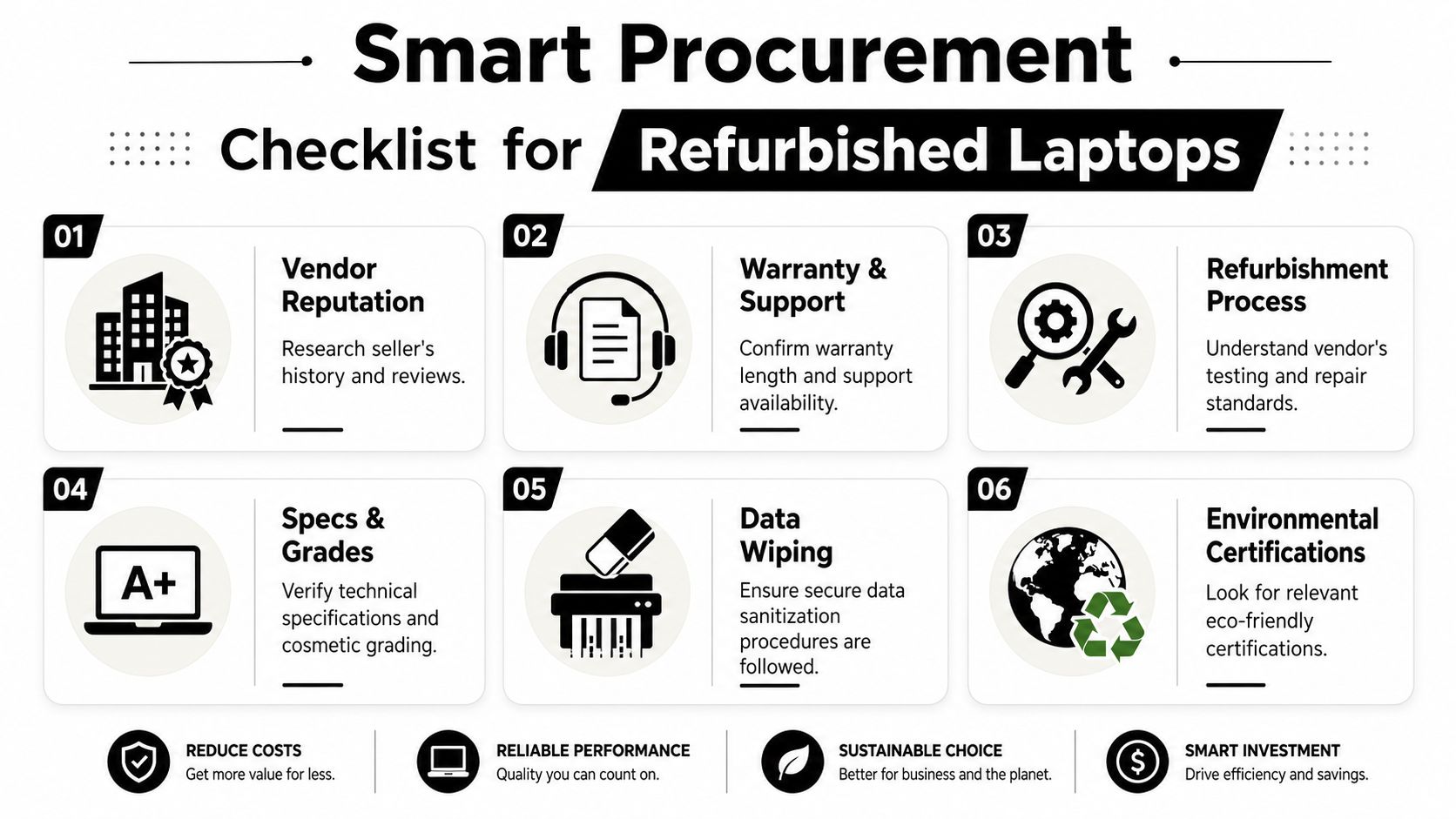
Start with your operating standard
Price only matters after the device clears your technical floor.
Use these checks before you approve any model family:
- Set memory by workload. For standard office users running browsers, Teams or Zoom, Office apps, and endpoint security tools, 16GB is usually the safer floor.
- Require SSD performance that matches current expectations. NVMe storage reduces user friction during login, patching, application launches, and large file handling.
- Stay inside supported processor bands. Newer Intel Core and AMD Ryzen business-class systems are less likely to create problems with OS support, encryption, and modern management tools.
- Match the physical build to the job. Port selection, webcam quality, screen size, weight, and dock compatibility affect user satisfaction more than cosmetic grade.
- Set a battery acceptance rule before buying. Mobile staff, field teams, and shared device pools need different thresholds. If the seller cannot define battery health in a way your team can verify, that lot is a risk.
Cosmetic condition should sit below those checks, not above them. A cleaner lid does not offset a weak battery, poor thermals, or a model that breaks your dock standard.
Vet the vendor like part of your service chain
In a refurbished program, the vendor affects more than the purchase. They influence deployment speed, ticket volume, warranty handling, and how cleanly the assets move into your end-of-life process. That is why I treat supplier review like an operational control, not a sourcing formality. A documented set of vendor selection criteria for refurbished IT suppliers helps keep that review consistent.
Questions that matter in practice:
- What exactly gets tested? Ask for a line-item process covering keyboard, trackpad, ports, camera, audio, display, wireless, battery, and thermal behavior.
- Which parts are replaced as standard? Some suppliers refresh common failure points before resale. Others only swap components after a failure appears.
- How is data sanitization documented? You need the method used, the chain of custody, and proof that the process applies to every asset in the batch.
- What does warranty support look like after delivery? Clarify who authorizes returns, how failures are triaged, and whether replacements will match the approved configuration.
- Can they supply repeatable batches? Catalog size is less useful than consistency across the units you deploy.
Ask for sample serial numbers, test documentation, and grading notes before the first volume order. Suppliers with mature process control usually have those records ready.
Build an approved model list around lifecycle control
The strongest refurbished programs do not buy whatever looks inexpensive that week. They buy inside a controlled model list with room for substitutes that still fit the environment.
A workable approval matrix should define:
- Primary model family: One or two standard business lines for most users
- Approved substitutes: Close alternatives with similar docks, chargers, and peripheral compatibility
- Minimum I/O and wireless specs: Based on your monitor, conference room, and accessory standards
- Battery and cosmetic thresholds by use case: Different rules for executives, shared carts, warehouse teams, and back-office staff
- Firmware and OS expectations: So provisioning, patching, and security settings stay predictable
This is also where lifecycle planning should show up in procurement. If a supplier can support reverse logistics, serialized reporting, and retirement intake later, your team avoids rebuilding that process with another provider at the end of service. Social enterprise ITAD partners such as Reworx Recycling can fit that role when the program needs both procurement discipline and a documented path to redeployment or secure disposition.
Deployment and Lifecycle Management Strategies
A refurbished laptop program succeeds or fails after receiving. Procurement can buy the right units, but if deployment treats them as exceptions, the support burden will erase the value.
The first requirement is integration into the same operational controls used for new endpoints. That means inventory records, asset tags, MDM enrollment, encryption enforcement, patching, and retirement status all need to land in the same system of record. Teams that maintain disciplined asset inventory management usually have fewer surprises later.
Standardize the operating environment
Mixed fleets are manageable. Uncontrolled mixed fleets are not.
Keep the runtime environment consistent wherever possible:
- Use a standard image or provisioning workflow: Avoid hand-built laptops.
- Map approved models to specific user roles: Don't assign at random.
- Align accessories and docks: Port mismatch creates hidden cost fast.
- Track refurb status in the asset record: Helpful for refresh and warranty planning.
Plan around Windows 11 readiness
Many buyers still get caught by this issue: Microsoft ends Windows 10 support on October 14, 2025, so procurement teams need to verify that refurbished devices are Windows 11 compatible to avoid compliance and security issues, as noted by Dell Refurbished's business laptop guidance.
That date changes the buying conversation. A laptop that looks inexpensive today may be a poor value if it can't stay inside your supported OS roadmap.
Use a simple deployment gate:
| Checkpoint | Why it matters |
|---|---|
| Windows 11 compatibility | Avoids near-term support dead ends |
| Driver availability | Reduces image and support friction |
| BIOS and firmware support | Helps security and manageability |
| Encryption and policy enforcement | Keeps reused hardware inside your standard controls |
Don't let refurbished purchasing create a second-class endpoint program. If it can't join the same management and security baseline, it shouldn't join the fleet.
Adjust refresh logic for refurbished assets
Not every refurbished device needs the same refresh target as a new executive laptop. Build separate lifecycle lanes. One lane for primary user devices. Another for spares and loaners. Another for donation or short-duration use.
That structure helps IT and finance make cleaner decisions. It also makes end-of-life planning easier because you already know which assets are candidates for redeployment, employee purchase, donation, or recycling.
Maximizing Value at End of Life
The end of a laptop's life in your environment shouldn't be the end of its value. Too many organizations still treat retirement as a disposal event instead of a managed handoff.
A stronger approach is to separate three outcomes clearly. Some assets still have internal reuse value. Some have remarketing or donation potential. Others should go directly into secure recycling because condition, age, or compliance requirements make anything else impractical.

Recycling is only one path
A complete IT asset disposition program looks at the next best use before final destruction. That can include employee purchase programs, resale channels, component harvesting, charitable donation, or certified recycling.
The key is process discipline. You need documented intake, chain of custody, data destruction, and disposition records. Without that, even a well-intended donation or recycling effort can create audit headaches.
A practical end-of-life decision flow often includes:
- Redeploy internally: When the device still fits a lower-tier role
- Return value through buyback or remarketing: When hardware still carries resale potential
- Donate through structured programs: When community impact is part of the organization's mission
- Recycle responsibly: When the device is no longer practical for continued use
What a mature disposition program looks like
The best ITAD programs close the loop. Procurement knows what enters the fleet. Operations knows where it's assigned. Security knows how it's sanitized. Sustainability knows how much material was diverted from landfill. Finance knows whether any recovery value came back.
That's why end-of-life shouldn't sit in a facilities corner as a once-a-year cleanout task. It belongs in the same planning cycle as acquisition. Organizations that want tighter governance should review how they're maximizing value through IT asset disposition rather than defaulting to one-size-fits-all recycling.
The handoff matters as much as the purchase. If you can't prove where the device went and how the data was handled, the lifecycle isn't complete.
Partnering for a Seamless and Sustainable IT Lifecycle
Most organizations don't struggle because refurbished corporate laptops are difficult. They struggle because procurement, endpoint management, facilities, security, and sustainability all touch the same assets from different angles.
That's why a specialized ITAD partner can make the program far more manageable. The right partner helps define intake standards, coordinate pickup and reverse logistics, document sanitization, sort equipment by reuse potential, and move retired devices into resale, donation, or recycling channels without breaking chain of custody.
What good partnership support actually looks like
A useful partner should help with practical work, not just haul equipment away.
Look for support in areas such as:
- Pickup coordination for office cleanouts and refreshes
- Secure data destruction workflows
- Asset tracking and intake documentation
- Sorting for reuse, donation, buyback, or recycling
- Guidance on retirement planning tied to procurement cycles
This matters even more for organizations running distributed offices, school systems, healthcare environments, or regulated programs. Those environments need consistency, and consistency usually depends on documented process.
Why the social enterprise model adds value
There's also a meaningful difference between simple disposal and mission-linked disposition. A social enterprise recycling model can help an organization pair environmental responsibility with community outcomes such as technology access and workforce development.
For teams under pressure to show more than cost control, that matters. It turns an old laptop fleet from a waste problem into a measurable operational and social decision. Done well, the refurbished lifecycle supports procurement efficiency on the front end and responsible community impact on the back end.
When companies approach refurbished corporate laptops as a full lifecycle discipline, they make better buying decisions, deploy with fewer exceptions, and retire equipment with less risk. That's the difference between occasional bargain hunting and a durable program.
If your organization is reviewing laptop refresh plans, office cleanouts, donation-based recycling options, or secure IT equipment disposal, Reworx Recycling can be part of that process. Businesses can explore responsible electronics recycling, schedule a pickup, donate retired equipment, or build a more structured IT asset disposition workflow that supports both environmental goals and community impact.