Physical servers often sit 15% to 20% utilized while still drawing full power, cooling, and rack space, and that mismatch is the original reason server virtualization became so valuable in the first place (server virtualization utilization and cost impacts). Once teams consolidate workloads onto virtual hosts, utilization can rise to around 80%, which turns idle hardware into usable computing capacity and changes the economics of the data center (Fortinet's server virtualization overview). That shift is bigger than a technical cleanup. It's the difference between buying more iron to cover waste and using the hardware you already own with discipline.
For IT leaders, the appeal was never just elegance. A simple virtualized infrastructure has been cited as reducing annual server costs by up to 35% per user, while a more advanced setup can reduce costs by up to 52% per user per year (server virtualization cost and utilization analysis). Another cited source places deployment cost at about $2,000 for a virtualized server versus $7,000 for a standard physical server with two CPUs, reflecting lower labor and hardware overhead (same source). Those are the kinds of numbers that push virtualization from a nice-to-have into standard infrastructure planning.
Why Server Virtualization Became an Infrastructure Standard
The historical case for virtualization is blunt. Traditional server rooms were full of machines that looked busy but were not doing much useful work. That low utilization meant organizations were paying for CPU, memory, storage, power, and cooling that mostly sat there waiting for a peak that rarely arrived, which is exactly the kind of waste infrastructure teams are hired to eliminate.
The economics changed before the architecture did
Virtualization addressed that mismatch by consolidating multiple workloads onto fewer hosts. The result was better utilization, lower capital spending on hardware, less rack space to manage, and reduced demand on power and cooling systems. That is why the technology stopped being a niche optimization project and became a default design choice for major environments.
The operational story mattered just as much. In one survey summarized in an industry white paper, 94% of respondents reported operational savings from virtual infrastructure, and nearly two-thirds said one-time tasks such as provisioning, decommissioning, and migrating servers took at least 75% less time with virtualization. That kind of time savings changes how teams plan outages, roll out new services, and recover from mistakes.
Practical rule: If a server is not delivering steady business value, its idle capacity is usually more expensive than the software it runs.
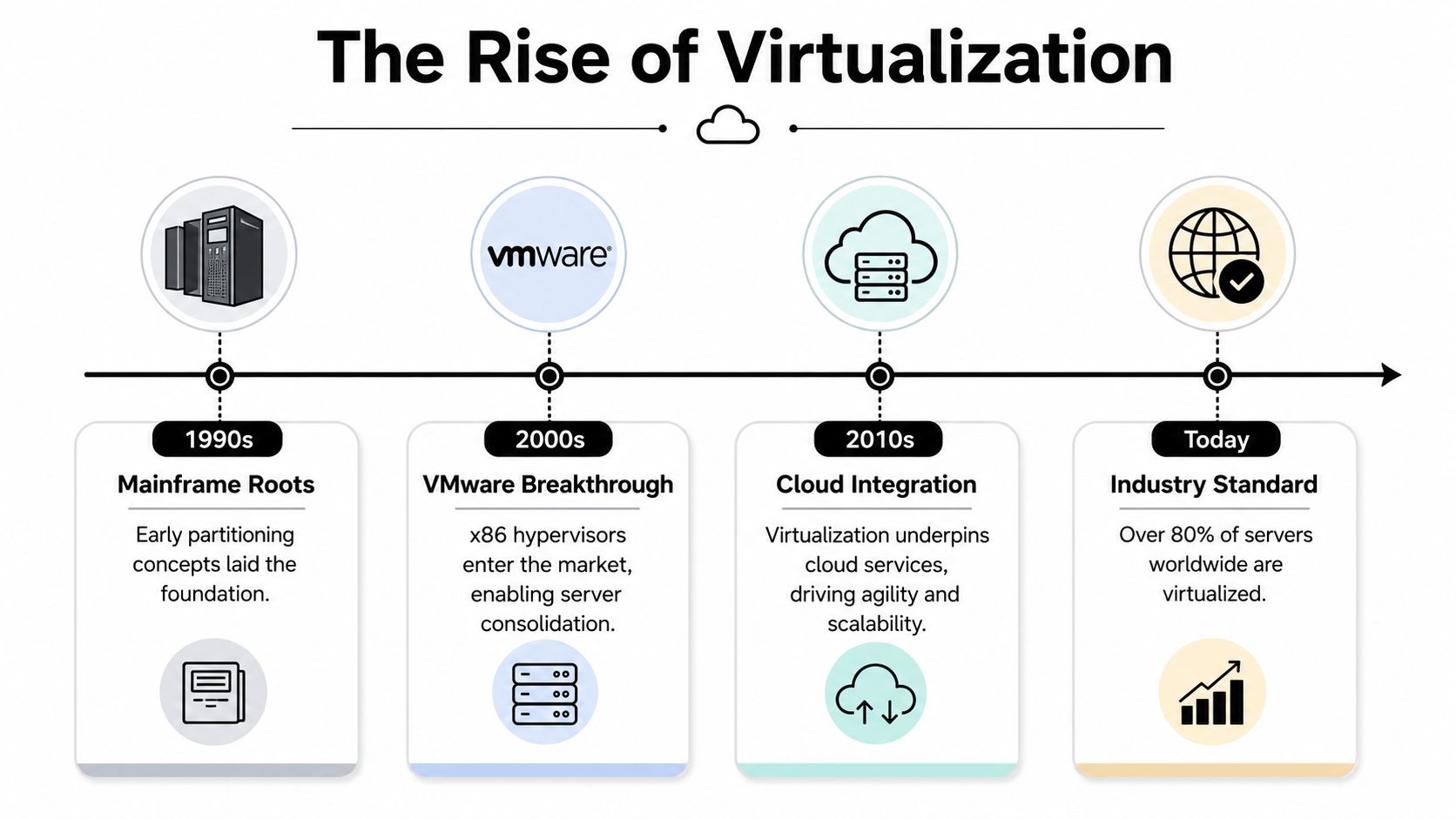
The standardization effect is still visible today
What made virtualization stick was repeatability. Once IT teams could provision, retire, and move workloads in a controlled way, they could standardize around fewer hardware patterns and fewer manual processes. That consistency is why virtual infrastructure became a foundation for modern data centers rather than just a cost-reduction tactic.
For teams that also have to think about what happens after hardware reaches the end of its service life, virtualization creates a cleaner path to retirement and resale decisions. That operational discipline connects directly with lower waste, which is why articles like reducing the environmental impact of data centers belong in the same conversation as capacity planning and consolidation.
If you want a strong example of where these decisions create real career demand, the SRE and infrastructure opportunities on Underdog.io are a useful reminder that virtualization still sits at the center of reliability work, not on the sidelines. The same discipline that keeps hosts stable, workloads isolated, and capacity predictable is what keeps infrastructure teams effective.
Understanding How Server Virtualization Works
Think of a physical server like a single-family home. Server virtualization turns that same building into an apartment complex, where multiple tenants share the structure but each unit stays separate. The building is still one property, but the living spaces are divided cleanly, and each occupant gets a controlled share of the utilities.
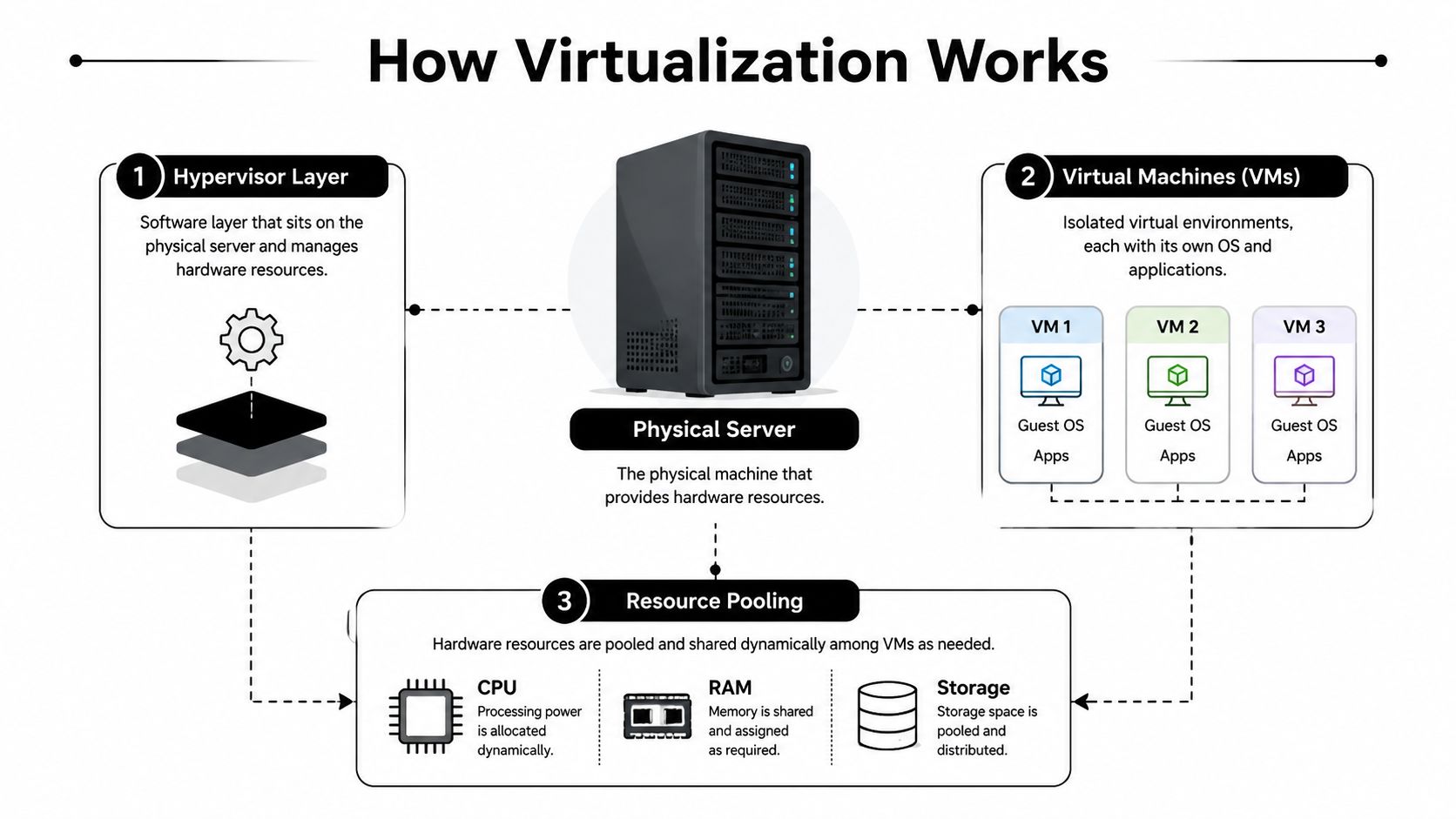
The hypervisor is the layer that makes the split possible
The software layer that manages that division is the hypervisor. It sits between the hardware and the virtual machines, assigning CPU, memory, and storage to each workload while keeping them isolated from one another. In practical terms, that means one physical server can host several independent operating systems without those systems interfering with each other.
There are two common hypervisor models. Type 1 hypervisors run directly on the hardware and are common in enterprise environments because they're built for performance and control. Type 2 hypervisors run on top of another operating system, which makes them more convenient for testing and desktop use, but less suitable for serious production consolidation.
Resource pooling is where the efficiency comes from
Once the hypervisor is in place, the hardware stops being tied to one workload at a time. CPU, RAM, and storage become a pooled set of resources that can be assigned where they're needed most. That's why a virtualized environment can run multiple applications on the same host without each application demanding its own dedicated machine.
This is also where the business case becomes easier to explain to non-technical stakeholders. Instead of buying another server for every new service, IT can place workloads into isolated virtual machines and use the same underlying hardware more effectively. That doesn't remove the need for planning, but it does remove a lot of waste.
Practical rule: Virtualization works best when teams treat capacity as a shared pool, not as a reason to overbuild and forget.
The abstraction also makes later moves simpler. A VM can be copied, restored, or shifted to another host without rebuilding it from bare metal, which is why virtualization changed the operational tempo of infrastructure teams. For decision-makers, that's the core lesson. Virtualization isn't magic, it's controlled abstraction applied to expensive hardware.
Core Server Virtualization Benefits That Drive ROI
The strongest server virtualization benefits show up in the places operations teams already track closely, hardware spend, recovery speed, change control, and the amount of time spent keeping aging systems alive. Fewer physical boxes usually means fewer warranty renewals and fewer refresh cycles, but the bigger value comes from how virtualization changes the way the environment absorbs failure, growth, and retirement.
Cost, speed, and recovery move together
A virtualized environment can lower server costs because each host carries more useful work, and fewer servers need to be purchased, racked, powered, and maintained. Studies on server virtualization have found sizable reductions in annual server cost per user in both basic and more advanced deployments (server virtualization cost analysis). The same analysis also reports a much lower deployment cost for a virtualized server than for a standard physical server with two CPUs (same source). In practice, that savings comes from less hardware, less labor, and less overhead every time a workload is added, changed, or refreshed.
The operational payoff is just as important. In the Insight white paper, respondents reported operational savings across virtualization projects, and many said provisioning, decommissioning, and migration took far less time once workloads were virtualized (Insight white paper). That matters because the day-to-day work of infrastructure is usually where budgets leak, through manual rebuilds, slow handoffs, and time lost to repetitive server tasks. Virtualization shortens those tasks and gives the team more room to handle higher-value work.
| Benefit Category | Key Metric | Typical Improvement |
|---|---|---|
| Hardware Consolidation | Server utilization | Up to around 80% in virtualized environments (Fortinet) |
| Cost Reduction | Annual server cost per user | Lower costs in both basic and advanced virtualization setups (server virtualization cost analysis) |
| Deployment Efficiency | Server deployment cost | Lower than a standard physical server with two CPUs (same source) |
| Operational Speed | One-time admin tasks | Much less time for provisioning and migration work (Insight white paper) |
| Energy and Facilities | Facility-level energy savings | ENERGY STAR says each server watt-hour saved usually creates 1.9 more watt-hours of facility-level savings (ENERGY STAR) |
Resilience and sustainability are built into the same design
Virtual environments make cloning, snapshots, replication, and workload mobility part of normal operations. That changes the recovery posture in a practical way, because a VM can be brought up on another host without rebuilding the entire service from bare metal. Nutanix notes that well-designed VM-based environments can reduce recovery time from the long rebuilds typical of physical-server recovery to much faster return-to-service windows (Nutanix server virtualization overview). When uptime matters, that difference is not academic, it determines how long users sit idle and how much manual intervention the team needs under pressure.
Energy savings matter too, and they go beyond the server itself. ENERGY STAR says saving one watt-hour at the server level usually creates an additional 1.9 watt-hours of facility-level savings because fewer servers reduce demand on power distribution, UPS systems, transformers, and cooling equipment (ENERGY STAR). That means virtualization helps cut load in the entire room, not just on the rack. It also fits cleanly into sustainability planning, because lower server counts can extend hardware life, reduce stranded equipment, and make responsible retirement easier when assets do reach end of service with partners such as Reworx Recycling.
The key benefit is recovery, not just backup. A portable workload gives the operations team more options when a host fails, and those options reduce outage time, repair pressure, and the scramble to rebuild critical services on short notice.
Security improves in a more practical way as well. VM boundaries help separate workloads, which makes it easier to apply different controls to different systems and contain issues when legacy applications sit beside newer services. That isolation also simplifies lifecycle management, because IT can retire, patch, or move one system without disturbing the others around it.
Real-World Virtualization Scenarios Across Industries
A mid-sized business usually feels virtualization first in the server room. Instead of a row of underused boxes handling email, file services, line-of-business apps, and aging databases, the IT team collapses those workloads onto a smaller virtual cluster. The immediate gain is simpler management, but the deeper value is that the business stops paying for every workload as if it were a separate physical problem.
SMBs, schools, and local government feel different benefits
For an SMB, the value is often financial and operational. Fewer servers mean fewer warranty renewals, fewer maintenance windows, and fewer surprises when a machine reaches end of life. The IT manager gets a cleaner environment to monitor, and leadership gets a more predictable technology budget.
A school district has a different priority. Student information systems, learning platforms, and staff services need continuity, especially during registration periods or testing windows. Virtualization helps because snapshots, replication, and workload mobility make recovery faster than rebuilding a physical server from scratch, which matters when staff cannot wait through a long outage.
Municipal IT teams often care most about resilience and compliance. They usually have limited staff, aging hardware, and a high bar for service continuity, so the ability to centralize administration and move workloads quickly helps with both everyday maintenance and disaster response. VM portability becomes a practical continuity tool, not an abstract architecture feature.
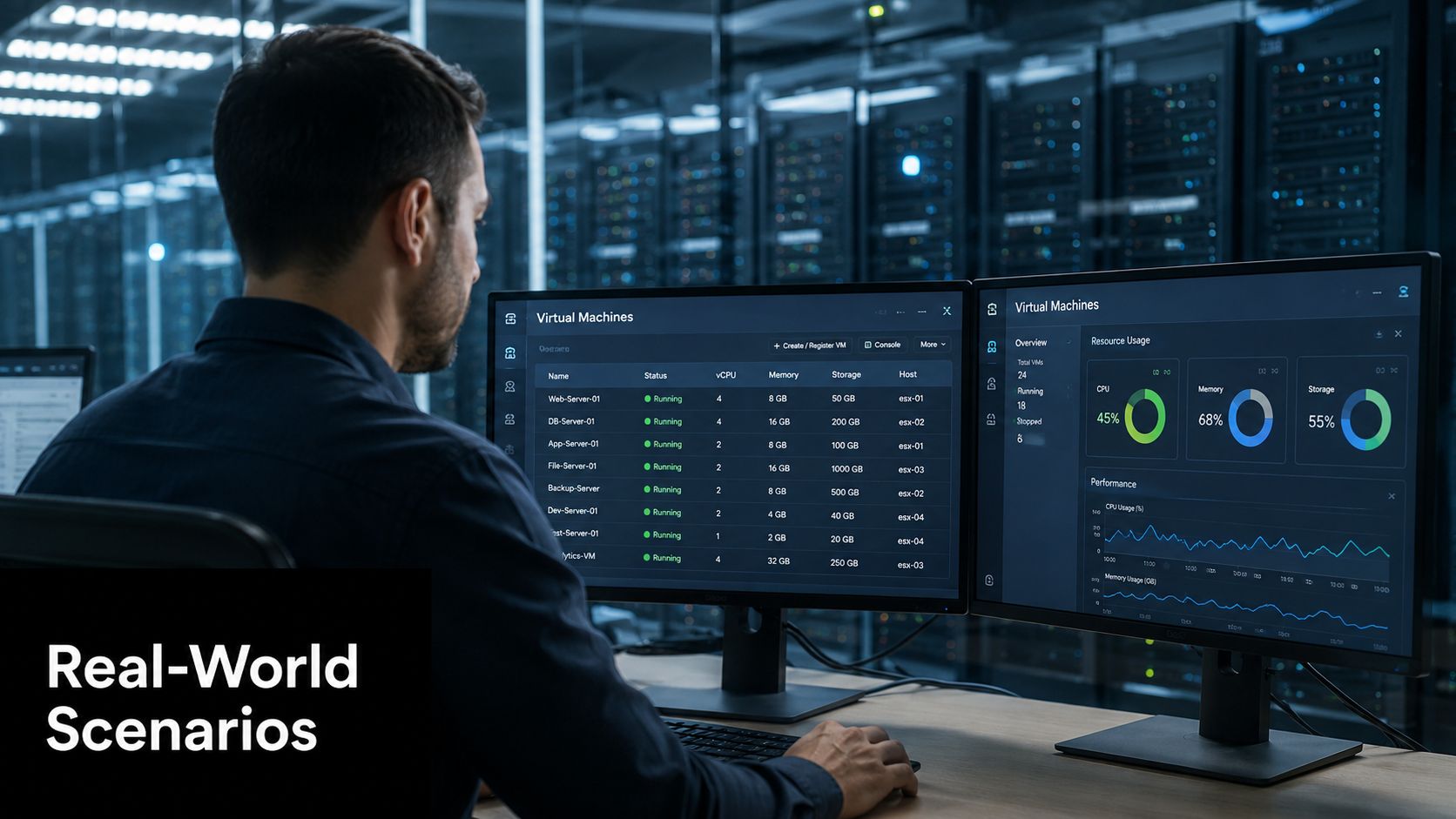
A healthcare clinic or a regional practice sees a different trade-off. Virtualization can keep scheduling, billing, and clinical support systems available on shared infrastructure, but only if the team designs for failover and keeps a clear eye on patching. I have seen teams save time on server maintenance, then lose that gain because they overpacked the host or delayed updates until one maintenance window became too large to manage safely.
Manufacturing and distribution environments add another layer. Shop-floor applications, inventory systems, and reporting tools often have uneven demand, and virtualization lets IT isolate those workloads instead of tying each one to a separate physical box. That isolation also makes it easier to stage upgrades around production hours, which matters when downtime affects operations directly.
Hardware retirement becomes part of the project, not an afterthought
These scenarios all create a similar downstream event. Once workloads move into virtual machines, the old physical equipment needs to be identified, wiped, retired, donated, or recycled in a controlled way. That is where many projects lose discipline, because the virtual migration gets scoped carefully while the hardware exit gets handled informally.
A good virtualization program treats physical decommissioning as part of the same lifecycle. Servers that no longer host production systems should be evaluated for secure reuse, redeployment, or disposal based on their condition and the organization's policy. Clear asset tracking also helps teams avoid surprises on the finance side, which is why many organizations look for pricing transparency from responsible recycling partners before they start removing retired gear. That keeps the project from creating a new pile of unmanaged assets at the moment the infrastructure becomes more efficient.
Common Virtualization Pitfalls and Hidden Costs
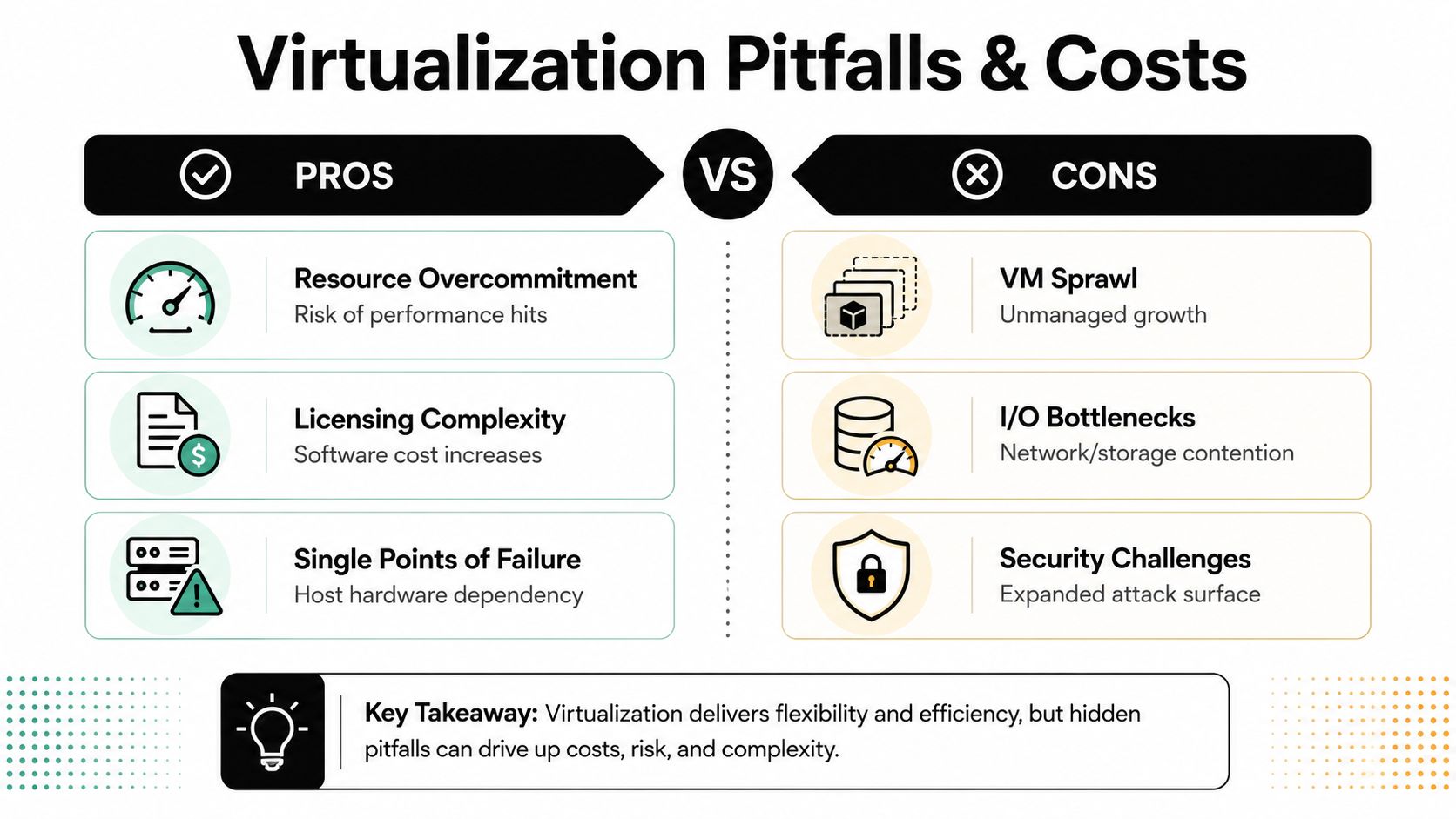
Virtualization saves money only when it is governed tightly. Without that discipline, consolidation stops being a control strategy and starts creating hidden expenses that show up in operations, procurement, and recovery work. VM sprawl, licensing complexity, and host concentration risk are the usual places where the original efficiency gains get diluted.
The most common mistakes show up after deployment
VM sprawl starts when virtual machines are created faster than they are retired. A team spins one up for testing, keeps it for production, forgets it during a migration, and leaves it running because no one owns the lifecycle. Over time, the environment fills with small, half-managed workloads that consume storage, complicate patching, and blur the overall capacity picture.
Licensing complexity can erase savings just as fast. Some vendors price by physical processor, others by VM, and some tie features to host tiers or management layers. That means the economics can shift as soon as procurement misses one term in the contract or one dependency in the platform stack. Teams should review vendor terms early and keep a clear record of assumptions, especially when comparing support costs and refresh plans against pricing transparency from responsible recycling partners.
Single points of failure become the hidden risk when consolidation goes too far. If too many critical workloads live on too few hosts without enough redundancy, one hardware issue can trigger a larger outage than the old physical setup would have produced. Virtualization reduces hardware sprawl, but sloppy host design increases the blast radius when something fails.
The fix is governance, not optimism
A disciplined environment uses VM lifecycle policies, continuous utilization monitoring, and host redundancy planning. That does not remove overhead, but it makes the overhead visible and manageable. The goal is not to run the maximum number of VMs possible. It is to run the right number with enough margin to absorb failure, maintenance, and growth.
Practical rule: If nobody owns the VM after day one, the environment will eventually own the VM.
Pricing and transparency matter here too. Procurement and operations need the same view of licensing, support, and growth assumptions before expansion starts, not after the bill arrives. When those assumptions stay hidden, virtualization turns into a shadow cost center instead of a control system, and that is exactly the kind of problem that careful planning and clear vendor terms are meant to prevent.
Connecting Virtualization to Responsible IT Asset Disposition
Every successful virtualization project creates a physical question. What happens to the hardware that no longer carries production workloads? That question matters because server consolidation usually leaves behind racks, drives, and endpoints that still contain data, still have environmental impact, and still need a lawful retirement path.
The virtual layer doesn't eliminate the hardware lifecycle
IT asset disposition becomes part of infrastructure planning. Virtual machines may move cleanly between hosts, but the underlying servers eventually age out, get redeployed, or leave the building. Before that happens, data has to be destroyed properly, not just removed from user access, because retirement without verified sanitization creates risk.
A structured disposition process also helps organizations align with e-waste handling expectations and internal audit standards. That's especially important when virtualization projects free up a meaningful amount of equipment all at once, because the old machines don't disappear just because the workload moved elsewhere. They become surplus assets that need tracking, triage, and secure exit handling.
The operational and sustainability case intersects here too. The earlier section on energy showed that virtualization reduces facility-level demand because fewer servers means less load on power and cooling systems. But once the hardware is retired, the organization still has a responsibility to avoid dumping functional equipment into the waste stream unnecessarily. Donation, resale, reuse, and recycling all belong in the planning conversation.
ITAD should be scheduled with migration, not after it
Reworx Recycling's explanation of what IT asset disposition means in practice fits naturally into this part of the process because virtualization almost always creates a retirement queue. The cleanest projects I've seen don't wait until the last server is unplugged to think about secure data destruction or pickup logistics. They coordinate both tracks together.
That approach does two things well. It keeps sensitive equipment from sitting in storage longer than necessary, and it makes it easier to separate what can be reused from what should be recycled. It also gives business owners and public-sector teams a more defensible end-of-life process when auditors, leadership, or sustainability teams ask what happened to the retired hardware.
Planning Your Virtualization Migration Strategy
Start with what you already own. A useful migration plan begins with an inventory of server utilization, application dependencies, and hardware age, because not every workload deserves the same treatment. The machines with the lowest utilization and the cleanest dependency chains are often the best consolidation candidates.
Decide platform fit before you move workloads
Hypervisor choice should follow workload requirements, not vendor habit. Some environments need strong compatibility with legacy software, while others care more about management tooling, integration with storage, or support for hybrid operations. The right answer is the one that fits your stack, your staffing, and your long-term support model.
Next, design host clusters with redundancy built in. If the whole plan depends on a small number of hosts surviving every failure without strain, the architecture is too brittle. Migration cutovers should also be sequenced carefully so that application owners know what changes first, what depends on what, and how rollback will work if a problem appears.
Practical rule: The best migration schedule is the one that leaves you enough time to test restore paths, not just move workloads.
Post-migration governance matters just as much. Teams need policies for VM ownership, decommissioning, patch windows, and resource thresholds, or the new environment will slowly recreate the same mess the old one had. When the physical gear is ready to leave, align that phase with a proper disposition plan, including secure data destruction and pickup coordination through a partner such as Reworx Recycling, using the server decommissioning checklist as a practical reference point.
Maximizing Long-Term Value from Virtualized Infrastructure
Virtualization only keeps paying off if someone keeps tuning it. Right-sizing VMs to actual usage, automating lifecycle rules, and using VM mobility for maintenance windows all help preserve the gains that consolidation created in the first place. Left alone, even a good virtual environment drifts toward waste.
Planning refresh cycles is part of that discipline too. Hypervisors evolve, host hardware ages, and workload needs change, so each refresh should trigger a review of what still belongs on-premises, what should move, and what hardware should exit through a responsible path. That's also the right moment to consider asset recovery solutions for equipment that still holds value or can support donation-based reuse.
The long-term lesson is simple. Virtualization is not just a cost-saving tactic, it's a resilience and stewardship layer that works best when the virtual and physical sides of the environment are managed together. Businesses that treat the whole lifecycle seriously end up with cleaner operations, better recovery, and less waste.
If you're planning a virtualization project or retiring hardware after a server consolidation, Reworx Recycling can help with electronics recycling, secure data destruction, and responsible IT equipment disposal that fits business and community goals. Visit Reworx Recycling to explore practical guidance, then reach out to plan pickup, donation-based recycling, or a clean decommission for your retired equipment.