
A lot of NYC businesses end up in the same spot. A device refresh starts with a clean procurement plan and ends with a locked room full of old laptops, monitors, docking stations, phones, network gear, and a few mystery boxes nobody wants to claim.
That backlog is not just a storage problem. It is a compliance issue, a data security issue, and a facilities issue. For companies trying to handle electronics recycling nyc the right way, the hard part is rarely deciding that old equipment should leave the building. The hard part is knowing what path is acceptable for a business, what documentation matters, and what should be reused, destroyed, donated, or recycled.
The Hidden Challenge of Corporate E-Waste in NYC
An office in Manhattan can generate a surprising amount of retired hardware in one quarter. A startup upgrades laptops. A law firm closes a floor. A healthcare group swaps out workstations. A school refreshes staff devices. In each case, equipment piles up faster than anyone expects.

Why the volume matters
The scale is bigger than many teams realize. New York residents discard over 400,000 tons of electronic waste annually, according to the New York City FY2022 collection and diversion data referenced in the verified dataset.
That number matters because it changes the conversation. Old electronics are not a side issue sitting outside your normal waste program. They are a separate operational stream with different risks, different legal rules, and different downstream handling requirements.
For businesses, the friction usually shows up in three places:
- Storage pressure: Equipment takes over closets, staging rooms, and file rooms.
- Internal confusion: IT, facilities, procurement, and compliance often define “disposal” differently.
- Release risk: The moment a data-bearing device leaves controlled custody, the exposure shifts from hypothetical to real.
Why ordinary recycling logic fails
Paper, cardboard, cans, and bottles follow a familiar routine. Retired corporate electronics do not.
A broken monitor is bulky but manageable. A laptop with a drive is different. A copier with internal storage is different again. The same goes for servers pulled from a rack, phones returned by remote staff, and lab or medical devices that may need a more careful chain of custody.
That is why ad hoc cleanup days often fail. Departments toss unlike items together. Reusable machines get mixed with scrap. Loose drives disappear into general surplus. By the time someone asks for an asset list or destruction record, the organization is already working backward.
Practical takeaway: Treat every electronics removal project as an IT asset disposition workflow first and a recycling event second.
What works better
The companies that handle electronics recycling nyc well usually stop thinking about e-waste as a one-time haul-away job. They build a repeatable process around control.
A stronger model looks like this:
| Business problem | Weak approach | Strong approach |
|---|---|---|
| Tech refresh | Stack devices in storage | Inventory and stage by asset type |
| Office cleanout | Let each team self-sort | Assign one cross-functional owner |
| End-of-life devices | Mix all hardware together | Separate data-bearing assets early |
| Sustainability goal | Focus only on scrap removal | Evaluate reuse, donation, and recycling |
The other shift is philosophical. Retired equipment is not always just waste. Some devices belong in secure destruction. Some belong in commodity recycling. Some may still support donation-based recycling if they are properly triaged and processed.
A social enterprise model becomes more useful than basic removal. It gives a business a way to reduce clutter, protect data, meet disposal obligations, and create community value from equipment that still has life left in it.
Navigating NYC's Business E-Waste Regulations
Most confusion around electronics recycling nyc comes from one mistake. People assume the rules for residents apply to offices, schools, clinics, and commercial properties. They do not.
Residential programs are not your business playbook
New York City has put real effort into residential electronics diversion. The ecycleNYC program collected and recycled more than 20 million pounds of electronic waste from residents by December 2018, as reported by Waste360’s coverage of the milestone.
That milestone is important, but it does not solve the typical business problem. A residential pickup or drop-off framework does not answer questions like who signs the chain-of-custody form, how drives are handled, whether serial-level reporting is available, or how a tenant should move pallets through a loading dock in a high-rise.
If you need a city-specific business pathway, NYC electronics recycling support for organizations is closer to the actual operating need than a resident-focused guide.
What the law means in practice
New York’s Electronic Equipment Recycling and Reuse Act established a producer responsibility model. For businesses, the practical takeaway is simple. Electronic waste cannot be landfilled or incinerated, and companies need a compliant path for covered devices.
That means you should not treat old computers, monitors, and similar equipment as ordinary trash during a cleanout. If a superintendent, office manager, or facilities team pushes electronics into the wrong stream, the business still owns the disposal problem.
The rule is straightforward. If the item is covered e-waste, it needs to leave the site through an approved electronics channel, not through general refuse.
Where businesses get tripped up
Compliance failures in NYC rarely come from bad intent. They come from weak process design.
Common failure points include:
- Move-out deadlines: A landlord or facilities deadline forces a rushed disposal decision.
- Mixed staging: Drives, laptops, monitors, and non-covered items end up on the same pallet.
- No ownership: IT assumes facilities is handling removal. Facilities assumes IT has approved release.
- Resident-style assumptions: Someone tells the team to “just recycle it” without defining what that means for corporate assets.
The operational difference between legal and usable
A business can technically find a disposal path and still create unnecessary exposure. Legal compliance is the floor. Operational control is what keeps the project from becoming a mess.
A usable business process should answer these questions before pickup:
- What assets are leaving?
- Which of them stored data?
- Which devices may be reused or donated?
- What paperwork will come back after removal?
- Who approved final release?
If you cannot answer those five, you may still be moving electronics out of the building, but you are not running a mature disposal program.
What covered teams should do now
Some sectors need tighter controls from the start. Finance, healthcare, education, government, and nonprofits all tend to handle devices that hold sensitive data, shared user profiles, or records that should never drift into an undocumented stream.
A practical compliance baseline for NYC looks like this:
| Requirement | What it means on site |
|---|---|
| Proper e-waste disposal | No electronics in trash or normal waste streams |
| Controlled release | Equipment should move through an approved internal process |
| Data-aware sorting | Devices with storage should be identified before pickup |
| Documentation | Keep pickup records, destruction records, and disposition summaries |
| Clear accountability | One internal owner should coordinate IT, facilities, and vendor contact |
Tip: If your current process starts with “clear out the room,” it is backwards. Start with asset control, then schedule removal.
The main point is not to overcomplicate compliance. It is to stop treating corporate electronics like ordinary cleanup debris. NYC businesses need a disposal process built for organizations, not households.
Building Your Corporate ITAD Strategy
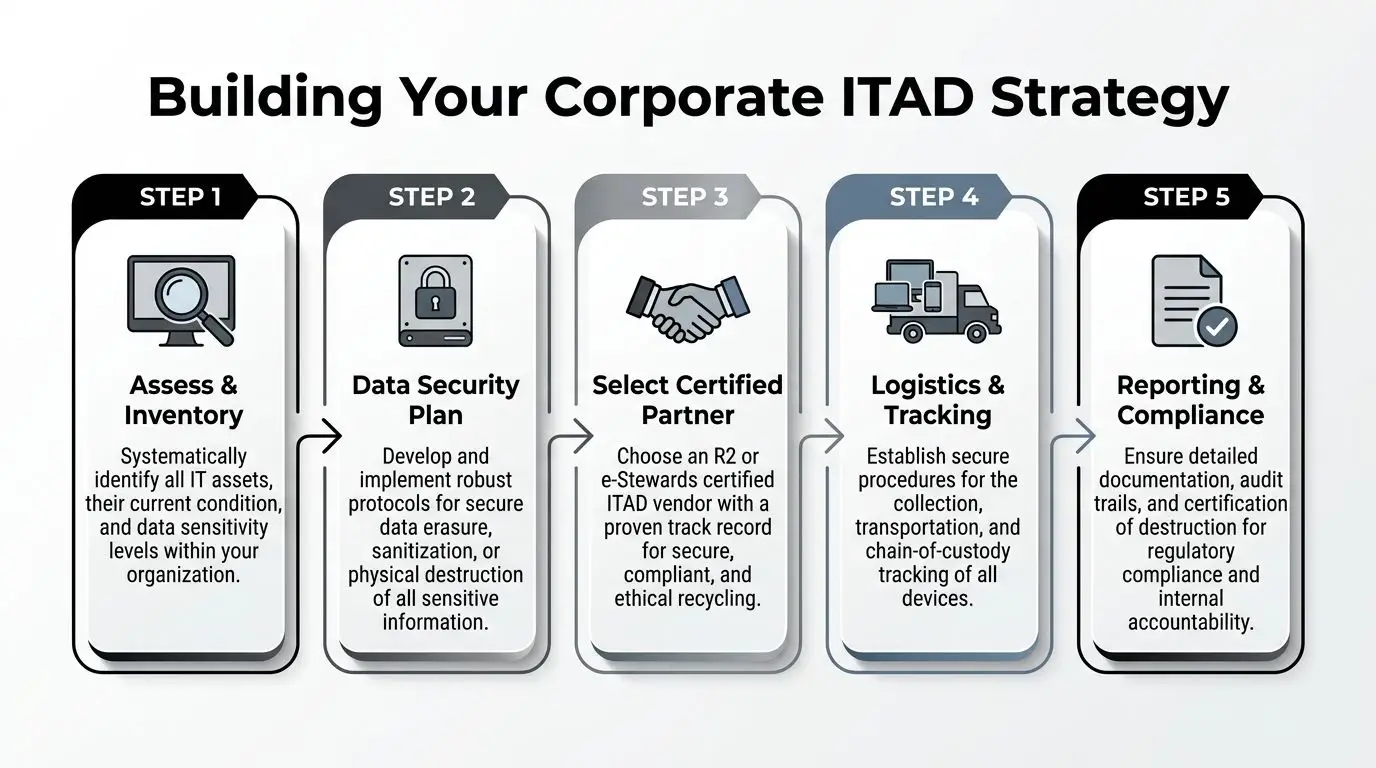
A workable ITAD program is less complicated than many organizations expect. It just needs structure. The strongest programs use the same sequence every time, whether the job is a small laptop refresh in Queens or a multi-floor office cleanout in Midtown.
Start with inventory, not labor
A compliant workflow begins with visibility. A five-step ITAD process includes inventorying assets, segregating data-bearing devices, triaging for reuse, executing documented data destruction, and final reporting. That process helps firms avoid untracked asset losses, which can account for 20-30% of devices in undocumented disposals, according to Reworx’s NYC recycling and ITAD guidance.
That first step sounds basic because it is. It is also where many cleanouts fail.
A simple spreadsheet is enough if it captures the essentials:
- Asset tag or internal ID
- Device type
- Physical condition
- Known data status
- Location
- Intended disposition
The point is not perfect asset accounting. The point is preventing equipment from leaving the building as an anonymous pile.
For teams formalizing this process, building an IT asset disposition strategy gives a useful framework for turning one-off pickups into a policy.
Separate data-bearing devices early
This step should happen before equipment reaches the loading dock.
Laptops, desktops, servers, tablets, phones, backup media, external drives, and multifunction printers should go into a controlled stream. Monitors, cables, keyboards, and other non-data peripherals can follow a different path.
That separation matters because mixed pallets create immediate problems. Drivers wait while staff resort equipment. Internal signoff gets delayed. Reuse candidates get damaged. Storage devices slip into the wrong pile.
A Manhattan finance office and a Brooklyn nonprofit may have different budgets, but they benefit from the same discipline. Distinguish data-bearing assets from non-data assets before anyone schedules transport.
Triage for reuse, donation, or recycling
Not every retired asset is waste. Some equipment still has value. Some still has community use. Some should go straight to materials recovery.
A good triage conversation is practical, not sentimental. Ask:
- Is the device functional?
- Is it old but still serviceable?
- Would secure refurbishment make sense?
- Is the unit damaged beyond reasonable reuse?
- Does policy require destruction regardless of condition?
Corporate donation programs become credible in this context. Donation-based recycling only works when devices are identified, tested, and separated from scrap early. If working laptops get tossed in with broken towers and untested drives, the opportunity usually disappears.
Match destruction method to risk
Data destruction should fit the asset class and the organization’s internal policy.
Some environments accept sanitized reuse for eligible systems. Others want physical destruction for loose drives, failed media, or regulated systems. The important thing is consistency. One office should not be wiping drives while another sends similar assets out with no written standard.
A clean rule set often looks like this:
| Asset type | Typical handling question |
|---|---|
| Employee laptops | Wipe for reuse or destroy based on policy |
| Loose hard drives | Keep in secure stream until destruction |
| Servers | Review for decommissioning, storage media removal, and destruction |
| Phones and tablets | Confirm reset and data process before release |
| Printers and copiers | Check for internal storage before disposal |
Key takeaway: The device itself is not the risk. The undocumented handling of the device is the risk.
Close with reporting
The final step is what turns disposal into governance.
Your records should show what left, how it was classified, and what happened next. For many organizations, that means pickup receipts, serialized summaries where needed, certificates of destruction for covered media, and recycling documentation for the rest.
Which assets were included? Many organizations think only about laptops and servers. In reality, copiers, phones, tablets, backup media, and loose drives often create the most avoidable blind spots.
What a mature process looks like on the ground
In practice, a strong NYC ITAD workflow is boring in the best way. The storage area is controlled. Assets are tagged or listed. Data devices are separated. Pickup is scheduled around building logistics. The business receives documentation after the fact.
That predictability matters during:
- Office cleanouts
- Lease-end moves
- Data center decommissioning
- School and nonprofit refresh cycles
- Multi-site equipment consolidation
The teams that struggle with electronics recycling nyc usually wait until space pressure forces action. The teams that do it well build a repeatable handoff between IT, facilities, security, and the downstream recycler.
Ensuring Bulletproof Data Destruction
For most businesses, recycling is not the hard part. Trust is the hard part.
If a device once stored employee records, customer files, legal documents, patient information, financial data, or internal communications, the question is no longer “How do we recycle this?” The fundamental question is “How do we prove the data is gone?”
Free disposal is not the same as verified destruction
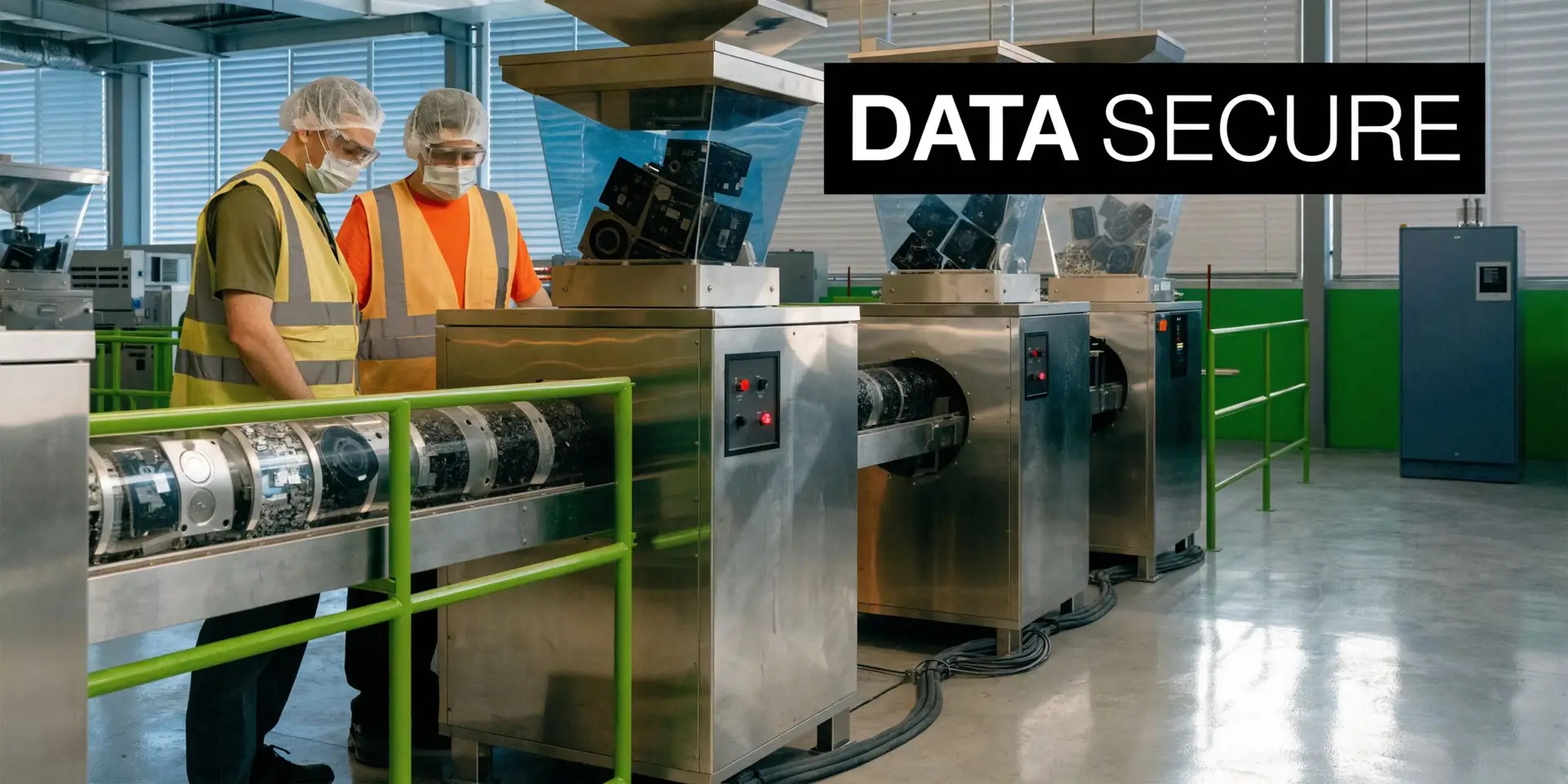
This is the most important distinction in electronics recycling nyc for business users. A convenient drop-off option may help someone remove hardware from a site, but removal and verifiable destruction are not the same service.
The gap is real. Audits of community events show that fewer than 20% of participants verify a data wipe, according to the RTS overview of NYC e-waste and business security concerns. The same verified dataset notes that this risk outweighs the $100 fine for improper disposal.
That should reshape how organizations evaluate “easy” recycling options. A low-friction event or drop-off path may be fine for some household users. It is not enough for a business that needs proof.
For organizations that need formal controls, secure data destruction services are part of the decision, not an add-on after pickup.
What to demand from any vendor
A mature data destruction process should answer four questions clearly.
Chain of custody
Who had the device at pickup, during transport, and at final processing?
If the answer is vague, the process is weak. Businesses should know how custody is transferred and how that transfer is documented.
Destruction standard
Was the device wiped, shredded, degaussed, or otherwise sanitized according to a written method?
You do not need marketing language. You need a defined procedure that fits your internal policy.
Scope of coverage
Which assets were included?
This helps avoid blind spots, as many organizations think only about laptops and servers. In reality, copiers, phones, tablets, backup media, and loose drives often create the most avoidable blind spots.
Proof
What comes back after processing?
At minimum, regulated or sensitive streams should produce documentation that your compliance, legal, or IT teams can retain.
Wiping versus shredding
The right method depends on policy, asset type, and reuse goals.
A business trying to remarket or donate devices may prefer approved sanitization for eligible systems. A firm handling failed drives or highly sensitive data may require physical destruction. The operational mistake is not choosing one method over another. The mistake is using different rules for similar assets with no documentation.
Where teams often miss risk
Data destruction failures rarely look dramatic at first. They look ordinary.
- A copier gets removed during an office cleanout without storage review.
- Loose drives sit in an unlocked cabinet waiting for “later.”
- Returned employee laptops pile up before IT evaluates them.
- A facilities crew schedules removal before security approves the asset list.
Each of those is avoidable. Each becomes harder to fix after the load leaves the building.
Tip: Ask for the destruction process in writing before pickup. If the vendor cannot explain it clearly, do not assume it exists.
The safest organizations build destruction into the project scope from the first conversation. They do not bolt it on at the end.
Beyond Compliance The Social Impact of Donation-Based Recycling
Once a business gets compliance and security under control, a better question opens up. What should happen to equipment that still works?
That question matters because not every retired device belongs in the shred stream. Some assets can still support learning, access, and community use if they are properly screened and handled.

Why this gap matters in NYC
Smaller organizations often get squeezed. NYC small and mid-sized businesses under 50 employees and nonprofits face a significant guidance gap when trying to access free manufacturer take-back programs, which can lead them to pay for services unnecessarily, according to the NYC e-waste drop-off information referenced in the verified data.
That gap creates two problems at once. First, usable equipment can get routed into scrap because nobody wants to deal with unclear options. Second, smaller organizations may assume responsible disposal always has to be expensive and complicated.
A more useful model is one that combines secure decommissioning with reuse screening. For organizations with eligible equipment, donating a laptop through a structured program is a more purposeful outcome than treating every retired asset as waste.
What donation-based recycling changes
Donation-based recycling changes the order of decisions.
Instead of asking only how to remove hardware safely, a business can ask:
- Which assets still have productive life?
- Which need secure sanitization before reuse is possible?
- Which should go to materials recovery immediately?
- Which devices could support schools, nonprofits, or digital inclusion efforts?
That shift matters for corporate sustainability teams because it turns an end-of-life task into a circularity decision. It also matters for IT teams because it forces better triage. Reuse only works when organizations know what they have and how it was handled.
The social enterprise difference
A social enterprise approach brings community value into the disposition process without weakening controls.
Done well, it can support:
| Outcome | Why it matters |
|---|---|
| Device donation | Extends the useful life of qualified equipment |
| Digital inclusion | Helps more people access working technology |
| Workforce development | Connects equipment retirement to broader community benefit |
| Internal ESG storytelling | Gives businesses a more meaningful disposition narrative |
There is also a practical benefit. Teams become more disciplined when they know reuse is possible. They sort better. They stage better. They stop treating everything as anonymous scrap.
When donation makes sense and when it does not
Donation should never override security. If a device cannot be sanitized to policy, or if its condition makes reuse unrealistic, recycling is the right path.
But many businesses default to destruction too early because nobody established a triage process. That is not safer. It is just less thoughtful.
A better approach is straightforward:
- Identify devices that are candidates for reuse.
- Confirm secure data handling.
- Separate those assets from broken or obsolete equipment.
- Route the remainder to responsible recycling.
Key takeaway: Donation-based recycling is not a softer version of ITAD. It is a more selective one.
That distinction matters. Social impact only counts when the basics are already solid. Compliance first. Security second. Reuse where appropriate.
Partner with Reworx for Your NYC Electronics Recycling Needs
Businesses in New York do not need more general advice about recycling. They need an operating model that works in real buildings, with real data risk, real move deadlines, and real documentation needs.
That model rests on three things.
Compliance has to be operational
A policy is not enough. Someone has to inventory the hardware, separate the data-bearing devices, manage the staging area, and document what leaves the site. Without that discipline, even well-meaning cleanup efforts create confusion.
Security has to be provable
If your organization cannot show how storage devices were handled, then the process is incomplete. The issue is not whether the recycler sounded credible. The issue is whether your team has a documented record of what happened.
Impact should be part of the decision
Once control and security are in place, businesses can make better choices about reuse, donation, and material recovery. That is where electronics recycling becomes more than a disposal function. It becomes part of a broader sustainability and community strategy.
For organizations that want one service path for electronics recycling, IT asset disposition, office cleanouts, pickup coordination, and secure downstream handling, Reworx Recycling’s electronics recycling services provide that scope.
The choice of partner matters in this situation. You want a team that can work with IT, facilities, compliance, and sustainability without forcing each department to invent its own disposal rules. You also want a process that fits NYC realities such as freight elevators, dock scheduling, phased office closures, and mixed hardware inventories.
The businesses that improve fastest usually start with a single event. A laptop refresh. A storage room cleanout. A lease-end move. A server room decommissioning. Then they turn that event into a repeatable process.
If your current approach is informal, the next step is simple:
- Assign one internal owner
- List the assets leaving the site
- Separate data-bearing equipment first
- Decide what can be reused, donated, or recycled
- Require documentation after pickup
That is the foundation of a better electronics recycling nyc program. Not more complexity. Just more control.
If your business is planning a tech refresh, office cleanout, facility cleanout, or secure device retirement project, contact Reworx Recycling to discuss donation-based recycling, schedule a pickup, or build a practical ITAD process that supports compliance, protects data, and creates community impact.


















