You're probably sitting on a stack of aging physical servers, a few underused racks, and a budget that keeps getting squeezed by power, cooling, and maintenance. That's exactly where server virtualization benefits stop being an abstract IT topic and start becoming a practical business decision. The catch is simple, virtualization only pays off if you treat it as part of the whole lifecycle, not just a way to squeeze more work out of old hardware.
What Server Virtualization Actually Means
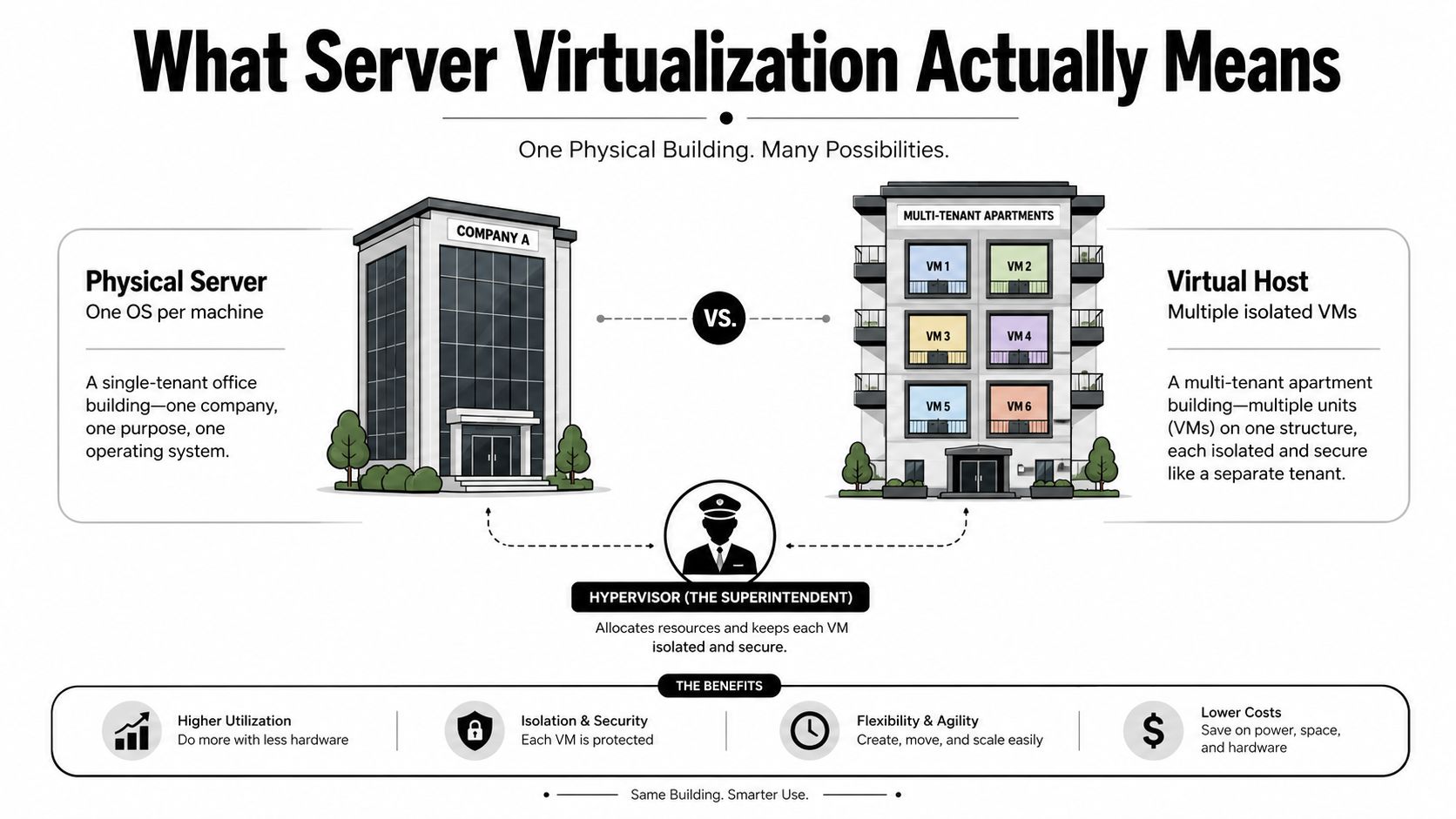
A physical server is like a single-tenant office building. One tenant, one operating system, one stack of applications, and a lot of space left empty when demand is low. A virtualized host is more like a multitenant tower, with partitioned floors and a superintendent making sure each tenant gets the resources it needs without stepping into the next unit.
That superintendent is the hypervisor. It sits between the hardware and the workloads, allocates CPU, memory, storage, and networking, and keeps each virtual machine isolated. A VM is just a software-based server with its own operating system and applications, but it doesn't need a dedicated box under the desk or in the rack.
This model exists because too many physical servers run hot and mostly idle. A recent review puts traditional physical servers at 15–20% capacity, while virtualized environments can reach up to 80% utilization (server virtualization review). That gap is the whole reason IT teams adopted virtualization in the first place, and it's still the main reason I recommend it when the workload mix is messy, legacy-heavy, and expensive to maintain.
Practical rule: If your team keeps buying hardware to solve a utilization problem, you're probably fixing the wrong layer.
The rest of this guide focuses on the benefits that matter in real environments, cost, provisioning speed, recovery, efficiency, and the downstream retirement work that most glossy virtualization content ignores. That last part matters more than people admit, because the gains only hold if you plan for host refresh, data destruction, and equipment disposition at the same time.
Core Benefits That Justify the Investment
A common virtualization story starts with a server room full of lightly used boxes, too many refresh dates, and a budget that keeps rising while performance stays flat. That is the wrong place to stay stuck. The first real benefit is hardware consolidation, because fewer physical hosts usually means fewer idle CPUs, less wasted RAM, less storage overhead, and less power draw for the same workload mix. Fortinet's server virtualization guidance notes that physical servers often sit at 18–50% capacity, while virtualization can push utilization to 80% or higher through pooling and dynamic allocation (Fortinet server virtualization guide).
The second benefit is cost control, and it shows up in more than one budget line. In the 2009/2010 ITIC Global Virtualization Deployment Trends Survey, almost 50% of respondents said virtualization helped lower total cost of ownership and deliver faster ROI, while experts cited power and cooling savings of up to 60% (ITIC survey summary). That is why the upside is rarely just a hardware story. It is a capacity story, an operations story, and a lifecycle story that affects host refresh planning later.
What actually moves the needle
- Provisioning speed: teams stop waiting on hardware lead times and can stand up a VM from a template or clone.
- Disaster recovery: virtual machines can be snapshotted, replicated, and restored on different hardware, which gives you options when a host fails.
- Energy use: one review says virtualization can cut energy use by 30–40% versus traditional deployments, and some studies found up to 33.5% lower energy consumption while maintaining equivalent computing output (server virtualization review).
- Business continuity: recovery time objectives can drop to minutes instead of hours or days (Nutanix server virtualization overview).
The mistake I see in smaller environments is treating those gains as a one-time win. Consolidation only pays off if you also plan what happens when the old hosts come out of service, how data destruction will be handled, and whether the refresh cycle is being aligned with disposal work instead of deferred until the end. That is where the 3- to 5-year value comes from.
Bottom line: the credible business case is not “virtualization saves money.” It is “virtualization reduces stranded capacity, speeds recovery, and makes the next refresh less painful.”
For smaller teams trying to separate real savings from hype, a practical planning lens like cloud cost optimization for startups helps keep the discussion grounded in unit economics instead of wishful thinking. I'd also point sustainability teams to this carbon-footprint reduction guide for IT departments, because energy reduction and responsible retirement work belong in the same budget conversation.
Physical Versus Virtualized Environments Compared
Bare metal looks simple until you have to operate it at scale. Every new application tempts someone to buy another server, and soon you've got idle hardware, uneven refresh timing, and backups that don't line up cleanly with recovery priorities. Virtualization compresses that sprawl into a smaller number of dense hosts, which makes the environment easier to provision, patch, and relocate when something fails.
The table below is the cleanest way to explain the operational difference to finance, facilities, and audit teams.
| Metric | Physical Servers | Virtualized Hosts |
|---|---|---|
| Utilization | Often low, with a lot of idle capacity | Much higher through resource pooling |
| Provisioning | New hardware, imaging, cabling, install work | VM creation from a template or clone |
| Disaster recovery | Rebuild hardware, reinstall, reconfigure | Snapshot, replicate, restore on other hardware |
| Hardware count | More boxes, more maintenance touchpoints | Fewer hosts, denser workloads |
| Failure domain | Many small single points of failure | Fewer hosts, but each host matters more |
| Scaling | Slow, tied to procurement cycles | Faster, tied to available cluster capacity |
That last line is the trade-off people skip. Fewer hosts mean less idle hardware, but each host failure carries more blast radius. That's why mature designs pair virtualization with clustering, tested backups, and recovery playbooks, not with wishful thinking.
If you're comparing on-prem and hosted models, this browse-on-premise-vs-cloud resource is a useful framing tool, especially for teams deciding whether to keep control locally or move more aggressively into cloud services. I still tell clients to be honest about workload fit. Legacy apps, regulated data, and predictable demand often favor virtualized on-prem infrastructure. Cloud-native services and containers can be the better choice when the stack already expects them.
Real-World Scenarios Where the Benefits Land
A regional hospital feels the pressure first. Clinical systems, scheduling, email, archive storage, and administrative tools all compete for attention, while the IT closet fills with aging boxes that are costly to keep alive and awkward to recover. Virtualization lets that hospital consolidate workloads onto a smaller set of resilient hosts, which makes recovery planning realistic when an electronic medical records system needs to return fast.
A public-sector agency deals with a different kind of strain, patches and change windows. When a citizen-facing portal breaks after an update, the team does not want to rebuild a full server stack while callers pile up. A clean virtual machine snapshot gives them a rollback path that is faster than the old restore-and-pray routine.
A mid-sized manufacturer cares about throughput. If the ERP team needs a test environment for a patch, upgrade, or integration check, waiting weeks for new hardware is dead time. Virtualization turns that wait into a much shorter provisioning cycle, and that speed matters when production schedules are already tight.
Three workloads, three places virtualization pays off
- Hospital systems: keep critical applications online and reduce the physical hardware footprint.
- Public portals: roll back failed changes faster and restore service sooner.
- Manufacturing test environments: spin up isolated test instances without buying more physical servers.
Those are the clean wins. The harder part is what happens after the consolidation project is finished. If the old hosts stay in the rack as forgotten spares, you have not finished the job, you have just delayed the cleanup. Pair the virtualization rollout with a documented retirement path, including a detailed server decommissioning checklist, so the hardware behind the old environment gets wiped, removed, and tracked properly before it leaves service.
That matters for the 3 to 5 year view. Virtualization pays when the host refresh, data destruction, and asset disposition plan are tied together from the start. If you treat consolidation as a one-time savings exercise, you miss the value, and you also create avoidable risk when the physical servers eventually need to be retired.
When Virtualization Is the Wrong Abstraction Layer
Virtualization is not the answer to every modernization problem. If the workload is already cloud-native, or it was designed for containers, adding another hypervisor layer can be the wrong move. You're then paying for abstraction you don't need, and in small environments that's where the math starts to get ugly.
The hidden costs are usually the ones that get minimized in glossy sales material. Hypervisor licensing, management overhead, snapshot storage, and recovery tooling all add up, and none of those disappear just because a host count goes down. TechTarget's coverage notes that although virtualization can cut energy use by up to 33.5% and reduce deployment time by 70%, those gains don't automatically cover software subscriptions or DR readiness costs (TechTarget virtualization benefits).
Use the right abstraction for the job
If you're running a cloud-native platform, ask whether virtualization is helping or just adding another control plane. If you're already replacing legacy applications with containers, the answer may be to skip a VM refresh and move the work higher up the stack instead. If a server is nearing end of life and the app is no longer strategically important, retire it through a structured ITAD process rather than rehosting it just because you can.
That's where the 3- to 5-year view matters. Consolidation can reduce electricity, cooling, and floor space, but it can also concentrate failure domains and make upgrade cycles more expensive if hosts, backup tools, and recovery plans age out together. My advice is blunt, virtualization is a bridge technology for hybrid estates, not a universal endpoint.
Planning a Migration That Actually Pays Off
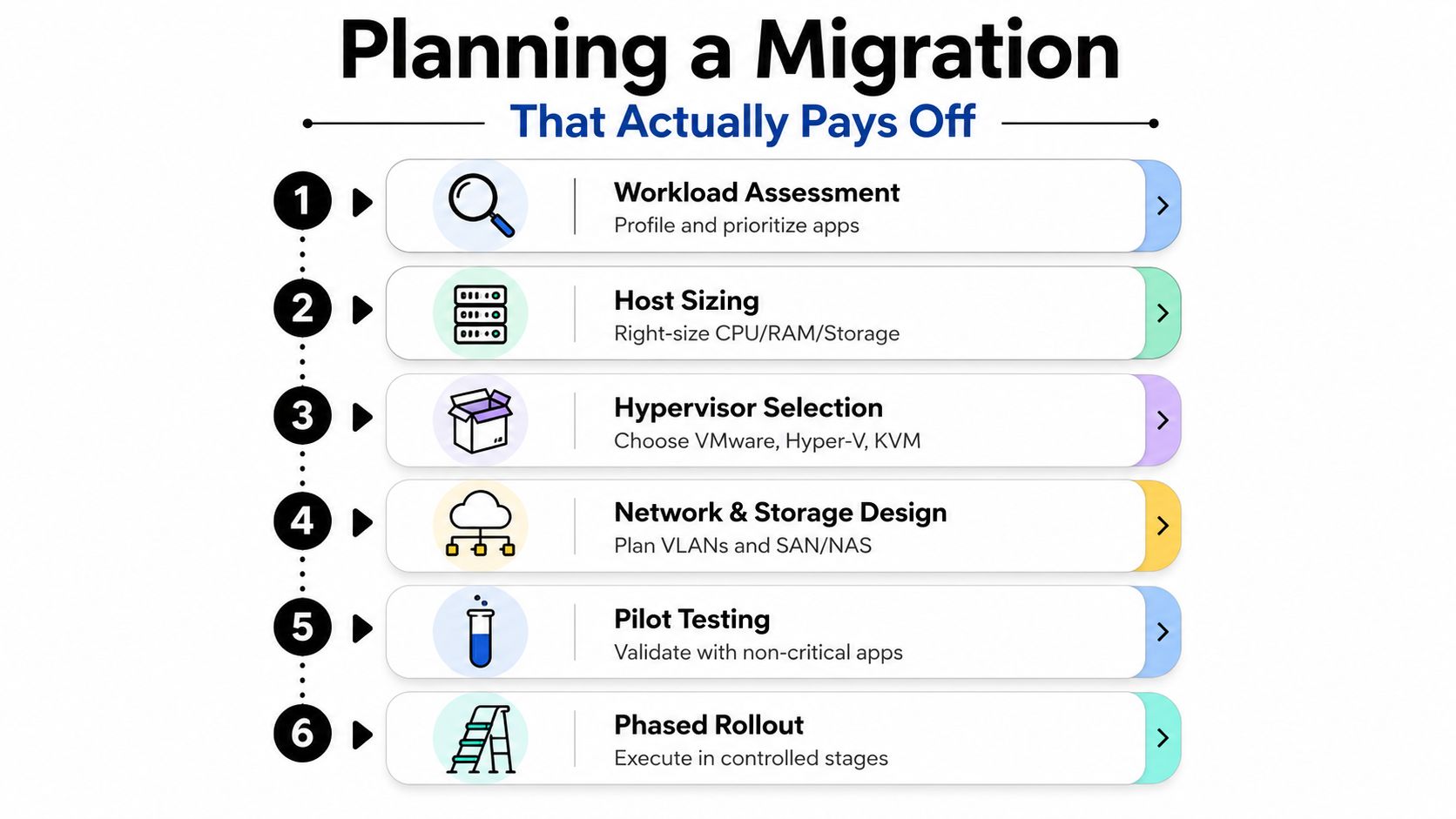
Start with the application list, not the hardware catalog. Identify which workloads are stable, which ones burst, which ones are fragile, and which ones should stay off the migration path until someone has a rollback plan. If an application cannot tolerate downtime or carries odd licensing terms, treat it as a special case before a hypervisor ever enters the conversation.
Then size the platform around real demand, not the loudest peak in the room. Choose a hypervisor your team can support, design the network and storage paths with care, and run a pilot on non-critical workloads before you touch anything that matters to operations. That sequencing is what separates a clean rollout from a project that eats its own savings.
Practical rule: validate backups before migration, not after the outage.
A good migration plan also has to include the end of the server's life, because the hardware still has to go somewhere once the workloads leave it. If you leave retirement planning until the cutover is done, you create a second project with its own delays, data risks, and storage clutter. The better approach is to line up migration timing, wipe and destruction steps, and refresh decisions together, then use a project timeline guide for implementation and retirement sequencing so the shutdown side does not trail the virtualization work.
The security and compliance checkpoints people skip
- Backups first. Prove you can restore before cutover day.
- Encrypted data in transit. Do not assume the migration path is safe by default.
- Retired-drive erasure. Secure erasure or shredding has to happen before devices leave your control.
- Chain of custody. Track every device that exits the building.
- Phased cutovers. Move in stages so you can stop if performance slips.
- Documentation. Record what moved, where it went, and who approved it.
For equipment leaving service, Reworx Recycling also handles free customer drop-off and business pickup programs, which makes it easier to clear retired servers out of the facility without turning them into a storage pile. That matters because the payoff from server virtualization is not just fewer hosts in the rack, it is a cleaner path from consolidation to disposition, with fewer loose ends when auditors or facilities ask what happened to the old gear.
Extending Value Through Responsible IT Asset Disposition
Virtualization creates retirement waves. That is the part teams miss until the old gear starts piling up in a corner. Once workloads move onto fewer hosts, the servers, drives, switches, and arrays do not disappear. They become a disposal project that needs timing, proof, and the right handling for data-bearing equipment.
Treat IT asset disposition as part of the virtualization plan, not a cleanup task at the end. If you want a clear reference for the handoff between IT, facilities, and compliance, start with this IT asset disposition overview. A donation-based recycling partner like Reworx Recycling can help keep retired hardware out of landfills while supporting community impact, and it gives teams a practical route for equipment that still has to be erased, tracked, and removed from service properly.
The value shows up when you plan the refresh and the retirement together. If the new virtual environment is live but the old servers are still sitting in storage, you have not finished the project. You have only shifted the burden.
What to close out before the refresh is done
- Secure hard drive shredding for sensitive media.
- Documented data destruction for audit support.
- Equipment buyback where newer hardware still has residual value.
- Donation or recycling routing for assets that should be repurposed or responsibly broken down.
Disciplined disposition protects the gains from virtualization. Secure hard drive shredding closes the data risk on retired media, documented data destruction gives auditors a trail they can follow, and equipment buyback can recover some value from hardware that still has resale life. Donation or recycling routing then clears the remaining inventory without leaving IT to manage a pile of obsolete equipment.
The practical payoff is simple. Virtualization improves infrastructure efficiency, and responsible IT asset disposition protects that win after the consolidation is already done. Finance gets a cleaner refresh story, auditors get records they can defend, and sustainability leaders get a disposal process that matches the environmental intent of the consolidation effort.
Measuring Success and Avoiding Common Pitfalls
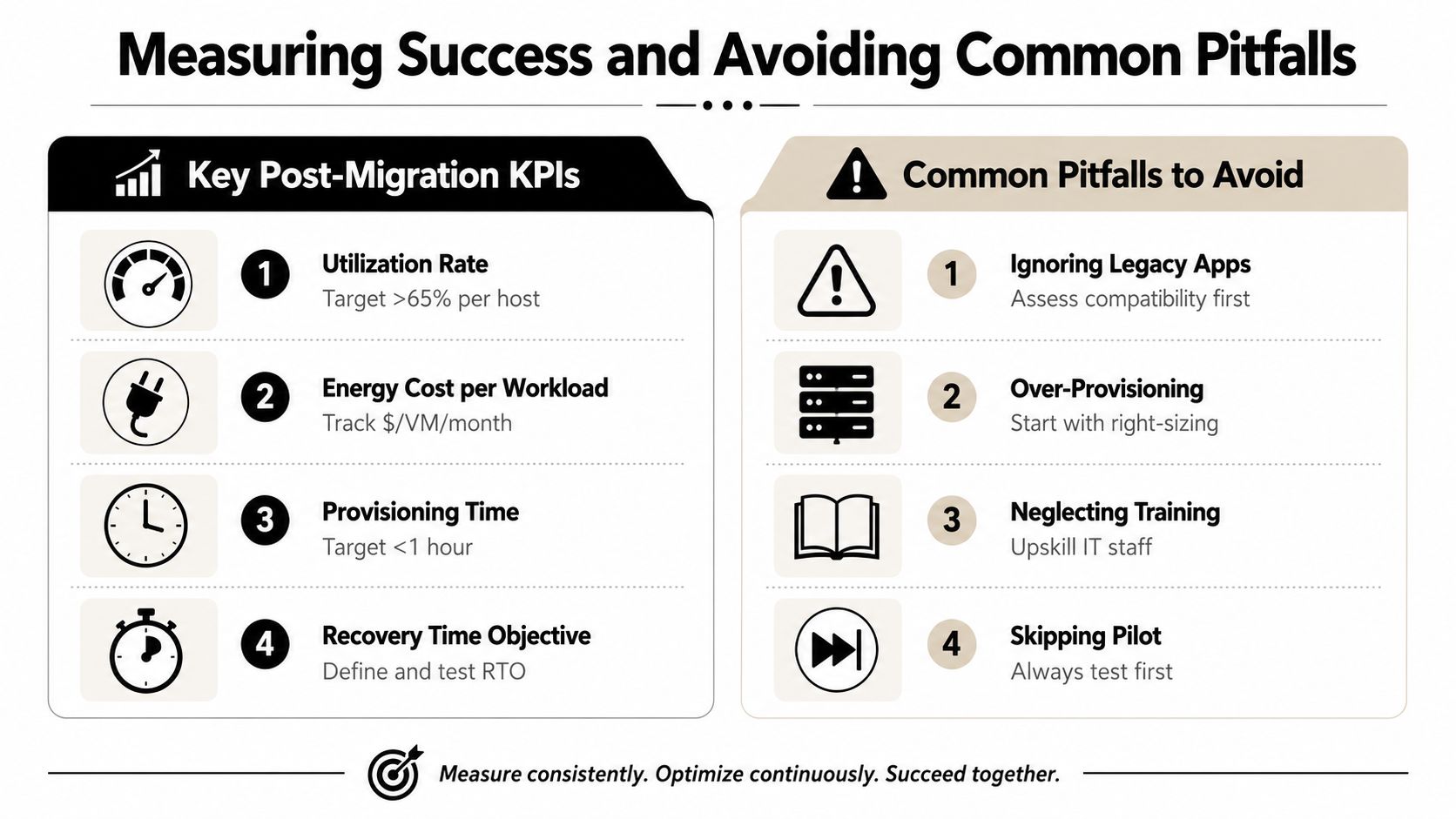
A virtualization project fails when teams measure the wrong things. Start with utilization rate, because it shows whether you consolidated workloads or just moved waste onto newer hardware. Then track energy cost per workload, provisioning time, and recovery time objective. Those four metrics tell you whether the environment is cheaper, faster, and more resilient than the one you replaced.
Do not stop at infrastructure metrics. Track how much retired hardware goes through certified e-waste partners, how many drives are erased with documented proof, and how much equipment still has residual value for buyback. If those numbers are weak, the project is incomplete. The new environment may be live, but the old one is still creating cost and risk.
The mistakes that erode the win
- Ignoring legacy apps: check compatibility before migration, or the old application stack will force exceptions later.
- Over-provisioning hosts: size for the actual workload instead of recreating the same waste on virtual infrastructure.
- Neglecting training: your team has to operate the new stack, not guess its way through incidents.
- Skipping the pilot: prove the migration pattern on a small set of systems before a full cutover.
- Treating end-of-life gear as a janitorial task: it is a compliance deliverable, and it needs the same discipline as the migration itself.
Use the KPIs to force a blunt post-project review. If provisioning is faster but recovery is not better, the design is unfinished. If utilization improves but licensing costs climb, the savings case weakens fast. And if retired drives are not documented and destroyed properly, the migration has added risk instead of removing it.
impact measurement matters because your disposal partner should be able to show what left the building and how it was handled. That record closes the loop between consolidation and retirement. The right standard is simple, each refresh should leave the environment leaner, safer, and easier to govern than it was before.