If your company has grown past a tidy stack of laptops and a single server room, you already know how hardware starts slipping through the cracks. A few devices are issued for remote work, a few more move between departments, a box of adapters disappears during an office move, and then finance asks for a clean asset list that nobody can fully trust. That's the moment IT asset management hardware stops looking like paperwork and starts looking like the backbone of control, security, and cost discipline.
A solid program gives IT, finance, security, and operations the same view of the same devices, from purchase to retirement. It also gives you a practical way to decide what stays in service, what gets redeployed, what gets refreshed, and what should be resold or retired through certified downstream handling. The point isn't to create more administration, it's to keep physical technology visible while it's still earning its keep.
When Hardware Disappears the Work Begins
A sales laptop ships to a home office, a dock is left behind after a desk swap, and a server no one remembers keeps sitting in a closet with no clear owner. By the time finance asks for a depreciation review or security wants to know where old storage media went, IT is piecing the story together from fragments.
Hardware management starts with proof. You need to show where each asset came from, who handled it, where it is now, and what happens when it leaves service. NIST treats chain of custody as part of provenance and traceability, and recommends tools such as RFID, digital signatures, or blockchains to track systems and components while they move, get stored, tested, maintained, or prepared for disposal. That lowers the risk of counterfeit substitution and helps protect device and data confidentiality, integrity, and availability NIST SP 800-161r1, with chain-of-custody documentation providing the paper trail that keeps each handoff defensible.
A hardware record that cannot survive a move, a repair, or a retirement cycle is a record you cannot trust.
For a mid-sized business, that trust gap shows up in ordinary work. Audits take longer. Missing devices stay missing. Retirements happen without a clean trail. The hidden cost is planning, because unmanaged hardware pushes IT to buy replacements before redeployable gear has been fully used.
The rest of this guide treats hardware like a living inventory. It ages, changes hands, leaks value, and eventually has to leave the environment in a way that security, finance, and sustainability can all defend.
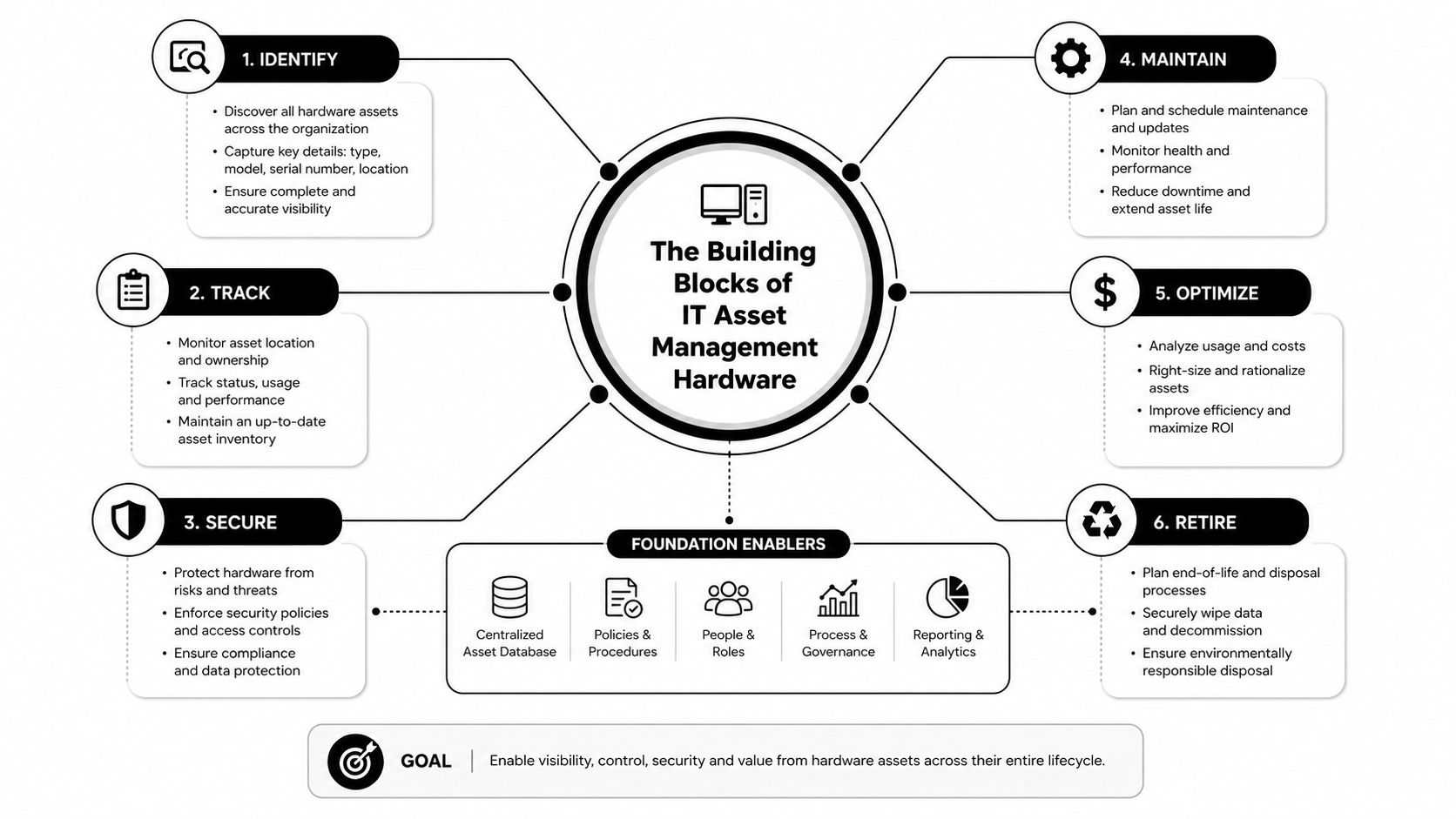
The Building Blocks of IT Asset Management Hardware
Think of a factory floor, where every pallet has a label, every station has a purpose, and every handoff gets logged before the next shift starts. IT asset management hardware works the same way, except the “pallets” are laptops, servers, switches, printers, and the odd drawer full of chargers and dongles that somehow matter during every audit.
At the center is the hardware inventory, the master record that ties each physical asset to its owner, location, warranty, contract, and lifecycle state. If that record is weak, everything downstream gets fuzzy, from support tickets to refresh planning. If it's solid, the rest of the program has something real to stand on.
Core records every asset needs
Each device should have a unique identifier, and that identifier should appear in the asset register or CMDB so the physical item and the record never drift apart. In a simple example, a team tagging 600 laptops across three offices needs more than a serial-number list. It needs a consistent asset tag, a named owner, a location, and a status field that says whether the device is in stock, in use, under repair, redeployed, or retired.
The practical value is obvious when a user leaves. IT can see whether the laptop should be reassigned, wiped, or removed from the ledger instead of hunting through spreadsheets and help desk notes. That same structure also helps with asset classification by criticality, because a loaner laptop does not carry the same operational risk as a production server in a data center rack.
Financial view and operational view
A finance team sees depreciation, contract dates, and write-offs. An operations team sees availability, performance, and current assignment. Both views matter, but they solve different problems.
Practical rule: one asset, one identity, one source of truth, or you'll spend more time reconciling records than managing equipment.
A useful external reference for teams evaluating inventory discipline is Safety Space's assets manager overview, which frames how organized asset records support accountability across a business. For a hands-on deployment checklist, Reworx also publishes an asset tagging system guide that fits naturally into a basic tagging workflow.
Tagging and Telemetry Compared
A laptop can sit on a desk, move to a conference room, then leave the building with no obvious trace if the record-keeping is weak. Tagging and telemetry are the tools that keep that movement visible. The question is how much certainty you need, and how much manual work your team can carry before the inventory starts to drift.
Barcodes, RFID, and agent-based telemetry each solve a different part of that problem. Barcode labels are inexpensive and easy to apply, but they still depend on a person pointing a scanner at each device. RFID supports batch reads, which helps in storerooms, server rooms, and crowded staging areas where many assets sit close together. A practical RFID deployment guidance example shows why teams use it for tighter inventory control and faster audits. Agent-based tools such as Intune, Jamf, and other endpoint platforms report software and security status, but only for devices that are powered on and enrolled.
Tagging and Telemetry Methods Compared
| Method | Typical Accuracy | Unit Cost | Audit Speed | Best Fit |
|---|---|---|---|---|
| Barcode | Manual-process dependent | Low | Slow, manual walk-throughs | Offices, small inventories, low-risk assets |
| RFID | Can exceed 95% with proper deployment | Moderate | Batch scans in seconds | Storerooms, data centers, mixed hardware counts |
| Agent-based telemetry | High for enrolled, active devices | Software-based | Continuous state reporting | Laptops, managed endpoints, secure fleets |
The table is easiest to read if you separate physical identity from live status. Physical tags confirm that a device exists and where it was last seen. Agents confirm that a device is awake, enrolled, and reporting. A mature program usually uses both. That keeps a missing laptop from hiding behind an old spreadsheet entry, and it helps managers spot the gap between what was issued and what is still active.
For teams that want a live tracking layer, real-time asset tracking connects physical inventory work to daily operations without forcing every check to happen by hand.
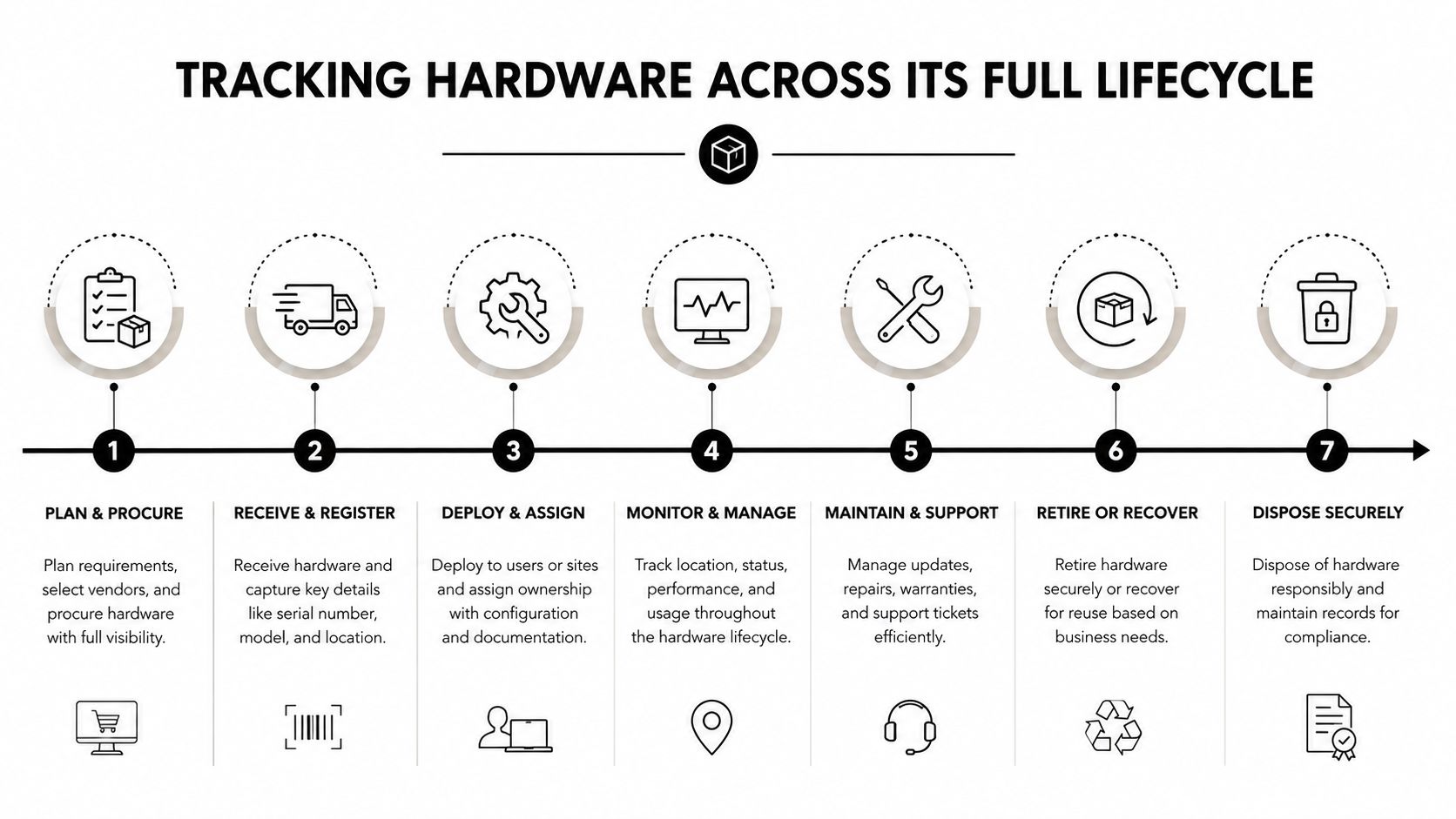
Tracking Hardware Across Its Full Lifecycle
Hardware doesn't fail you all at once. It drifts. One device is ordered, another arrives without matching paperwork, a third is reassigned without a status update, and eventually nobody knows which record is accurate. That's how inventory decay starts, usually within weeks of deployment.
The handoffs that matter most
The cleanest programs update the same source of truth at every stage, from procurement through decommissioning. Procurement should create the record before the device lands. Receiving should match the shipment to the purchase order and serial number. Deployment should lock in the assigned user, location, and status. Maintenance should preserve those details when a unit moves for repair. Redeployment should log the new owner and the reason for the move. Decommissioning should close the loop with sanitization and disposal evidence.
That sounds simple, but the common failure point is always a handoff. A laptop leaves IT without a record change. A storage shelf gets used as a temporary holding area. A field office swaps equipment informally. Each shortcut creates a gap the next audit has to chase down.
Keep one rule in place, if a device changes hands, its record changes too.
What to capture at each stage
- Procurement: purchase order, model, serial number, warranty terms, and expected service window.
- Receiving: physical condition, serial match, and whether the shipment arrived complete.
- Deployment: assigned user, department, office, and go-live date.
- Operations: repairs, maintenance notes, and movement between sites or staff.
- Redeployment: new owner, updated location, and reason for reassignment.
- Decommissioning: sanitization status, destruction or donation path, and final closeout.
The point is not data for data's sake. The point is to prevent a device from becoming a ghost asset, because ghost assets create avoidable spend, slow audits, and make security's job harder. If the record follows the machine, every team downstream gets a better answer.
When to Redeploy Refresh or Resell
The end of first use is where many IT teams lose money, because they treat every old device the same. A laptop that still handles light office work is not in the same category as a workstation that's too slow for current workloads. A server with resale value is not the same as a machine that should be retired before support risk grows. The smart move is to compare the options, not default to replacement.
A practical decision frame
Ask three questions. Can the device still do useful work for a lighter user, intern, call-center role, or lab environment. Does it still fit the organization's current performance and security needs. And does the secondary market still reward it enough to justify remarketing instead of internal reuse.
Recent coverage says IT asset management now overlaps with FinOps and cloud cost control because AI and asset classes such as IaaS, PaaS, SaaS, and XaaS are changing spend decisions. The same coverage notes that server resale values surged 37.3% over the past year in a 2025 benchmark, pulled up by constrained enterprise supply and AI infrastructure demand, while data center outsourcing plans are also accelerating Deloitte IT asset management survey. That matters because the window for a good resale decision can shrink fast when demand is changing and teams hesitate too long.
Redeploy vs refresh vs resell decision criteria
| Criterion | Redeploy | Refresh | Resell |
|---|---|---|---|
| Remaining performance | Good enough for lighter use | Too limited for current needs | Still marketable if condition is strong |
| Security support window | Acceptable for short-term use | Becomes a risk if support is ending | Must be cleared before transfer |
| Business priority | Low-demand roles, temporary seats | Critical users, performance-sensitive work | Surplus equipment with recoverable value |
| Finance impact | Defers new purchase | Resets lifecycle cost but may improve productivity | Recovers value through certified channels |
A simple rule helps. Redeploy if the hardware still works well for a less demanding user. Refresh if support, compatibility, or performance is starting to block business work. Resell if the device still has value and your process can move it quickly enough to protect that value.
For teams formalizing that decision tree, Reworx publishes a refresh strategy and ITAD services overview that sits naturally next to a redeploy-versus-dispose review.
Secure Data Destruction and End of Life Planning
A laptop that leaves your office still holding files is not retired hardware. It is a live data risk. The same goes for a drive tossed into a bin without a record, or a damaged battery mixed into the wrong pile. End of life work has to hold up under audit, security review, and whatever happens after the asset leaves your control.
The NIST 800-88 approach gives IT teams a practical way to choose the right end state. Clear and Purge apply to drives that can be sanitized and reused or transferred. Physical destruction fits damaged media, or cases where wiping is not enough. That distinction matters most with SSDs, because older destroy-everything habits are not the same as a documented sanitization process.
Retirement needs one chain, not three disconnected tasks
Retirement should follow one trail from start to finish. Sanitization, packaging, transport, downstream recycling, and documentation belong in the same workflow, not in separate handoffs that nobody owns. A certificate of destruction closes the loop for media that must be destroyed. Chain-of-custody records show who handled the asset and when. Certified downstream recycling shows where the hardware went after your team released it.
The U.S. EPA warns against abandonment and unsafe disposal of electronics and says they should be sent to a certified recycler, which sets a clear baseline for old hardware handling EPA electronics reuse and recycling resource.
Mixed hardware needs special handling
Damaged or swollen lithium-ion batteries need their own path before anything gets shredded or baled. They are not just another item in the pile. If a battery is unstable, the retirement record should show how it was isolated, stored, and handed off.
Industry coverage from Resource Recycling survey coverage points to a wider pattern. It notes that many respondents now align with NIST 800-88, while others still rely on older methods the source describes as obsolete for SSDs. The same coverage also reports that formal procedures for damaged lithium-ion batteries are still missing in many environments. That combination matters because retirement work often fails at the messy edges, not in the neat parts of the process.
Do not treat batteries, drives, and whole devices as one waste stream. The retirement record should explain how each one was handled.
For teams that want the retirement stage handled through a structured workflow, Reworx Recycling offers secure data destruction services alongside equipment recycling and documentation support.
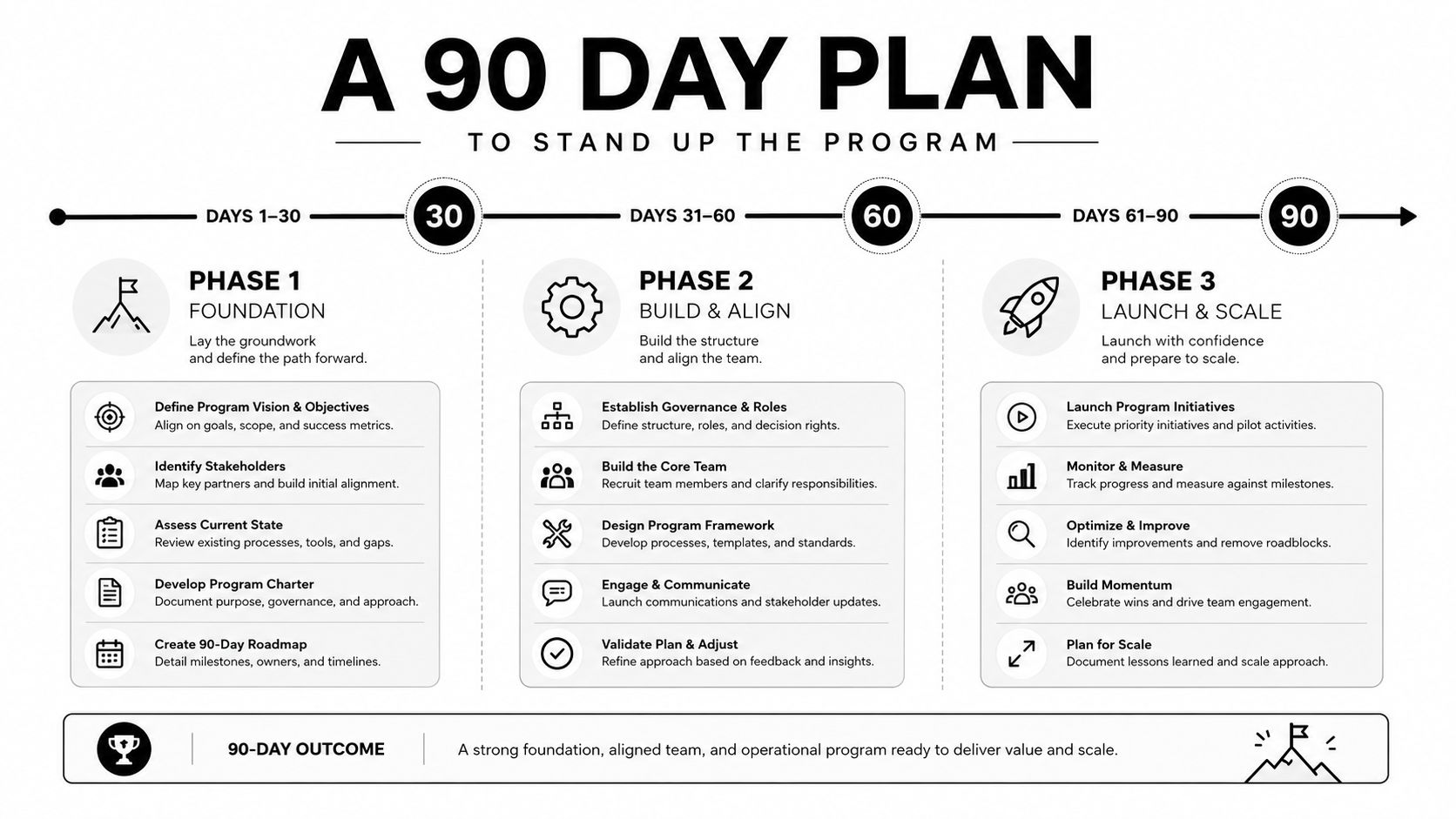
A 90 Day Plan to Stand Up the Program
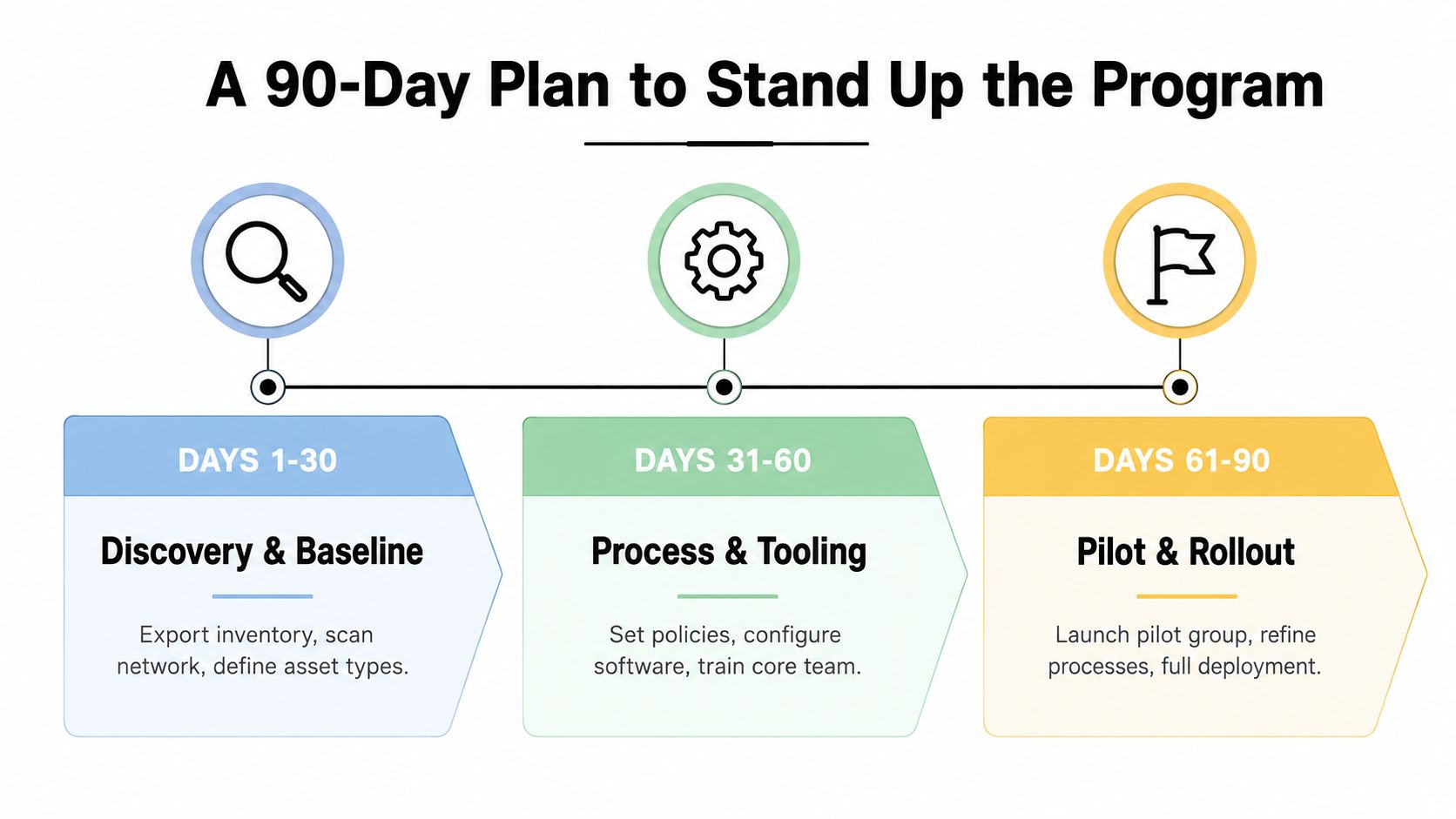
The fastest way to improve control is to stop trying to fix every record at once. A 90-day rollout works because it gives the team a baseline, a process, and a pilot, in that order. Mid-sized IT departments rarely need more theory. They need a sequence they can run without hiring a second operations team.
Days 1 to 30
Start by exporting the current inventory from tools like Intune or Jamf, then compare it with what staff have in use. Use barcode or RFID passes to close the obvious gaps, assign tags where records are missing, and lock the baseline in the ITAM database. If a device can't be matched to a person or place, treat that as a tracked exception, not a side note.
Days 31 to 60
Wire procurement intake, lifecycle stage changes, and refresh review fields into the same system. Train two super-users per business unit so each department has someone who knows how to update ownership, location, and status without waiting on IT. This is also the time to define what “in stock,” “in use,” “under repair,” and “retired” mean in your environment, because fuzzy labels create bad reports.
Days 61 to 90
Turn on accountability. Track the percentage of assets with a confirmed owner, the mean time to locate a missing device, and the percentage of retirements with a destruction certificate. Those numbers give finance and security something concrete to review, and they expose process gaps before they become habits.
Practical rule: if the team can't prove a change happened, the change didn't happen for audit purposes.
A 90-day program won't solve every lifecycle issue, but it will give you a repeatable way to keep hardware visible while it moves through the business. That's the win, because visibility is what turns a noisy device list into a manageable operating system.
Turning Retired Hardware Into Community Impact
Retired hardware doesn't have to end as waste. When working devices clear data destruction standards and still have useful life left, they can be refurbished and routed into schools, nonprofits, and workforce programs instead of being broken down too early. That shifts the conversation from disposal to access, and it gives businesses a practical way to connect asset retirement with community benefit.
Damaged devices still matter too, because certified component recovery keeps useful materials in circulation and hazardous materials out of landfill. For organizations that want a donation-based path, Reworx Recycling can receive equipment, clear it through secure data destruction where needed, and route usable hardware toward downstream reuse or certified recycling. The value is both operational and social, because the business closes the loop while another user gets a working device.
If your team is sorting through laptops, servers, storage media, or mixed retirement loads, Reworx Recycling can help with secure data destruction, pickup coordination, and certified electronics recycling that fits a real ITAD workflow. Visit Reworx Recycling to plan a pickup or start a responsible retirement intake for your next hardware refresh.