For businesses in Georgia, from the tech hubs of Atlanta to the manufacturing centers in Savannah, optimizing IT budgets while championing sustainability is a top priority. Let's get one thing straight: refurbished PC computers are not just used machines. They're professionally restored, pre-owned devices that have been put through their paces—tested, repaired, and certified to meet specific functional standards. This rigorous process makes them a reliable and incredibly budget-friendly alternative to brand-new equipment for any Georgia-based business.
What Refurbished PCs Mean for Modern Business
Staring down a tight IT budget is a familiar challenge for organizations across the Peach State. This is why so many businesses are now looking at refurbished PCs, not just as a cost-cutting tactic, but as a smart, strategic move to boost efficiency and hit their sustainability goals. It’s a solution that goes far beyond the "used" label, bringing in a meticulous process of professional testing, restoration, and certification.
This growing trend allows IT managers to stretch their budgets further without having to sacrifice performance. It's a practical solution that gets enterprise-grade technology into the hands of your teams while promoting a more circular economy. As a social enterprise focused on community impact, Reworx Recycling is a key part of this ecosystem, transforming retired corporate assets through donation-based recycling into certified, high-performance machines ready for their next chapter.
The Soaring Demand for Refurbished Technology
The shift toward refurbished tech isn't a small ripple; it's a massive market transformation. The global market for refurbished PCs and laptops, valued at around USD 5.24 billion in 2025, is on track to skyrocket to USD 12.52 billion by 2033.
That huge jump reflects a major shift in thinking among small businesses, enterprise IT departments, and even government agencies who are all looking for more affordable and sustainable tech. North America is leading the charge, currently holding over 40% of the market share.
Key Advantages for Your Organization
Adopting refurbished computers brings a mix of immediate wins and long-term benefits that check all the right boxes, from financial to operational.
- Significant Cost Savings: You can get your hands on enterprise-grade hardware for a fraction of what you'd pay for new equipment. That frees up capital for other critical investments.
- Proven Reliability: Refurbished devices from a reputable vendor have often been field-tested in demanding corporate environments. Any initial bugs or defects have likely already been found and fixed.
- Environmental Responsibility: Choosing refurbished tech extends the life of existing hardware, which drastically cuts down on e-waste and the carbon footprint that comes with manufacturing new devices. This aligns perfectly with corporate sustainability initiatives gaining traction throughout Georgia.
- Faster Deployment: With stock readily available, deployment cycles can often be much shorter compared to waiting on new models, which might be hit with supply chain delays.
By bringing refurbished hardware into your IT strategy, you can build a robust infrastructure that's both economically sound and environmentally conscious. To learn more about how retired electronics get a second life, check out our article on unlocking value after electronics recycling.
The Journey from Used Device to Certified Asset
Ever wondered what really happens to a computer after it leaves one office and before it arrives at another? The path from a used device to a certified, enterprise-ready asset is a detailed, multi-stage journey. It's so much more than a quick wipe-and-resell job; it's a professional restoration process designed to guarantee security, reliability, and performance.
This transformation kicks off the moment a business decides to retire its hardware. The first step, decommissioning, is all about carefully removing equipment from the live environment. This is where having a professional partner is crucial to make sure the transition is smooth and doesn't disrupt your daily operations.
Securing Data Before Anything Else
Before a single piece of hardware gets inspected, the most critical phase has to happen: secure data destruction. Lingering sensitive corporate data—from financial records to private client information—is a massive liability just waiting to cause a problem.
Reputable refurbishers and ITAD specialists like Reworx Recycling follow strict data sanitization protocols, like those laid out by the EPA and NIST 800-88. This isn't just about dragging files to the trash. The process uses specialized software to overwrite the entire hard drive with random data, making the original information completely unrecoverable. For drives that are faulty or at the absolute end of their life, physical shredding offers a final, foolproof guarantee. This step is completely non-negotiable for staying compliant and protecting your company’s good name.
Comprehensive Hardware Diagnostics and Upgrades
Once a device is verifiably clean of all data, it's put through a whole battery of diagnostic tests. Technicians meticulously inspect every single component to spot any potential points of failure.
- Motherboard and CPU: Stress tests are run to make sure the core processors can handle demanding workloads without overheating or crashing.
- RAM (Memory): Each memory stick is checked for errors to prevent system instability and future data corruption.
- Ports and Peripherals: All USB ports, display outputs, and other connections are tested to confirm they're fully functional for business use.
- Power Supply: The power supply is checked to ensure it delivers stable, consistent power—a key factor in the long-term health of the hardware.
After diagnostics, any necessary upgrades are made. One of the most common and impactful upgrades is swapping out old-school Hard Disk Drives (HDDs) with modern Solid-State Drives (SSDs). This one change can make an older machine feel brand new, dramatically boosting boot times and how fast applications run. Other upgrades might include adding more RAM or installing a better graphics card, depending on what the machine will be used for. Understanding the full scope of these services is a core part of effective IT asset disposition (ITAD) strategy.
Cosmetic Restoration and Final Quality Assurance
With the internal parts certified and ready to go, the focus shifts to the device's physical condition. Technicians handle cosmetic restoration, which might involve cleaning the chassis, replacing worn-out keyboards or trackpads, and buffing out minor scuffs or scratches. The goal is simple: deliver a product that not only works perfectly but also looks professional.
Finally, a fresh, legitimate copy of the operating system is installed. The machine then goes through one last quality assurance (QA) check, where it's tested from top to bottom to make sure everything functions just as it should. Only after passing this exhaustive inspection does a used device earn the title of a certified refurbished asset.
This rigorous, end-to-end process is what separates a certified refurbished PC from a simple used computer. It transforms a potential risk into a reliable, enterprise-ready tool backed by a guarantee of quality and security.
Decoding the Industry Grading System
To be transparent and help buyers make smart decisions, refurbishers use a grading system to classify the cosmetic condition of their products. While the exact terms can vary a bit from one vendor to another, the system generally follows these tiers:
- Grade A: The best you can get. These devices are in near-mint condition with very few, if any, signs of use. They might have a tiny, almost invisible scuff, but they're free of noticeable scratches or dents.
- Grade B: These computers are fully functional but show some minor cosmetic flaws. You might see light scratches on the case, small scuffs on the corners, or shiny spots on the keyboard from use. These imperfections don't affect performance at all.
- Grade C: The most budget-friendly choice. These devices show clear signs of wear, like obvious scratches, dents, or worn-off paint. Despite their appearance, they have been tested and are guaranteed to be 100% functional.
Getting familiar with this system allows procurement managers to pick refurbished PC computers that perfectly fit their budget and what they expect aesthetically, making sure there are no surprises when the order arrives.
Choosing Your Hardware: Refurbished vs. New vs. Used
For IT managers and procurement teams, every hardware decision is a big one. It doesn't just hit the immediate budget; it ripples through your long-term operational reliability. When you're weighing the options between new, refurbished, and used computers, you're really balancing trade-offs. New PCs boast the latest specs but come with a premium price tag, while used devices are a gamble, plain and simple.
This is exactly where refurbished PC computers find their sweet spot. They offer a smart, strategic balance—delivering enterprise-grade power and proven dependability for a fraction of the cost. It’s a move that satisfies both the finance department and your corporate sustainability goals.
The journey from a decommissioned corporate machine to a certified, market-ready asset is a professional one. This quick flowchart shows you exactly how it works.
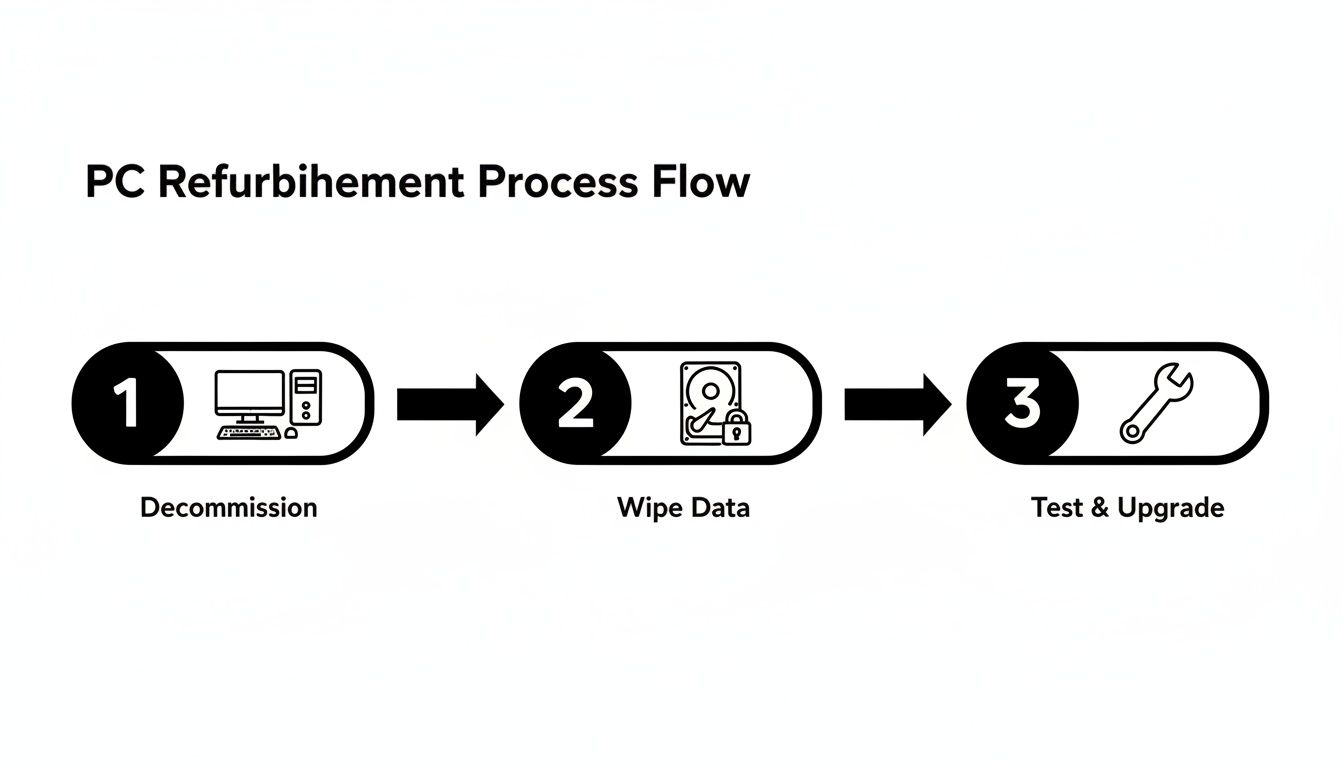
This process isn't just a quick wipe-down. It involves critical steps like secure data sanitization, tough diagnostic testing, and smart upgrades that elevate a refurbished machine far beyond a typical second-hand sale.
A Head-to-Head Comparison
Making an informed choice means putting these options side-by-side and looking at what really matters for your business. Let's break down how new, refurbished, and used computers stack up across the metrics that impact your IT infrastructure and financial health.
Comparing New, Refurbished, and Used Business Computers
| Attribute | New Computers | Refurbished Computers | Used Computers |
|---|---|---|---|
| Cost | Highest initial investment. Depreciation hits fast, losing a huge chunk of its value in the first year. | Significant savings (30-50% less). Delivers the best value-to-performance ratio for business needs. | Lowest up-front cost. But hidden expenses for repairs or replacements can pile up quickly. |
| Performance | Top-of-the-line specs with the newest processors and parts, perfect for the most demanding tasks. | Enterprise-grade performance fit for 95% of business applications. Often upgraded with speedy SSDs. | Inconsistent and unpredictable. Performance can be sluggish due to age, wear, and zero professional servicing. |
| Warranty & Support | Full manufacturer warranty (usually 1-3 years) and complete tech support. | Comes with a refurbisher's warranty (e.g., 90 days to 1 year), giving you a safety net for your investment. | No warranty or support. All risks and repair bills are on you, making it a total gamble. |
| Reliability | Generally reliable, but new models can have surprise bugs or "first-generation" hardware quirks. | High reliability. These devices have been tested in the real world, and common faults are fixed during refurbishment. | Low reliability. Prone to sudden failures from an unknown history, potential damage, and component fatigue. |
| Environmental Impact | Highest impact due to resource mining, energy-heavy manufacturing, and global shipping. | Lowest environmental impact. You're extending the life of existing hardware, cutting down e-waste and saving resources. | Low initial impact, but devices that fail quickly just become e-waste, contributing directly to the problem. |
| Data Security | Secure when you unbox it, but your organization is on the hook for end-of-life data destruction. | Professionally sanitized using standards like NIST 800-88, guaranteeing no data from the previous owner is left. | Major security risk. There's no guarantee the data was wiped, potentially exposing you to the last owner's data. |
Why Refurbished Wins for Most Businesses
The comparison lays it all out. For the vast majority of business needs, refurbished hardware is the clear winner. New computers offer power that often goes unused for standard office work, all while straining your budget. At the other extreme, used computers introduce an unacceptable level of risk—from reliability and security to unexpected downtime.
Professionally refurbished machines eliminate those risks. They are a predictable, dependable, and budget-friendly solution. When you're trying to decide, it helps to think about similar choices where value is key, like the debate over building versus buying a gaming PC. That discussion also revolves around balancing cost, performance, and convenience, highlighting the same kinds of trade-offs.
The real power of refurbished PCs is their ability to deliver predictable enterprise performance without the hefty price tag or the risks of the second-hand market. It's a proactive strategy for building a resilient and affordable IT fleet.
By opting for professionally restored equipment, your organization gets powerful technology that has been meticulously vetted and is backed by a warranty. This move not only gets the most out of your IT budget but also supports a circular economy, strengthening your commitment to sustainable business practices.
You can learn more about which models are available and how they fit your operations by exploring our selection of refurbished desktop computers. Making this strategic choice lets you invest the capital you save into other growth areas, all while knowing your hardware foundation is solid, secure, and sustainable.
A Smart Procurement Checklist for Buying Refurbished PCs
Making the jump to refurbished PCs isn’t something you do on a whim. If you just grab the cheapest option you can find, you're setting yourself up for headaches and hidden costs down the road. To build a fleet of reliable, high-performing machines, you need a solid game plan for vetting vendors, nailing down your specs, and making sure you got what you paid for.
This checklist is your framework for sourcing top-notch refurbished tech with confidence. It turns a simple purchase into a smart IT investment, ensuring the computers you get meet your team's needs from day one.
Phase 1: Vet Your Vendors and Their Certifications
The quality of your refurbished PCs is a direct reflection of your vendor. They aren't all the same, so doing your homework here is the most important first step. You want partners who are serious about their craft and can prove it with recognized industry certifications.
- Look for R2 or e-Stewards Certification: These are the gold standards. A vendor with these certifications is committed to strict rules for protecting the environment, securing data, and keeping their workers safe. You can learn more about why this matters in our guide to understanding electronics recycling certifications.
- Ask About Their Data Destruction Process: Get specific. Do they follow NIST 800-88 guidelines? Can they give you certificates of data destruction? A trustworthy partner will be completely open about how they sanitize drives.
- Check Their Warranty and Return Policies: A refurbisher who believes in their product will back it up. Look for a clear warranty—90 days is the bare minimum, but a year is much better—and a simple return process in case a machine is dead on arrival (DOA) or just doesn't cut it.
- Read Customer Reviews and Case Studies: See what other businesses are saying. Do they have a history of supplying dependable hardware to companies like yours?
Phase 2: Define Your Hardware Specifications
Once you've got a shortlist of vendors you trust, it's time to get crystal clear about what you need. Being specific here is key to getting machines that can handle your team's workload without wasting money on power you don't need.
A common mistake is buying refurbished PCs with specs that are either too weak for the job, leading to frustrated users, or way too powerful, which just blows the budget. Getting it just right means every dollar is spent wisely.
Use this list to build out your spec sheet:
- Processor (CPU): Be precise about the generation and model (e.g., Intel Core i5, 8th generation or newer). This directly impacts performance and software compatibility.
- Memory (RAM): Decide on the minimum RAM needed for your daily applications. 8GB is a solid baseline for most office tasks, but 16GB is a better bet for heavy multitasking.
- Storage: Specify the type and the size. You should absolutely insist on Solid-State Drives (SSDs) for their speed and reliability. For most business users, a 256GB SSD is plenty.
- Operating System: Make sure the vendor provides a genuine, properly licensed OS. This is non-negotiable for security and staying compliant.
- Cosmetic Grade: Figure out what level of physical wear and tear is okay. For computers that clients will see, Grade A is the way to go. For internal teams where looks don't matter as much, Grade B can unlock even bigger savings.
Phase 3: Acceptance Testing and Validation
The job isn't finished when the delivery truck pulls away. The last step is to make sure you actually received what you ordered. A quick but thorough testing process protects your investment and prevents problems from popping up later.
Before you roll them out to everyone, grab a small batch from the order and put them through their paces.
- Verify Physical Specs: Pop open a few units and confirm they have the CPU, RAM, and SSD you specified on your purchase order.
- Run Hardware Diagnostics: Use built-in tools or third-party software to stress-test the processor, check the RAM for errors, and confirm the SSD is healthy.
- Test All Ports and Connections: Plug things into every port—USB, display outputs, Ethernet—and check the Wi-Fi to make sure everything works.
- Check Battery Health (Laptops): For laptops, see how long the battery lasts under a normal workload. You need to know it will hold an acceptable charge for your users.
Follow this three-phase checklist, and you can confidently bring refurbished PCs into your IT ecosystem. You’ll strike the perfect balance of cost-savings, performance, and sustainability.
Data Security and Sustainability: The Bigger Picture
Choosing refurbished PC computers goes way beyond a simple IT purchase. It's a strategic decision that touches on your organization's compliance standards and your commitments to corporate sustainability. Before any device gets a second life on the market, its previous life has to be completely wiped clean, and that's non-negotiable. This is where certified secure data destruction becomes absolutely critical.
Partners like Reworx Recycling see data security as the very first step in the whole refurbishment process. Just hitting 'delete' on a few files won't cut it. Professional IT asset disposition (ITAD) services follow strict standards like NIST 800-88, which provides a clear roadmap for sanitizing media. This process guarantees that every single sector of a hard drive is overwritten, making the old data impossible to recover. For any business, this provides a solid audit trail and some much-needed peace of mind, knowing your sensitive information is gone for good before that hardware is passed on. You can get a better handle on this essential step by exploring our overview of data security's vital role in the recycling industry.
The Powerful Environmental Ripple Effect
Once you get past that critical security layer, you’ll find that choosing refurbished hardware creates a huge positive ripple effect for the environment. This isn't just talk; it's a direct contribution to your company's Environmental, Social, and Governance (ESG) goals and helps build your brand's reputation as a business that cares.
The environmental upside isn't just a nice idea—it's measurable and significant. Manufacturing a brand-new computer is an incredibly resource-heavy process that guzzles up energy, water, and raw materials.
By extending the lifecycle of existing electronics, your business actively diverts functional hardware from the e-waste stream. This single choice conserves natural resources, reduces landfill burden, and significantly lowers the carbon footprint associated with new production, aligning with EPA recommendations for sustainable electronics management.
Quantifying the Sustainability Advantage
The numbers don't lie. They paint a clear picture of why refurbished tech is the smarter environmental choice. Refurbished PCs offer incredible cost savings, often running 30-50% cheaper than new, which is a huge driver for budget-conscious organizations. But from a sustainability angle, this choice dramatically slashes e-waste—a key metric for anyone managing corporate responsibility. To put it in perspective, making just one new laptop can pump out between 400-500 kg of CO2 equivalent. That figure drops dramatically when you opt for a refurbished model instead.
- Reduced E-Waste: Every refurbished PC you buy is one less piece of equipment dumped in a landfill before its time. This directly helps fight the massive global e-waste problem.
- Lower Carbon Emissions: Going refurbished means you skip the carbon-intensive manufacturing and global shipping needed to produce new devices.
- Resource Conservation: You're also helping to conserve precious metals, plastics, and water that would have been consumed to create new hardware from scratch.
Of course, whether you choose new or refurbished gear, strong data security is a must. It's always a good idea to explore comprehensive cybersecurity strategies to protect all your valuable assets. At the end of the day, bringing refurbished PCs into your procurement strategy is a powerful way to line up your IT infrastructure with smart financial decisions and a real commitment to protecting the environment.
Completing the Circular IT Lifecycle with Reworx Recycling
The journey to a smarter, more sustainable IT strategy really comes together when responsible disposal feeds directly back into intelligent acquisition. This is the very heart of a circular IT lifecycle, a model where every piece of hardware is managed from deployment all the way to its end-of-life—and then looped back into use.
Think about it: your organization’s retired assets aren't just junk. They're the raw materials for the high-quality refurbished market.
By partnering with a social enterprise like Reworx Recycling, you can transform your IT equipment disposal process from a simple cost center into a real strategic advantage. When your business decommissions old equipment with us, you're kicking off the first, most critical step in giving those assets a second life. We make sure every single device is securely processed, professionally refurbished, and ready for its next chapter, supporting digital inclusion and workforce development across Georgia.
This closed-loop system creates a powerful synergy. The same partner that guarantees your data is destroyed and your e-waste is handled responsibly can also become your trusted source for reliable, cost-effective refurbished hardware for your future needs.
From Your Office Cleanout to a New Beginning
Take the typical corporate hardware refresh cycle. Laptops are a huge part of this, driving a massive slice of the refurbished market simply because businesses upgrade them so frequently. This trend is so significant that laptops are projected to command an incredible 73.55% revenue share of the refurbished PC market in 2025.
For businesses, this creates a seamless reverse logistics opportunity. Old laptops can be securely processed, with options for hard drive shredding and even buybacks to help fund new gear. You can read more about these market dynamics and the demand for Grade A inventory to see just how big the opportunity is.
Our role at Reworx Recycling is to bridge this gap. We provide the essential services that make this circular model work:
- Secure Data Destruction: We guarantee the complete and permanent sanitization of your sensitive corporate data before any device is even considered for refurbishment.
- Professional ITAD Services: Whether it’s a simple office cleanout or a full data center decommissioning, our team manages the entire process efficiently and compliantly.
- Donation-Based Recycling: Your retired equipment supports our mission to promote digital inclusion and workforce development right here in the community.
Transform Your IT Strategy Today
When you start viewing ITAD and procurement as two sides of the same coin, you unlock immense value. You reduce your environmental footprint, secure your data, and optimize your IT budget—all at the same time. This integrated approach isn't just good for the planet; it's just plain smart business.
Ready to close the loop on your IT lifecycle? Partner with Reworx Recycling to handle your IT equipment disposal responsibly and explore the benefits of high-quality refurbished PC computers.
Take the next step toward a more sustainable and cost-effective IT infrastructure. Schedule a pickup for your old equipment or contact us to discuss a corporate donation program that benefits your business and your community.
Answering Your Questions About Refurbished PCs
Diving into the world of refurbished tech can feel like a big step, especially when you’re making decisions for your entire organization. IT managers and business owners need to know they’re making a smart, cost-effective choice. Let's tackle some of the most common questions to help you feel completely confident about investing in refurbished PC computers.
Are Refurbished Computers Reliable Enough for Business?
They absolutely are. The real magic happens in the difference between a simple "used" computer and one that's been professionally "refurbished." It all comes down to a rigorous certification process that separates the good from the great.
Reputable vendors, especially those holding certifications like R2 or e-Stewards, put every single device through its paces. We're talking comprehensive diagnostic tests, necessary repairs, and even performance upgrades. Unlike a random second-hand machine you might find online, a professionally refurbished PC has been thoroughly vetted by expert technicians to meet strict standards for performance and reliability. These machines often come from corporate environments where they were well-maintained to begin with, and any hint of an issue is found and fixed long before it ever lands on a desk in your office.
What Kind of Warranty Can I Expect with a Refurbished PC?
This is a make-or-break question for any vendor you're considering. A trustworthy refurbisher will always stand behind their work with a solid warranty—that's one of the biggest things setting them apart from a typical "used" sale.
While the exact terms can vary, you should look for a warranty of at least 90 days. Many of the best suppliers go even further, offering a full year of coverage. This warranty isn't just a piece of paper; it's a guarantee of quality that protects your investment against hardware failures. It gives you the kind of peace of mind you’d expect from buying new, but at a fraction of the cost. Always get the warranty details in writing before you finalize a purchase.
A strong warranty is the clearest sign that a vendor is confident in their refurbishment process. It elevates a budget-friendly purchase into a smart, risk-mitigated IT investment for your business.
How Do I Know the Data on a Refurbished Computer Is Secure?
Data security is non-negotiable, and certified refurbishers treat it with the seriousness it deserves. Before any hardware gets tested, let alone resold, it goes through an exhaustive data sanitization process that follows strict standards like NIST 800-88.
This is far more than just dragging files to the trash bin. It involves using specialized software to completely overwrite every sector of the hard drive, making the previous owner's data totally unrecoverable. For any business that handles sensitive information or needs to stay compliant, this certified process ensures the computer you receive is a completely clean slate. It’s a level of security you just don’t get with a standard used machine.
Ready to build a more sustainable and cost-effective IT infrastructure? The Reworx Recycling blog is your go-to resource for expert insights on ITAD, e-waste management, and making smart technology choices. Explore our articles today to learn more.