Asset lifecycle management is the end-to-end governance of an asset from planning and procurement through operation, maintenance, and secure decommissioning. A laptop, server, or switch only stays useful when someone tracks who owns it, what it supports, and what happens when it leaves service. Standards-based guidance aligns this approach with ISO 55000, which frames asset management as creating value through effective management of enterprise assets, not just counting them (Dexpi guidance on asset lifecycle management).
A closet full of retired laptops, a spreadsheet nobody trusts, and no clear answer on who owns the data, the warranty, or the final disposal. That is the messy version of lifecycle management failure. Inventory tells you the device exists. ALM keeps the handoff clean, from purchase through use, maintenance, refresh, and secure decommissioning.
Why Asset Lifecycle Management Matters More Than Inventory Tracking
An inventory list tells you what you own. Asset lifecycle management tells you what happens next. That's the practical gap often missed, especially when the asset in question is a laptop, phone, printer, network switch, or server that's already moved past its useful life.
A closet of 140 retired laptops is a common failure pattern. The devices may still exist in a spreadsheet, but the business no longer knows which ones were wiped, which ones were reassigned, which ones are waiting for pickup, and which ones have been sitting long enough to create compliance risk. A static record can't answer those questions. A lifecycle model can, because it treats each asset as a governed object with a beginning, a middle, and a controlled end.
That's why ALM isn't just inventory tracking. It's a governance model that ties each decision to cost, risk, service performance, and disposition across the full useful life of an asset (Dexpi guidance on asset lifecycle management). In plain English, inventory says the laptop exists. ALM says who uses it, what it costs to keep it alive, when it should be refreshed, and how it leaves service without leaking data or budget.
Practical rule: if a device can leave service without a documented owner, you don't have lifecycle management, you have storage.
For IT teams, that distinction matters because end-of-life is where the hidden work shows up. The asset has to be decommissioned, data has to be handled, and the organization needs evidence that the decision was controlled. That's the stage many teams leave to chance, and it's usually where problems pile up.
If you're trying to connect inventory to action, an asset inventory management framework is only the starting line. Value comes when that list becomes a decision system.
The Core Stages of an Asset Lifecycle From Procurement to Retirement
Most mid-sized organizations can point to at least one device in the pipeline that has no clear owner. That is usually the first sign that lifecycle work is breaking down. The asset may exist in a spreadsheet, but no one can say who approved it, who is using it, or how it will leave service.
Planning and procurement
Planning starts with a simple question: does the organization need the asset, and what job should it do over time? That answer drives demand forecasts, standard model choices, and the refresh horizon before anyone places an order. Procurement then turns the plan into a tracked purchase, capturing serial numbers, warranty data, and configuration details from the start.
Deployment and operation
Deployment is the handoff into active use. The device gets imaged, assigned to a user, and tied to a location and warranty start date. Once it is in service, IT operations tracks incidents, patching, and utilization so refresh timing rests on evidence, not habit.
A useful record is more than a log. It should stay consistent when assets move between departments or sites, which is where operations inspection templates can help teams standardize checks.
Devices wear down on desks, in bags, and on loading docks. The record has to follow the hardware, or the hardware slips out of management long before it leaves the building.
Optimization and retirement
Optimization is the stage where underused devices get reassigned before new purchases are approved. Retirement is where the hard calls show up. Some assets are extended, some are redeployed, some are donated, some are resold, and some are recycled, but each path needs a controlled exit.
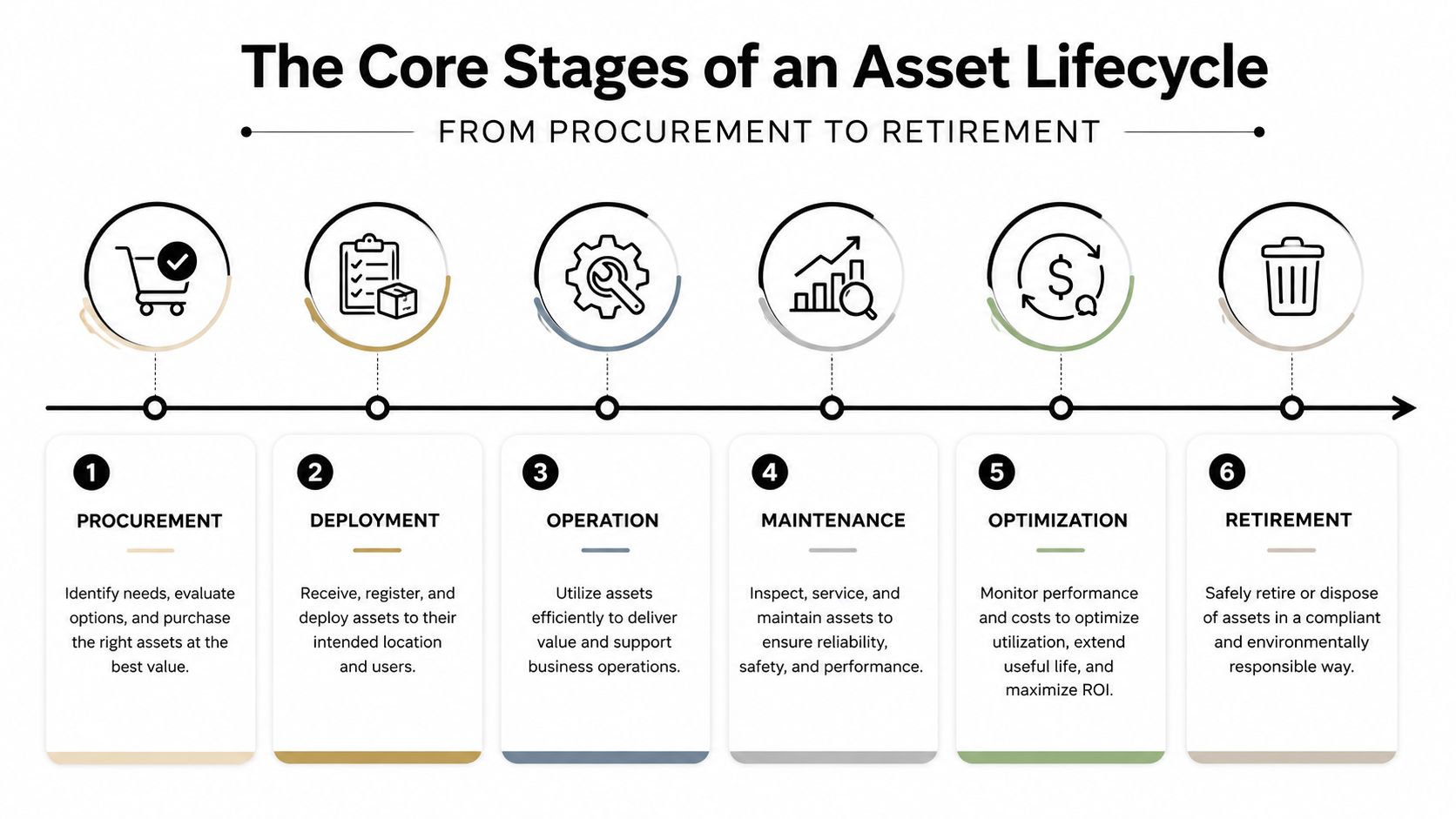
The failure point I see most often is waiting until equipment is already stacked in storage before retirement is planned. At that stage, data status gets unclear, warranties expire, and the organization loses the chance to recover value or prove secure disposition. The retirement and ITAD handoff is where device lifecycle management matters most, and where Reworx Recycling fits into the process as assets leave service.
Roles and Responsibilities Across the Lifecycle
ALM falls apart when everyone thinks someone else owns the final step. In smaller organizations, one IT lead usually carries most of the load, but the work still spans multiple functions. In larger organizations, the responsibility has to be split cleanly or the lifecycle becomes a blame chain.
Procurement owns vendor selection and the commercial terms. IT operations owns deployment, maintenance, and user assignment. Finance handles capital planning and depreciation. Security owns data classification and destruction verification. Sustainability or Facilities usually handles environmental reporting and disposal records. The end user owns day-to-day care, which sounds simple until a laptop comes back with a cracked screen and no ticket history.
| Lifecycle Roles and Primary Responsibilities | ALM Stage | SMB Owner | Enterprise Owner |
|---|---|---|---|
| Planning and sourcing | Planning, procurement | IT lead or office manager | Procurement with IT and Finance |
| Deployment and support | Deployment, operation, maintenance | IT lead | IT operations or service desk |
| Retirement and disposal | Decommissioning, disposition | IT lead or facilities | IT asset manager with Security and Sustainability |
The biggest gap appears at the end of life. Devices get set aside “for later,” then later becomes months, and nobody can prove who approved retirement or whether the media was sanitized. That's how warranty value goes unclaimed and chain of custody gets broken.
For a growing company, a single lifecycle owner with cross-functional authority is the simplest fix. A Reworx IT asset management group can fit into that retirement handoff when a business needs a structured path out of the closet and into documented disposition.
KPIs and Metrics That Reveal a Healthy ALM Program
A healthy ALM program shows up in decisions, but it also shows up in metrics. If the numbers only tell you what's in the closet, you're still doing inventory. If they tell you what to refresh, what to redeploy, and what to retire, you're managing the lifecycle.
Three metrics matter most. Forecast accuracy tells you whether purchasing matched actual demand. Utilization rate shows whether assets are earning their keep. Cost per asset year gives finance a clean way to compare keeping versus replacing. Those three together create a sharper picture than any single asset count.
The metrics that expose weak spots
Supporting measures fill in the rest of the picture. Maintenance cost ratio shows whether support is starting to eat the asset's value. Warranty recovery rate shows whether the team is acting before coverage disappears. Downtime hours point to operational disruption. Refresh-cycle variance shows whether replacement timing is disciplined or random.
If you can't see the retirement pipeline, your cleanest-looking dashboard may still be hiding the ugliest risk.
| Core ALM KPIs by Lifecycle Stage | Lifecycle Stage Exposed | Healthy Signal |
|---|---|---|
| Forecast accuracy | Planning and procurement | Purchase timing matches real demand |
| Utilization rate | Operation and optimization | Assets are actively used, not sitting idle |
| Cost per asset year | Maintenance and finance | Support cost stays defensible against replacement |
| Warranty recovery rate | Deployment and maintenance | Coverage is used before it expires |
| Downtime hours | Operation and maintenance | Fewer interruptions to service |
| Refresh-cycle variance | Planning and retirement | Replacement timing follows policy, not guesswork |
| Certified disposition rate | Retirement | Assets leave with documented proof of data handling and final destination |
The most revealing metric is the hardest one to capture. It's the share of end-of-life assets that leave the building with verifiable data destruction and downstream chain-of-custody documentation. That's where lifecycle discipline becomes auditable, and where a Reworx impact measurement process can help tie the physical exit to the paper trail.
End of Life Choices ITAD Recycling Donation and Resale
Before a device leaves your building, four paths are possible, and the right one depends on condition, compliance burden, residual value, and the documentation you need to keep. A laptop that still has useful life does not follow the same path as a dead server or a storage device tied to regulated data.
Comparing the disposition paths
IT asset disposition, or ITAD, is the controlled route for a managed handoff of data, logistics, and downstream processing. It suits organizations that need formal chain of custody and documented retirement. Certified e-waste recycling fits when reuse is no longer realistic and the priority is safe material recovery. Donation works when the device still has practical value for a school, nonprofit, or community program. Resale works when the hardware can still recover value in a secondary market.
The security question sits inside every path. NIST-linked guidance and industry summaries distinguish between data sanitization, which permanently removes data so it cannot be recovered, and data destruction, which physically demolishes the storage media to prevent retrieval (EPA report on data sanitization and data destruction). That distinction matters whenever devices may contain regulated, confidential, or customer data.
| Comparing ITAD, Recycling, Donation, and Resale | Compliance & Data Security | ESG Impact | Best Fit |
|---|---|---|---|
| ITAD | Strong control over chain of custody and disposition records | Supports responsible downstream handling | Assets that need documented retirement |
| Recycling | Best for end-of-life material recovery | Diverts unusable hardware from disposal streams | Broken or obsolete devices |
| Donation | Requires clean data and working hardware | Extends device life through reuse | Schools, nonprofits, and community programs |
| Resale | Needs verified sanitization and condition checks | Recovers value before recycling residual materials | Devices with remaining market demand |
A single asset can move through more than one path. A device may be resold first, then recycled after its next owner is done with it. The operational mistake is assuming someone else owns the last mile. That last handoff needs clear records, verified data handling, and a partner that can document what happens after pickup. For teams mapping what ITAD includes, the IT asset disposition model separates reuse, recovery, and final destruction without blurring the steps.
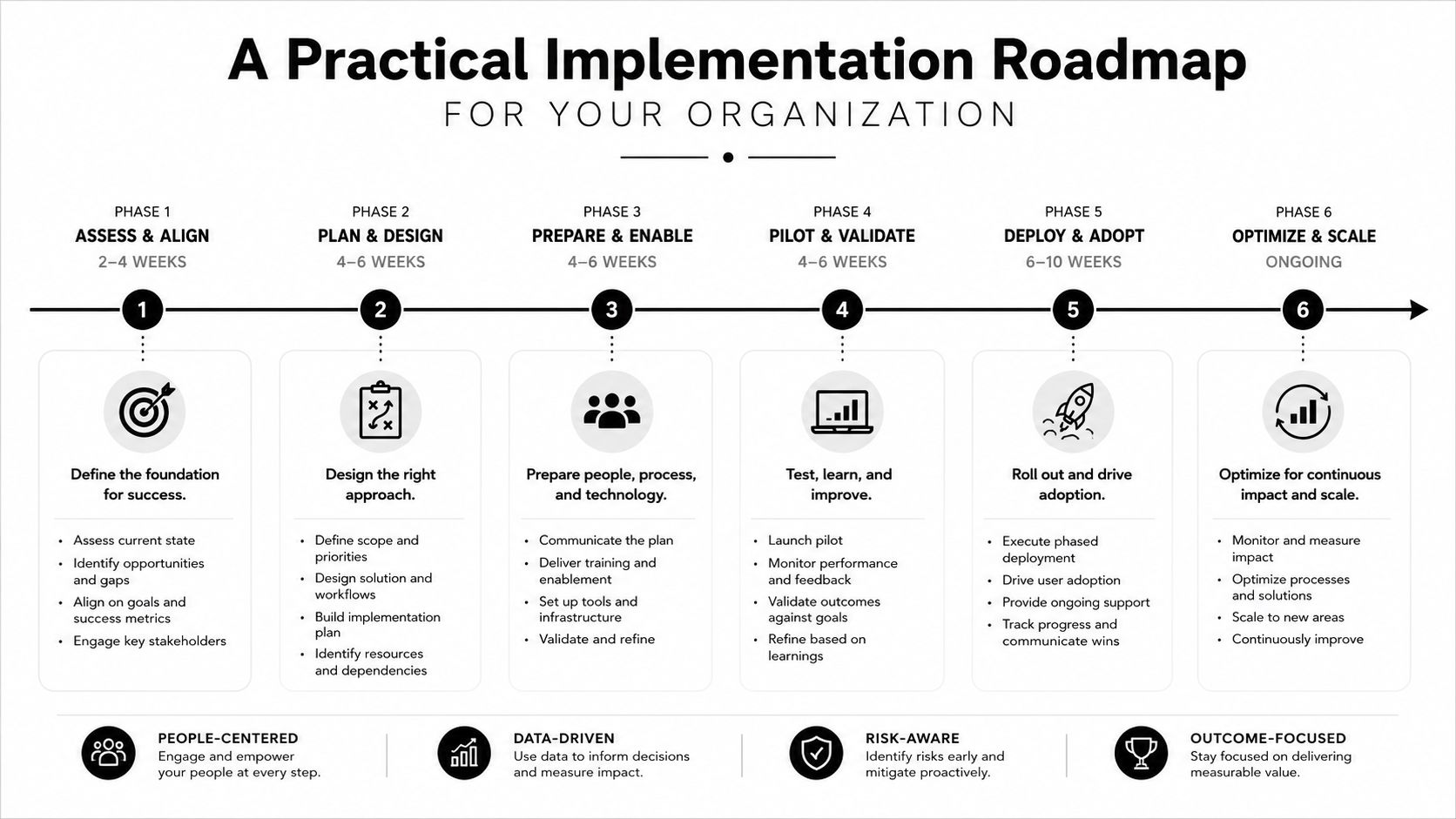
A Practical Implementation Roadmap for Your Organization
A working ALM program doesn't need a massive platform on day one. It needs a clear sequence, a named owner, and a process that stops devices from drifting out of control. Most mid-sized organizations can start with policy and visibility, then layer in automation later.
Phase 1 assess
Start with a current-state inventory and risk scan. Focus first on devices older than four years and any storage media that lacks sanitization records. The first action is simple, pull those assets into one list and mark them by risk, owner, and location.
Phase 2 standardize
Write the lifecycle rules down. Define approved stages, a RACI chart, and vendor criteria for ITAD and recycling. Add purchase approval rules, deployment steps, and retirement procedures so nobody has to improvise when a device ages out.
Phase 3 automate
Use CMMS or ITAM tools to trigger refresh, maintenance, and retirement events. That doesn't have to mean a full enterprise rollout on day one. It means the system should start reminding people before the asset becomes a surprise.
Phase 4 audit
Close the loop with quarterly audits. Reconcile physical inventory, financial depreciation, and disposition certificates so the record matches reality. If the asset is gone but the document isn't, the process still has a hole.
A school district, city department, or regional business can run this in parallel with normal IT work. The key is to keep the process small enough that people follow it, then expand once the basics are working.
Cost ROI and ESG Trade-offs of Retire vs Extend Decisions
The retire-versus-extend decision isn't a feeling, it's a cost equation. You're balancing depreciation, support time, license spend, energy use, security exposure, and the value you can still recover at the end. If the math is ignored, the organization pays for old hardware twice, once in support and again in risk.
What the trade-off looks like in practice
Use total cost of ownership per asset year as the anchor. When maintenance and licensing costs climb too far against replacement value, extending the asset usually stops making sense. The point isn't to chase replacement for its own sake. It's to stop pouring labor into equipment that's already past the useful phase.
The ESG side is just as real. A new device carries embodied manufacturing impact, while an aging one can draw more operational energy and create more support waste. Delayed retirement also raises the risk that data destruction gets rushed or skipped, which turns an ordinary refresh into a compliance problem.
The greenest device is the one you keep in service for the right amount of time, then retire cleanly.
| Retire vs Extend: Cost and ESG Trade-off Snapshot | Extend the Asset | Retire via Reworx |
|---|---|---|
| Maintenance burden | Continues to rise as hardware ages | Ends active support burden at the handoff |
| Data risk | Increases if retirement keeps getting delayed | Managed through secure data destruction and documented disposition |
| Residual value | Can decline while the asset sits unused | Can be recovered through pickup, resale, or recycling streams |
| ESG reporting | Harder to justify if the asset is inefficient and underused | Easier to document downstream handling and reuse outcomes |
| Operational impact | Keeps short-term spend lower, but can trap hidden support cost | Creates a cleaner endpoint for replacement and reporting |
Reworx Recycling fits naturally into the retirement stage. The company handles business pickups, equipment decommissioning, secure hard drive shredding with data destruction, and downstream recycling or buyback pathways, which gives SMBs, schools, and agencies a documented way to close the loop when the asset is done.
If you're sorting out a pile of aging devices, visit Reworx Recycling to plan the retirement path, schedule a pickup, or build a cleaner process for your next refresh cycle.